Can't play folders using the desktop app

It looks like they finally removed the ability to play a folder of playlists from the desktop version. They removed the ability from mobile back in 2017. I think I'm going to revert my current version to the previous one and stop updating. I'd love to understand why it was removed, but have never gotten a great explanation.
Spotify for Windows (64 bit)
1.2.40.599.g606b7f29
Accepted answers
All comments

Hey @jw231,
Thanks for reaching out about this!
We'll take a look at what's going on and let you know if this is expected behaviour. In the meantime though, the 'Play' command is still visible if you open the folder and select the three dots/ if you right-click the folder name:
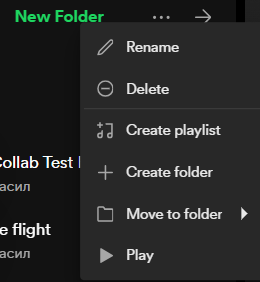
Hope this helps! We'll keep you posted 🙂

i found that only works if you don't have sub-folders in that main folder, if you do you can only play from the sub-folder, not the main. so you can't play a "folder of folders" lol ;(
Hey @beatrizmeps,
I tried it with playlists within a folder within a master folder and it did work for me:

Just click on the three dots of the master folder and select 'Play'. My second playlist started after the first one finished even though they're in different sub-folders 🙂

this doesnt work anymore. i have literally no option to play it whatsoever

Plan
Premium
Country
France
Device
PC
Operating System
Windows 11
My Question or Issue
I know we can't play folders on phones anymore, but until now I could still do it on my computer. Was the option removed or can't I just find it ?

Plan
Premium
Country
Australia
Device
iMac
Operating System
Mac OS Monterey
My Question or Issue
So one of my most used features was right clicking on one of my playlist folders and then playing every song within that folder on a shuffle. I have a LOT of playlists, and a LOT of folders and this was great for getting a reasonably random (as we all know how bad Spotify's shuffle algorithm is) tune selection to work to.
However today that option has gone:
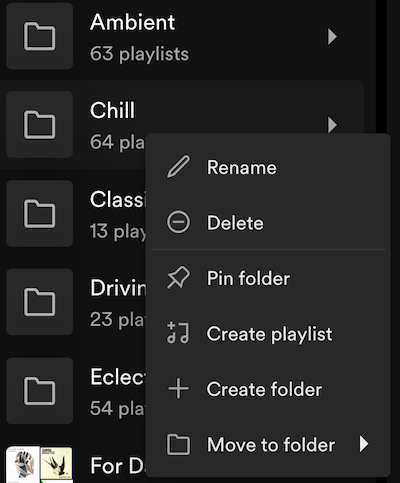
Is this just a glitch or has this option gone for good? I can live with Spotify upping its prices, I can even live with the annoying tweaks you keep doing to the UI, but actually REMOVING useful features for no apparent reason whilst upping prices is a little much....

Hi @iutonin,
Thanks for reaching out. Usually, if you right click a folder on the library sidebar, you should have the option to play the whole thing. Do you see this on your end? Alternatively, you can also click a folder to open it in the sidebar and then up top next the title of the folder you should have a three dot menu. This should also give you the option to play the whole thing.
Hope this helps.


Since the last update (June 23, 2024), the play option in folders is gone.. I can only play playlists that are inside the folder, but not the entire folder anymore. I reinstalled the app and the issue is still there.
Please fix this, thank you.

you had the feature by adding the playlists to folders now its gone... how do you make it worse?

Plan
Premium
Country
Slovakia
Device
Lenovo Legion S7
Operating System
Windows 10
My Question or Issue
I have recently reinstalled the app since it was running real slow for some reason. Since then, the play button has been missing in the drop-down menu for folders. It is still present if I go into the folder and then access the menu through the three dots.
Hi folks,
We've done some work on our end and this should be resolved in the next update. Please make sure your apps are up to date and if necessary, perform a clean reinstall to clear any damaged cache or data. If you face any similar issues, let us know so we can help you further.
Cheers!
Thank you very much Joan. I'm glad to see this was not intentional! I downloaded the latest version and it is definitely back again.

Plan
Premium Family
Country
United States
Device
Windows 11 laptop
Operating System
Windows 11 23H2
My Question or Issue
I used to use the feature to play the contents of a Playlist Folder all the time (https://community.spotify.com/t5/Your-Library/Can-I-play-a-Playlist-Folder/td-p/5159689). The app updated this morning, and that feature seems to have disappeared.
Please tell me it has not been removed. It is such a useful feature for shuffling a variety of music from various playlists.
There are numerous threads in the Ideas section where people complained about this feature being removed from the mobile clients. I was disappointed that mobile clients lost the ability, so have up voted them in the past.
Really not happy that the desktop and web apps have lost it now too!!
Hmm, this a little weirder. Just discovered that one folder in my library has the play option. My other five folders do not... Maybe it's a bug, not a deliberate choice... Here's hoping!
Okay... have kind of solved it myself...
If you have the list on the left of the screen in "Compact" view, you used to be able to right click a folder and select play. That seems unreliable now. After closing an reopening Spotify, it seems random as to whether a playlist folder shows the Play option in the context menu.
However, if you change the view to "List", you can still click on the folder icon and play the folder. I guess that sort of solves my use case.
this issue is back

I have the same issue, but unfortunatly your solution doesn't seem to work so I am guessing this is a weird bug, but I really hope they sort it out. The play folder option is the one reason I am on a premium plan.
i can confirm that the issue is back. no play button on folders. please solve this as soon as possible as many of us listen to music exclusively this way. thank you.

Hey folks,
Thanks for reaching out.
Just to confirm, are you using the desktop app or the Web Player? I just tested on my end and the desktop app works fine, but the option to play a folder on the Web Player is currently missing.
On the desktop app, the folder's icon should turn into a play button when you hover over it. Something else you can try is expanding the folder > right-clicking > Play.
Let us know how it goes!
still no solution?
Just opened the Desktop Player and still, the issue is not solved.
I believe it was solved for a while, but now the issue is back..

Hey @sobekmusic,
Thanks for the reply!
Just to make sure we cover all bases, could you try changing the current setting for hardware acceleration in the desktop app to see if you notice any difference? You change it by heading over to Settings > scroll down to Compatibility.
It's also worth clearing stored cache from the app, as this should remove any cached data from older app versions, which could interfere with the performance.
Should the option to play folders still not appear after trying the steps above, a screenshot of what you see when following the steps mentioned by @Yordan would be helpful. Keep in mind that, for the Play button to appear on the folder icon, you need to have Your Library expanded & make sure it's set and sorted by List  .
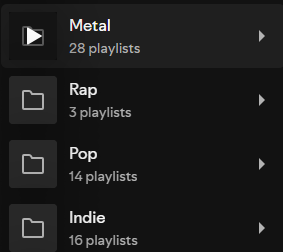
Let us know how you get on!

Plan
Premium
Country
Mexico
Operating System
Windows 11
My Question or Issue
Double cliked on a folder and the play button is nowhere to be found, only the options to edit the folder itself

When is this getting fixed? I have monthly playlists from the last 4 years that i would play by shuffling the master "Monthly Playlists" folder and now I cant?
Once again, the issue is back.It's time for a permanent solution for this.
Hey there folks,
Thanks for joining the conversation!
To confirm, does the option appear when following the steps mentioned by @Yordan earlier in the thread?
If not, would you mind giving the troubleshooting steps in our latest reply a shot, if you haven't already?
Should the play button for folders still not appear, however, it would be great if you could send us the following details:
- Your device's make & model.
- Its current OS version.
- Current Spotify version.
- A screenshot or video showing how things look from your end.
Keep us posted!

Varför går det inte längre att spela en hel mapp (högerklicka mapp - spela upp)?
Mor

That is simple on my side, I have changed to Apple music since this features is not stable ...


I've figured out why everyone seems to be getting varying results: the Play button on a folder only appears if one of the playlists contained within it is currently visible.
If you collapse sub-folders within a master folder so that all the individual playlists are hidden, the Play button doesn't show up on any of them, as if the folder contained no playlists at all. But if you expand one of the sub-folders so that at least one non-empty playlist appears, then the Play button will be there for any folder that the playlist is nested within. If you play the master folder in this scenario, it'll still successfully play tracks from every playlist it contains, whether their sub-folders are collapsed or not.
This'll also be why updates haven't fixed the problem - because it hadn't been diagnosed correctly.


Hey there folks,
Thanks to everyone that posted in the thread and we appreciate your patience while the team investigated.
This should now be fixed and the play button on folders should be visible. Make sure that you're using the newest Spotify app version.
We're here if there's anything else you need help with 🙂