Spotify Embed do not work on Disord and will not show up when a song is shared.

Plan
Premium
Country
UK
Device
Samsung A72 and Desktop Windows. (But issue is on Discord)
Operating System
N/A
Discord Version: 0.0.309
My Question or Issue
I have had this issue for a while since spotify updated the embeds where on Discord if I put a embed in it will not work and will just leave a blank space where the Embed is ment to be. This has been going on a while now and I am fustrated with this issue. I remember it just started happening after the new embeds were implemnted and then what happened is the embeds were ok for a while, but then just one day they broke were if you posted a new embed it would not show the song at all and it has been annoying.
If a solution can be found that would be a great help.
Thank You!
Accepted answers
All comments

Some embeds show again but not all
One thing that still is not showing up entierly are embeds for groups aka. albums, artist profiles or playlists
It slowly works, but sometimes it still crashes, especially if you send playlists or full albums
Discord themself did not respond to my issue yet, so something needs to be fixed via Spotify now to get it working again I guess. I also do not see how one does fixing itself if it just not works. I hope anyone of Discord or Spotify comes uo with a solution soon cause I don't know what to do since I am not trained in computer-issues
OK, so ... embeds have been good for the past 4 days now, however since end of yesterday they dissapeard again. IDK whats going on anymore with how embeds do whatever the heck they want and weirdly enough on both sides (Spotify and Discord) it's constantly called out as "no there is no issue" even if there is one. Whats causing the issue this time? I tried to link a song yesterday, nothing showed. I tried to link a album today, nothing showed
Its getting me crazy sometimes, cause I have no idea why this keeps happening
yeah today it got worse, no embed shows up again and IDK whats going on with discord that its on/off with showing embeds ... like pls trow a fix on it and make sure it won't break again pls
So today I noticed when I click on share and than "copy song link" it says "copied link to clipboard" instead of "copied link" ... is this why embeds on Discord don't show up or what is causing the issue that Discord is constantly failing to display the embeds? Discord themself told me in a message some time ago when this issue first ever apeared that they do not see the issue on their end, so this must be from Spotify's end then?
What can someone with ZERO IT-knoledge do themself to get this issue fixed or can Spotify work on this ?
I'm a bit confused how it's mostly only affecting Discord, like it used to work and now it somehow dosn't and I myself don't even know what to do. It doesn't mather if I post from my Phone, from the Spotify website or from the Desktop app, it just won't embed the song for whatever reason.
Is there no way to fix this for once and good is?
Hey, no clue if anyone is even listening, but when can we possibly get a fix now? embeds do not work since ages now and IDK if anyone is even doing anything
Would be great if someone of the tech people form Spotify could give an answer instead of not saying anything.
I asked Discord and they constantly say its not their problem, since they don't see the issue, so either anyone tells me how to avoid the not showing embeds or anyone pls fixes this

WASSUP
ok so i think i may have found a solution? so the link displays as follows:
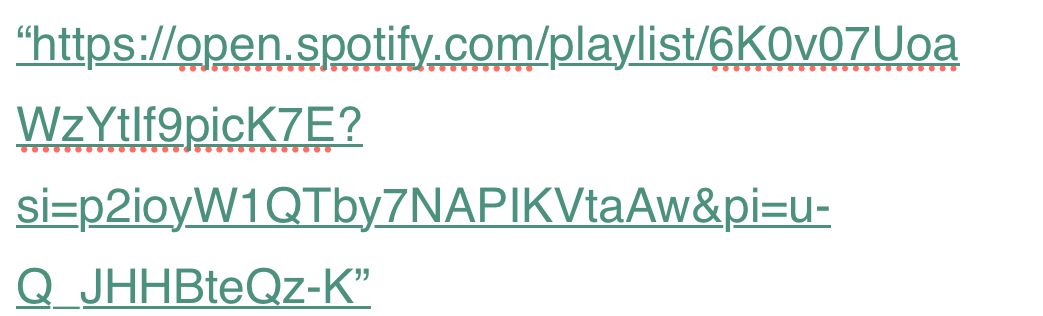
pasting this into discord doesn’t work - but when i remove the portion of the link that begins with “&pi-“ it embeds
so for example with the link above:
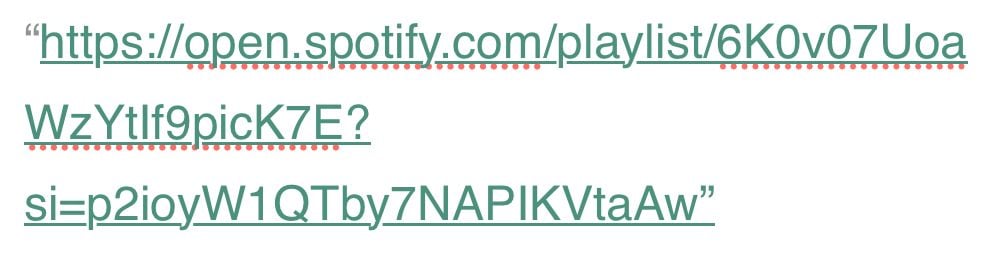
this was the only solution that worked for me. i tried unlinking my spotify, disabling and renabling embed links, but none of that worked. i hope this works for you!!
@bowtieghost your post does not work, since songs I try to link and they don't embed, do not even show up with the "&pi" so IDK ... it works like 6 out of 10 times showing songs now, but the other 4 times still bug a lot
aw sorry 😧 i should’ve noted that these links were generated via spotify mobile’s “share” option - for a playlist specifically as well

Hey!
I've had a similar issue where when I send links (originating from the desktop app) on discord... they sometimes work and sometimes don't.
When someone else sends a link to a song it will look like the first image...
compared to when I send links they just simply don't work or they work and come with no little preview listen option.
but sometimes it does work and that's cool. but its become hit or miss lol.
I also pay for nitro and am also a premium subscriber. I haven't tried reinstalling Spotify yet. I will try doing that. But I have had similar issues to you and it's only been super recently. Its not the most deal-breaking issue ever but it gets annoying.
Did anyone ever figure a 100% fool proof way on how to get this situation finaly fixed?
After the issue with the embeds from some time ago, it worked fine now for the past couple weeks, but today when I looked at Discord, all embeds had been removed, that worked just fine yesterday. Pls bring the embeds back, they are very usefull in music conversations
It was working very fine on Discord, however today the embeds are fully gone everywhere and it sucks, because many people post them without saying what song and artist this is, so talking to people on Discord without them and just looking at blank links is a bit sad. Pls give us the embeds back

Ahhhh yea can confoime that it won't work by doing that it is a problem with discord
Still nothing happening. Why are embeds crashing so often? like this is the 3rd time in a year or so and its bugging me. Day 5 and I still sit here not seeing anything

i used to have the same problem, one day the embeds came back and suddenly they don't work again, i guess the problem come and go and we can't do anything about it

Plan
Premium
Country
UK
Device
PC Laptop
Operating System
Windows
My Question or Issue
Copy & pasting a song or playlist link and pasting into Discord no longer shows a preview. The solution offered in Preview of song not working when copying it doesn't work. I've attached a screenshot showing the spotify URI showing up as text and a second message containing the link below with no preview.


I have found a solution to this issue.
every Spotify link has this small piece “si=“
When you post the link, delete everything from that section on.
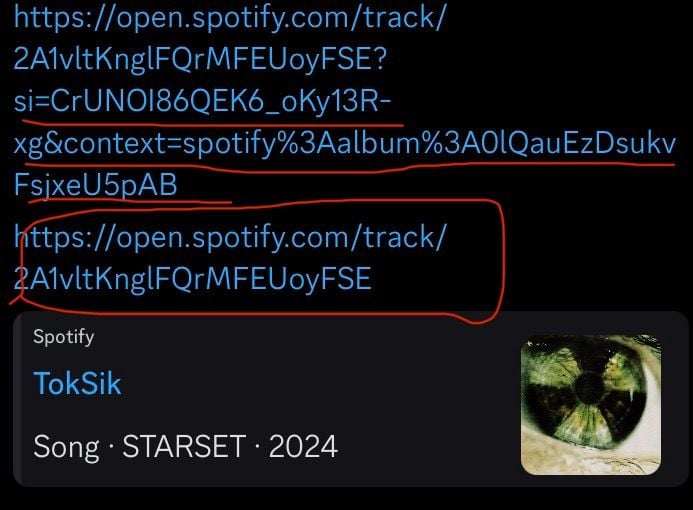
The underlined part of the link is what you should delete. It should look like the link on the bottom of the image provided. Do not delete the question mark before the “si=“

I finally found a fix! I went to settings > Chat in my android app. At the bottom there is an option for Sync. Once I turned sync off, it fixed the link embed issue on all of my devices. I think that sync options is somehow broken, and was making it so I could see embed links even if turned on for every single device.

this is still an issue by the way
Does not work for me :') (yes I kept the question mark)

Hi there, sorry for the long reply. Yes, this issue happens to me. Constantly. For years.
TL;DR: This is almost certainly a Discord issue.
This issue annoys the **bleep** out of me, and has been happening for about 4 years from what I can tell, but has gotten much worse. It used to be you could edit the message and remove some of the URL gunk from the '?' onward. Today at least, this isn't the case for myself.
I've seen dozens of threads mentioning this bug over the years, both directed to Spotify and to Discord. Spotify tends to point toward it being a Discord problem (I agree, details below), and Discord tends to obfuscate its bug reporting system so that discussion cannot occur publicly, which means the issue is likely swept under the rug.
(side rant): Discord's bug reporting form is awful, and asks for (among other vaguely hostile things) a way to reproduce the bug with 100% certainty. Anyone who has worked in software knows that most bugs are not predictable, ESPECIALLY in ways users can verbalize (usually because of esoteric conditions and variables outside any user's, or developer's comprehension). Yes, computers are deterministic, but expecting a volunteer bug reporter to diagnose their bug for them by outlining the exact string of faulty logic which causes the issue to occur so infrequently— and all without the benefit of source code — is unreasonable.
(end of rant)
This bug (as this thread details) is one of those which is not 100% reproducible. Perhaps this is why Discord has not fixed the issue.
I'm a developer by trade, so after years of frustration with this one single unfixed bug I decided to turn some of my righteous fury with this bug toward actually getting closer to an answer.
Digging into the issue, it seems quite simply that the Discord client is not sending an HTTP GET request to the Spotify API. Why? No clue, but from my perspective this ball is entirely within Discord's court.
You can see this for yourself if you open up the Discord app in a web browser and use the developer tools to look over the network requests/headers and console logs.
In all cases where the preview widget is working as intended, the HTTP GET request is present. In call cases where the HTTP GET request is missing, the widget embed is missing.
I've seen casual mention in threads regarding this bug that perhaps Spotify is refusing connection to the widget for some reason on particular songs, or limiting bandwidth at busy times. My evidence against this line of thought is that Spotify can't send the widget to the Discord client if an HTTP request is never made, so this is almost certainly a Discord issue.
As some easily visible evidence for this claim, we can simply ask Spotify's API for the embed which isn't appearing (ourselves). Take the Spotify URL of a song you're not seeing an embed for, and prune it until you just have the song ID. For example:
Step 1) Use Spotify to copy the song share link:
I.e https  /open.spotify.com/track/141hcjVM8lNPxi4wjNLgdX?si=321d066eb2c2484f
Please note, I've added a space after https to try to avoid Spotify auto-embedding widgets (very ironic) on this post.
Step 2) Remove everything after the URL's query string (the question mark):
I.e. https /open.spotify.com/track/141hcjVM8lNPxi4wjNLgdX
Step 3) Remove everything up to the /track/, and then copy what remains:
I.e. Copy `141hcjVM8lNPxi4wjNLgdX`
This is the song ID.
Step 4) You can make your own request for an embed widget by pasting it at the end of this partial URL:
https /open.spotify.com/embed/track/
I.e. https /open.spotify.com/embed/track/141hcjVM8lNPxi4wjNLgdX
Again, please note I've added a space after the https for easier viewing.
And then hit enter, and watch as Spotify's API happily and quickly hands you the widget that Discord should be asking for.
I'm posting here partly in hopes making a stink outside Discord's bug reporting space will maybe get some traction with Discord.

thank youu!! it worked finally

i found a fix to this if you add a dot or any character after the link it works

think they'll never fix the links problem Its just annoying trying to send a link and see no preview of the song as before I just don't understand why this hasn't been fix already we need embed links back!!

This trick recovers the mobile embeds but not the desktop ones where we could directly preview the songs inside a Spotify album / playlist
I have noticed that when I edit messages containing Spotify links, the embeds often break after editing. This happened quite a few times. For several links I could not find a feasible workaround to make the embed with the preview widget to show up. (i.e. the embeds are blocked from showing up even when I tried to post it to a diff server)
First screenshot is the Spotify desktop embed.
Second screenshot is the Spotify mobile embed.

would be swell if this got fixed - it's been a frustration for several years at this point.

On Discord, the "https /open.spotify.com/embed/track/SONG-ID" command doesn't seem to embed within Discord (even with a valid song ID). However, when the link is clicked on (assuming it has a valid song ID), it opens in a new browser tab and embeds within the tab. I'll have to do more tests with this though.
However, "https /open.spotify.com/track/SONG-ID" seems to embed within Discord (assuming it has a valid song ID), but I'll also have to do more testing.
P.S. I added a space between the "https" and the ":" so it doesn't try to make a weird hyperlink.
If you see this message, please verify this on your end.


With the /embed in the link, it does embed within the browser tab. Can confirm that.
But "https /open.spotify.com/track/SONG-ID" doesn't embed within Discord. How do we confirm it has a valid song ID? I can see that it generates different SONG-IDs depending on where I'm copying it from - mobile app, web browser, or the desktop app. In any case, neither of them embed within Discord.
Randomly though, ONE song ended up working when I copy it from the browser's (Edge) spotify. The same song doesn't embed when I do from the desktop app or mobile. I was happy for a moment when that worked as I assumed copying everything from browser works. But then every other song that I tried don't embed. Weird and annoying as heck.
Hey folks,
We appreciate the screenshots and info you've posted in this thread!
It's best to reach out directly to Discord Support so they can also check things out from their end. You can do so here.
In the meantime, the Community's here should you need help with anything else.