PLEASE HELP!!!!

I cannot play any of my downloaded music on my phone even tho I pay for the premium. It has said since last night that it is pending even tho it downloaded months ago. Please help.
Accepted answers
All comments

I've just checked your account - Everything seems to be up and running just fine. Has Spotify been connected online in the last 30 days?

Also check that you are not in Offline mode in Spotify Mobile settings.
Also downloading this preview may help.
Let me know how you doing.
Everything is not fine. I am about to cancel my subsription. NONE of the starred music will play on my phone anymore.
I tried the preview thing and my computer would not dowload it so it must not be compatible enough yet. WIsh that had at least worked. I've reset my facebook password, I've deleted the app. Now I'm going to just cancel.
NOW I've tried to cancel and it says it doesn't recognize my password. WOW. Guess I'm gonna have to cancel my card unless this gets figured out. WHAT a hassle.
You need a wifi or 3G connection to stream songs or download.
You can also download tracks via 3G, just make sure you enabled download also via 3G option. Also make seure that Spotify isn't in Offline mode in settings.
Also to be clear, you can't download Android app to your computer. Download it to your smartphone Android.
Jibentrude - I've put all your comments into one post. You can edit your post if you have any further to add. No need to triple post.
The information here we have is a little vague. Could you tell us the following -
- The Phone you are trying to use
- The Operating System on the phone (Check your settings menu)
- Are you getting any specific error messages at all? How about error codes?
- Can you provide screenshots at all?
DUDE with the picture! I know how to use this thing. I've been using it for months. Your system has just decided to stop working, And there seems to be no solution to fix it.
It's not my system... I am Spotify user like you, I'm just trusted user by Spotify. I know everything about Spotify!
But yes, David can provide help then.
Went to Explorer and it let me cancel.
You can use your Premium status to it's end.
Also to be clear, you need wifi if you want to download music using your computers internet. Songs can't be played, if you do not download them first! In my opinion this is poor reason to cancel, problem was in my opinion here - you can not download tracks first to device.
Also best results are with mobile connection on the go, then you can listen Spotify for Mobile online without need to download first to Offline mode.
Spotify Premium user for 2 years in December 2012.
Cheers.
Jlbentrude - No need to double post. You can edit posts. See the below screenshot to see how to do so.
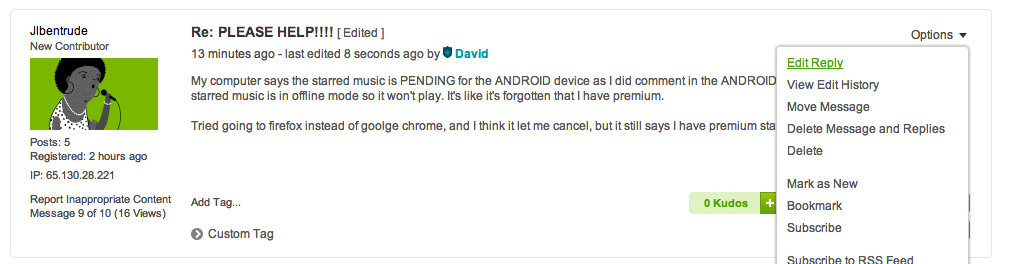
DUDE! I have wifi which is why I'm able to talk to uuuuuuuuu! You are hilarious!!! Hehehe.
What is this about? I haven't double posted, but I can since my last post wasn't answered by you.

Hi there,
you still haven't really provided enough information to go on - you never answered the question about whether Spotify itself was on- or off-line, or this post:
@David wrote:Jibentrude - I've put all your comments into one post. You can edit your post if you have any further to add. No need to triple post.
The information here we have is a little vague. Could you tell us the following -
- The Phone you are trying to use
- The Operating System on the phone (Check your settings menu)
- Are you getting any specific error messages at all? How about error codes?- Can you provide screenshots at all?
Offering much more advice on what the issue might be will be tricky without some extra info
Also, in terms of trying the beta preview release - you do not need to download and install this on your computer - surf directly to the page from your phone to get the .apk file and install it there: http://www.spotify.com/download/previews/
Again, the phone says there is no network activity (so it's in offline mode) yet it says it is hooked up to both wi-fi and bluetooth. This is the longest amount of time spotify has not worked for me on my phone while on premium since March.
Ok so I downloaded the link directly on my phone and it still says it's in offline mode so it it acting the same way as the regular spotify
@Jlbentrude wrote:Again, the phone says there is no network activity (so it's in offline mode) yet it says it is hooked up to both wi-fi and bluetooth. This is the longest amount of time spotify has not worked for me on my phone while on premium since March.
But what about the app itself. If you go into the settings menu (in the Spotify app, not Android settings) is it in Offline mode?
@Jlbentrude wrote:
And again, tried to download the new android app, but it says my computer won't support it, and it's not in my android market when I look it up on my phone.
Again .. this is not a computer app, this is an app for your phone, to install over the current Spotify app. Download the .apk file from your phone browser to your phone, then launch it from your phone - no need to involve your computer in this process at all. If you get a message saying you need to enable third-party installs, just follow what it says ... or tell us what version of Android you are on and provide the other requested info so we can try to help further. This version is not yet on the market - it's a preview release specifically intended to help people who might be having issues with the old version. It still has some issues, but is more stable than the old version.
Look above. Again, it says there is no network activity so I can click the offline button as much as I like, but it doesn't change anything. Again, I've had this since March so this is a much more pressing issue than that, and I think I'm capable enough to figure that out on my own. What I am not caplable of is fixing a broken system,
I'm sorry, but if you can't/won't provide the answers to the other requests I don't see how we can help diagnose what your issue is. I understand it's frustrating, but the questions and information we've asked for is intended to help us help you, not prolong your problems.
Yes, it's offline. Connect to some wifi or purchase data plan and then you can use app.
Problem is not in Spotify, my Spotify Mobile works like a charm.
YESSSSSSSSSSSSSSSSSSSSSSSSSSSSSSSSSSSSSSSSSSSSSSSS! Is that clear enough?????
Oh, Licenced. Let's go to bar... 😄
Glad it works for u guru, but I see plenty of other posts where ppl are having the exact same problem as I am so it actually doesn't work very well, and spotify won't make money unless it performs.
And can you please try to answer the other questions.
Again, I can understand you are frustrated, but venting on here without providing more information will not really help.
. Did you go into the Spotify settings in the Spotify app and make sure the Offline Listening option was set to OFF?
YESSSSSSSSSSSSSSSSSSSSSSSSSSSSSSSSSSSSSSSSSSS!
Again, the phone says there is no network activity (so it's in offline mode) yet it says it is hooked up to both wi-fi and bluetooth. This is the longest amount of time spotify has not worked for me on my phone while on premium since March.
I downloaded the link directly on my phone and it still says it's in offline mode so it it acting the same way as the regular spotify.
AND I checked it and It's also set to OFFFFFFFFFFFFFFFFFF
Do you have internet connection in your smartphone?
EDGE/UMTS/HSDPA/DC/4G/WIFI... ?
Of course I do guru. How else could I have downloaded all the starred songs before? And I have wifi, wireless, internet right now. All my other apps work just fine except for spotify.
Reinstallation of Spotify (Android)
Please note that your offline playlists will need to be synced again after reinstallation.
Do the following:
- Open Spotify in your mobile
- Go to More > Settings and select Clear saved data
- Close Spotify and uninstall it from your mobile. You can do this by going to Settings > Application > Manage applications > Spotify and press Uninstall.
- Install Spotify once again through the Android Market or by visiting m.spotify.com in your mobile web browser.
Done!
It doesn't let me do that in the settings that the android one u guys had me download. Only says.... offline mode OFF, private session, connect to facebook, music quality, and show licenses.
Generally you should not have to resync after installation.
You're better off trying to answer the other questions we've asked several times so we can see why the songs you have already downloaded aren't playing
They're already answered. I'll try and uninstall this new app then... Sigh. On this new one just says downloading 0%.
And where is the customer service in this company where I can talk on the phone with a paid agent for a service that I pay for?!
So deleted the android app and starting a new spotify made it go back to Premium.
While I have ur attention, can you answer why when u change a song (on the android) it kicks u out of spotify or it stays stuck at the end of the song? It has done that since I've had premium, and it's doing it now. Just wondering if they're ever gonna fix that kink.
They're already answered. I'll try and uninstall this new app then... Sigh. On this new one just says downloading 0%.
And where is the customer service in this company where I can talk on the phone with a paid agent for a service that I pay for?!