Spotify friends activity empty/not updating

Plan
Premium
Country
Finland
Device
Pc
Operating System
Windows 10
My Question or Issue
For several months (pretty much years at this point), my Spotify friends feed has not been updating, it only shows 1 friend I have, while it should have a dozen others. This has been going on for far too long for it to be a problem on my end as I have changed my devices, settings, and other things to try and fix it. I have reinstalled Spotify and my OS but nothing helps. I also see no friends through my Facebook integration even after disconnecting and reconnecting my Facebook profile multiple times. All my settings are the same as my friends and he can see his friend activity but I can't. I already posted about this problem once, and was told it would fix itself but that was months ago. This is very infuriating as it has been going for so long.
Accepted answers
All comments

Hey there,
Thanks for posting in the thread!
@Yaghmour - just to confirm, are you unable to see all of your friends activity, or does some friends activities appear for you? Could you also check if they're able to see yours?
You can also try following the Community account in the app to check if it appears in your Friend Activity tab: https://open.spotify.com/user/spotifycommunity.
Let us know how you get on!

my friends are able to see my activity but i cant see anyones activity, and also i cant see anyones activity not just a couple of friends.

Hi @Yaghmour!
I recommend checking with the people you follow if they have Share my listening activity on Spotify also toggled on under Settings > Social, and asking them to restart the app (you can also give it a shot) and play something to see if that would cause the Friend Feed to update - just make sure that they aren't in a Private Session.
If the issue persists, try unfollowing one of your friends then follow them back and restart the app to see if that does the trick.
Cheers 🤘
yes my friends do have their sharing activity on and they do see what i listen to as soon as i play something but from my side i can’t see a thing and i give u permission to check it out from my account if ur with spotify


Hi,
I think my case is exactly the same of post author.
Can you check my account?

Buenas. Tengo un problema similar. Hoy instalo Spotify en mi computadora. A mis amigos si les aparece lo que estoy escuchando yo, pero a mi me sale en actividad de amigos que vaya a configuración. Tengo en las visualizaciones activadas el "Entérate de lo que escuchan tus amigos". En social esta activado el de "compartir lo que estoy escuchando en spotify" y desactivado el de "sesión privada". Ya probé desinstalarlo, y también reiniciarlo cambiando el acelerador de hardware, pero no se resolvió.
Espero su respuesta, desde ya muchas gracias.

have the same issue for long time i enable sharing but it still tells me to enable even though it is abled so more less at a stand still with it

i dont know

Alguém poderia me ajudar com essa situação?

My social feed has been broken for 2-3 years since I joined my spouse in a Duo plan. Social sharing is enabled but it shows 0 friends. Also, what's with Spotify changing the user interface every few months and having different interfaces for mobile and desktop? Why are new items a bell on desktop (which makes sense) and a lightning bolt (through my slit) on mobile?
Windows 10
Desktop
Duo

Go to the users' profile and try unfollowing and following again by clicking on Following then Follow
Toggle the setting "See what your friends are playing" off then on again
Different device
Different Internet connection
Reinstall the app
Restart your devices
Check if your app is up to date
Check your device’s operating system is up-to-date
Log out and then log back in
While also ensuring these:
Check that you’re following other users. If you go to another user’s profile, check that the Following button is there.
Other users that you follow must have played something recently on a device that supports sharing listening history.

Plan
Premium
My Question or Issue
I can see the column of my friends activity but I can only see one of them, the others don't even appear (but a while ago they used to). The thing is, I asked them and they can see mine.
I already tried to log in and out, check the box off and on again to show my activity, I updated my laptop and reinstalled the app, but still nothing changed.

Hola, he seguido las indicaciones, pero sigo sin ver nada, he reinstalado 2 veces la app en un mac, ysigo sin poder ver la actividad de usuarios.
Gracias.


Yesterday my friends' activity turned BLACK, the column is empty. I've tried EVERYTHING to fix it. Reinstalling, clearing cache, removing and putting hardware acceleration... Some curious things I discovered trying everything is that if I change accounts (I have this account that I haven't used since 2013) I don't have that problem there, so... ???? Non sense.
My friends CAN see my activity, btw.
I tried unfollowing one of my friends and then followback but when I restart the app everything goes the same.
My username is <snip-moderator edit>, I give you permission to look my account. Thanks.

Hi,
I have had this problem since I created my Spotify account, I can't see what my friends are listening too.
The users I am following have “Share my listening activity on Spotify” turned on. All of the below are true:
- You must be following the friend whose activity you want to see.
- The friend must have enabled the setting to publish their activity:
- Share my listening activity on Spotify - toggled on.
- The friend must have played more than 30 seconds of a track on iOS, Android or Desktop in the last 7 days.
- This can’t be in a Private Session.
- Also you should both have restarted the App at some point recently.
All my friends can see what I am listening too, so this problem is only regarding my account.
"give us permission to check your accounts".

Thanks for reaching out!
Is it ok if we follow you on Spotify and for you to follow the Community Spotify account back in order to check what's happening? It'd also be great if you can attach a screenshot to your next response from Settings -> Privacy and social just so that we can double-check that your listening activity settings are all in order.
We'll be on the lookout for your response.


Plan
Premium
Country
USA
Device
Macbook Pro 2020
Operating System
Ventura
My Question or Issue
My friend's recently played artist is updating but on friend activity it is not updating. It is showing music last played hours ago and not the current music they're listening to.

I've had this issue for the last 12 months at least. I am growing so frustrated with it now, thought the bug would have been fixed but I can see that all over the internet this is not the case at all and this issue persists for many. I loved this feature (when it worked) as it's a great way to find new music I'd be interested in from my friends. Please, advise how to actually resolve this. I have got 30 followers and following 18 FRIENDS. My setting is turned ON, I have rebooted the app, I have reinstalled the app, I have tried on my mobile device, turning it on and off multiple times in multiple ways. I've logged out "twice so it syncs". Not buying it. I know for a fact that one of my friends I am following is using sportify daily. My issue persists that I "need to turn it on". Please, provide assistance.

Device
Macbook Air 2020
Operating System
MacOS Sonoma 14.5
My Question or Issue
hi I also having the same issue, the friend activity not showing on a specific account, i already did re-login, re-installing the app, and updating my device system but still doesn't change anything. But when i log in to my another account, the feature is working well, so i don't think this is my device issue, but the account of mine, so please help me to solve this
my username is so <snip - Removed by Moderator> I give you permission to look my account. Thanks.

Plan
Premium
Country
Ukraine
Device
Dell/Lenovo laptops
Operating System
Windows 11
I have Facebook connected, the checkbox for displaying my activity is turned on, but instead of displaying my friends and the music they listen to, I see only instructions on how to configure this function. I did everything according to this instruction. I re-logged in, reset the settings and reinstalled the app. My friends are not displayed on any of my devices (I checked it on 3 laptops)
Translated with DeepL.com (free version)
It looks like this
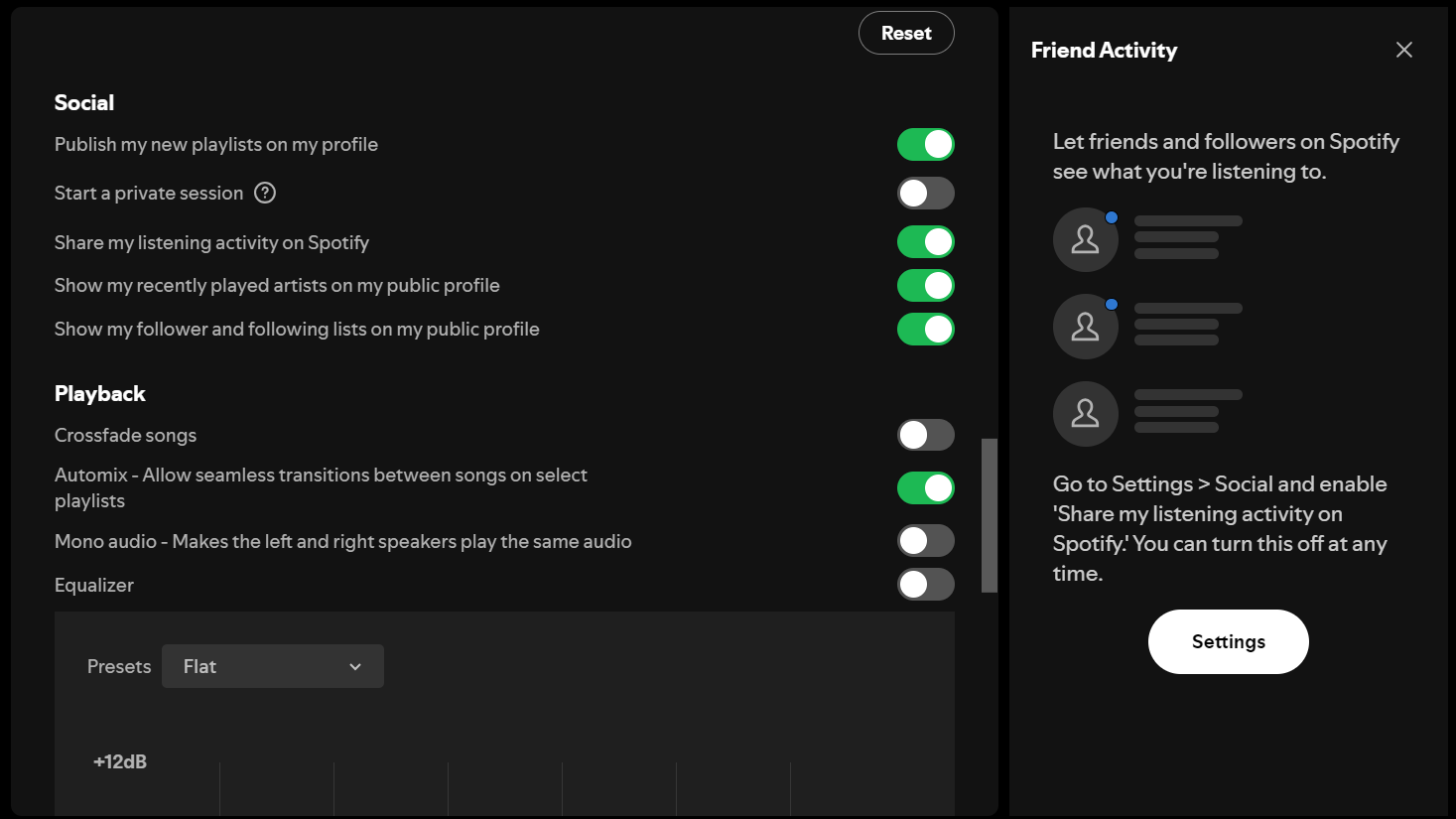
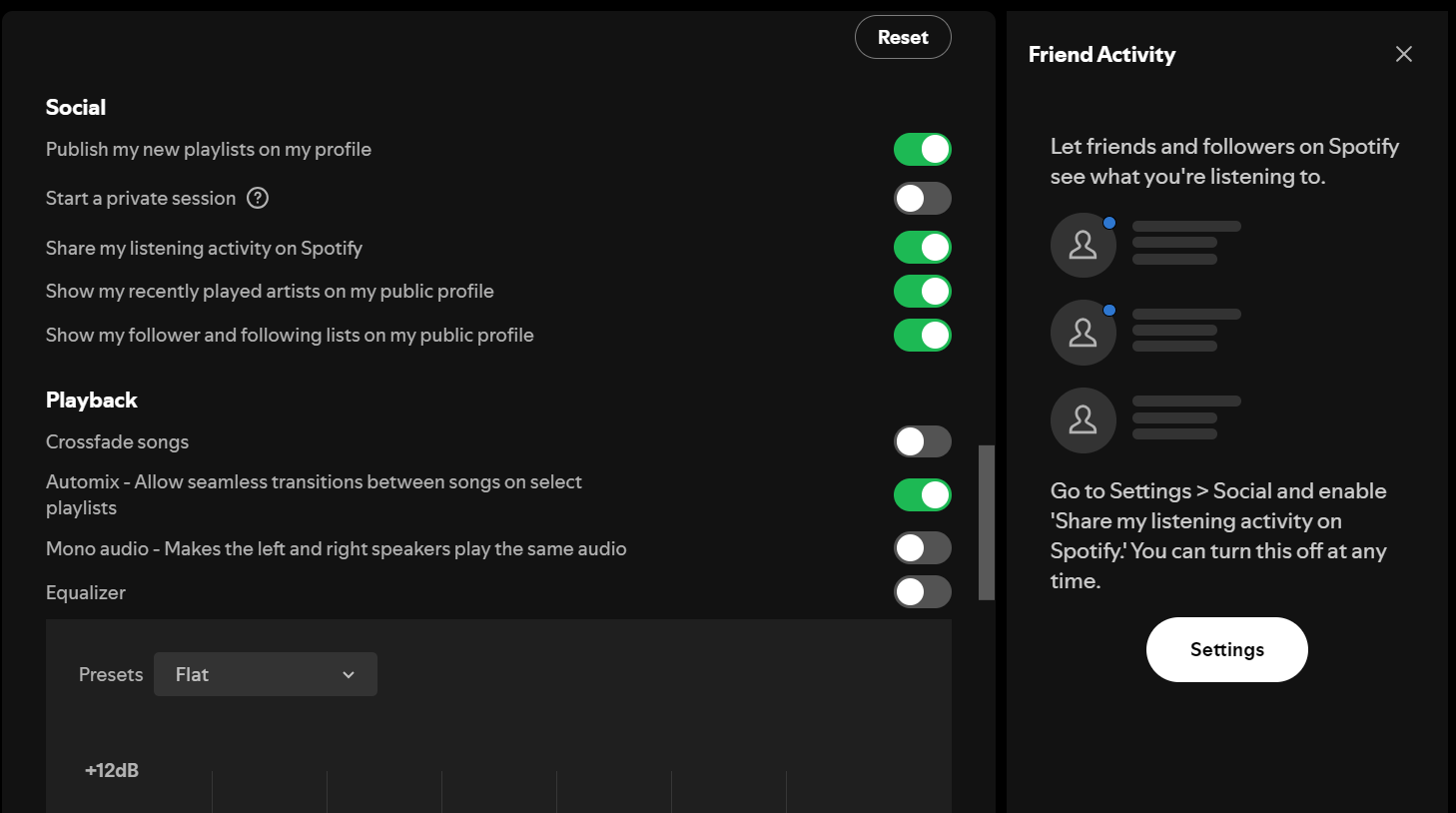
It looks like this. I have this problem more than a year, and my friend can see what I`m listening

Me too, I am unable to connect with my friends from fb neither see their listening activity...

Plan
Premium
Country
Egypt
Device
(Desktop)
Operating System
(Windows 11)
My Question or Issue
The issue is in sharing the listening activity
I tried every thing I have updated the app re installed it restarted the device even un following my friend and follow them back
The issue is no listening activity appears on my screen even though I'm activating 'share my listening activity' also there is nothing appears on my screen

Plan
Free
Country
UK
Device
Laptop
Operating System
Windows 11
My Question or Issue
I've been trying to see my friends activity, but as you can see in the photos attached, it keeps saying to turn on the thing to share my listening activity, but it is on. I've tried turning it off and on, uninstalling it and reinstalling it after, but none of it works.

Hey, it's not working for as well, it's been like that for several years.


Plan
Premium
Country
United Kingdom
Device
PC
Operating System
Windows 11
My Question or Issue
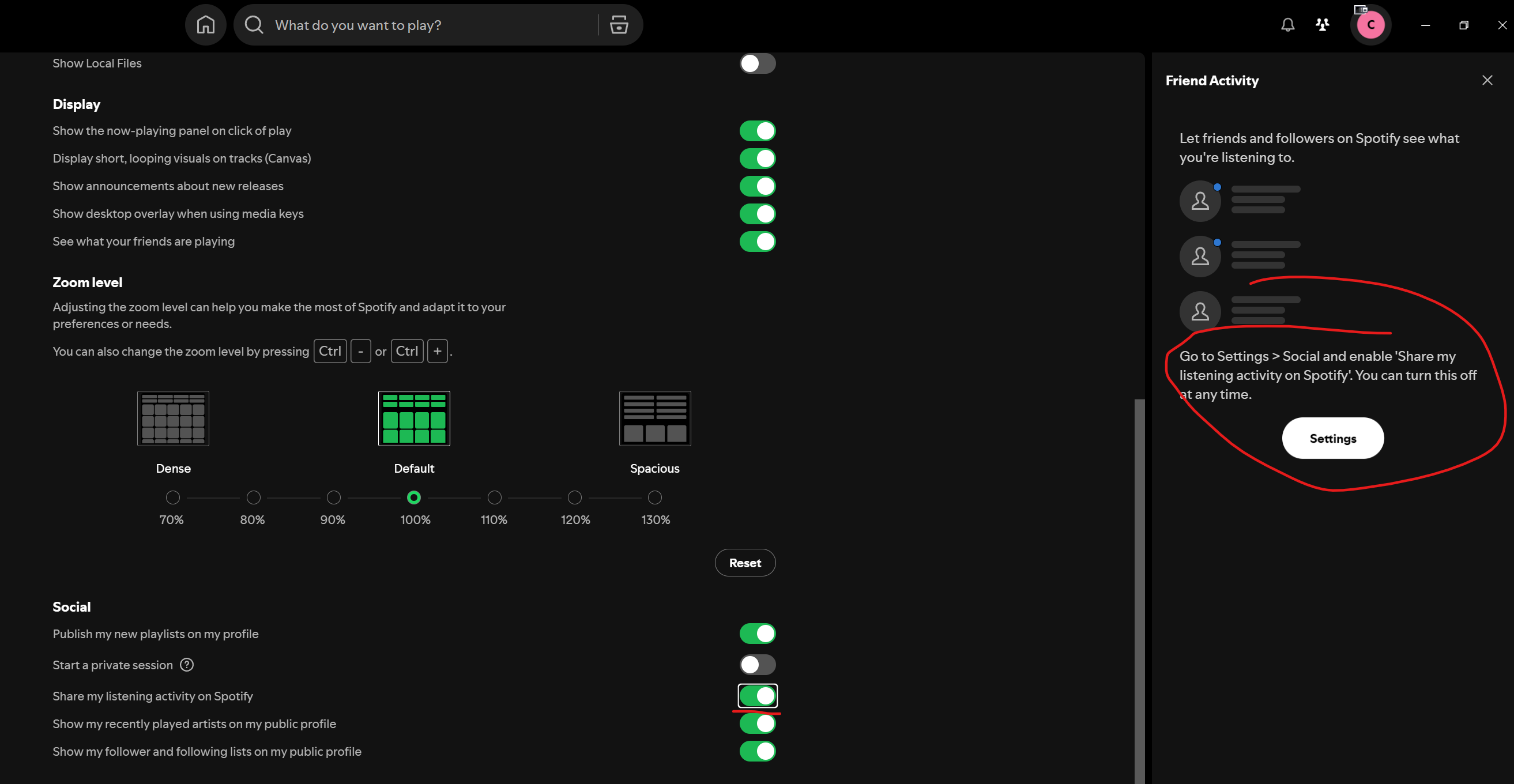
For some reason my friends activity is refusing to work. As you can see the setting is enabled, I've tried logging out and back in, uninstalling and restarting, logging out, uninstalling, clearing appdata, restarting then logging back in, nothing works. I am following people but none show in the feed, it just tells me to enable to setting even though it is enabled. Any ideas?
We have seen the reports of people saying Friend Feed is not working for them, and we are happy to investigate specific cases, because as far as we are aware, there are no issues with Friend Feed working.
Firstly, it’s important to restate that ALL users had “Share my listening activity on Spotify” turned off as default - so users you followed and saw in your Friend Feed in the past, will no longer show in your Friend Feed, UNLESS they turned “Share my listening activity on Spotify” back on.
Also worth noting that you don’t need Facebook set up for Friend Feed to work.
Having said that, all of the below must be true for users to show in your Friend Feed:
If all of this is true for you and your friend and they don’t show up in your Friend Feed, then:
Once we have this we can do some checking. Thanks all.