PC Spotify app collects all your regular files in "Downloads" directory !!! Why is it so ?

Hi,
I'm using PC desktop Spotify version 1.1.1.348.g9064793a.
I was investigating the issue related to constant high CPU usage and memory leak of Spotify app, and accidentally has noticed the strange thing:
If you try to monitor the Spotify process via Sysinternals ProcessMonitor you will see, that every time Spotify starts is reads every file (which even does not belong to Spotify) located in C:\Users\<user>\Downloads despite the fact that all Offline Songs data is being saved to totally different directory by default (according to Spotify settings the path is C:\Users\<user>\AppData\Local\Spotify\Storage).
What the heck is going on ? Why does Spotify app collect the data about all my files in Downloads directory ? What is being done with this data ?
Accepted answers
All comments
@Sebasty , thank you for your reply. Unfortunately this feature is entirely disabled (Preferences -> Local Files -> Show local files (disabled/unticked)). Nevertheless mentioned issue is still happening. The problem is - my "Downloads" directory is a hardlinked (google for NTFS hardlinks ) to another directory on another hardrive. It seems the Spotify is unable to parse such hardlinks, the app start to overload the CPU, and if you try to manually close it - the Memory (RAM) consumption begins increasing to maximum and the whole system starts to freeze and becomes totally unsusable.

That's an interesting case!
I'd recommend reinstalling your Spotify client - you can follow this article as a guide (restart your PC before installing).
You can also try installing Spotify using the offline installer.
Reinstalling will reset all settings, you will need to disable Local Files and modify other settings to your liking again.
Let me know how it goes 🙂
Sure, i have tried reinstalling Spotify for a thousand of times  , moreover - i even freshly reinstalled Windows 10 for the purpose of diagnosing what is the issue - it is still there, btw Local files are disabled by default and are currently disabled for sure. It seems some sort of bug in Spotify app.
UPDATE: It seems i should enable "Show local files", then other two options will be visible (Show songs from "Downloads"/Music library), then i should disable other two options, and only then disable the main "Show local files".
So it is NOT enought to disable just main "Show local files" )
It seems the issue is solved now, **bleep** buggy Spotify 🙂
@Sebasty thank you for help!

It's 3 years now, Spotify is STILL monitoring my downloads folder, which is a HDD, constantly keeping it awake. The behavior is still the same as @romanaleksejuk mentioned it.
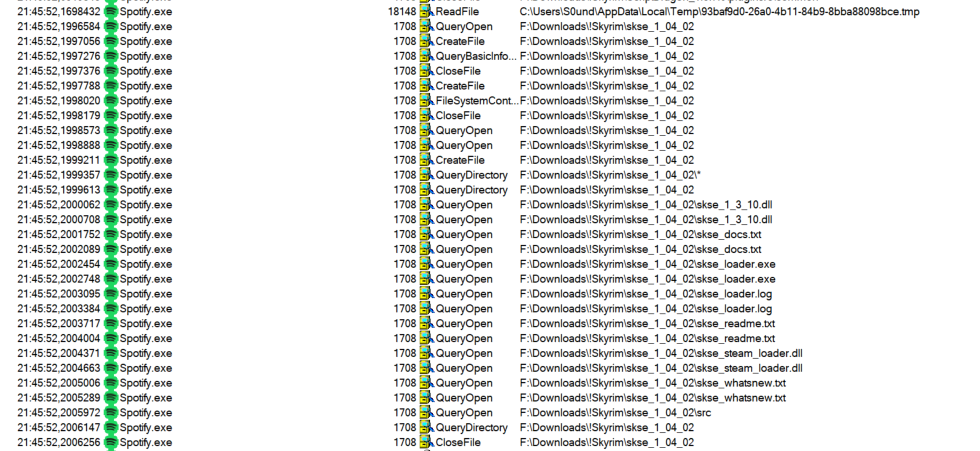
I wonder how many music files it will find in that folder...
Local files is turned off (by default)
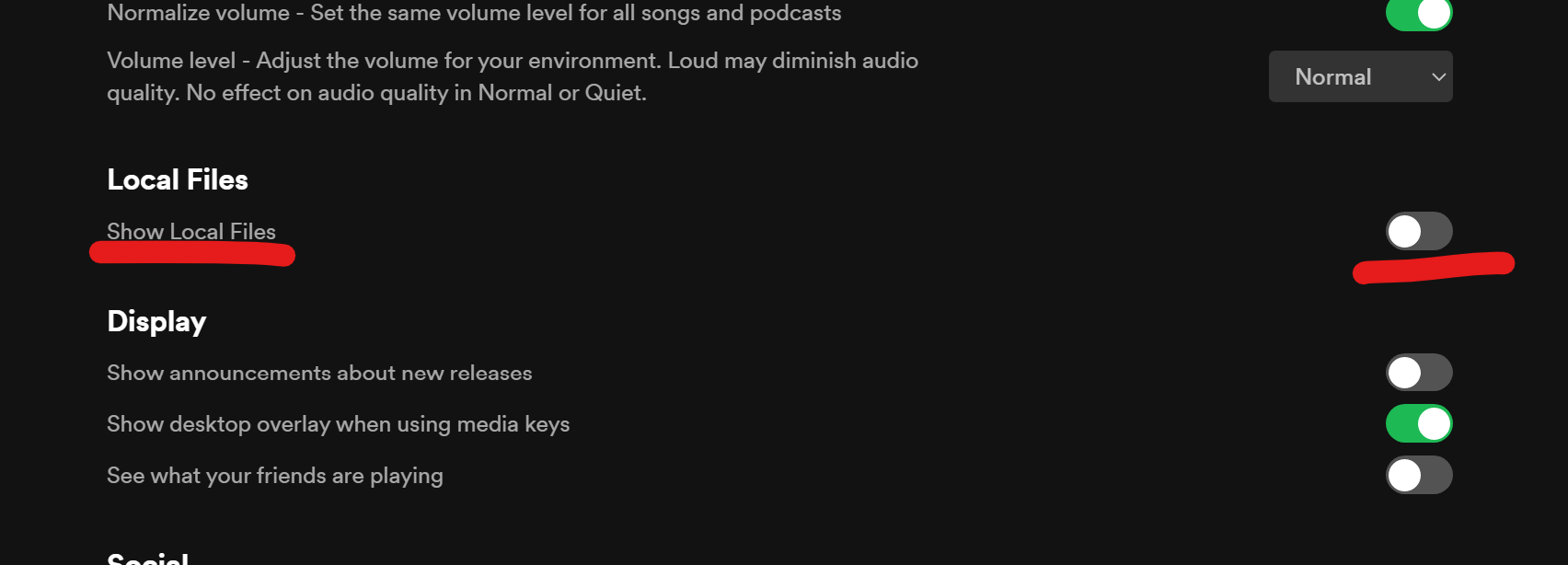
But the moment you turn it on:
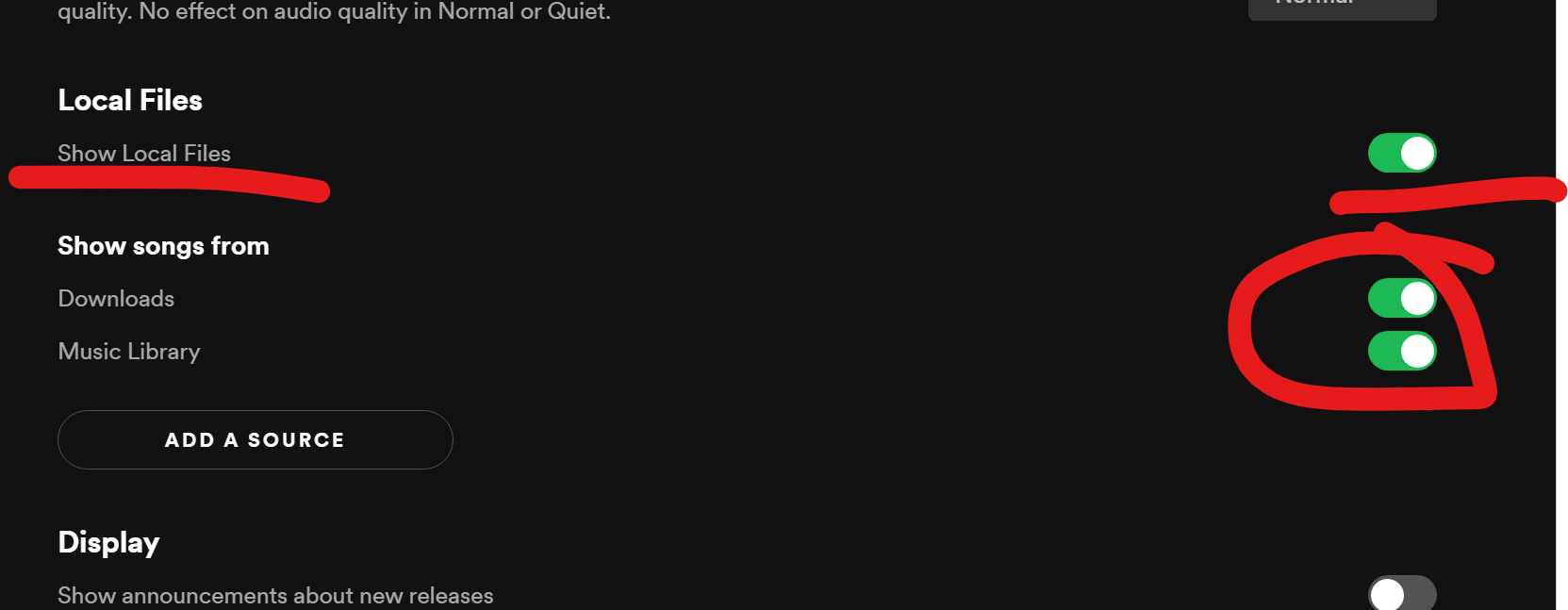
Turns out the file monitoring doesn't respect "Show local files" files setting, and won't stop until i manually turn OFF Both Downloads or Music Library.
I think it's time to fix it.

it's 2024 and I had the same issue

Same issue here. Over 5 years later and this still hasn't been fixed. Crazy.
I've just discovered the two extra hidden switches that only appear when you enable Show Local Files (seriously who designed this UI?? - I never would have found it if not for another user pointing that out).
I'm very close cancelling my account. Let's see how this goes. If it doesn't work I think it's time to switch to a new service that doesn't automatically violate the user's privacy.
Hey @romanaleksejuk
It looks like your Spotify client is searching for your local music files and by default it will look from your music library and the Downloads folder.
If you don't want Spotify to do that, you can disable that by going to Spotify's Preferences, navigating to Local Files and turning off either Downloads, or the entire feature itself. 🙂
Let me know how it goes!