Plan
Premium
Country
Germany
Device
different PCs
Operating System
Windows 10, Windows 11
My Question or Issue
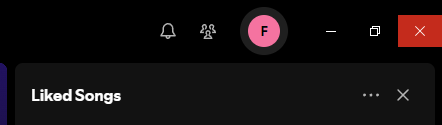
The buttons in the top right corner are no longer at the top of the app. This is very annoying for me, as it makes it significantly more difficult to click. Previously I could just move my mouse all the way in the top right corner to close the app, now I have to pay attention and make sure I don't click in the empty space above the button.
As you can see in the screenshot, the red area is where I can click and above it is some empty black area that does nothing:
UX design-wise this seems like an awful choice because the corners of a desktop display offer essentially an endless clickable area because the user can just move their mouse in the general direction of the respective corner and always hit the element. Windows even specifically made it so that the mouse doesn't slide into a different monitor when you hit the corners (if multiple monitors are used). This way you can always hit the corners, without even looking at the screen.
This is used for the windows button (bottom left) or minimise all (bottom right) or commonly the close button (top right) in basically all windows applications (except full screen)