Cant Uninstall Spotify

Cant find Spotify in appdata, control panel, the app isn't opening up.
I saw the other post about the same problem but I couldn't follow the solution because it is not there in control panel
Plan
Free
Country
India
Device
(Asus tuf f15)
Operating System
( Windows 10)
Accepted answers
All comments

Same problem. It was working fine, my internet went out so I took the time to do a windows update or nvidia driver update. I updated those and restarted, the spotify desktop icon was gone.
So I go to find it in Settings > Apps to uninstall. "Spotify - Music and Prodcasts Spotify AB" is therre but the opacity on the icon is lowered unlike all the other app icons. I click to uninstall I get this:
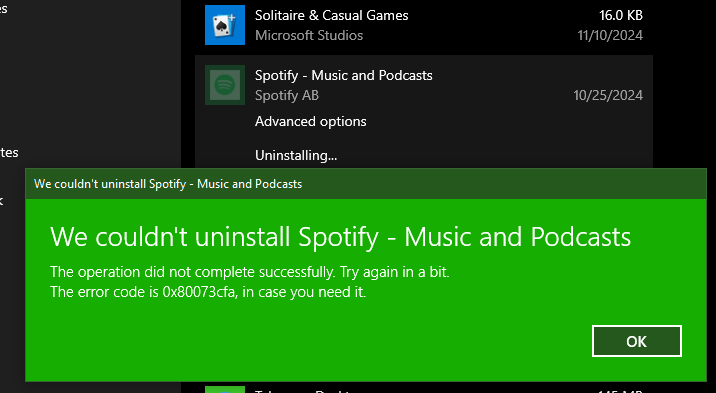
I check my computer for any signs of Spotify, and it's no where even with a file explorer search, it shows the leftover icon shortcut and a few cache things that can't be deleted.
I go to redownload it from the official spotify site location. Download the package and open it to install and it says there is already a Spotify on my pc and if I would like to open it. But when I click yes, nothing happens.
I go to Microsoft store to Spotify, it says it's not installed. I click install, it says there's an error. I go to library to see that it's there but only offers to update. I try that, and it says there is an error, no other info.
Plan
Premium
Country
Canada
Device
AMD Ryzen 5 3600X 6-Core Processor 3.79 GHz
Operating System
( Windows 10) 64bit

Restarted my PC recently and Spotify vanished, no entry in the registry, nothing in \AppData it's just gone. I tried to remove the package via Windows PowerShell and that command failed. Registry has some package ids that reference Spotify but that's it ...
Plan Premium
Country Canada
Platform Windows 10 Pro 64-bit

Hey folks!
Sorry to see you've been having issues with the app!
Have you tried removing the registry entries for Spotify? I'm assuming that there's something that's preventing the app from installing normally or from being viewed as properly uninstalled. This behaviour can oftentimes be caused by entries in the registry that have, for some reason, remained on your machine.
Check out this thread here, find the accepted solution and scroll down to the "If that doesn’t work try reinstalling Spotify" steps. Once there, locate the steps for clearing the registry as described by @Merik. Re-run the registry scanner until you stop getting errors.
Once this is done, reboot your devices and try installing the app anew. If all goes well there will be nothing preventing the installation.
Hope this helps! Keep us posted 🙂
@Horsenberg @lovinlisteninmusic
@Jubilations @drewgeschutz
Neither solution from Merik's post helped me.
Followed both suggestions to the T and no change. CCleaner shows spotify under the uninstall list, but implementing the uninstall doesn't do anything. Spotify still shows it is there on the list as well as my system's apps just as before.

Hey all,
For everyone experiencing this issue, would you mind sending over the exact Spotify version that's currently installed on your computers?
It'd aso be helpful if anyone could provide more screenshots or a screen recording/video of the issue. This way we can report the issue to the relevant teams.
Keep us posted.
Impossible to determine app version @novy - the app won't run, won't install and won't uninstall - and the file structure is no longer on my rig. Here's another recap;
- %appdata%\roaming\spotify folder is gone
- searching for Spotify in the Windows search bar results in a display of the app and recent playlist shortcuts, however none respond when selected (see attached SpotFromWindowsSearch.png)
- uninstalling the app from Windows Add/Remove programs results in the error code 1x80073cfa (see attached AddRemoveSpot.png)
- searching the registry editor for "Spotify" only returns these keys;
- HKEY_CLASSES_ROOT\ActivatableClasses\Package\SpotifyAB.SpotifyMusic_1.221.1104.0_x64__zpdnekdrzrea0
- HKEY_CLASSES_ROOT\ActivatableClasses\Package\SpotifyAB.SpotifyMusic_1.235.663.0_x64__zpdnekdrzrea0
- HKEY_CLASSES_ROOT\ActivatableClasses\Package\SpotifyAB.SpotifyMusic_1.243.420.0_x64__zpdnekdrzrea0
- HKEY_CLASSES_ROOT\ActivatableClasses\Package\SpotifyAB.SpotifyMusic_1.250.335.0_x64__zpdnekdrzrea0
- HKEY_CLASSES_ROOT\Extensions\ContractId\Windows.AppService\PackageId\SpotifyAB.SpotifyMusic_1.221.1104.0_x64__zpdnekdrzrea0
- I'm using Windows 10 Pro 64-bit, last Windows updates applied were on 11/12;
- KB5046542
- KB5046613
- No 3rd party antivirus installed
I wrote a detailed post for you @novy with screenshots but it was flagged as spam and deleted by your automoderator.
I wouldn't have it now. I did a system restore to just before I did the windows update and it's back to normal. A few things got a bit funky on my pc along with Spotify that needed the restore. Not sure what in the windows update caused it.

Opening Spotify in app manager (windows icon in lower left) progress line gets almost to end & then … nothing, not even in Task Manager.
Other posts suggested uninstalling & fresh install. In System Settings for Apps, Spotify icon is only one shaded. Clicking on Uninstall returned an error message that I sinned against man, nature, & entire MicroSoft universe. Ok, maybe only error code 0x80073cfa
I’ve tried restarting, hard rebooting, & even prayers. Any thoughts on how to get the Spotify app to cooperate? No problem listening to the web player on this computer, it’s just the desktop app.

Reinstalling won't work, installer and start menu both think i still have the app. system settings can see it and says it has 614 MB but can't uninstall it.

Same here. Tried lots of possible solutions even asked chatgpt and nothing worked. According to the screenshots posted here the issue is identical.
PC: HP Elitebook 745 G5 AMD Ryzen 7
Windows 10
Spotify App Version: 1.250.335.0

FIX THIS *BLEEP* ITS BEEN A WEEK BRUH, WHAT AM I EVEN PAYING FOR

Same issue here. Just like @drewgeschutz and others;
Spotify won't run. %appdata%\roaming\spotify folder is gone. Failed to uninstall it (error code: 0x80073cfa).

same issue, cant open, cant uninstall, app it not started, doesn't appear in processes
*Spotify app suddenly got back*
Yesterday I noticed spotify icon was back. When I clicked it Windows defender asked me if I allow the app access on public/private networks, and I did.
Now the app works fine except all downloaded music/episodes are gone, like when you reinstall the app.


I still have the issue.


Issue on my part as well.
Hey @0071241,
Sorry to see you've been having issues with deinstalling your Spotify app!
Is the error you're getting the same as the one that is described in this thread and has it appeared after a specific event like e.g. an app update that wasn't installed properly or a new OS update?
Let us know if the app works as a whole (excluding the uninstalling process), as well as what the error you're getting is, alongside the troubleshooting steps you've tried and your device details - we'd need your OS version and your Spotify app version.
Many thanks! We'll be on the lookout for your reply.
Hello,
After reusing my computer for the first time in a few months, Spotify had stopped working. It did not seem to be due to a specific version of the app, as it was on the latest update at that moment.
The app was unfortunately not working overall. The error was the same as described previously.
What I did (which did not work):
- All sorts of PowerShell commands
- Uninstalr
- All sorts of Command Line commands
What I did (which worked, I do not know if the steps above helped with this):
- Use Revo to uninstall (this uninstalled it, but it was still showing in the Windows Remove Apps) then restart your computer
- Run this command in PowerShell as admin: Get-AppxPackage -AllUsers *Spotify* | Select-Object PackageFullName
- With the string extracted, run this command: Remove-AppxPackage -Package "PASTE_FULL_STRING_HERE" -AllUsers
- Then restart the computer
For the first option,
For the second option,
And for the last option,