Spotify can't play this right now. If you have the file on your computer you can import it

Plan
Premium
Country
UK
Device
Desktop
Operating System
Windows 10
My Question or Issue
When I try to play a song I get the following error message "Spotify can't play this right now. If you have the file on your computer you can import it"
I have tried all the fixes I have seen:
Reinstalling app.
Using version from Microsoft store.
Disabled hardware acceleration.
Disabled crossfading.
Changed speaker options.
Deleted local files.
I've had this issue before and it was fixed by using the version from the Microsoft store but this isn't working now.
Spotify works on my phone and my laptop, web player also works only the desktop app doesn't work.
Accepted answers

Hey folks,
Just dropping by to mention that this is an issue that can be caused by a variety of things, so for your convenience, we've compiled all of the most common ones in this article, along with steps on how to get everything fixed of course.
Make sure to try those suggestions and if you have anything you'd like to share, feel free to comment in this thread. If the issue you have is more specific and doesn't get resolved by these steps, feel free to reach out on a separate thread so we can assist you further.
Cheers!
All comments


I have the same problem on and off on the web player (I'm on spotify premium). This is increasingly frustrating and am already thinking of ditching the service.

I have done full reinstall from both spotify.com and microsoft store, i have made sure spotify have full acces through firewall and cleaned cashe etc. Nothing helps.

Hey! Welcome to the Spotify Community, it's good to have you here.
At the moment, it's possible to download the app from both the Microsoft Store and our web page here. So, in this case, if you installed the desktop app from the web page, try to uninstall that version and try installing the one from the Microsoft one or vice versa.
Keep me updated to continue helping you!
Cheers,
ribezaz
Already tried both, no luck
Can you send me screenshots of the situation and explain in more detail what is happening? This way, I can help you more effectively.
Cheers,
ribezaz

I've exactly the same. I can't play any song at all on desktop (windows 10 latest update)
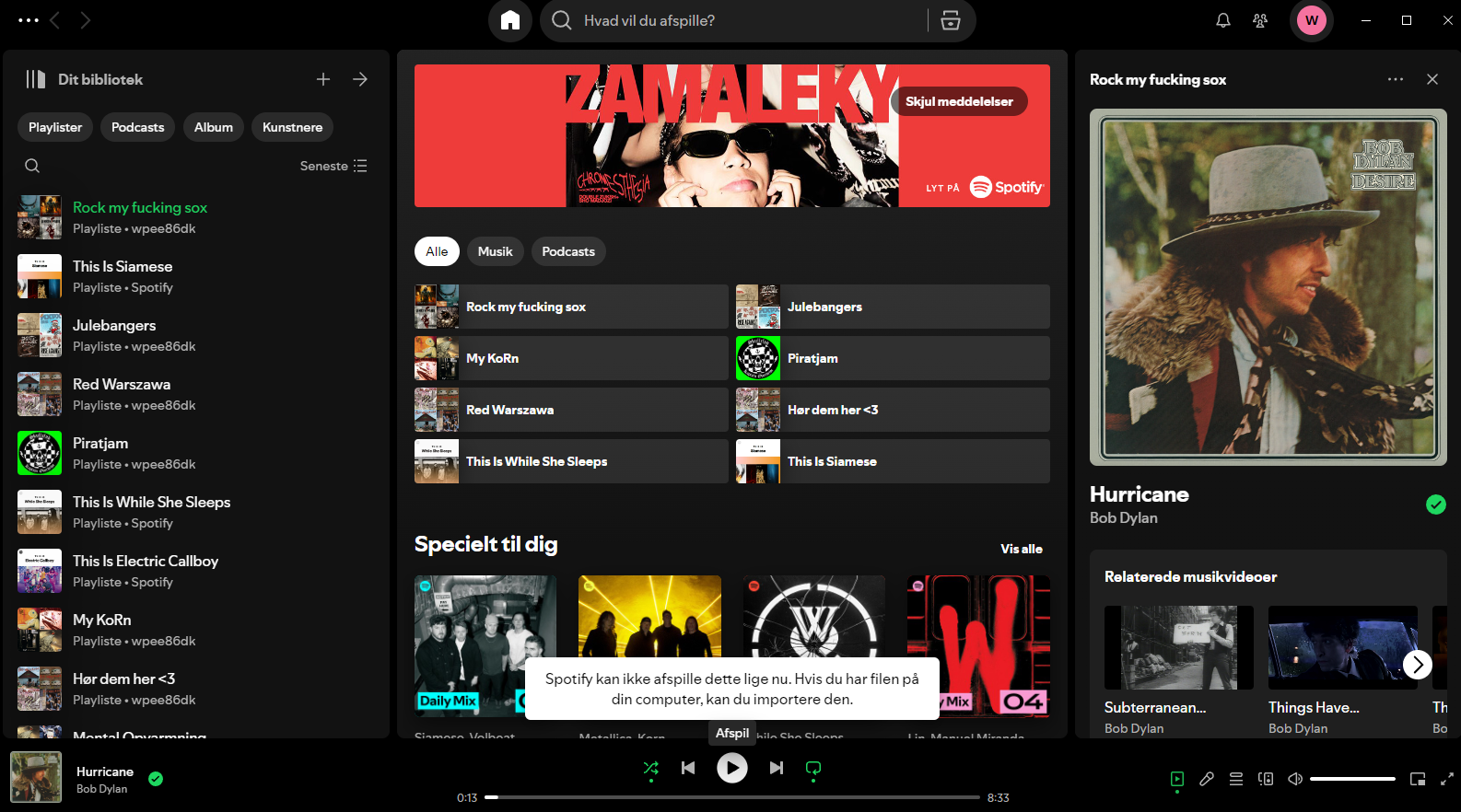
Well, u press play and i get the message.. translated it means: Spotify can't play this right now. If you have the file on your computer, you can import it.
If i play a song on my phone or the web player, the app can track it and show how far it is. But if I press teh "play on this device" option I get the same message.
Hey!
@oliveraptor Have you tried any troubleshooting steps? If you haven't already, I recommend checking out the suggestions shared here in the thread.
@Wpee86DK Could you give us more details on what exactly happens when you try to play a song? This will help you better understand the issue.
In the meantime, try these suggestions:
1. Test with a different internet connection: If possible, connect to another network (for example, Wi-Fi from another location or a hotspot) to see if the problem persists.
2. Flush the DNS cache:
- In the lower left corner of the desktop, type cmd in the Start menu search bar and press Enter.
- In the Command Prompt, type ipconfig /flushdns and press Enter.
- You will see a message confirming that the DNS was successfully flushed.
- Restart the Spotify app.
3. Test with another account: Ask someone (a friend or relative) to log into their account on the same device and see if the problem repeats. This will help identify whether the issue is related to your account or your device.
If any of these steps work or help you identify something, please keep me updated so I can continue to help! 😊
I tried everything mentionned above and in help but it doesn't help. I still won't play.
But i then tested to play sound on the browser (and no more on my PC-NAME) and it worked, only there
So it seems there is something preventing the sound channel output to PC (while i can play anything else as normal on any other app than spotify)
Figured it out. Wasnt any of the above issues, but as the other person mentioned the sound output. I changed it to the onboard soundcard on my pc and now it can play, however i need the sound to go into my headphones using my Presonus Studio 26C. Where can i change the soundchannel in the spotify app? cant find it in the standard settings

I have the same issue since..today. What is going on guys??? I used Windows (10) app on my PC and it was always fine to listen to the music with my pc speakers, now it's impossible. PLEASE FIX IT ASAP!


Spotify won't play on PC after Update to LibreOffice v24.8.3
Plan
Premium-family
Country
USA
Device
Dell Precision 7290
Operating System
Windows 11
My Question or Issue:
I updated LibreOffice to the latest version 24.8.3, while listening to the Spotify Desktop App. When the system rebooted and I went to restart Spotify. I get a warning: Spotify Can't Play this right now.
Spotify plays on my phone, tablet and on the browser. All other programs with audio are functioning. I can play and control the audio on my phone from the Desktop App but not through my PC's Audio devices. it's not the sound, the music fails to start completely.

wow it's been 3 weeks and web player is still unusable
Plan
Premium
Poland
Device
PC
Operating System
Windows 10 64-bit
Issue
Spotify cannot load any song/podcast from audio (video option is working)
After 3 hours of chatting with support, I found a solution 🙂
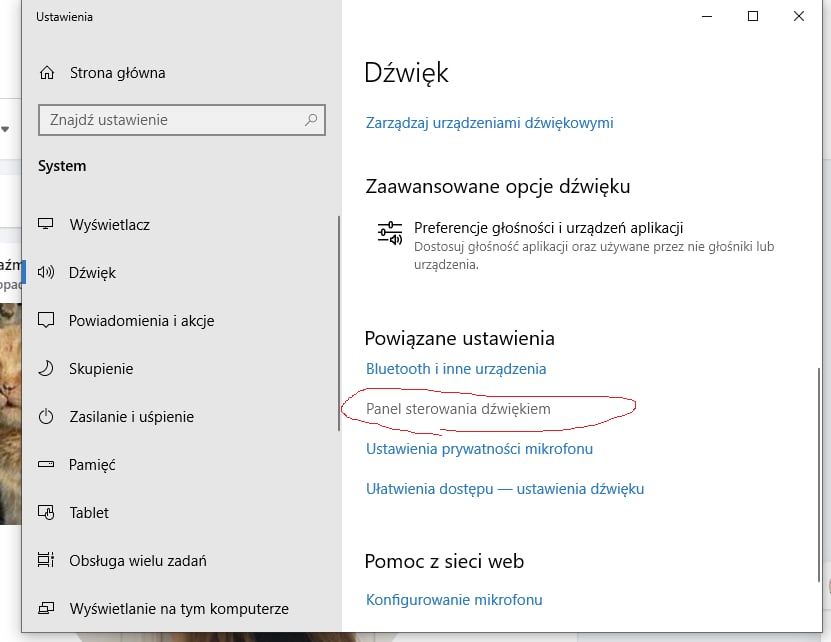
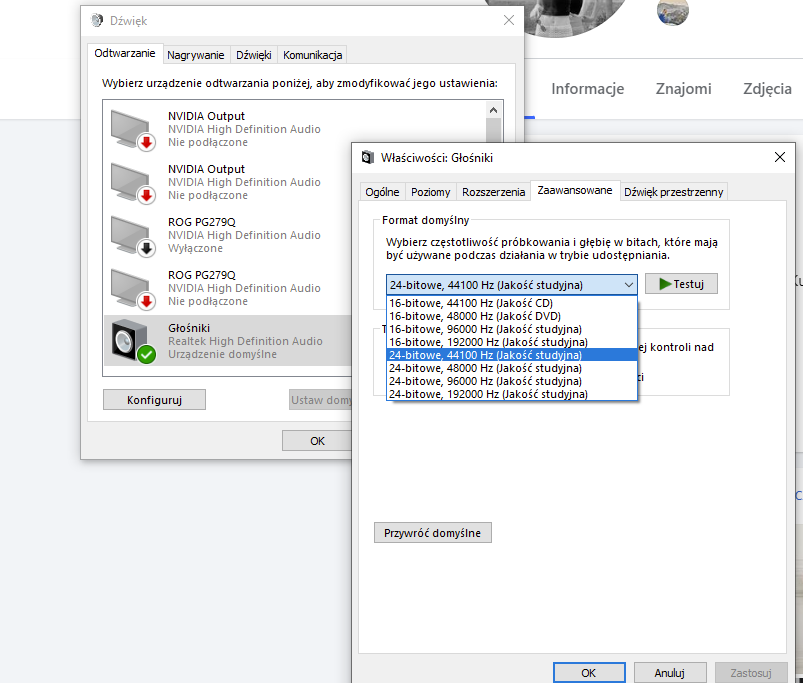
Can be that your speaker device has chosen somehow (don't ask me how, maybe Windows Update changed something in the settings) a different default format of sound...
steps to do: 1) go to Windows settings / Sound / Voice control pannel / right click on your default speaker / Advanced / change to at least 24bit / 44100 kHz and the issue should gone forever, cheers

Plan
Premium
Country
USA
Device
App (PC)
Operating System
Windows 10
My Question or Issue
I keep getting the "spotify can't play this right now" error. it's also changed my username to be a full string of random letters/numbers and icon to be the default, but re-logging in fixed this. It still won't let me play anything. clearing cache, re-logging in, re-installing, and trying to change output devices haven't fixed this. it's been days now and I'm getting really frustrated as I use the app while I'm gaming

This has just happened today but I find can play anything on Spotify via my Alexa devices, either by diverting output from the PC app (Windows 10) or asking the Alexa devices directly. Windows 10 arm-wrestling Spotify maybe?

I have the same problem as the others above, 7 years of trouble free use and suddenly the pc app playback on the speakers stopped working, no song can be played but it can on headphones, the web version however always works. I think the latest Spotify update has **bleep** something up.... wierd.

Same 😞

Hey everyone,
Thanks for your messages and for making us aware of this issue.
Jumping in here to gather all the details we need to report this with internal teams. In case you haven't sent it yet; let us know the following info:
- Your device info (make/model) and OS version
- Exact Spotify version
Also, and if possible; could any of you record a short video where we can take a better look? You can attach it to your next response by using the Insert Video option in the post editor. You can also upload it to YouTube or Google Drive and share the link with us (make sure the video has the permissions for anyone to see it).
We'll be on the lookout.
This was suddenly fixed yesterday.
well, maybe after my fighting with support for good 3 hours...
whether it was you or not, thanks for your contribution lol

Plan
Free
Country
Australia
Device
Macbook Air M2 2022
Operating System
macOS Sonoma 14.4.1
My Question or Issue
Whenever I try to play songs on a specific wifi, it says "Spotify can't play this right now. If you have the file on your computer you can import it." When I use other wifi's it is fine, but I mostly listen to songs at this specific location on this wifi so I would like to fix it. I know it is not the wifi's problem as other people can listen to songs on that specific wifi without the error message.
I have tried restarting my laptop, deleting and redownloading Spotify (not using this wifi as it does not let me), using the Spotify website, but it does not fix it and I cannot play any songs.
What I found worked was that if I play the song first using a different wifi such as my mobile data, then the song would play but not if I did not play it first.
If anyone has any solutions that would be great.
Edit: I restarted my laptop again and now I can play specific songs but not all of them.

Have to say this is one of the worst apps I've ever come across for random issues - and I've been in IT since the mid 80s.. I've sat at conferences where Spotify has presented on their Agile methodology and how wonderful it is....yet look at the number of potential fixes listed in this thread - not a great example of a stable, mature app.
I started having the same problem with not playing about a week ago after changing my drive. Cloned my old drive onto a larger one and everything worked perfectly. Upgraded to Win11 and everything worked perfectly again - except Spotify. Played in web browser through the same speakers - no problems. Using the app - no chance. Tried all the fixes - no luck.
Then suddenly today it decided to start working - I have no idea why as nothing has changed on the system for a few days. Totally dumbfounded....

**bleep** thank you so much for posting this picture, i was two seconds away from throwing a screwdriver at my mobo 😄

2024 updated Fix, Go to your Add or Remove programs in your settings. Click "Advanced Options" then at the bottom Click "Repair". Worked For me EZ fix.


I'm experiencing a similar issue. I discovered that it only occurs on the Windows app when I'm using any type of headphones. I've tried reinstalling the app, but the same error message appears every time I attempt to play a song. Videos work fine, but the error reappears when I switch to audio.


Same issue here. It was working fine like couple days ago. And then it can't play anything for no reason even on web player.
Oddly, my IOS app works well but when I tried to switch devices the same error popped up.
Hey folks,
Could you check if the correct audio output device has been selected for Spotify? Also, make sure that the sample rate of the device is set to anywhere between 44.1 kHz and 192 kHz. You'll find a guide on how to do that + some additional things you can try in this article, check it out 👍
If you're experiencing this in the Web Player, I'd recommend trying the troubleshooting steps from this post.
Cheers 🤘