Unable to remove songs from Discover Weekly

I'm on the premium plan, using the Windows desktop app version of Spotify. I'm trying to remove a song from my Discover Weekly playlist, since it's been there before and I didn't think much of it the first time. The button to do this has been removed. I can find old posts explaining where it is, and it's not there any more. How do I remove this song from my playlist?
Accepted answers
All comments

Did all 52 weeks last year, and haven't missed a week this year neither.
Besides enjoying the collection, I also do this because I don't always get the time to listen each week's DW and enjoy going through them properly later.
But since your recent changes to how songs can be added to a playlist / Liked, every song in DW is now auto-liked after archival. And I can no longer click "Remove" on the songs I don't like in DW to curate next week's list.
Please let me save songs without "Liking" them, I ❤️ Discover Weekly, but it's ruined ATM.
It seems to only be a problem on some devices.
"Hidden in Discover Weekly" works on one desktop, but not on the other. Not sure why the "Remove" button is ineffective and does nothing on one, but works fine on the other.

Hi there @oslofreak,
Thanks for your post here in the Community and welcome!
Right now the Plus button will add the song to your Liked songs, but that's not the only option available. There are two ways to add the song to other playlists. The first one is clicking the Plus button twice in a row and a screen will come up where you can select the exact playlist to which you want to add the song:
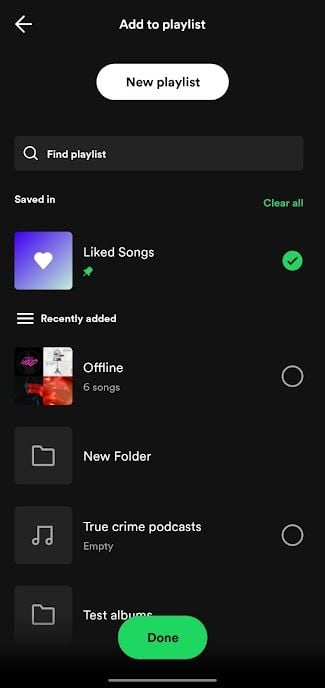
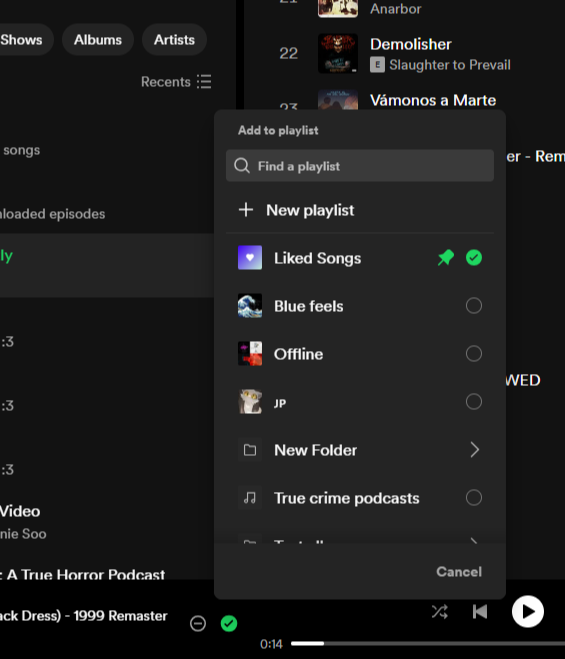
Or you can click on the 3 dots on the top right and select the option Add to playlist:

On another note, the dislike option only comes up in certain playlists. The dislike button should come up on the Discover Weekly playlist on every device. If you don't see it, could you send over a screenshot? We'll take a look.
Lastly, the dislike button will not come up once you have added the songs to a playlist in your Library, but you should be able to click on the 3 dots and select Remove from this playlist.
Let us know how that goes.

Hi there @_fj1-gf6lbp3h,
Thanks for bringing this to our attention!
We've forwarded the info to our tech folks who'll investigate further. In the meantime, could you confirm the exact version of Spotify you're running?
Cheers 🤘

Same for me on the Mac app.
Spotify for macOS (Apple Silicon)
1.2.50.335.g5e2860a8
I have the same issue running the mac app:
Spotify for macOS (Apple Silicon)
1.2.50.335.g5e2860a8
Good to hear.
Spotify for Windows (64b), version 1.2.50.335.g5e2860a8
Cheers

its been removed, can no longer hide songs i dont like in my discover weekly

It is also no longer there for me on my Desktop app.

It is the same for me for the Mac Desktop app:
Spotify for macOS (Apple Silicon)
1.2.51.345.gcc39d911

Earlier this week I was able to remove a song, but then a day or two later I noticed it was 'unhidden' and the option to remove it has disappeared. I also have a Premium plan.
Spotify for Windows (64 bit)
1.2.51.345.gcc39d911

Same here on Spotify voor Windows (64-bits)
1.2.51.345.gcc39d911
Second week.
The work around I use for the moment is to copy the playlist to a new playlist, where I can click on the three dots at the end and 'Remove from playlist'.

I am also having this issue, not being able to hide songs from my Discover Weekly playlist. Really missing this feature.
Using Spotify Desktop on Windows computer
Using a Premium Spotify Family Plan
Spotify for Windows (64 bit)
1.2.51.345.gcc39d911

Having the same issue on Spotify for macOS (Apple Silicon)
1.2.51.345.gcc39d911
However, the hide functionality works on iOS 8.9.94.418
It's gone for me now as well on Spotify for macOS (Apple Silicon)
1.2.51.345.gcc39d911

Same issue, version 1.2.51.345.gcc39d911 on macOS. Very annoying, since I have played a lot of kid's songs lately for my children, so now my Discover Weekly is contaminated with songs I actually do not like that much...;)

Gone for me too in the spotify.com Web version in Chrome. Frustrating to not be able to remove terrible songs.


Same problem for me
Spotify for Windows (64 bit)
1.2.51.345.gcc39d911

Same here, a member of staff asked me if I was sure that feature was ever there and recommended uninstalling Spotify 🙄
1.2.51.345.gcc39d911
Spotify for macOS (Intel)

Same fot me, Spotify for Windows (32 bit) 1.2.51.345.gcc39d911. It works to hide inte the mobile app so I use that, but nothing shows in the desktop version. Very annoying!
Just checked into my spotify weekly, usually would be some songs that i actually like but since i can longer delist ones i don't it's completely messed it up and all the songs that are recommended are absolute **bleep**
Totally agree. Don't understand why it's gone there, but still available in Release Radar. Shouldn't be too difficult for the tech guys to fix it?Unless Spotify wants to eventually get rid of Discover Weekly and have a funny way of introducing it to its heavy users...

The same issue on Linux. Spotify 1:1.2.50.335. Premium plan.
This is a huge problem, because when we hear Discover Weekly once more, we need to manually skip songs, which takes time and is incredibly annoying! Or forces us to hear the list only once, because more times becomes annoying if the list is bad some weeks.
As with others, button still exist in Release Radar.

Spotify für Windows (64 Bit)
1.2.51.345.gcc39d911
Very annoying that I can't hide songs anymore, been doing it for over a quater year regularly
Please, everyone who confirms the problem, hit the "Me too" button on the header (look up, Me Too button is underneath the image) of this thread to show that we are not just commenters but also have this problem. There are plenty of comments, but only 6 "Me too" counts so far.
Time to show Spotify that this is a serious problem, and we need a serious response from them.
If you don't see the Me Too button immediately, click on the like button and the Me Too button will appear. At least, that's how it worked for me.

I updated to: Spotify for Windows (64bit)
1.2.52.442.g01893f92
And it is still mising dislike/remove/hide function.
I have old android version on my phone (because other Spotify terrible decisions), I can hide song there, but it will still play on windows...
Please fix this. Discovery weekly is unusable without dislike or some other way to remove songs.


It's currently 2024, near 2025; hopefully I'm not so old that I'm blind to the button, but with the constant changing of the user interface, it seems I cannot locate that UI again (or ever, funny enough). I would love to know where the app designers hid it this time.
Unsure what may have happened on the backend but on desktop I can now see the Hide button is back on my Discover Weekly as of today. (Dec. 8 2024)
Spotify for Windows (64 bit)
1.2.52.442.g01893f92
The Hide button is now back on Desktop for 100% of users. If you don't see it, please update the App to its latest version and/or close/reopen the App a few times for it to take effect. Thanks again for your patience and comments.