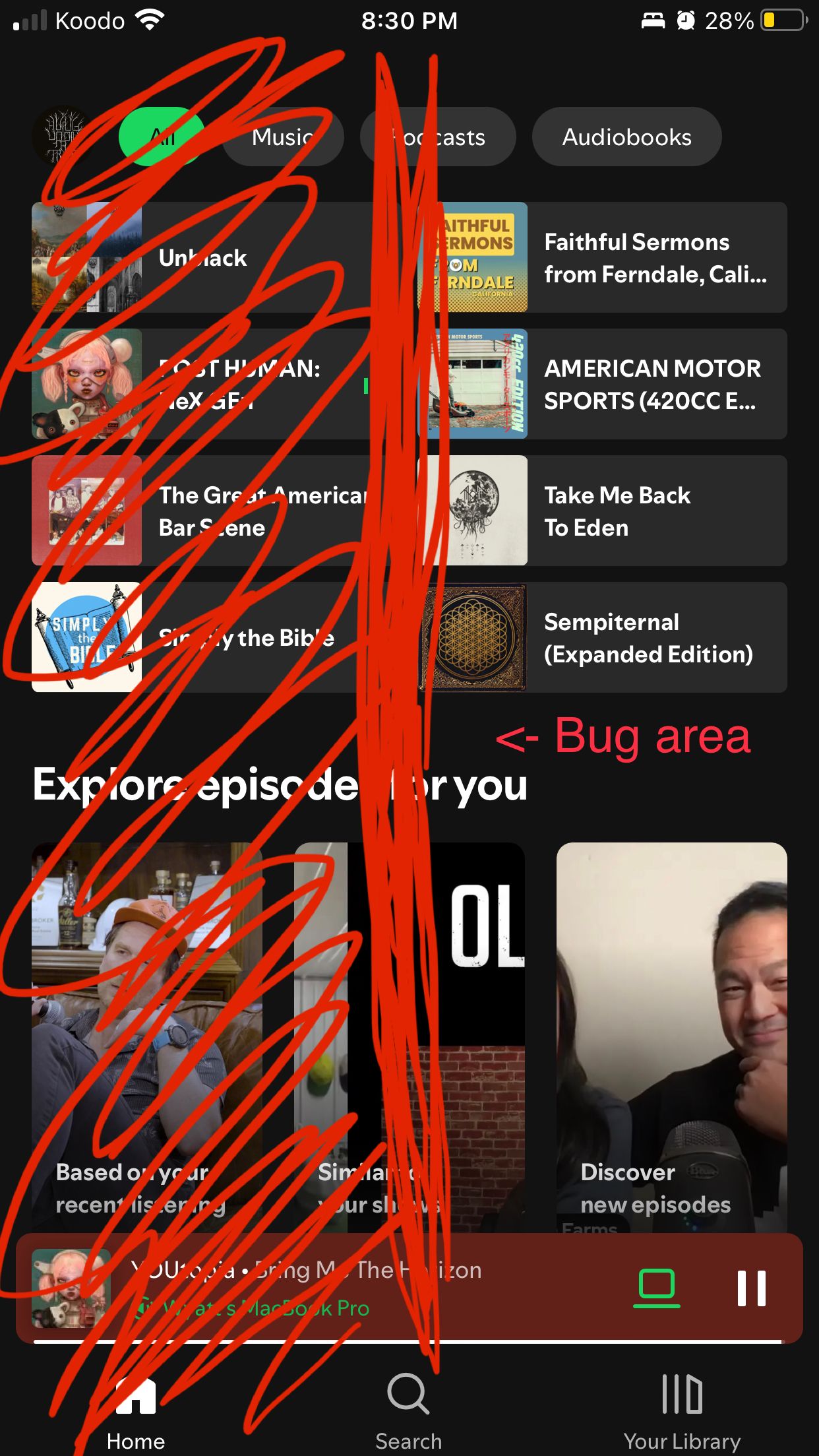
It only happens in Spotify, and it's not a issue with my display. Already performed a clean reinstall etc etc.
Plan
Premium
Country
Brazil
Device
(iPhone 6S)
Operating System
(iOS 15.7.5)
My Question or Issue
How do i fix this?
Hey @quiveringheartofcory,
Thanks for posting in the Community and welcome.
In this case, we'd like to gather some additional info. Would you mind sending us the exact Spotify version you're running on your mobile device?
On another note, can you replicate the mentioned behavior on the web player from your mobile device? If you're not sure, we'd suggest opening the web player there and checking.
Lastly, did you notice if this started to happen after a specific event, such as an OS update? If yes, please send us the details.
Keep us in the loop!
@AlejaR Thanks.
I'm using version 8.8.36.571
Web player works fine.
I couldn't tell you, but probably not the case since IOS 15.7.5 came a while ago and there is 0 reports of this bug thus far.
Thanks for your reply.
In this case, we'd like to check: is this happening if you open a different account on the affected device? It'd be awesome if you could check. You can ask for the account of a relative or a friend to open it on your device and check.
On another note, is this happening if you open your account on a different device? You can have a relative or a friend check your account on their mobile device.
@AlejaR
Funnily enough, it doesn't happens when I switch to a different account. And the effect even stays when I return to my main account, but after a couple minutes it goes back to doing the same thing.
I don't have anyone available right now to test my account :B
Hi there @quiveringheartofcory,
Thanks for the post.
This is a very strange issue indeed. Since everything works fine with the new account, we'd suggest you try using that for a few days, just to be sure that everything works fine. If it does, you might consider transferring your account information over to the newly created account, following this guide. The process only takes about 10 minutes.
Before you do that, we advise you to check if the issue doesn't come up on other apps as well. Try Force Resetting your phone and and doing a clean reinstall on the Spotify app, just in case. Older iPhones often have issues with the touchscreen which can be resolved with the phone restart.
Hope this helps.
Hi! Just an update. Moving to a new account was not a possibility to me so I just continued to live with the bug. Until recently when he just decided to disappear.
I have the exact same problem, Are there any updates?
Hey @ChrysZ,
Welcome to the Community and thank you for joining the conversation.
To continue investigating your case, would you mind confirming if you've tried any troubleshooting steps? This is to avoid repeating processes that may not work for you.Also, include in your next response the make, model, and OS version of your device, along with the Spotify version you're currently running.
We'll be on the lookout.
Same issue returned to me recently. No solutions available. Don't even bother doing all the steps they tell you to do. The best chance you got is to completely reinstall the app, which sucks because you lose all your downloads.
Freer
IDN - Indonesia
(iPhone SE 2020)
(iOS 16.7)
it just me or it’s a bug? so apparently i using my phone with my one hand (left hand) and starts scrolling library. when i do the scroll motion, it’s tapping insted of scroll. tap one of my playlist. but when i change to my right hand (the right side of the screen) it didn’t behave like that. it’s scrolls normally.. i’m not using the scroll feature while doing in the right side of the screen. i know it sound silly, but it kinda bother.. well let me know if it’s true or nah. have a good day!
Hi @sulaylul,
Thanks for reaching out. So scrolling in the marked area doesn't scroll but will instead select whatever is underneath, is that correct? Have you seen this behaviour on any other devices or only here?
Let us know how it goes.
every time they update the app causes a bunch of bugs or adds/changes features nobody asked for. it’s getting really annoying
it is correct. unfortunately, i didn’t testing out in any other device yet. sorry
Hey folks,
For anyone still experiencing this, please let us know your device model, OS version and exact Spotify version so we can report it to the right team.
Thanks!
If anyone still has this issue, I found a solution that worked for me today. I don't know which step fixed it, but here's what I did:First I logged into Spotify on someone else's device, and noticed I didn't have the problem on that phone. The glitch was still occurring on my phone though, so I logged in with my brother's account, and we had no issues there. I just logged myself back in, and now it's good as new!... Except for the fact that Spotify is running an older version. The heart button is there instead of the "+" (which I honestly don't mind).
I offloaded Spotify and redownloaded it afterwords to try and get the Spotify version back up to date, and that worked, but the scrolling issue came back at that point. Definitely has something to do with the version of the app.
I'm having the same issue. It still persists after a clean reinstall.
Family
Indonesia
(iOS 15.7.9)App version is 8.8.82.607.I've tried using another device (iPhone 7 Plus), and the same issue occurs. I cannot scroll the page on the left side, except when I'm in playlist view or now playing.
I have the same problem. using iphone
Hey folks,Thank you for your reports.
To continue investigating this issue, and in case you haven't sent it yet, remember to include in your next response the make, model and OS version of the affected device, along with the Spotify version you're currently running.We'll be on the lookout.
I had this same issue on iPhone SE (iOS 16.1.1) and it started doing this bug a few months ago, I think it was when the app updated (or iOS, can’t remember which). But logging out and back in again seems to have fixed it again, for now at least!
And also, it was version 8.8.88.445
Did your brother have an older version of the app?
I’ve noticed that when the app is freshly opened (after the app has been restarted) the left side of the is usable. But as soon as I switch screens (through the buttons on the bottom of the screen) the problem comes back, and the entire left side of the screen is unusable to be scrolled on.
Over a year later and this problem has not been fixed. And they have the nerve to raise the price again. I’m switching to youtube music.
Can't scroll on the left side of the screen
The above thread shows many people who have the same problem as I do. The person who posted it has a good screen recording. But, someone in the replies posted an image that misinforms onlookers, one that does not address the problem we are having. For the one posting the image, it is only a small portion on the edge of the screen. For almost all of us in the thread, we cannot scroll anywhere on the left hand side of the screen.
It's been over a year for many of us (that is, those who didn't cancel their subscriptions), and there hasn't been any solution.
iPhone 8
(iOS 16.7.10)
Spotify Version: 8.9.94.418
iOS Version: iOS 16.7.10 (20H350)
Hey folks,Thanks for posting in this thread!We're keeping an eye on your comments here, however, as we couldn't reproduce the exact behavior your describing from our end, we would need some more details from you.
It would great if you could let us know the following (if you haven't already):
These details will help us look into this behavior further. Should the files be too large to attach here in the Community, you can send them to us as unlisted YouTube videos or via Google Drive (just make sure it doesn't include any personal info).