Black overlay bar blocking left side of podcast video

Plan
Premium
Country
Australia
Device
iPhone 13
Operating System
ios 18.0.1
My Question or Issue
Only two or three days ago I noticed when watching a podcast video, a black see through bar appears on the left side of the screen. It doesn’t have text but blocked the left side and won’t allow me to hit the arrow to minimize the video.
I have restarted the app a few times and it fixes itself and I see that it is initially a “show video” button but when a new episode plays or if I click out and back into Spotify, it lengthens the button vertically and won’t go away.
Accepted answers
All comments

Seems like this issue is happening on smartphones, Android and iPhone as well as laptop devices….so it’s not device specific and seems to be something any update on the issue?
the black overlay gets in the way and seems to happen on podcasts that have video as an option for podcasters who have video instead of just audio…. Never had this issue before November 2024

version: 8.9.94.418
iphone 15 pro, IOS 18.01
Hi same exact thing is happening to me as all of the above. I have spotify premium.
I don't think this is a unique bug to specific devices or software versions but rather happening across the board and people are now slowly starting to notice. It's very annoying as I don't always watch my podcast videos in full screen. Hopefully we get a fix soon! Thank you

Same exact issue here for the past few weeks.

I have also noticed this coding error watching Podcasts. I have an iPhone 14. It’s kind of annoying because it also blocks the small arrow button in the upper left corner to minimize the screen. You can still swipe down on the screen to get out of the mode but It’s also just annoying when you’re trying to watch someone talk on a podcast. To me it looks like some coding error that Spotify has to figure out so hope you guys can figure it out quickly!

Hi, has there been an update or solution to this yet? This exact issue has been happening to me when I watch podcast videos. It didn’t used to happen.
Hi, has there been an update or solution to this yet? The exact issue has been happening to me recently when I watch podcast videos. It never used to happen before.

I am having the same issue. iOS 18.2 beta. I recently added multiple accounts to my Spotify app. Not sure if this is related.
I have subscribed to this thread.
My Spotify app has multiple accounts logged in at once. I notice that I don't have the same overlay when watching podcasts on an account that I added to the app more recently.
I see it when watching the same podcast on the primary account that I have been using the Spotify app with for years. I can circumvent this overlay by tapping the 3 dots and selecting something that minimizes the video, like "go to podcast."

I had the same issue also while watching Distractible!! When I click on it, it toggles between audio and video.


I've been experiencing the same on iOS 18.1.1.

Any solution to this yet? Quite irritating.

Hi AlejaR!
I have the same problem with a black overlay to the left of the screen that when clicked switches the song i'm listening to into the music video for the song. It only appears for songs with music videos. I played around with the app a bit to maybe see what caused it. I then found that the overlay disappears after i restart the app, but most importantly it only appears after i've used the spotify DJ. It's only then that the overlay appears on all songs with music videos.

What is the status of this issue? It's really annoying that as a premium user, A) I have to watch your stupid ads at all anyways, but  the Ads kick it from full screen to portrait mode, which causes this issue
Something I did fixed it. I went back and forth between the multiple accounts I am logged in to on my iPhone and the black overlay bar is gone for video in all accounts.

Same thing was happening to me. Signed out and signed back in and it fixed it temporarily, but then it came back.
iPhone 15 Pro Max. iOS 18.1 (22B83). Spotify version 8.9.94.418

Hey folks,
Thanks for all the info you've sent so far.
Now this issue should be fixed. Could you let us know if you're still experiencing it? If so, we'd recommend performing a clean reinstall of the app on your devices to make sure you're running the latest version.
Keep us posted.
Thank you! Issue is fixed for me

I can confirm the issue is fixed for me. Downloaded the latest update to Spotify and the issue was fixed. I didn't have to uninstall and reinstall the app or sign out and sign back in.

I am also having this issue. Iphone 12 pro, iOS version 18.1.1. Doesn't happen during music videos, only video podcasts. Spotify version 8.9.94.418 - any updates on this one?

Hey @akissick,
Thanks for reaching out and welcome to the Spotify Community!
It looks like you're not running the latest app version, so I'd recommend updating it to see if that fixes the issue for you.
Keep us posted.

I have the same issue. I see this post is 28d old and It started around the same time. The bar doesn't occur until full screen or PIP on iPhone 16 pro max. I previously had iPhone 13 Pro Max and it continued with the upgrade of phone. I'm running iOS 18.1.1.
This is United States spotify version 8.9.94.418.
I don't watch music videos. I don't remember a specific triggering event.

bro im watching distractible rn and this be going on

Is there a solution yet? I’m having the exact same issue described by CasuallyNanners. Im on an iPhone 11 up to date with all software and using Spotify Premium.

Hi folks,
Thanks for the replies.
@kins8373, @AndresVega could you please confirm the exact app versions you're currently using? Does it only happen with the Distractible podcast (or any other specific podcast) or with any?
In general, we were able to reproduce this issue internally once more and a new fix has been deployed in the latest app version. Please update your apps to it and test if any issues occur. If you notice any more strange behaviour, please let us know.
Keep us posted.

This is happening after i switched from offline to online. In fact that entire experience is **bleep** up especially with podcasts. Once tou download a podcast audio you can never watch the video afain even while online.
now i always half this half dark overlay on the left side no matter what.

Same
I have the same problem. It only happens for me for podcasts with the video option. When the black overlay is clicked it switches the video to a picture, or a picture back to video.
IPhone 15 Pro
IOS 18.2
Spotify version 8.9.94.418
I have restarted my phone.
I would guess it came with the IOS 18 update but I'm not sure.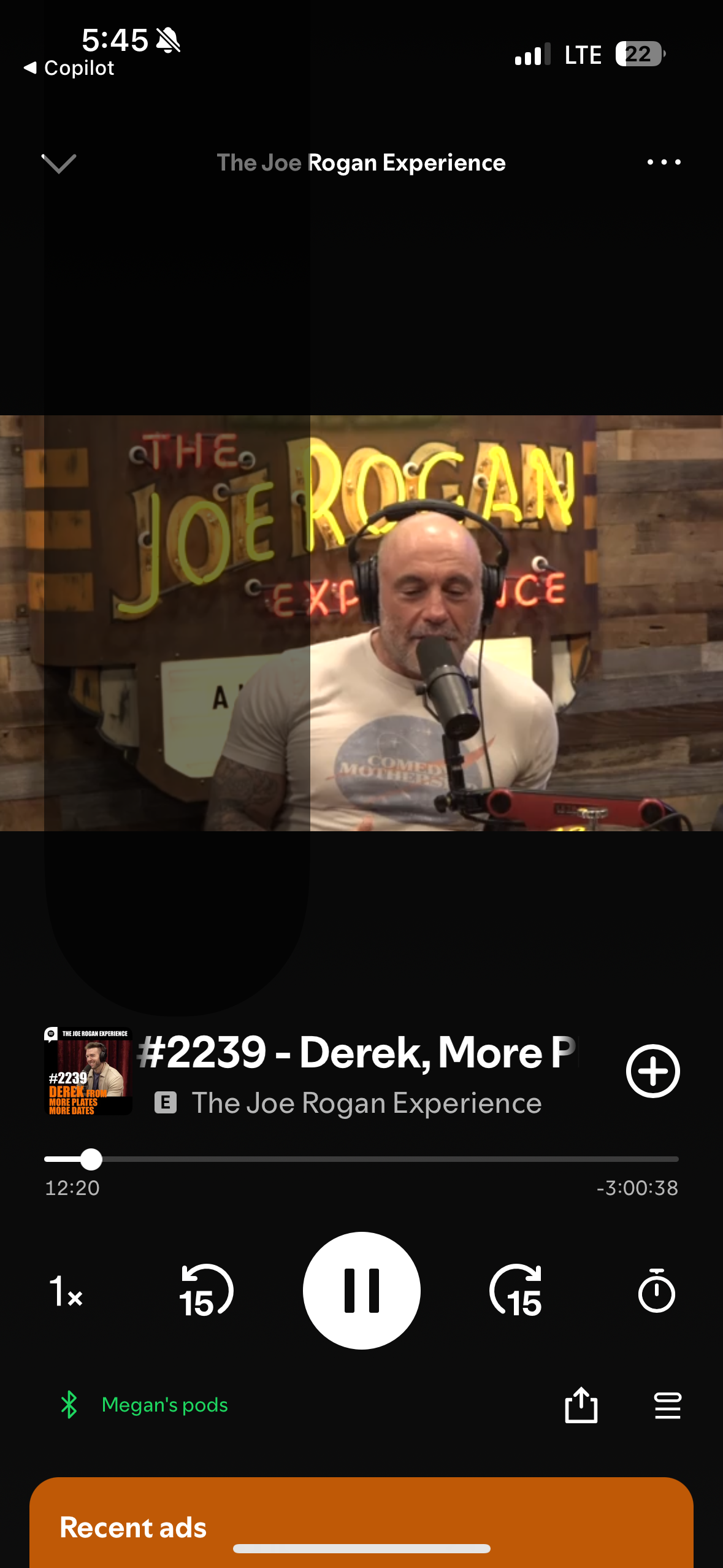
Hi All, for me version 8.9.96.xxx or higher of the Spotify app fixed the issue. I recommend updating the app using the App Store to fix the issue.


Clearly a consistent bug. I’ve had it on an iPhone 13 mini and now an iPhone 15 with iOS 18.1.1
it impacting usage as you can’t exit a podcast. You need to add some extra clicks to get back to the main menu.
Hi folks,
Thanks for the replies.
Our internal testing shows that the issue is resolved in all versions after 8.9.96. Your reports here seem to corroborate this. Please update your apps to the latest version and test what happens. If the issue persists on an app version after 8.9.96, please let us know so we can investigate further.
Cheers!