Spotify can't play this right now. If you have the file on your computer you can import it

Plan
Premium
Country
UK
Device
Desktop
Operating System
Windows 10
My Question or Issue
When I try to play a song I get the following error message "Spotify can't play this right now. If you have the file on your computer you can import it"
I have tried all the fixes I have seen:
Reinstalling app.
Using version from Microsoft store.
Disabled hardware acceleration.
Disabled crossfading.
Changed speaker options.
Deleted local files.
I've had this issue before and it was fixed by using the version from the Microsoft store but this isn't working now.
Spotify works on my phone and my laptop, web player also works only the desktop app doesn't work.
Accepted answers

Hey folks,
Just dropping by to mention that this is an issue that can be caused by a variety of things, so for your convenience, we've compiled all of the most common ones in this article, along with steps on how to get everything fixed of course.
Make sure to try those suggestions and if you have anything you'd like to share, feel free to comment in this thread. If the issue you have is more specific and doesn't get resolved by these steps, feel free to reach out on a separate thread so we can assist you further.
Cheers!
All comments

i had this fixed (idr what i did) then accidentally logged out, went to log in, and it's broken again. this is getting really frustrating, not a single thing im doing is working. not restarting my computer, checking the sound output settings, clean installing spotify (did this 4 times), nothing, and my internet works fine. works fine in the site, but not the app

GET ON WITH REPAIRING THIS LONGSTANDING ISSUE INSTEAD OF IGNORING YOUR PREMIUM CUSTOMERS STILL TAKING OUR MONIES & THEN YOUR ENGINEERS HANGING UP AS THEY HAVE REPEATEDLY TO MYSELF OF LATE !! ??

Ran into this problem recently on Windows 11, System>Sound>Properties, under Advanced settings>Audio enhancements - I changed the drop drow from Device Default Effects to Off then set back to Device Default Effects and it worked. My guess is a recent windows update made a change that Spotify couldn't work with.
As a side note, I had no issues if I selected a different output source but the moment I went back to my Realtek (built in), it would produce the error.

It actually will play when I select any other output that is not my default one.

I'm having this problem. I've tried all the solutions in this thread and nothing works. The browser version plays fine but the app gives the "Spotify cannot play this right now" error.
Spotify for Windows (64 bit)
1.2.52.442.g01893f92



Welcome to the Spotify Community, @triplethreat23!
Could you try the following:
- Go to Start > Settings > System > Sound > Sound Control Panel, switch to the Communications tab and set "When Windows detects communications activity" to Do nothing.
- Head back to the Playback tab, then right-click your audio output device and select Properties. In the new window that pops up, switch to the Advanced tab and untick "Exclusive Mode" + "Enable audio enhancements".
It's also worth updating/reinstalling your sound drivers, if you haven't already. This article has some additional troubleshooting steps you can try, feel free to check it out as well.
Hope this helps!

再インストールやキャッシュクリア、再起動などは一通り試してみたが改善されず、料金だけが取られている状態

I've been having the same problem for a week since I updated Windows. Figured out I could play some podcasts, but not all and no music. Tried a few minor changes like clean cache. What worked was going to the control panel, Sound, all sound devices, properties, and under "advanced settings" Audio Enhancements was set to "Device Default Effects" and I changed it to OFF and it WORKED!!!

Plan
Premium
Country
FR
Device
Windows 11 Pro
Iphone 14Pro
Marshall home speaker
Operating System
Windows 11 Pro
IOS18
My Question or Issue
Nearly each time I start Spotify, during the start-up time, it is skipping on its own 10-15 soundtracks, then finally open. Afterward, I am only able to click on the last playlist I've used and click play. Otherwise, even tho buttons appear, I click them and it does not do anything (skip track, play another playlist, ...)
If I want to select another playlist or skip track, the buttons are locked and does not do anything.
FYI, I use Eartrumpet, Signal RGB, Bluetooth with my speaker.
For some time, not connecting the speaker was inhibiting this behavior but now it is back no matter what.
What fix this each time regardless of how the pc is used, is a restart of windows ...
Also, even from my phone, I can't skip the track ; looking like it is locked for anyone.
So now each time I want to use Spotify, I need to restart windows ...
Yes I did reinstall Spotify (both directly and from Windows Store), yes I tried without the addons I have, yes I did reinstall Windows too.

Go to sound control panel right click on your audio device select configure and select 7.1 surround instead of Stereo and complete setup by clicking on continue this should fixed the issue worked for me 🙂
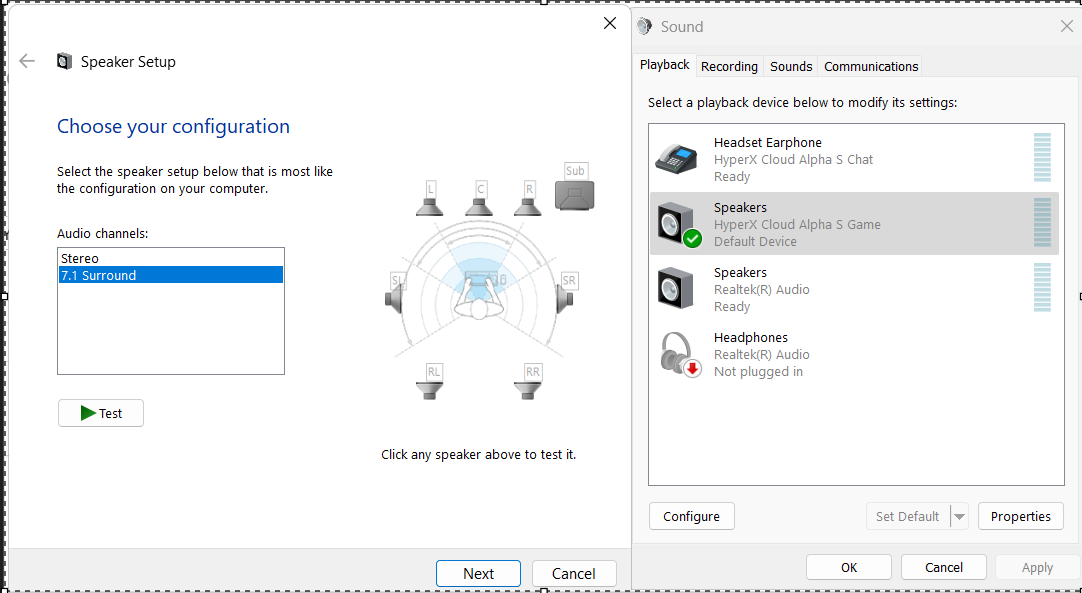


This worked for me too. What he did above > Windows start button > settings > system > sound > output device properties > advanced device properties > advanced > changed format to 24 bit, 44100 Hz.

Hi, I tried all of what you listed but nothing works. The music is working on my phone but not here. Here's a screen recording of me attempting to play a bunch of different things but none of them work. Pls help i need my music
I tried your whole list of solutions but it still doesnt work so This is a screen recording of me trying to play music but i keep either getting the error message or it just doesnt work (I promise im connected to my wifi) but pls i need help to fix this 😭
Try this Windows start button > settings > system > sound > output device properties > advanced device properties > advanced > changed format to 24 bit, 44100 Hz.
I've tried the steps you outlined as well as the steps in the article and I still can't get anything to playback using the Desktop app.

I dont know if you still have this issue or not, because it's 3 years ago.
But if you still do have this issue, I manage to solve it by installing desktop app not via Microsoft Store, but directly download spotifysetup.exe from download page on official Spotify. This fixed the issue of "Spotify can't play this right now. If you have the file on your computer you can import it"

These Spotify tech support people are so useless. I literally found my issue to this bug within minutes.
(Note: This should work for all external devices connected directly to your computer in anyway, being a dongle or cable)
- Open Device Manager; via search
- Find The Sound, Video and game controllers Tab and click on the arrow on the left of it
- Right-Click whatever device you are using to output audio
- Click "Disable Driver"
- After that, right click again and click "Uninstall Driver"
- Whatever device that you use, unplug it from your computer now
- Plug it back in and it should set all settings to this device to factory settings but should now work
I hope this helped because this was annoying to figure out. 😁

I'm having the same problem with spotify desktop app not playing any songs or my local files, we pay for this app and I'm that close to stop using it if this carries on, I need music to get me through life and this is not helping me.

Everything was working fine this morning, but when I relogged on a bit later I got the same error message for Spotify Desktop. It plays fine on my phone and I was able to use Remote Desktop Connection to log into my work desktop and was able to use Spotify remotely, but can't get my damned local machine to get Spotify to play anything.
So this is not a user issue, I did not reset any of my audio options -- this is 100% a Spotify issue. All the online advice has been useless or overly technical. Very disappointed with the value of my subscription. Hope this is fixed soon, might want to explore other music apps.

I am having the exact same issue. Just started today out of blue, after years of working fine. Web version works fine, but app just has same error msg listed by OP. Tried everything mentioned here and still no go.

I did not even have a hosts file. still having this issue. Followed every step and turn offer hardware acceleration then reset again. Only happens on the PC and I can even see the app update when playing off a different device but as soon as I switch it hits me with " Spotify can't play this right now. If you have the file on your computer you can import it. "
So no idea if this will work for you but this worked for me at least just now, ill update if it reverts. So go to > Windows start button > settings > system > sound > Advance sound options.. Now see if you can see spotify app showing up here. If not open spotify app and just press play.. yes at this point it still might not work but after you press play go back to the Settings app and look for spotify, make sure it is on the audio source you want. Then once that is confirmed go back to spotify app turn off the hardware acceleration.( 3 dots top left > Help > Troubleshooting > Disable hardware acceleration and restart.
This was what finally worked! After idk 6 months..
Thanks this did not do the trick for me but it gave me the off hand thought that helped me fix my issue. So thanks a bunch!

I can't find the setting for sound quality.
The weird thing is:: I can't play spotify on my computer, but phone and web-player function perfectly.
given up and launch Spotify on my browser, the desktop version is now
trashed.


i can't find any solution for this problem i have tried almost everything,
I have tried
Reinstalled the app both from spotify page and from microsoft store
Restart Spotify
Turn off crossfade
Clear cache on your device
Lower the streaming quality
Disable hardware acceleration
Restart my computer
Done a ''network recovery''
Connecting different headset and changing output to it then changing back
Updating my drivers
And i have tried more stuff
the only place it doesn't work is the app i can play on web and phone
Please help
Hey folks,
Could you check if the correct audio output device has been selected for Spotify? Also, make sure that the sample rate of the device is set to anywhere between 44.1 kHz and 192 kHz. You'll find a guide on how to do that + some additional things you can try in this article, check it out 👍
If you're experiencing this in the Web Player, I'd recommend trying the troubleshooting steps from this post.
Cheers 🤘