Play local mp3 on desktop computer in Spotify Free on Android device

Hi all, this is my first post. I've a big peoblem; I can't listen my mp3 on my android device with Spotify Free. I followed these steps to sync my local files:
1) I connected smartphone and computer to the same wireless network
2) Created a new playlist and added my mp3 to it(on computer)
3) Right click on playlist and selected "available offline" ----> "need Premium account" message appears
4) Playlist appeared on the smartphone however and downloaded it
Now I disconnect phone from wireless network and try to play my music offline but it isn't possible. Continuously appears message about Premium account.
I've read on Spotify website that with Spotify Free I can download and always listen my own music not in shuffle mode, like a normal music player!
As you can see from attachment, I downloaded 2 songs but can't listen to them!
Accepted answers
All comments

Hi. The procedure for synching local files is described here, under the android tab. Could you try again but maybe with a playlist containing a few more tracks.
I'm still a bit confused as to what the revamped spotify free allows as regards local files but I'm hoping @Peter__ will pop in and tell us both.

It does look like those tracks have been downloaded though, what error do you get when you try and play them?
It appears a message that says I need to upgrade to a Premium account!
jwylot I tried in all ways, also synchronizing more than 20/30 songs. For the synchronization I followed step by step the guide provided by the Spotify website(under the android tab). I also tried creating a new account and reinstalling the app on both devices.
Hey guys, bad news! I just received an e-mail(in italian  ) from Spotify Support in which they say that to syncronize local files on mobile devices need to have a Premium Account. I don't know what is the logical sense but this is the situation! In the attachment the e-mail.
Ugh this is going to cause some discontent. Thank you for posting this.
Delightful...
Nothing. I infer that Spotify can not even be used as a normal music player placing mp3 physically on the smartphone memory! Isn't it?

Hey there, I'm keen to get this completely clarified for you so we can set out what's possible and what's not.
Can we get a screenshot of the 'Premium required' message you get when trying to sync your local files? It's possible that the app thinks you're trying to sync songs from the Spotify catalogue (which would require Premium, of course).
Thanks!
Hi Richard, sorry for the delay, I've not received the email notification. Therefore, I add my music to local files section in Spotify desktop, after I choose to synchronize(only local files manually) and I receive together on the smartphone this message(in italian 😄 ) that says I have to upgrade to Premium 😞
Aah ok! I've sent a private message to @Richard, it seems he doesn't want to help us anymore ;D
Just to let you know, my understanding is that you can synch local files to android on free spotify but the same restrictions apply when you play them as with playing spotify music - you can only play on shuffle, six skips an hour limit, ads etc. I really want to know the answer to this too 🙂
Oh no my friend! I just can't sync my local files; it appears the message at the same time I'm doing the action of synchronization!
Oh yea! However, when I follow the official Spotify guide to sync on Android(who says you have to create a playlist with local files) I get this message on Spotify desktop
Hey there!
What's the name of the playlist you're trying to sync? I'll just check everything's ok on your account.
Hey Richard! We missed you!  )
The name of my playlist is: YATB-L
Hey Richard, I'm now able to download my playlist but I can play music only in shuffle mode!
That's how it should be, as I said above.
It's all so buggy! No album-art and sometimes it still appears the message!
I've just disconnected my phone from internet and I'm unable to play my music, not even in shuffle mode, nothing! I am very angry now. It appears the message "upgrade to premium".
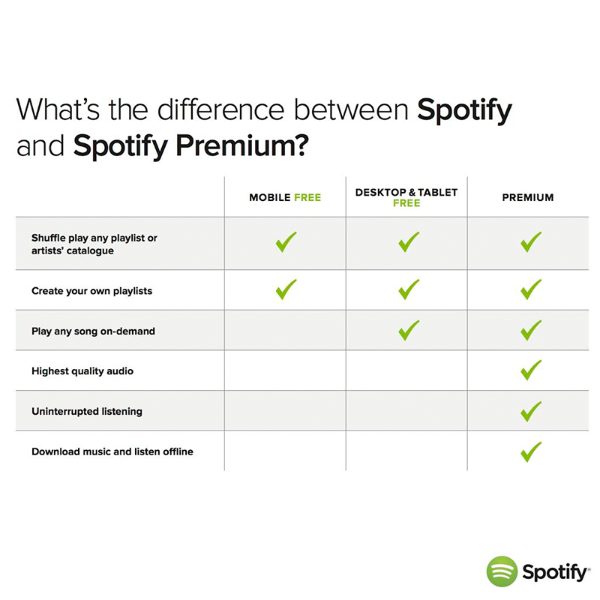


Hey again, does the above clear things up?
To be clear, as a free user all your playlists will play in shuffle mode.
Hey guys, bad news! I just received an e-mail(in italian ) from Spotify Support in which they say that to syncronize local files on mobile devices need to have a Premium Account. I don't know what is the logical sense but this is the situation! In the attachment the e-mail.