Spotify Connect/Cast is Broken, Can't Switch Devices Without Losing Queue

Plan
Premium
Country
United States
Device
Pixel Fold
Operating System
Windows 11 Pro
My Question or Issue
Spotify Connect and Cast is broken on Android.
The issues I have seen in the past is what led me to switch to YouTube Music for a period of time, but that's bad in its own special way. My family voted me out so I had to switch us all back to Spotify.
1. If I am casting to a speaker (Google Home), and switch the playback device back to my phone via the Android app, playback stops and my queue disappears.
2. If I am playing on my PC, and I switch the playback device from my PC to my phone via the Android app, playback stops and my queue disappears. Spotify just shows some toast about being unable to play that track, but it's not track specific, it's any track. I have 22,000+ tracks in my library to choose from, and I have tried many.
3. If I am playing on my PC, and I switch the playback device from my PC to my phone via the Windows app, a whole new queue loads up and begins playing back on my phone. The queue I had on my PC is discarded and replaced with whatever queue my phone generated out of thin air.
4. If I am playing on my phone and I switch the the playback device from my Phone to my PC via the Android app, a whole new queue loads up and begins playing back on my PC. The queue I had on my phone is discarded and replaced with whatever queue my PC generated out of thin air.
Please do not suggest a clean install. I haven't had Spotify installed on anything for months, this is about as clean as you can get. Everything was installed fresh yesterday.
Accepted answers
All comments

Yeah, I agree - I think that's what they're saying. The way you're meant to switch between devices is using the "available devices" function to switch an already playing queue to another device. That was the part that was broken for me previously. It appears to be mostly fixed now. It can still be a little twitchy but its manageable. The way I manage it is when I've finished listening I try to switch from whatever I'm playing on (eg. desktop app) to my phone, & when I start listening again, I restart on whatever device I last listened on (typically my phone) & then switch to the device I want to listen on. That seems to consistently work now that Spotify have put in a fix (thanks devs).

I just said it wasn't happening to me anymore. Well it turns out it's still happening but only when switching from my PC to my phone.

this must be fixed it's driving me insane!

1. I ask Google Home to "Play my Liked songs on Shuffle". This works correctly. A queue is generated and songs start playing in a random order (no Smart Shuffle is on).
2. I plug in my Bluetooth earphones and on my phone, I open Spotify. I see the song currently playing. I press on the "Devices" menu. I switch from "Google Home" to "This Device".
3. The current song finishes playing correctly. Then, the next song is the one I already heard before! I press next on my phone, and the previous song starts playing, that I already heard on Google Home! The whole queue is reversed. I keep pressing next on my phone, and sure enough, every song is just a reverse order of the queue played by the Google home.
4. I get to the office. I sit in front of my laptop. I open up Spotify there. Once again, I see the current song playing. I press the devices menu. I switch over from my phone to "This computer". The order is reversed again! Now I am listening to the same songs, again, just like how the Google Home built the queue earlier.
I can reproduce it consistently. Here are some technical specifications:
Phone: Xiaomi Redmi Note 12 Pro (Android 14 UP1A.231005.007)
Phone Spotify Version: 9.0.12.567
Laptop Spotify version: Spotify for Windows (64 bit) - 1.2.55.235.g5eaa0904
Laptop Operating System: Windows 10 Home (22H2)
I have tried logging out from everywhere and logging back again, sadly it doesn't solve the problem. Any guesses on what to do to avoid this happening every morning?

This restarting of the Liked Songs playlist, especially when using shuffle seemed to have been fixed with the most recent update to the mobile app for a bit, but then returned. I'm able to replicate this issue everytime with mobile versions of Spotify regardless of what device I'm swapping from, but the PC app also seems to have the same bug. However, the web browser version of Spotify is perfectly fine to swap to, like how TVs/Consoles are which is strange. I don't always manage to get the bug to happen again when switching devices with shuffle turned off, but when shuffle is on it happens every time.
To replicate it, shuffle the liked songs playlist on Web Browser or a TV, skip a few songs ahead, and then switch to the mobile version, and you'll find that the song queue has been altered by the current song being moved to the beginning of the queue and removed from its original position. You can also start the shuffle on a mobile device, skip a few songs ahead, switch to the Web Browser or a TV, and then switch back to mobile to replicate the issue, and switching from mobile to mobile also causes the bug.
I hope the devs can properly look into this bug and fix it soon via replicating it in the ways many of us have described, and then running their debugs to see which code gets flagged when the switches happen to identify and remove the bug.
Yep, I can confirm that this has started happening again. Worse, it just happened without me actually prompting a device switch! I was listening to a song on my desktop app & was near the end of the song when it suddenly stopped for no reason. My first port of call was to check my mobile app to find the song had jumped back to about a third of the way thru. I'm not sure whether the act of checking the mobile app trigger the device swap (it shouldn't) but when I checked the queue it had jumped 21 songs back in the queue to where it had been playing earlier.

Plan
Premium
Device
(PC, S24+)
Operating System
(Windows 11, Android 14)
I've noticed that whenever I switch listening devices my played songs will return to a loop. Example would be I listen to songs 1 - 5 on my phone, and switch to a PC midway through song 5, song 5 will continue to play and finish. But then will loop through to the exact same songs that I just listened to on my phone (1 - 5) before moving on. This happens in reverse as well when switching from PC to phone. This didn't use to happen and I have not fiddled with any settings on the apps.

Plan
Premium
Country
Germany
Device
(Desktop PC, Nokia XR20)
Operating System
(Windows 11, Android 14)
My Question or Issue
When switching between devices, the queue is fully reset to the starting point - like, the first song I began with in the current playlist / artist / album after the current song is done, instead of picking up where I left and going on from there, which means I sometimes have to go through hours worth of songs (often longer than the queue even shows) to find where I was.
This is very annoying, especially since it also happens when I don't fully switch but Spotify thinks it's still open on the other device, even after I closed it on my phone, for example.
Doesn't make a difference if I'm switching from phone to desktop or the other way around, either.

2025, this issue still exists
You can see below where I've marked up where my queue reset with a red line. I want to be clear - I did not switch devices at any point. On Sunday January 26 I drove for about 2.5 hours listening to my Spotify on my phone connected to my car stereo by bluetooth. The following day ('Yesterday' as shown in the screenshots) I drove for about 1.5 hours listening to Spotify on my phone connected to my car stereo by bluetooth. When I arrived home & connected to my home network, turning on my PC (also connecting to my home network) but did not switch devices. Afterwards I drove for maybe 20 minutes (listening to Spotify on my phone connected to my car stereo by bluetooth) before returning home. The next day I drove to work & back (listening to Spotify on my phone connected to my car stereo by bluetooth). You can see that its at that point that the queue reset.
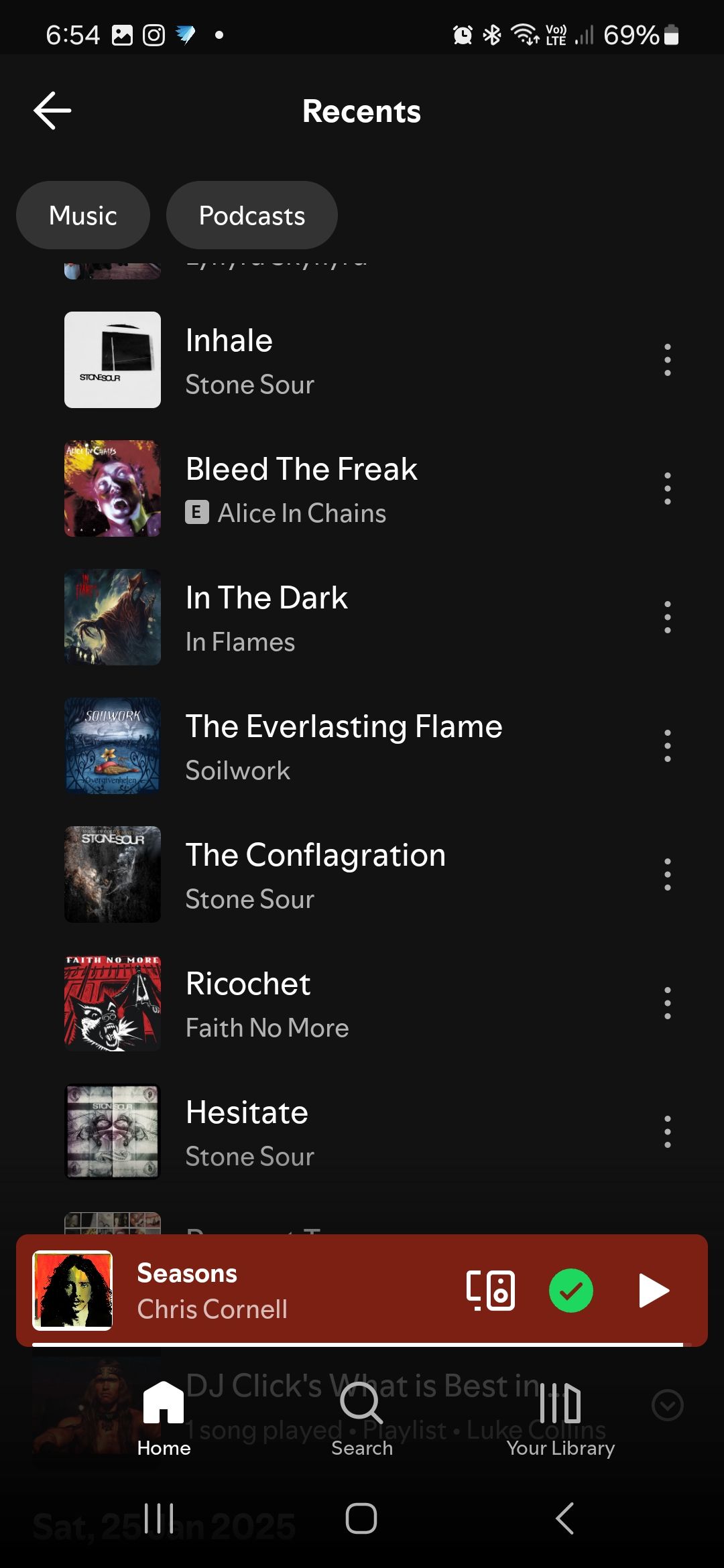
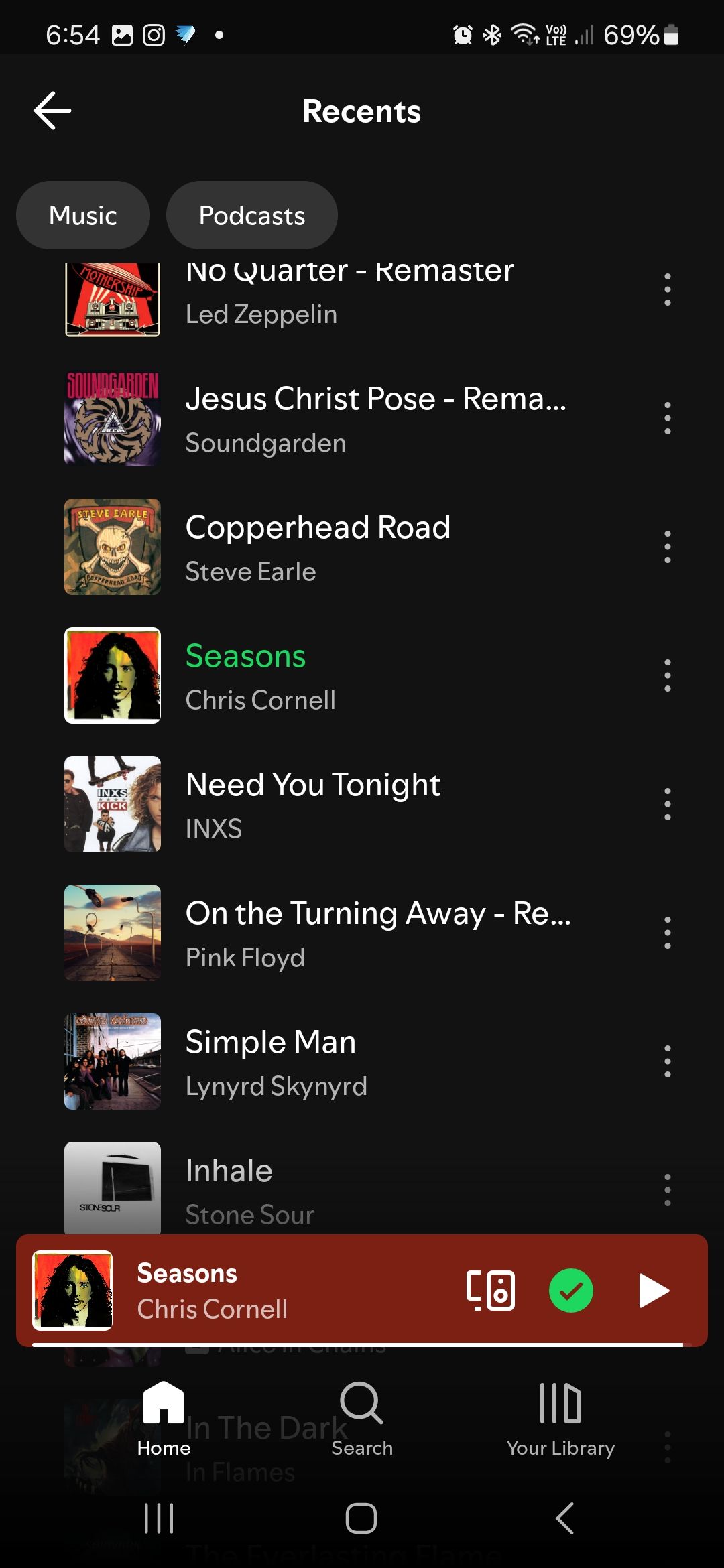
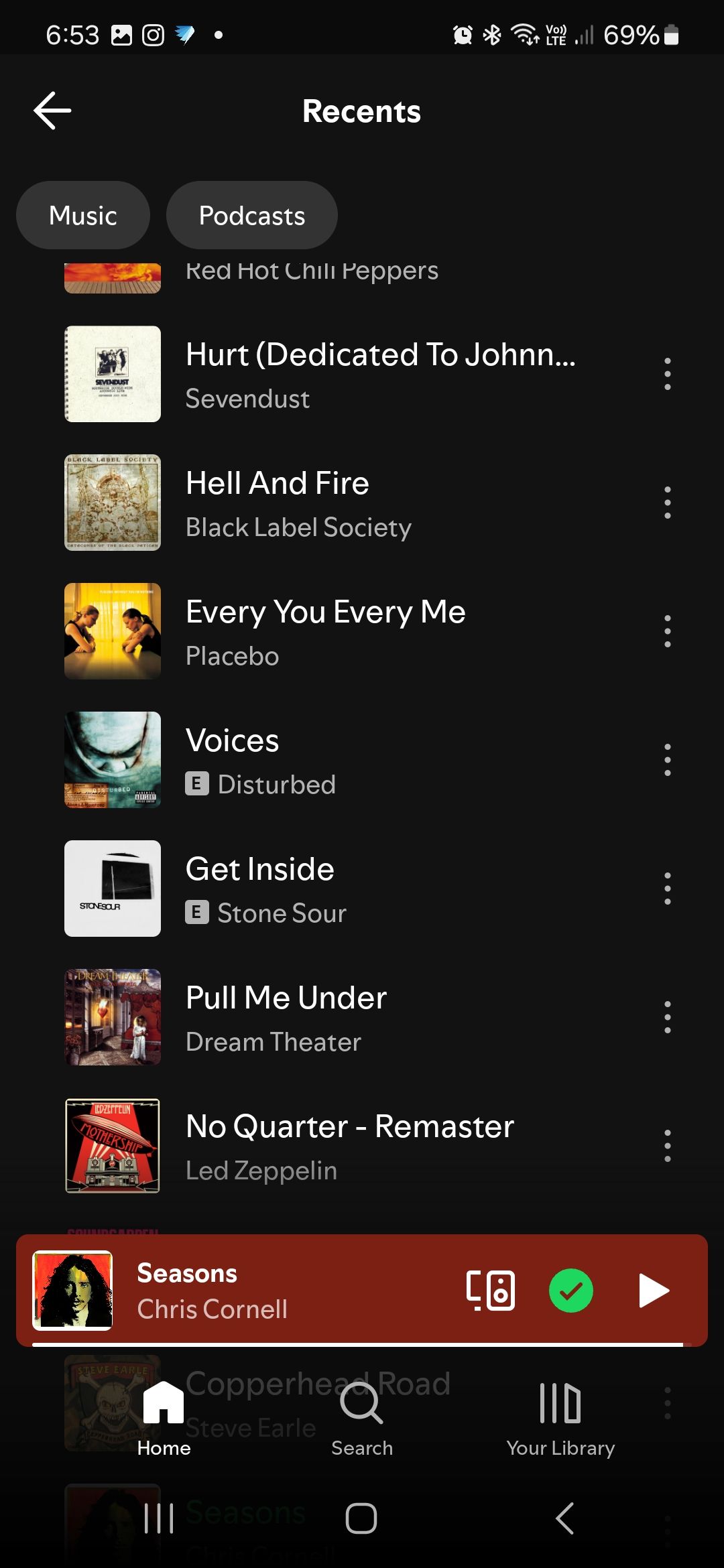
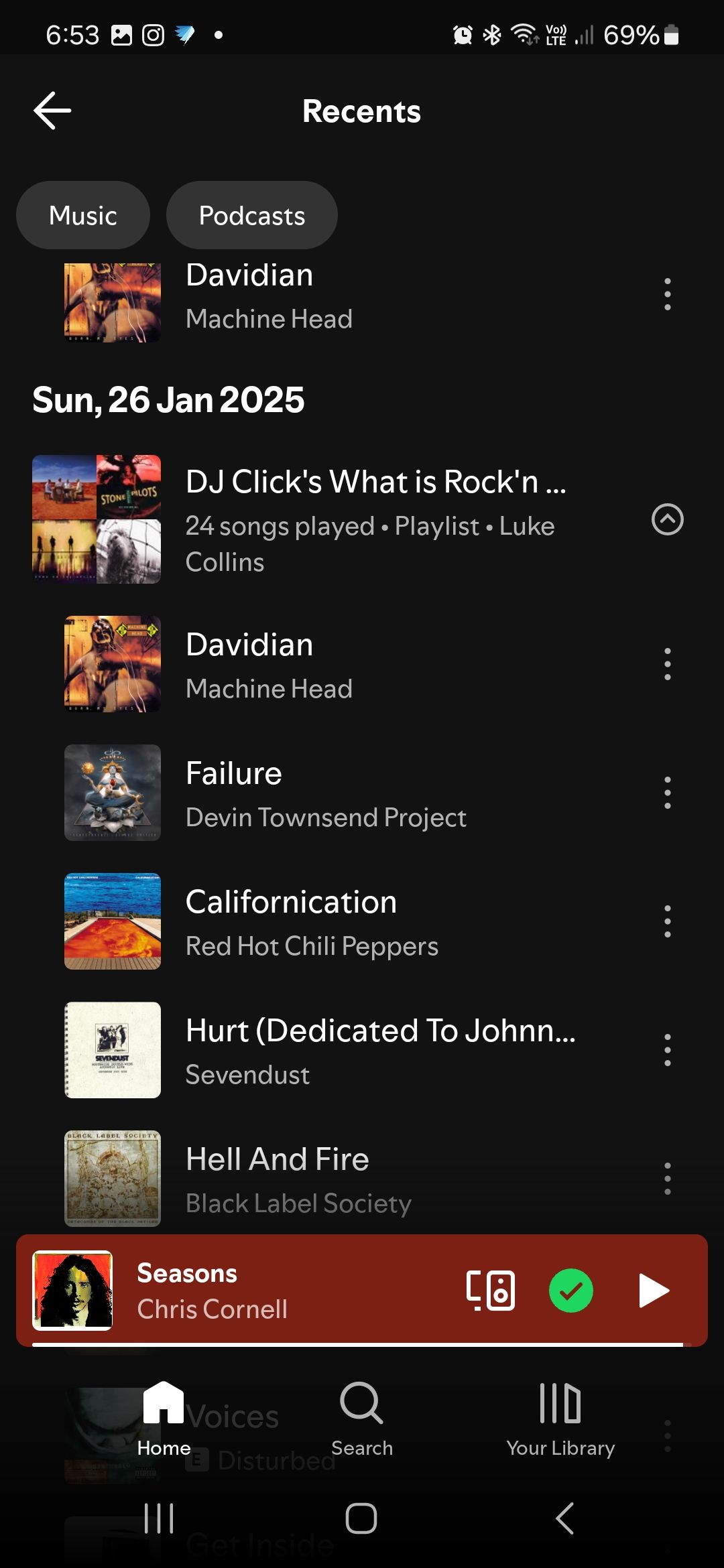
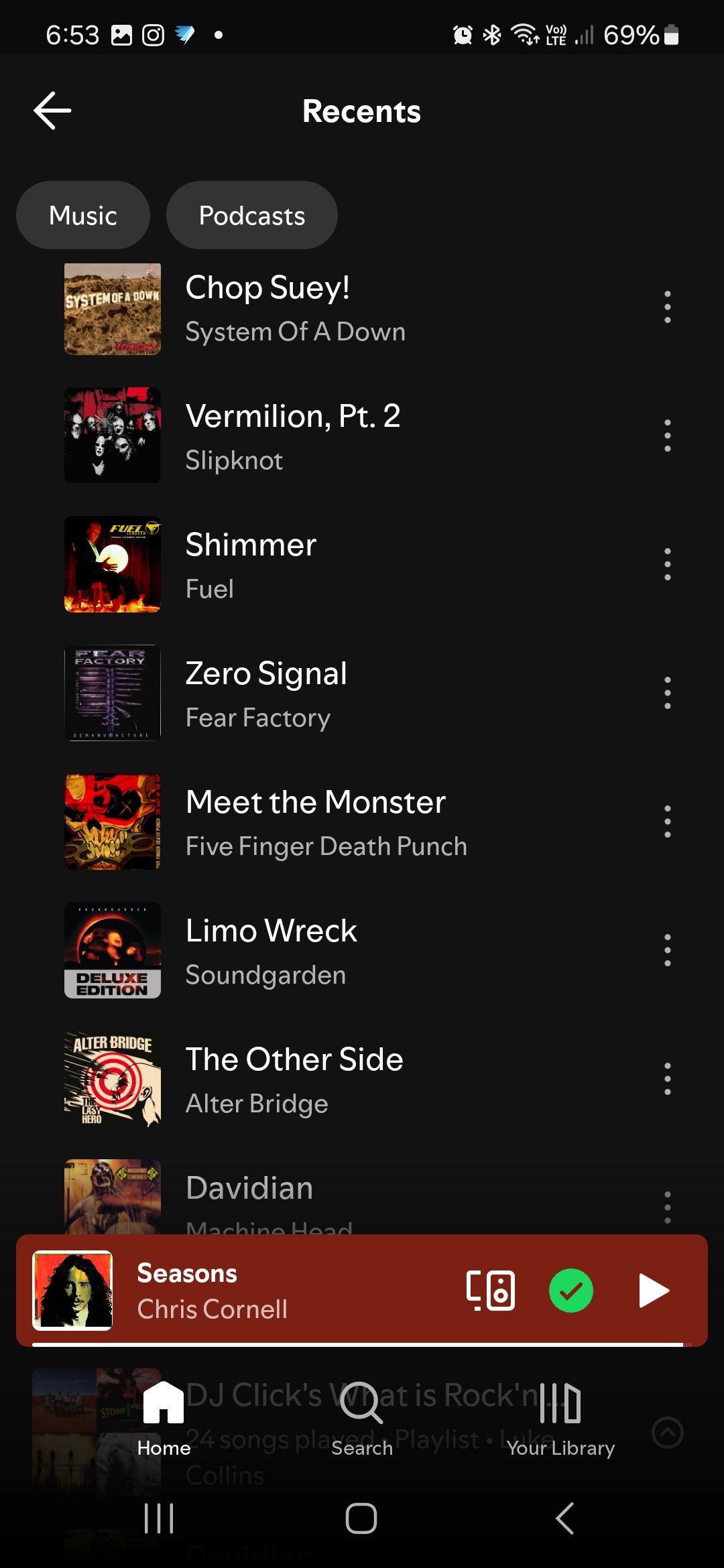
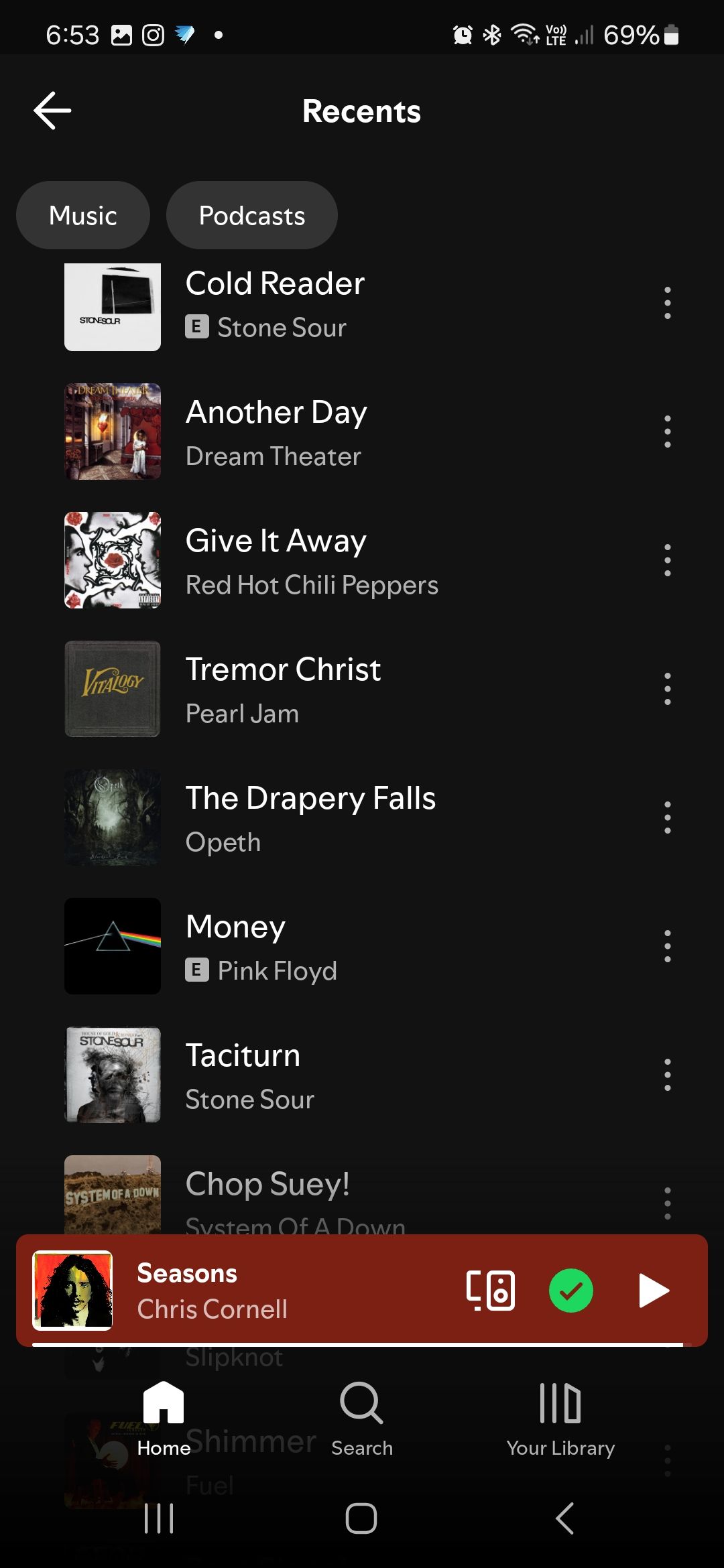
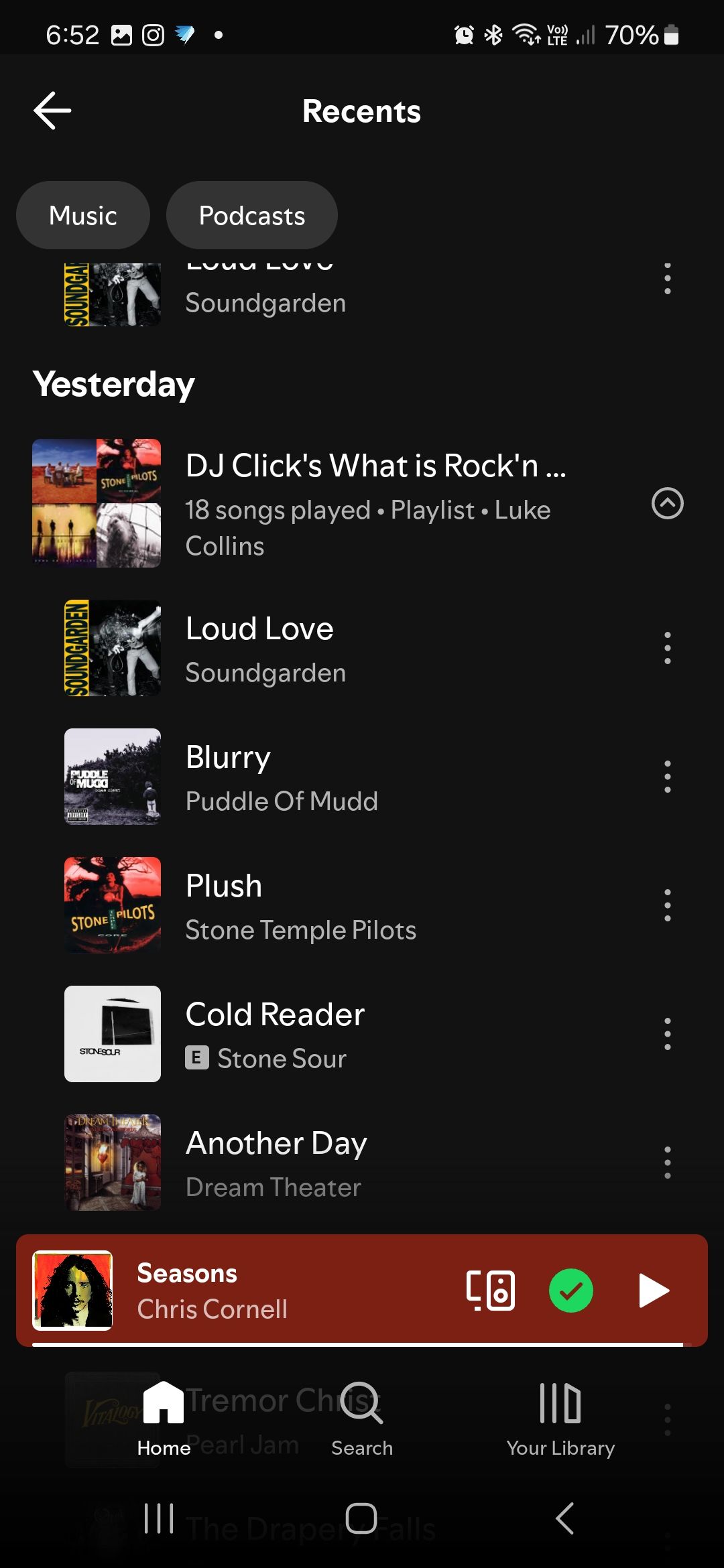
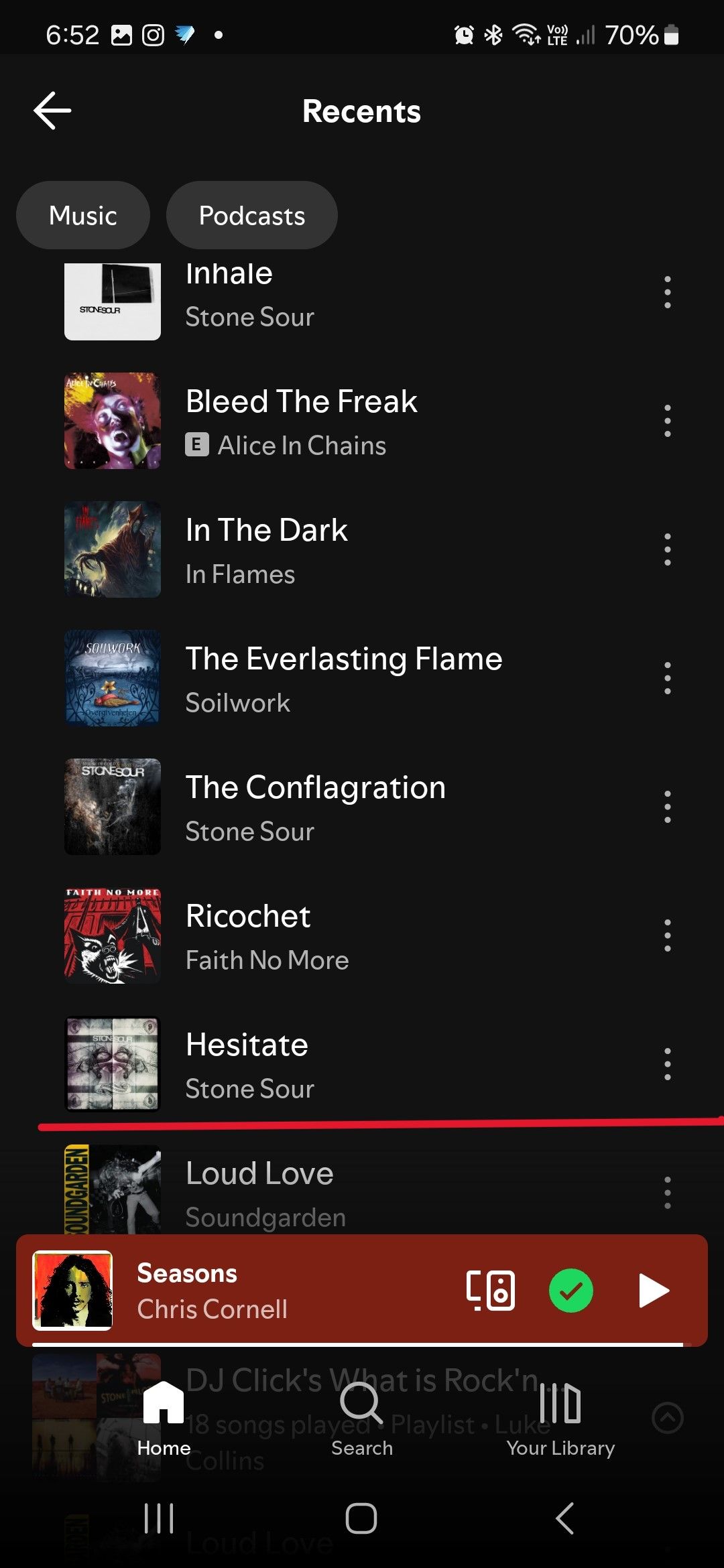 Queue restarted here
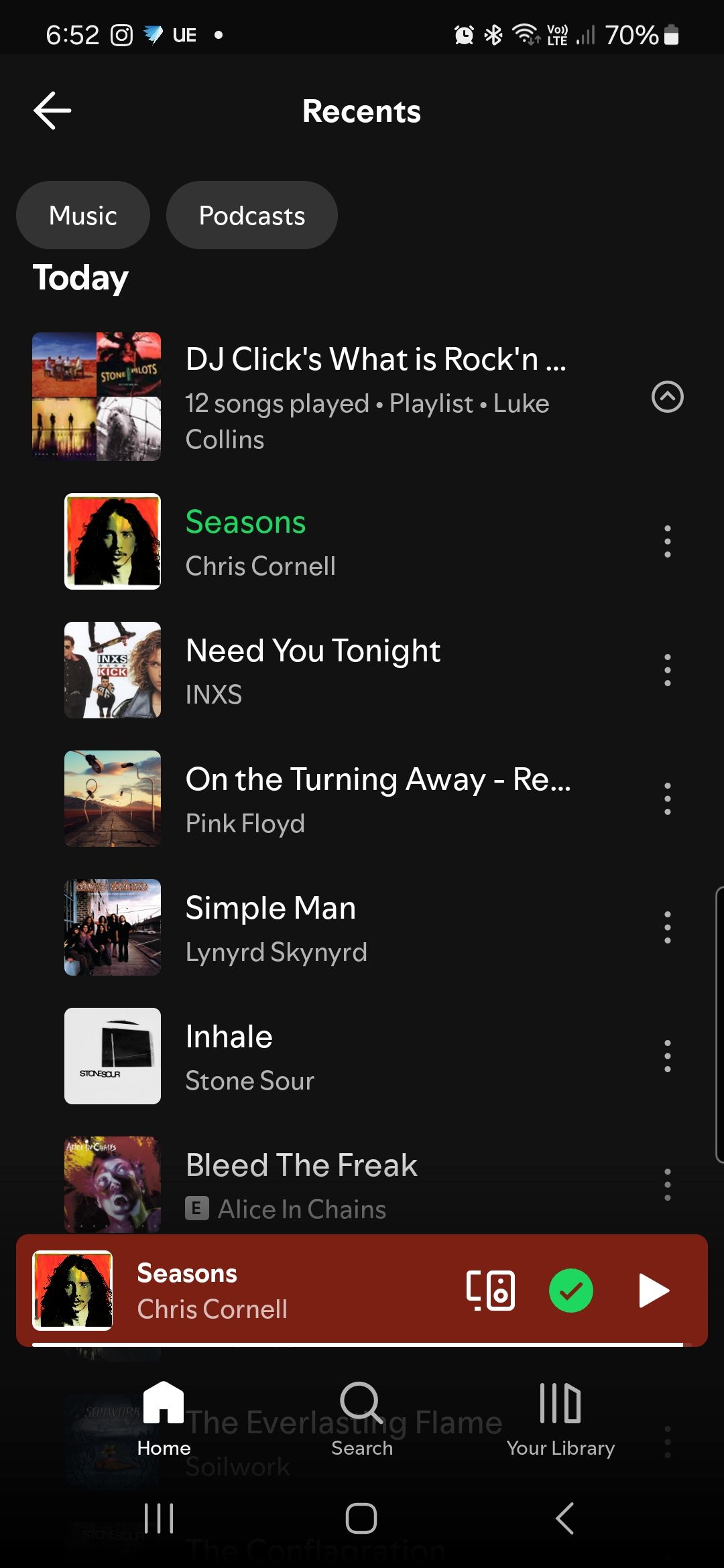
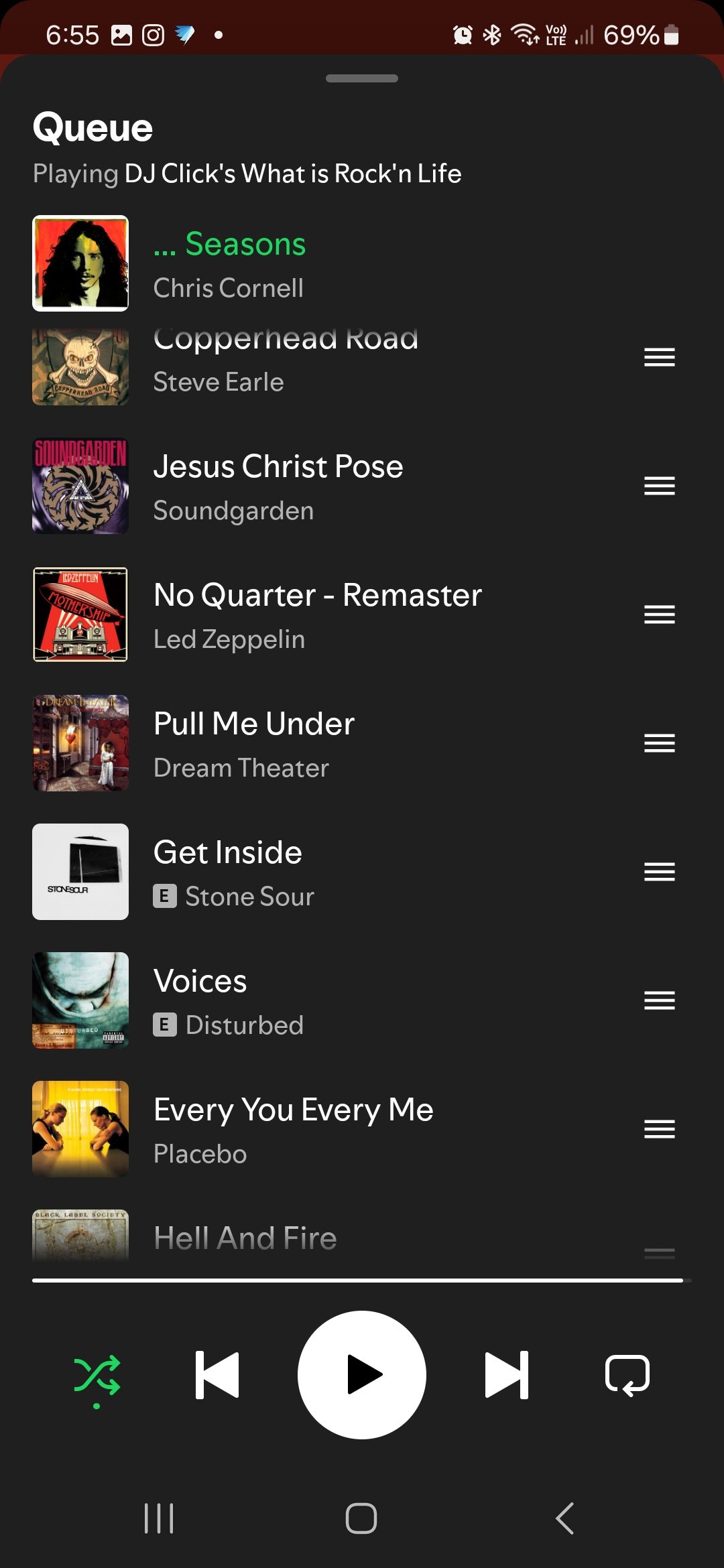
Aaaaaand it's reset again!
I *did* actually switch devices this time - I came home after listening to my phone on my car stereo & switched to my desktop app & the very next song it switched to Stone Sour's Hesitate again. And yes, I was still listening to the same playlist - because I can never bring myself to change playlists in the middle of a good song & once I'm driving its ILLEGAL for me to touch my phone. Doesn't mean it doesn't **bleep** me off to be hearing the same songs the 3rd time in a week. I may as well listen to a CD on repeat!
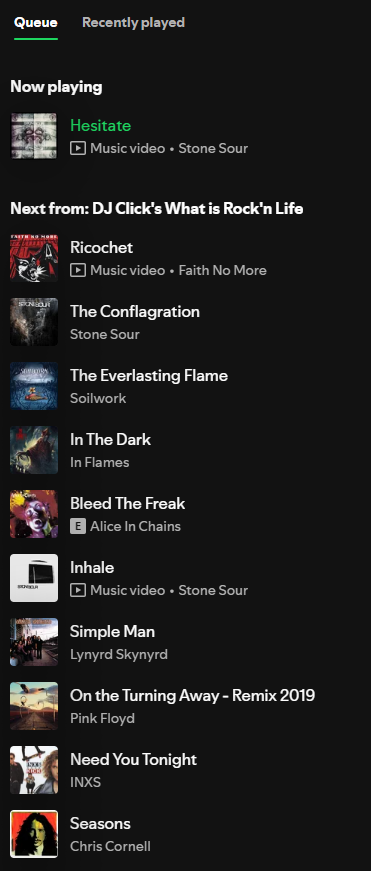
I don't want to jump the gun here but indications I'm experiencing are that this might be fixed! Hopefully it sticks this time. If it is, thank you devs!
just tested,
Moving from desktop to mobile didn't break the queue
But moving back from mobile to desktop restarted the queue
My specs are written in previous comments.
Yeah, I might've jumped the gun there. Jumped in my car to drive to work this morning - initially the last song I was playing continued. But then I switched to radio (as I do, to get the traffic report) & when I switched back to Bluetooth my whole queue was gone, including the song I was playing.
No issue since my last post, during which time I:
- Switched from my PC to my phone & listened on my phone over Bluetooth in my car; and
- Switched back from my phone to my PC.
🤞
The issue seems to be partially fixed
If I open Spotify on my phone and Mac, and switch devices back and forth, it doesn't lose sync and continues the current queue
However if my phone is previously connected to a Bluetooth device, and then I open the Spotify app on my phone, it automatically switches devices to my Bluetooth headset, and moves the queue back to the beginning.
In the 2025 lifestyle, where you constantly switch between, car, earbuds, and tv, it's hardly good enough.
I don't personally have that issue with Bluetooth headphones and earbuds because they route through my mobile device directly for using Spotify. Are you using other types of Bluetooth devices too? For example, an Amazon Alexa Echo Dot or Google Home device usually have directly compatibility with Spotify, and I haven't linked those back to my Spotify account yet because I wanted to make sure the queue bug was gone first. Unlinking those types of devices and then re-linking them later after trying to use your headphones again could fix the issue.
Update: Agree that this is partially/mostly fixed. I haven't been having any problems as long as I manually switch the playing queue to my phone from whatever device I was previously playing on. I can't, for instance, use my phone to pause a song playing on my desktop, as the queue will reset on my phone. Instead, I need to use my phone to switch the playing queue to my phone & then pause. Later I can start playing on my phone & switch back to my desktop or any other device. This is what I have done in the past & while its not ideal, its manageable, & far better than the recent issues discussed in this thread.

Plan
Premium
Country
Netherlands
Device
Pixel 8 PRO and Windoews 11
Operating System
Android and Windows 11
(iOS 10, Android Oreo, Windows 10,etc.)
My Question or Issue
If I am playing a list on Android, stop listening and then go to win dows 11, it takes another playlist. Can I change this, also in the other direction.
Nope, Jabra earbuds, connected through the phone.
Usually whenever I connect them or any other Bluetooth device such as car speaker or JBL Bluetooth speaker, it switches devices automatically to the newly connected Bluetooth device.
Now it does the same, but also resets the queue.
Don't have an echo and the likes.

This issue isn’t a glitch. I see answers from Spotify all over the place for years asking to delete and redownload the app, or specify what devices this happens with. The answer is ALL DEVICES. This is a widely known issue of at least 7 years.
I build long queues all the time and repeatedly end up with the whole thing wiped out for any of the following reasons: I play something via Spotify using a smart speaker, even if it was the next thing in my queue. I switch devices… phone, car, pc, speaker etc. I have a queue built but purposely or accidentally play something random that suddenly came to mind, or was looking a song up on google and hit a Spotify link… everything gone! Often replaced by a new queue related to what I clicked (eg: I have been stuck with an Elton John queue for several days now because I asked the question “what is crocodile rock?”). Or even just simply… I have a long queue built, and am looking through it or reorganizing it and accidentally click or double click in the wrong place, and instead of just moving that song to the top, it deletes every single item above it. I’ve been frustrated by this for literally years. Please solve!

I'll add on that matter -
Now that I've updated the app there's no way to build a queue from the next up songs.
It forces one to just remove the songs one does not want to listen to from the next up songs.
But! Whenever you do such thing, and get just in range of your other device, they seemlessly "sync" and all the removed songs are back in your next songs list once again!
Gotta be fixes ASAP

Hey everyone,
We're unable to provide an ETA for a fix at the moment, but we’re regularly looking for opportunities to enhance the user experience for everyone, so your feedback on this is greatly appreciated.
In the meantime, make sure you're always running the latest version of Spotify so you don't miss out on any updates.
The Community is here if there's anything else you need assistance with.

@RubbleMuss wrote:
I build long queues all the time and repeatedly end up with the whole thing wiped out for any of the following reasons: I play something via Spotify using a smart speaker, even if it was the next thing in my queue. I switch devices… phone, car, pc, speaker etc. I have a queue built but purposely or accidentally play something random that suddenly came to mind, or was looking a song up on google and hit a Spotify link… everything gone! Often replaced by a new queue related to what I clicked (eg: I have been stuck with an Elton John queue for several days now because I asked the question “what is crocodile rock?”).
Or even just simply… I have a long queue built, and am looking through it or reorganizing it and accidentally click or double click in the wrong place, and instead of just moving that song to the top, it deletes every single item above it. I’ve been frustrated by this for literally years. Please solve!
For the first part, that's definitely the program working as intended. You're telling the app to play that new song rather than what's currently playing. I do think there needs to be some way to bring the queue back like an "undo queue change" button or give us a setting that makes it so clicking a new track adds it to the top of the queue or plays it at the top of the queue rather than replaces the entire queue. I've definitely had my share of accidentally pressing on a new track when I meant to click the three dots to add it to the queue and it wiped the whole queue
For the second part, if you click a song further down in the queue, you can hit the back button and it should backtrack through the queue that you had going. Next time this happens, try doing that
@Dessi wrote:Hey everyone,
We're unable to provide an ETA for a fix at the moment, but we’re regularly looking for opportunities to enhance the user experience for everyone, so your feedback on this is greatly appreciated.
In the meantime, make sure you're always running the latest version of Spotify so you don't miss out on any updates.
The Community is here if there's anything else you need assistance with.
Well having seamless connectivity so that you can go from listening on your computer to your phone is sort of integral to the app (isn't it even one of the selling points?), so this fix should probably be a top priority.
How about giving us an option to dictate what pressing a track does? For example, say you have a queue going and you accidentally press a song. This clears the queue and plays that song, maybe creating a queue of similar songs to the one you pressed. We should have the option of setting it so that pressing a song would add it to next in the queue or play it now on top of the current queue
By the way, there's this annoying "Did you find this article helpful?" pop up that appears about 5 seconds after you stop scrolling and it gets in the way of being able to read comments. Probably something that should be looked into

Hi everyone,
I’ve been experiencing an ongoing issue with Spotify that’s persisted across multiple devices and app versions, and I’m hoping someone here might be able to help.
Whenever I connect my iPhone to a Bluetooth device (like my car or headphones), my listening queue will often reset completely or change unexpectedly, and while it tends to happen more often when connecting a new device, it also happens at random. It happens whether I’m playing a playlist, an album, or a manually created queue. I have made sure that auto mix and other shuffle modes are off.
I have already tried the basic troubleshooting methods to no avail.
In the video I provided, the new songs that were added to the queue were from the same artist, but its usually a random song from the current playlist. It also took me a while to catch it since it happens at random times.
Thanks in advance for any help!
this is outragous!
this is the worst 'feature' ever concieved!
this must be solved.
horrnedous.
This is far from being a feature,
And even if I open the mobile app and transfer devices with it to the desktop it still restarts the queue.
Please reopen this case, this is far from over!

When I'm listening to queued songs on my phone and then get in my car, my queue disappears and starts playing from a playlist that I haven't listened to in a long time.
I don't know why it happens but an option to add queued songs to a playlist would solve this.

Any change in this area? It drives me nuts that when I'm at work vs. back in my car vs. casting to my Sonos, the queue is constantly reset. Even today I was playing something in one room on my Sonos which my open Spotify app on the desktop was already connected to. I clicked to the next song and it reset to the very beginning of the queue. It seems to have gotten worse recently. I'm about to try Apple Music and if it does this how I would expect (plus it allows grouping in AirPlay), I'm gonna bail on my Pro sub here.
So this is apparently a feature, not a bug. Per spotify's customer service twitter:
"This is actually expected behavior; starting playback on a new device resets the queue. To avoid this, keep music playing on the first device, open the app on the second, and use the "available devices" button, or add songs to the queue before switching."
I doubt spoofify has any intention of fixing the issue or even addressing this thread