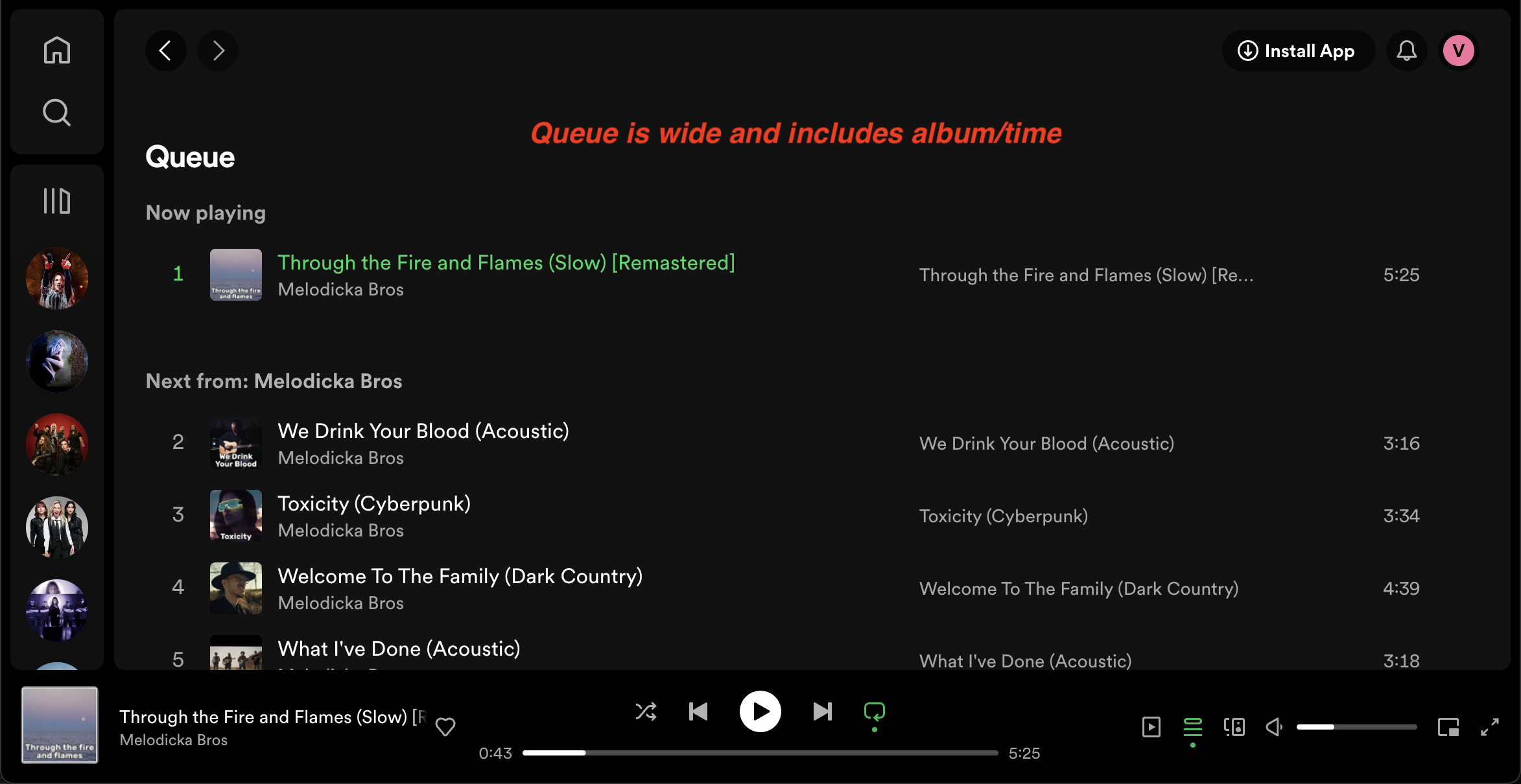
Return expanded queue view (not only sidebar) for desktop as it was before and now on web

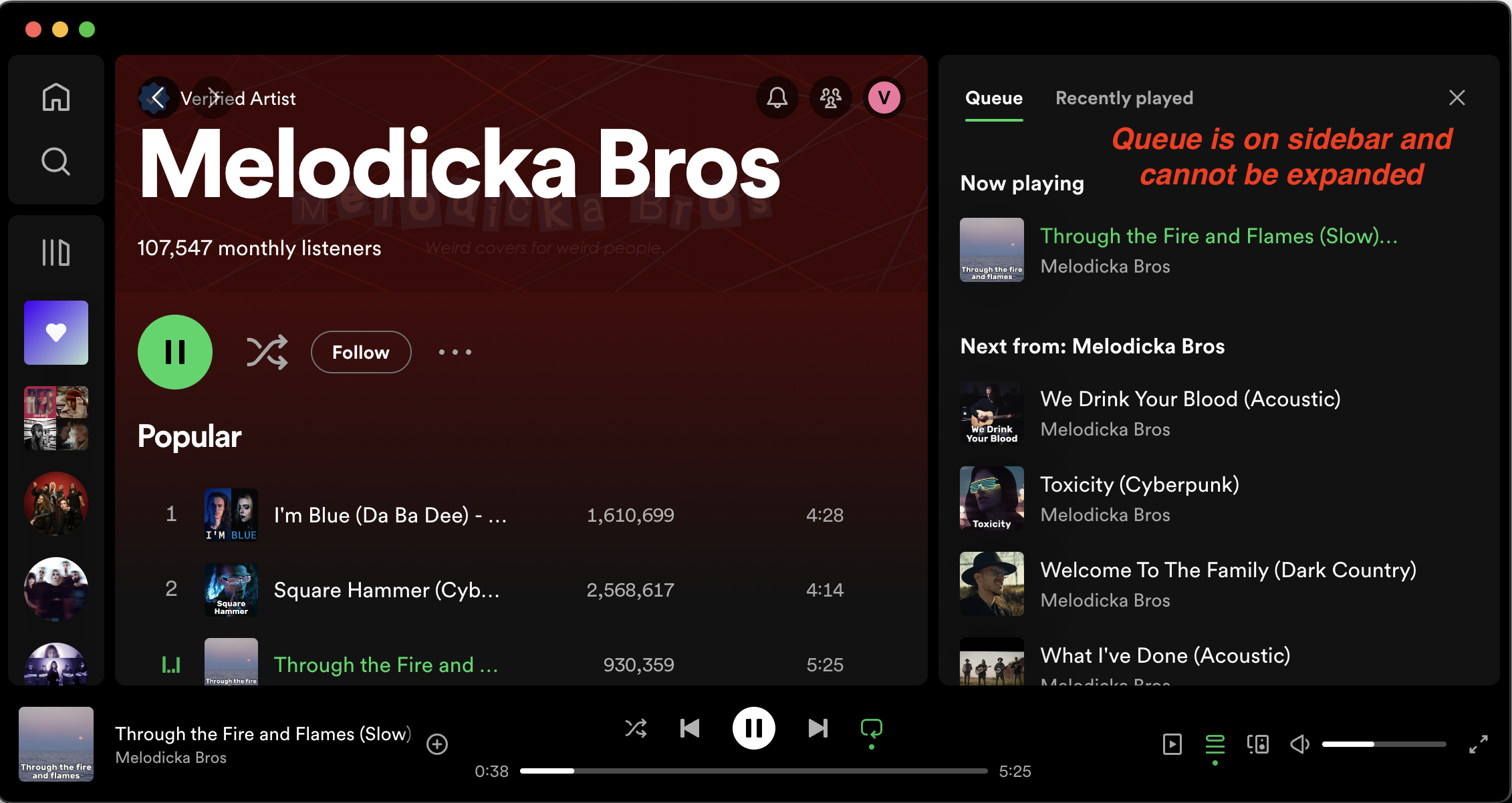
As mentioned in https://community.spotify.com/t5/Desktop-Mac/Cannot-expand-queue-section-on-Mac-desktop-application/td-p/5922851 it would be great to return old and pretty standard view for queue (aka playing now). As having it very limited on sidebar is against existing UX
Screenshots for reference:
MasOS:
Web version (preferred version):
Comments

I apologize, I didn't realize the two were connected. I also didn't realize at first that Spicetify was for the desktop app, not the Microsoft Store app (which I had). Once I figured that out, I was able to get my Spotify back to normal. Thanks for the tip, everyone.

BRING BACK QUEUE IN THE MIDDLE PANE!!!
HATE TO HAVE IT ONLY ON THE RIGHT PANE!

Jon, install spicetify. it brings it back.
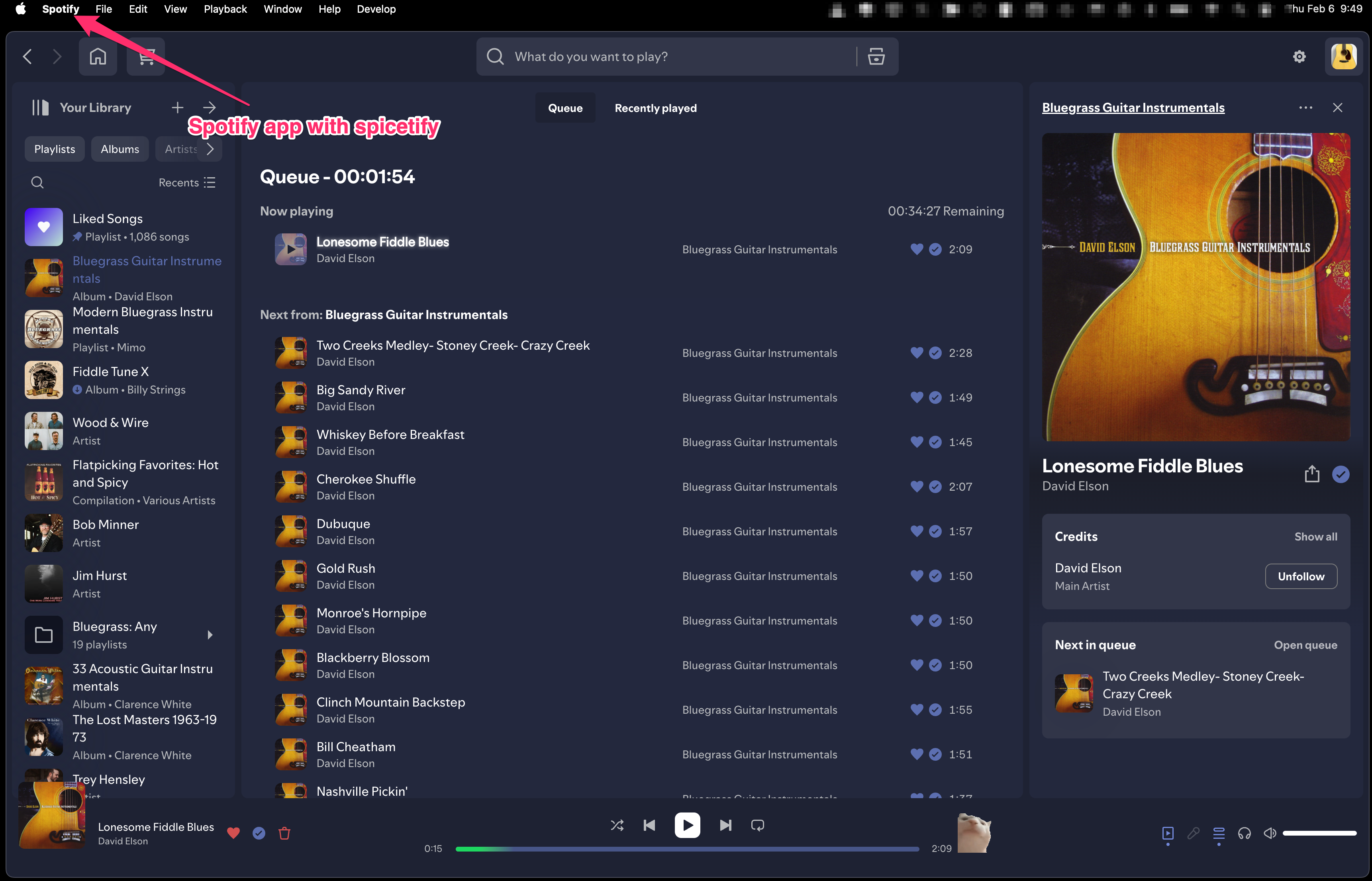
spicetify allows you to customize the spotify app interface on desktop. Not on mobile though so there's still that.

Yeah, I'll finally got this and I do not like it. It makes everything feel claustrophobic and give me less info about the upcoming songs. I generally leave my spotify on the queue screen, as I don't need to see the playlist/radio I'm listening to when shuffling.

In addition to my previous tip, here, you can also pin Spotify to that version, so it won't get updated accidentally:
# Remove any installed spotify client, if installed via WinGet
winget remove spotify --all

# Install nice version with center pane queue view
winget install spotify --version 1.2.31.1205.g4d59ad7

# Now pin Spotify to the nice version, preventing it from bein updated.
# After that, you can safely update the other Winget packages with `winget upgrade --all`.
winget pin add --id Spotify.Spotify
Happy queuing!
But yeah, Spotify proofs to be worse and worse of a company in so many ways, I think it's better to look for an alternative.

PS C:\WINDOWS\system32> winget install spotify --version 1.2.31.1205.g4d59ad7
[...]
No version found matching: 1.2.31.1205.g4d59ad7
Found the correct version via: winget show spotify --versions
winget install spotify --version 1.2.31.1205.g4d59ad7c

After a year a member of the Spotify team has finally acknowledged our criticism of the revised queue layout...by telling us to discuss it in a different thread. Unbelievable.

More than a thousand of us here have been demanding the return of (or at least option for) the queue being restored to the middle of the screen as it was before it was relegated to a side bar. The one year anniversary of that topic was just a few days ago. Today someone posted that a Spotify employee advised that we should discuss in a different thread. Well I propose that we ALL do so by creating a new thread. Here's the first one. Flash mob away until Spotify finally acknowledges it's actually a big deal OR we all close our accounts!
Hmm ... maybe each of us posting a new thread about this hot topic is exactly what we need to do. It will be more difficult to ignore when the community forum is flooded by a flash mob. I just posted mine. Who's with me?! 😛

PLEASE give me back my full width Queue view in the main part of the screen!
P.S. I just jumped through 1,000 hoops to finally be able to finally be able to vote and comment in this busted community.spotify.com site that barely seems to work (and why does it require a separate login?).

Once I am no longer on a group plan I will be leaving Spotify if this option isn't made available. It irritates me every time I use the service.

Yea this is super annoying! I need my expanded queue view back!!!

Where the **bleep** is the queue? That crappy list on the right is lame. It only shows like 30 songs while I put 100 in my queue. I want to remove an album I added by accident to the end of my queue and I CANNOT SEE THAT FAR DOWN! Stop fudging around. 90% of the app is showing me **bleep** I don't want to hear and I can't see the stuff I WANT to hear. There's a section called "Your favorite artists", um no. Those aren't my "favorite artists". Not even close. Just because I checked out that band's album a while ago doesn't mean I'm in love with them.

Just got given the tiny queue view again... spotify please revert back to fullscreen queue view, i like having the friends tab or now playing tab open at the same time as the queue!

They just removed the option from Dev Tools to put the queue in the middle. Not only are they making stupid design decisions, they are now fighting against the community from trying to fix it. Just downloaded Spotify for a 2023 version and set my machine up to disable updates too.
@kornfan2007 where did you download it from?

Holy **bleep**, they somehow managed to mess up the search function for the people that have old versions to avoid their ******** changes. I have a version from February, 2024, the very last moment we had Queue in the middle and the search now says "Something went wrong" and stays like that. Good grief, Spotify, I will now look actively for a replacement.

thread.
Come on people, don't just come here to complain, READ the thread.
@otis_barthleh if you had read the thread you would have seen a reply from me stating that they have now removed the option to put the queue in the middle from the dev menu, and therefore I couldn't get it working on Spicetify. If you have updated instructions on how to make it work, I would be grateful as at the moment, the once I used fail since the option is gone.

What a bunch of losers, now they totally effed it up by even removing the developers option. I'd be long gone if there was any other music service with something like spotify connect for my Denon. Thank you for nothing, Spotify.
I've tried Spicetify as otis_something mentioned and nope, nada. I can't find a way to move the queue bar to the middle. I guess I'll be without Search until the old version with queue in the middle dies off.
F*** Spotify devs and the UI designers. Bunch of good-for-nothing blind/deaf losers.
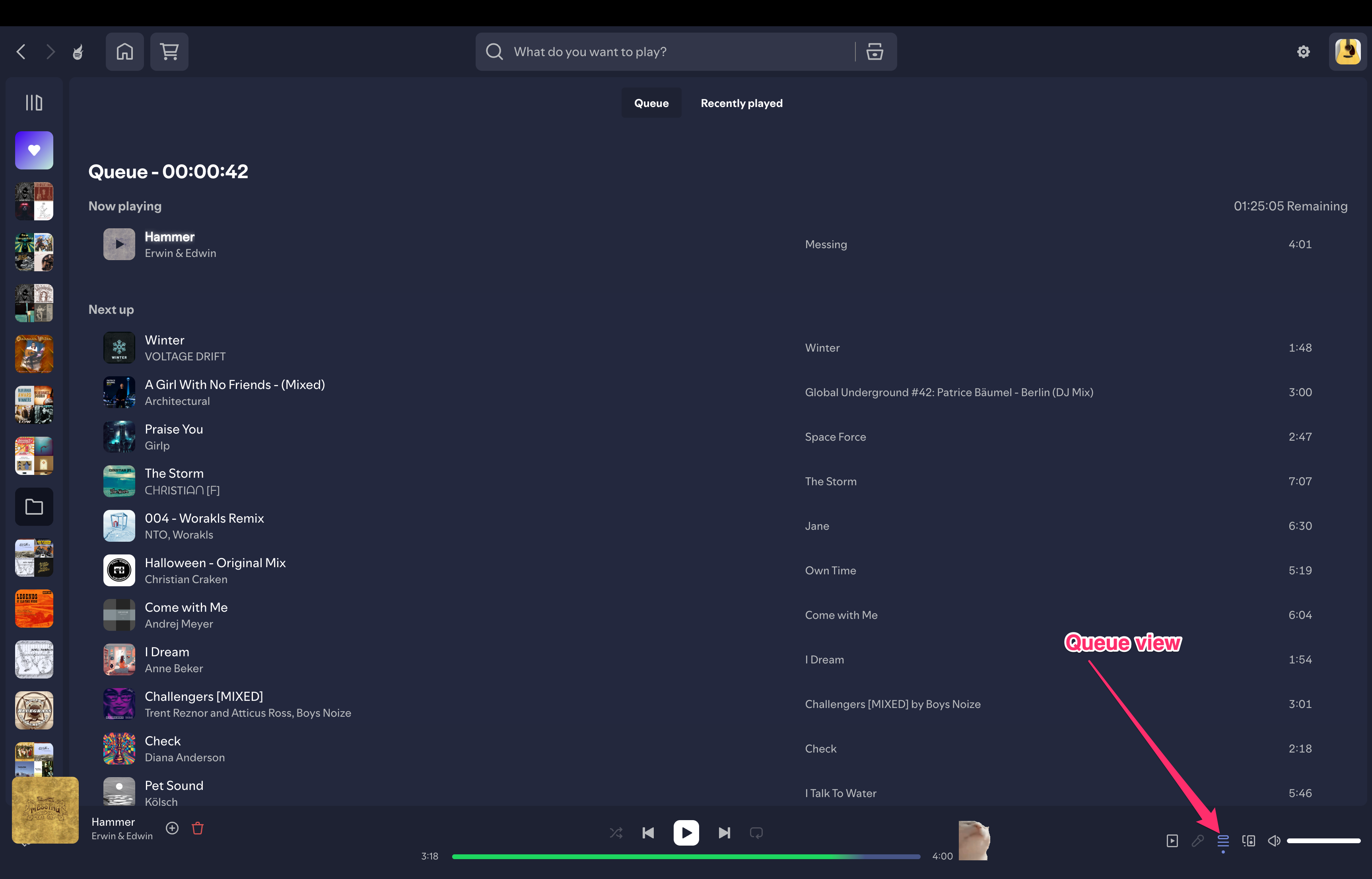
There are nice big pictures of how to do it on spicetify with arrows on page 27.
Here's a link:

@whaleslap Yeah unfortunately that no longer works with the newest version because Spicetify simply used the old centered queue that was still present in the application, but no longer accessible. In the newest update Spotify has completely removed this feature
See also issue #3394 (Return enable queue on right panel button on new version) on the Spicetify Github

Ah. Disappointing. I'll turn updates off then. Its still ok here.

how do you turn updates off? With kind regards
To turn of Spotify updates via spicetify the command from the command line is
spicetify spotify-updates block
To see all the options, from the command line, type
spicetify -h
Workaround for the new Search issue is to use Ctrl+K for the alternate search popup.
I just got my center queue back by reverting to an old Spotify version. For anyone wanting to try it out:
- Block Spotify updates using icacls command. Posted by reddit user dishkyumpishkyum
Step 1: Close Spotify
- Ensure Spotify is completely closed before proceeding.
Step 2: Delete the Update Folder
- Open Command Prompt and run the following command
- del "%localappdata%\Spotify\Update"
Step 3: Create a New Update Folder
- In the same Command Prompt window, run
- mkdir "%localappdata%\Spotify\Update"
Step 4: Restrict Access to the Update Folder(Dont run both commands together)
- Run the following command
- icacls "%localappdata%\Spotify\Update" /deny [your pc username]:D
- Then run this command:
- icacls "%localappdata%\Spotify\Update" /deny [your pc username]:R
- Use WinGet to install a version of Spotify where they haven't removed the center queue feature:
winget install --id=Spotify.Spotify -v 1.2.60.564.gcc6305cb -e - Open Spotify (but don't log in) for 10 to 30 seconds so spicetify can find it.
- Apply spicetify:
spicetify backup
spicetify apply
spicetify spotify-updates block - Open Spotify and log in.
- Got to Experimental features (click profile picture). Search queue. Uncheck "Enable Queue on the right panel."
The link is two posts above, you need to install the spicify app to allow you to customize the spotify interface. The "Experimental Features" is part of that system.
https://spicetify.app