Help - can't search for friends

No idea why, but if I search for any of my Facebook friends in the "search" bar, nothing comes up... even if I just search something simple like "Mike" or "Katie". I am linked with Facebook and don't remember having this issue before. Just want to find a couple people to follow and send music to.
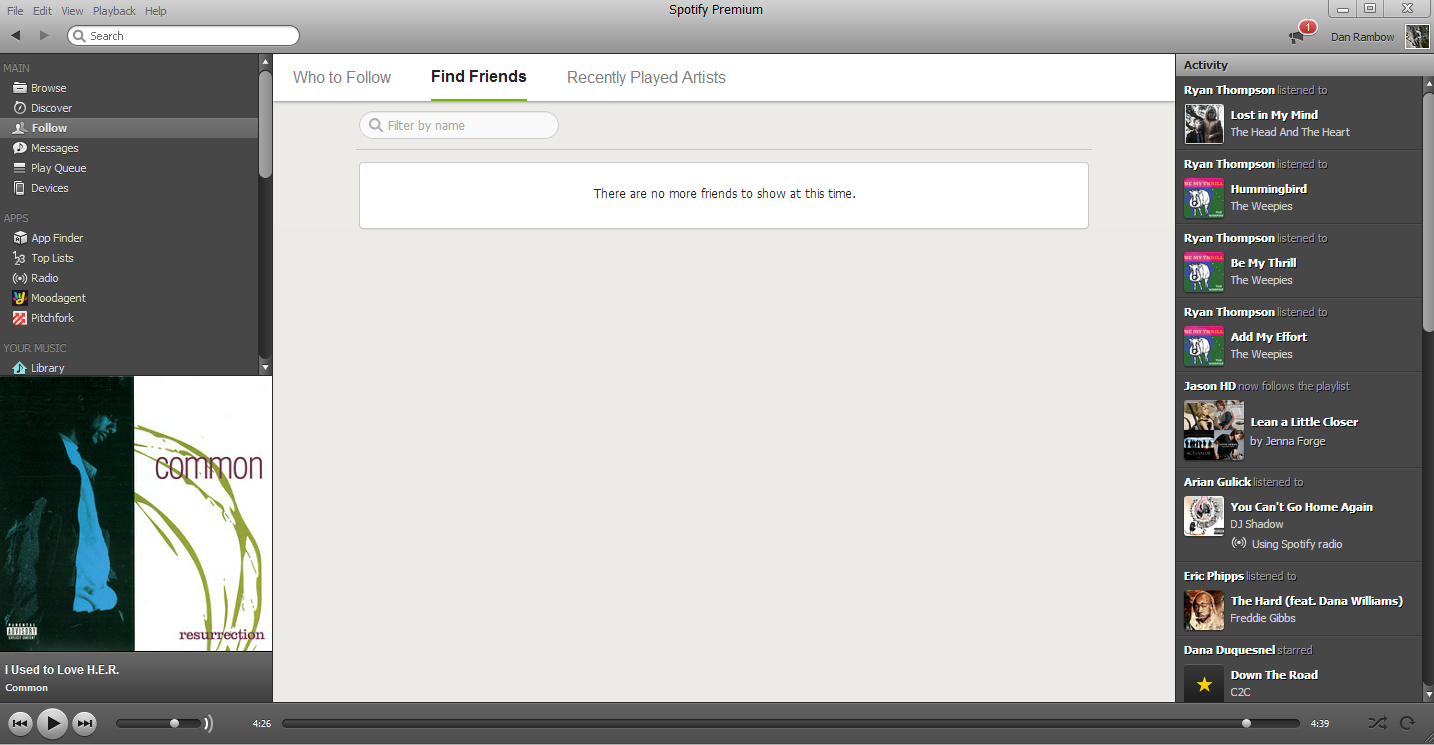
Also, if I go to "follow" in the top left, I can see suggested friends to follow, so I know my friends are linking... but I can't search to find specific ones.
Help!!!!!! This makes no sense!! What am I missing?
Accepted answers
All comments

Hey! Welcome to the community 🙂
Can you see any Facebook friend suggestions in the follow tab?
Peter
Yes, but can't search for anybody specific. And I have a LOT of friends on FB who use Spotify (because Spotify is awesome), so I was seeing if there was a better way than hitting "refresh" 100 times.
Yeah you should definitely be able to search!
Just to confirm you don't see the search suggestions when you enter a name under the heading "User" like outlined in this tutorial?
Peter
Correct.... For example, here is what I see if I search "Michael"... no "Users" category on the bottom.
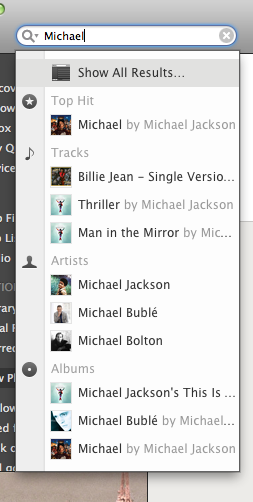
Very strange!
Can you try logging out and back in again and/or disconnecting+reconnecting to Facebook from the preferences menu if you have a dedicated Spotify username style account (since you don't get that option if your account was created via Facebook).
Peter

Peter, I'm also having some similar issues when I use Spotify. I also cannot search my friends using the search bar

Working fine here, 0.9.4.169.gc0399df6.

Havin the same issue. Have logged out and back in as well as disconnecting/reconnecting Spotify and FB as was suggested earlier...all to no avail. Please help! I really, really need this feature. 🙂

I have the same problem. I can only find people among the "user" kategori who Im already following. People who Im not following and who I know have spotify wont show up in the search field. Is there another way to searching for those friends and follow them?
@peterlt - You should now be able to view all of your Facebook friends who have Spotify who you do not already follow (or who you have no ignored by clicking the "x" beside their name) from the Follow Tab.
There are other non-Facebook ways you can find friends too, check out this tutorial 😉
Peter

@Peter wrote:@peterlt - You should now be able to view all of your Facebook friends who have Spotify who you do not already follow (or who you have no ignored by clicking the "x" beside their name) from the Follow Tab.
There are other non-Facebook ways you can find friends too, check out this tutorial 😉
Peter
I have the same problem, and have scoured the web for a solution to no avail.
Could you help?


I have the same problem. Cant find any friends from facebook. My account is connected with facebook

Same problem here - can it please get solved? Also, how do I get access to people I have "deleted" (without even knowing that these suggestions will be completely unavailable in the future!)

I'm having the same problem - didn't realize when I ignored people I wouldn't be able to find them again. Anyone know how to bring them back? Thanks!

I don't use facebook but I was wondering what would happen if you removed a friend in facebook then added them back as a friend. Would that confuse spotify enough for them to show up again? Anyone tried this?

i have the same problem, is there a solution, or are you ignoring this topic???
I think the issue is here on the community we have never found a solution to Facebook friends being missing. I would suggest you get in touch with the Spotify support team directly using the online contact form and see if they have any suggestions?
If you get an automated email reply back directing you to the community or help pages, you need to reply directly to that email (even if its from no-reply) and one of the customer services agents will get back to you as soon as possible.
Alternatively, if you prefer support via Twitter, please tweet @SpotifyCares.
Hi Peter, I'm having the same problem, I cannot find any friends either using the search tab or in the follow one...
But I remember I might have clicked the (x) at the very beginning when some friends appeared as a suggestion (I just wanted to postpone the add, not to delete or make it impossible forever)... I fear that this is avoiding now the search of friends, right?
What can I do to see the suggestions again, or to be able to find any friends at all?
the funniest thing, is that when I click on SHARE song, I type a friend's name and I can see all my facebook friends with that name (i.e Mike, I see all the Mikes)...it is kind of weird.
Thanks for your help!
M

I'm having the exact same problem. Plenty of friends on Spotify that have facebook linked that I can't find. It's acting like I have zero.
A good friend of mine is trying to add me right now, and me him. But we can't.
[quote]
What can I do to see the suggestions again, or to be able to find any friends at all?
the funniest thing, is that when I click on SHARE song, I type a friend's name and I can see all my facebook friends with that name (i.e Mike, I see all the Mikes)...it is kind of weird.[/quote]
Yes! This is happening to me as well. At least this is a very common issue. Hope a solution is found soon, though this thread dates back a ways. 😞

I am also having this issue and have emailed Spotify via their contact form (no answer yet but it was only yesterday.) Pretty annoying that they would ditch the 'Friends' menu on the Android app (which happened after an update yesterday) when there's a known issue with missing friends.

I might have a "solution", even if it is not the best one...
So after my last post some weeks ago, I contacted directly the customer service via support@spotify.com and wrote exactly the same I wrote in this forum. Very fast, a lady from the staff, very helpful and friendly told me what could be done (reconnect with facebook, some steps). None of them worked...
In the end they had to delete my old account and create a new one, importing my old playlists. Problem: your followers and following disappear, which can be pretty annoying if you have a big amount (I just had 11 so not a big real problem).
After this I could log normally into Facebook and connect it with Spotify (she gave me all the steps, again, very helpful) and EUREKA, it worked. Now I can see all my friends.
BUT, and this is what I now know... We might have all done the same mistake. Spotify suggests you to follow this or that friend when you start. Maybe in that moment, you don't feel like following so you just click on the (x) beside it and then...WRONG!!! YOU WILL NEVER SEE THIS FRIEND AGAIN. Can't they just create an option like "later or postpone"? (whatever they feel nicer!)
I remember I did this with my old account (I followed the very close friends at the very beginning and then clicked the (x) on the others just as a "maybe I will do it another day"...but with that, I completely deleted them from my friends view. And that's my point of view.
I tried, to check if this is true, to be on the safe side, and with the new account clicked the (x) beside the suggestion of a not very close friend. And as I said: I don't see this friend anymore.
Can this just be solved, so we don't have to create new accounts??? It is a bit annoying...
Hope this helps!
M

n of the suggestions for sending music to friend here work. Have tried to send to friends who are on FB and those who are not, the search just say name not found..... It is becoming maddeningly frustrating and I am getting nowhere.

Hi, so I dont have any friends available under my follow tab. I have tried connecting to facebook but I am not sure it is connecting properly either :S

Hi Peter!
Can you please highlight this problem many people seems to have..we cant find people on spotify..and i left facebook a while ago to
Regards
Jonas


Having the same problem is it possible for you to fix my account as well?

I don't understand Peter, what was the solution? I still cannot find friends through the search feature. Some come up, but most don't, and I had not clicked the littled "x" next to their name because these users weren't using spotify when I first created my account some years ago when it first hit US.

I've got friends that don't have facebook but have Spotify, is there anyway to find them and follow them? I've tried to search for them but nothing comes up, why is it we can only follow people who have facebook and is your friend?


Same problem here. Would love to be able to use the Facebook friend feature, especially as a new premium member.
@peterlt - You should now be able to view all of your Facebook friends who have Spotify who you do not already follow (or who you have no ignored by clicking the "x" beside their name) from the Follow Tab.
There are other non-Facebook ways you can find friends too, check out this tutorial 😉
Peter