High CPU usage on Desktop Windows client when "Now playing view" is visible

I have noticed high CPU usage when the "Now playing view" sidebar is visible, even when no music is actively playing. It is 100% reproducible. Closing the "Now playing view" makes CPU usage go down to 0% while idle.
It uses 10% of my CPU (Intel i7-9850H). This is my client version info:
Spotify for Windows (64 bit)
1.2.32.997.g4c6498b6
Accepted answers
All comments

Hi there @Intelli32, @olimex338,
Thanks for reaching out. Could you please provide us the following:
- Is this on all devices or only on specific one(s)?
- When did this start happening?
- If you haven't tried already, perform a full clean reinstall. It's possible some sort of corrupted data is causing this and such a reinstall can remedy that.
Let us know how it goes.
Hi,
I reinstalled Spotify and I am now on this version:
Spotify for Windows (64 bit)
1.2.34.783.g923721d9
CPU usage is lower now but still at 5% while idle (no music playing). What I notice is that I get high CPU usage if there is a scrolling animation of the song title/ album name. If I play a song with a shorter title the CPU usage drops and is close to 0% while idle.
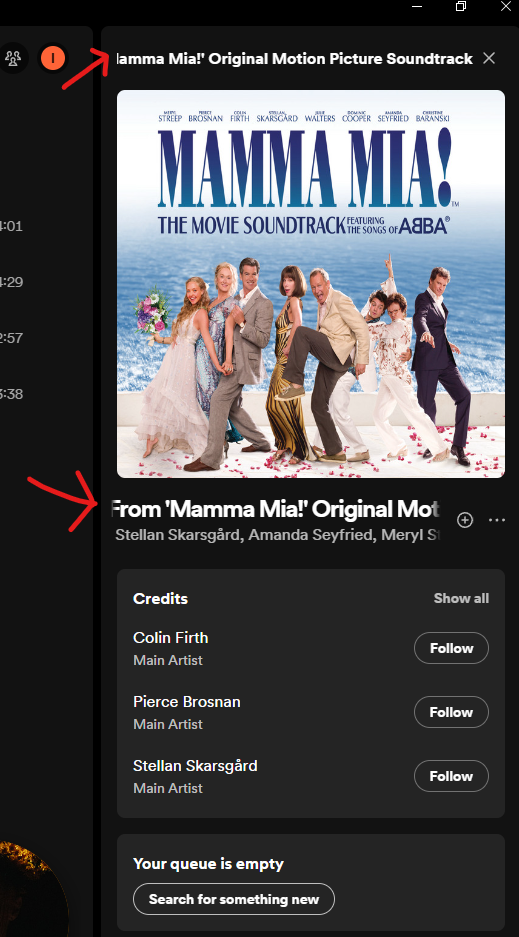
Might be worth looking into the animation of the text.

Thanks for the update @Intelli32!
What you can also try is to uninstall the app version you're currently using and download the one either from our website or from the Microsoft Store (whichever version you weren't using so far). As they can have different behavior, you can give it a test.
In addition to that, check if you've got Local Files enabled in Settings and if it's so, try with disabling them to see if it'll make any difference.
If anything else comes up in the meantime, we're here.

I thought I'd comment to say:
- same problem, same solution (turn off "now playing", or choose a shorter song, or make the window big enough)
- totally repeatable with the issue apparently only being the scrolling text on the song name
Surface Pro 7 i5, all up to date. Spotify app from website...

Hi there @DO_jws,
Thanks for your reply in this thread and for the provided info.
Could you check if enabling/disabling hardware acceleration from the Spotify app's settings makes a difference?
On another note, a previous user performed a clean reinstall of the Spotify app and the usage decreased. We'd recommend giving it a try.
Lastly, send over the OS on your device and the exact Spotify version you have installed.
We'll be here!
Hi
Did a clean reinstall (from MS Store) - same issue: Spotify for Windows (64 bit) - 1.2.38.720.ga4a70a0e
Hardware acceleration makes limited, if any, difference (maybe slightly better with off). It only happens when the text scrolls. I can't be certain, but I think there is a CPU hit for each bit of scrolling txt (so worst case is a super long song name, in a long playlist name with the "Now playing" window open), and this includes the song name to the left of the controls (bottom left). If I get three bits of text scrolling I can push over 25% CPU utilisation.
It also drops CPU usage if you minimise the window (or maximise / choose songs and playlist that don't scroll).
Also tried installing from website (same version). Same issue.
Out of curiosity I checked - same behaviour on my gaming PC, but smaller % CPU utilisation as its a Ryzen 5600.

Hey @DO_jws,
Thanks for all additional info and for reporting this behavior!
While we can't give you a specific time-frame for when this will be looked into, we're always working on optimizing the app and to improve the user experience. In the meantime, we recommend keeping both the app and the device(s) OS up-to-date.
If anything else appears, we're just a post away. Cheers!

Well this is an unexpected find.
Same ridiculous behaviour on my windows 10 laptop.
CPU while app is focused, the now playing thingie is closed:
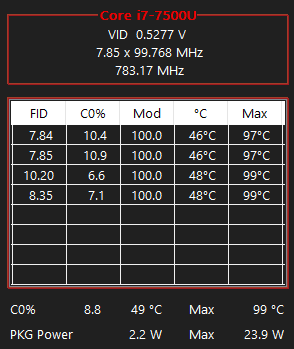
CPU while app is focused, the now playing thingie is open:
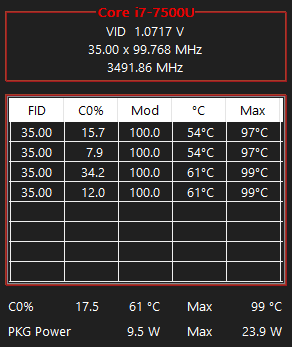
Wow.

EDIT : The clicking sound is not related with the problem, it was a headphones problems.
Hi Maria,
I confirm the follwing : Spotify GUI uses a lot of ressources when it's maximised on my Windows 10 laptop.
The audio started to "click" with the latest updates of Spotify.
I confirm that I'm using Spotify version
Spotify pour Windows (64 bits)
1.2.42.290.g242057a2
With some system info
Processeur Intel(R) Core(TM)**bleep** 2.21 GHz
Mémoire vive installée 32,0 Go (31,6 Go utilisable)
Type du système Système d’exploitation 64 bits, processeur x64
Dedicated Geforce GTX 1050 Ti Max-Q mobile
This behaviour is very annoying!
I also confirm the following :
- when the song name is long and "playing now" make the song name to slide from left to right, it does take A LOT of CPU for a simple animation like that. (8-10%)
- when the song name is shorter, it take less CPU, still high from my standards! (5-6%)
- when Spotify is minimised, Spotify very few CPU (0-1%)
Nonetheless, sound "clicks" are heards in whatever situation described over.
I also confirm the following :
- If i use Chrome Browser to listen the music from open.spotify.com, the roughly same CPU usages apply.
- 6-11 % when maximised
- 0-1% when minimised
- Still hearing some clicking sounds!
Hopefully that get fixed!
Best regards,

I have the exact same problem. Scrolling through a playlist causes extreme amount of lag and high CPU usage.
Disabling hardware acceleration doesn't do anything.
Windows 11 Pro 23H2
See here: i.imgur.com/kom2WY2.gif

I have exactly the same problem!

This is horrible, I'm using the latest version downloaded from their own website, spotify consumes up to 25% of CPU just by scrolling on the main page or watching the playlists, has a fatal performance even activating the hardware acceleration, I can move games in ultra at 144fps but Spotify looks less than 30, it has been like this for a while and it seems that with each update is worse.

ok so i found something weird when i dont put a song on repeat or one repeat the cpu usage goes normal

..
I have found a decent fix for Windows users using the app, if you open the Spotify process tree in Task Manager then set the one using high CPU to efficiency mode along with disabling Hardware acceleration in spotify settings, the CPU usage will be fixed.


Plan
Premium
Country
USA
Device : PC
Operating System
Windows 11 Pro
My Question or Issue
So as of today my temps will get high (75c) when a song with a scrolling name plays. Any idea why?

Hey @Autrii,
Thank you for reaching out to the Community and welcome.
That's an odd behavior as the scrolling name shouldn't be elevating the temperature of your PC. So first, to make sure we start covering all the basics, we'd recommend performing a clean reinstall of the app by following the steps in this article. This is often an overlooked step, but it’s more thorough than a quick one and can be helpful in getting rid of any cache that might be causing trouble.
If the issue persists, would you mind checking with different songs and let us know the URI/link of the tracks that seems to be affecting to test it on our end?
Lastly, include in your next response the make, model, and OS version of your PC, along with the Spotify version you're currently running to continue investigating the case.
We'll be waiting for your response.
A clean reinstall did not work.
As for the song it's any song that activates the scrolling of the songs names if it's too long. If the song name is short and doesn't have a scroll to show the whole song name my temps are fine.
I'm on Windows 11 Version 10.0.22631 Build 22631
My Spotify version is; Spotify for Windows (64 bit)
1.2.59.514.g834e17d4. I have found a temporary fix which is setting my zoom to 90%.
Appreciate the details @Autrii.
Could you let us know if you noticed when this behavior started happening for the first time and if it was after an update of the app for example?
It's great to hear that you've found a workaround by setting the zoom to 90%, but something else that comes to mind is to disable both hardware acceleration and Canvas within Spotify's settings to test if these would make any difference.
On Windows it's possible to download the app both from our website and from the Microsoft Store and it's possible that they have different behavior sometimes. To test if Spotify would work better, it's worth deleting the current version that you're using (you can follow the clean reinstall steps to get rid of any leftover files) and get the app version you weren't using until now.
Keep us posted.

I have noticed about 10% CPU usage when Spotify is idling (song paused). It causes my CPU fans to ramp up. I have tried reinstalling Spotify and disabling HW acceleration, but still happening.
Spotify for Windows (64 bit)
1.2.59.514.g834e17d4
I've tried both versions from the Microsoft store and directly from Spotify and they both seem to keep doing the same thing. I also tried your recommendations and they didn't work either.
I should also mention that it's on a vertical monitor when this is happening. No idea if that'll help figure out the issue.

Having this exact same problem. If the song name is too long and has to scroll left to right my cpu usage is at 10%. If the song name is short and static the cpu usage drops below 1% like normal. Please fix this.

Hey folks,
Thank you for all the reports 🙂
We're keeping tabs on this!
If you need anymore information do let us know! The higher temp issue seems to be fixed on this latest update at least for me.

Plan
Free
Country
Netherlands
Device
None
Operating System
Windows 10 H
My Question or Issue
I have Spotify via MS Store latest update 1.2.60.564.gcc6305cb.
For since early February internal navigation is extremely slow, but even more when opening the settings page. I've been throttling all kinds of option on/off to see if that helps but it does not seem to help much. Because Windows and Spotify released an update on the same day it's difficult to say which one made Spotiy slow down to a crawl. Other things on my PC work fine and at normal speed. So seems to be Spotify bugs. Earlier updates cause my processor to peak above acceptable limits.
Normally Spotify uses just 400 Mb, today memory-usage for Spotify hit 4,5 Gb on my 8 Gb system with 3th gen intel processor. So hitting near 90% used memory. Totally unworkable and unacceptable. Even opening my profile page in the app takes 10-20 seconds and the settings page as long as 20-40 seconds.
I hope your tech-guys can find the problem and fix it.


Plan
Premium
Country
United Kingdom
Device
HP Envy 13 Laptop w/ Core i5-1135G7 and 8GB of RAM
Operating System
Windows 11
My Question or Issue
Spotify uses a lot of RAM and CPU - to play a video it uses over a GB of memory and roughly 30-40% of my CPU at times, which makes animations slow and stuttery and makes my laptop heat up very quickly.

This happens to me too