Unable to remove songs from Discover Weekly

I'm on the premium plan, using the Windows desktop app version of Spotify. I'm trying to remove a song from my Discover Weekly playlist, since it's been there before and I didn't think much of it the first time. The button to do this has been removed. I can find old posts explaining where it is, and it's not there any more. How do I remove this song from my playlist?
Accepted answers
All comments

Dear Spotify, You are my favorite streaming platform for many reasons.
But this "issue" (or this will as I guess if it was really a bug it would have been solved already) is real pain !!
This last for 5 months now and this is, according to a lot of people and me as dev, a really long time to solve an important issue (not yet a master).
Please stop joking your clients and re-enable the removing feature or be honest and tell us the truth instead of beating around the bush.
Regards.

I keep getting AI slop music in my Discovery Weekly. Stop forcing these AI garbage tracks on u and give us the dislike button back.

I already posted here a couple of weeks ago. Having a hard time this week with my "discover weekly" list, I am back!
The hide feature is still missing on the desktop version. But I cannot hide / remove the tracks I cannot listen to (I really can't, it is not a matter of willing), even when doing it from the mobile app. A red minus sign appears but the tracks are still played though. What is the purpose of the feature then? Could a product owner / manager explain that?

IT'S BACK! THAT BIG, BEAUTIFUL HIDE (-) BUTTON HAS RETURNED!
Many have said that it couldn't be done, but I never lost faith in you, Spotify. I knew you could do it! Now if you could work on that DJ Beta voice option... Oh sorry, am I being obnoxious now?

Debi

Spotify for Windows (64 bit)
1.2.60.564.gcc6305cb
It is not back!

It is on mine (see lower left of my screen shot).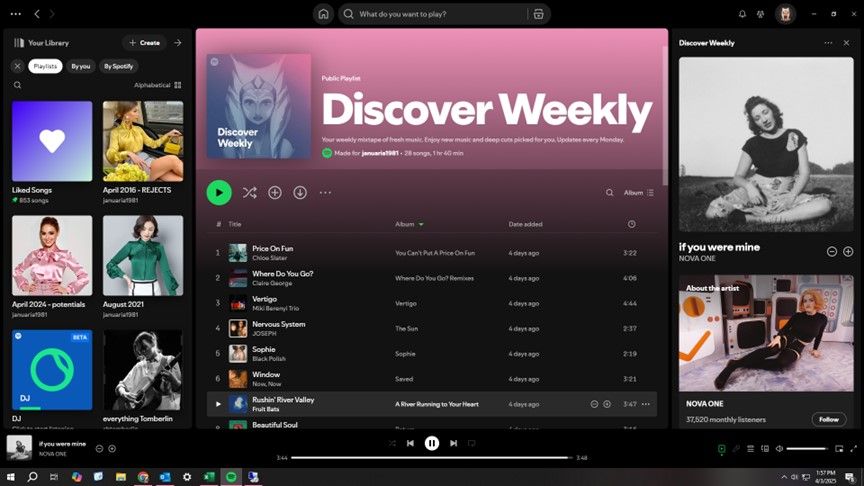

point.
The button isn't back. The button very likely is not ever going to come
back.
Again. I desire to be proven wrong but the corpo 2 step garbage the mods
have fed us here has said one thing: Never gunna happen.
@januaria81 what version?

Hi everyone, the Hide button is rolling out over the next week. Please keep your app up to date.

Are we being for real? Why does**bleep** need to be a topic? Is Spotify really this brainless???
but I'm cautiously optimistic.

First of all, I HATE ALL THE COVERS that I get in my discovery weekly playlist.
When doing a search in the community, the only recommendation I was able to find for dealing with this is to "hide" the song, which is the only way to give feedback regarding my like or dislike of a song.
The problem I have with that approach is that I often love the original song, and often hate the cover.
So, this brings us to my request. I often hear music on my iphone and the hide option is available, however, at the moment I'm listening via my computer and the mac OS app does not seem to have the hide song feature available.
So, this is really two requests in one. PLEASE add the HIDE function to the mac OS app, and more importantly, please create a way for me stop getting all the covers on the playlists that Spotify creates for me.
In the attached screenshot, you will see a number of covers on the playlist that I'm wanting to hide from the list.
Thank you,
Daniel

I woke up this morning feeling dangerous. Then I opened Spotify to listen to discover weekly and saw, to my immense disappointment, the [minus] (-) button has not been reinstated. The good thing was I found three songs that were ok... the remainder were irritating and did not enable me to restore my kwon. Please fix this.
on the roll out of this supposed fix as they already came back shouting
about standing by for the update. If it's a roll out, tell us how long it's
planned for. If there's a version number we can check for, tell us.
Otherwise I'm getting that weird carrot taste in my mouth again.

At least it seems to work going to the artist page of the track that you want to remove from Discover Weekly and choose "Don't play this artist" from the 3-dot dropdown menu. Then it will stop playing the unwanted track immediately and skip to the next.

Can we fire the guy who suggest this?

It's finally back for me.
Took embarassingly long for a company of Spotify's size to reimplement a previously existing feature. I would assume the contiuous upkeep of beloved existing features like this one would always be the priority but apparently that was not the case here. Or you are severely undermanned which would also be a problem.
Anyway it's back now so thanks for that!
It appears you haven't completely abandonded loyal users like us.

Solved !

For me "hide song" is now available (again), on desktop.
Discover Weekly from this morning on desktop version Spotify for Windows (64 bit)
1.2.60.564.gcc6305cb:
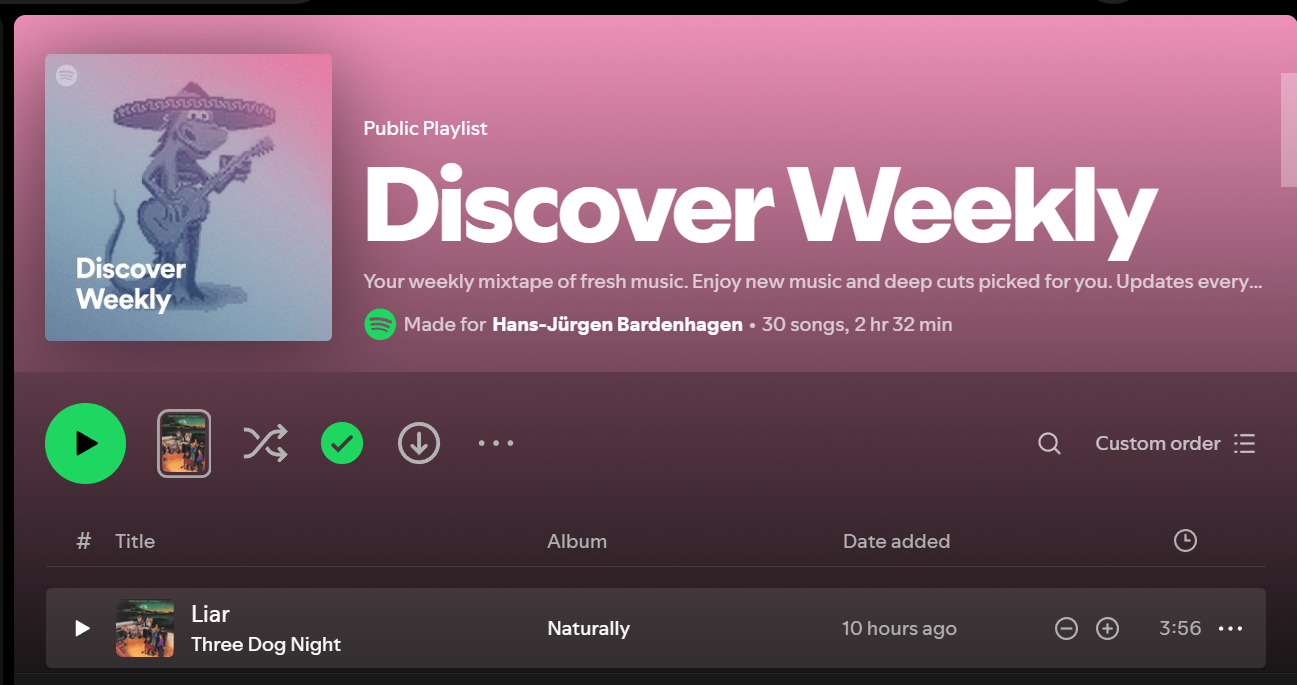
Never would I have though that the "Hide song" button will ever come back after it's several months of absence from the desktop app. Just a few minutes ago I restarted my subscription.
Whomever from Spotify is responsible for this extended absence of the button, please don't casually remove features in the future without realizing how essential they are to the core functionality of the application.
In the end, thank you for bringing back the button.
The Hide button is now back on Desktop for 100% of users. If you don't see it, please update the App to its latest version and/or close/reopen the App a few times for it to take effect. Thanks again for your patience and comments.

Indeed! The button has made a remarkable come-back!
Many thanks for this!
Thanks for putting back a feature that never should have been disabled for 5-months.
As a customer, if you told me the feature would be disabled to achieve fixes/updates, changes to platforms etc for 5-days then I could accept that. However on reflection, the 5-month period without this functionality is still unacceptable. I trust you will conduct a thorough review of your systems, functions, processes and their performance to ensure this doesn't happen again.


Oh yes... Looks good (on MAC too)...
Now you can say "Solved".
The Hide button is now back on Desktop for 100% of users. If you don't see it, please update the App to its latest version and/or close/reopen the App a few times for it to take effect. Thanks again for your patience and comments.