Queue reshuffling

Plan
Premium
Country
Brazil
Device
Samsung Tab A9+, Samsung S20FE, Redmi 8A, Samsung Galaxy A35, PC
Operating System
Android and Windows 10/11
The Issue
Whenever I select a new song in a playlist, the queue do not reshuffle.
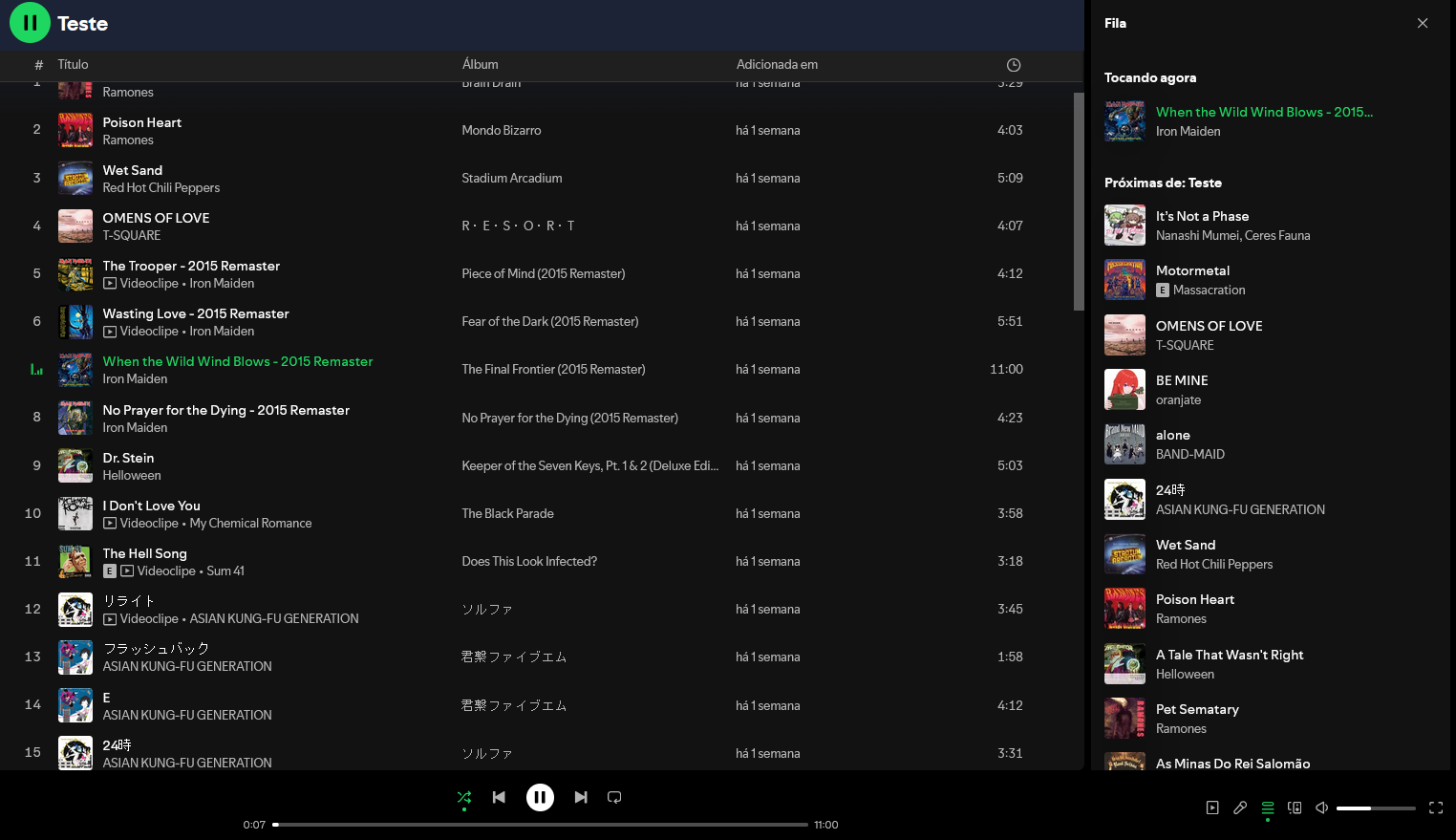
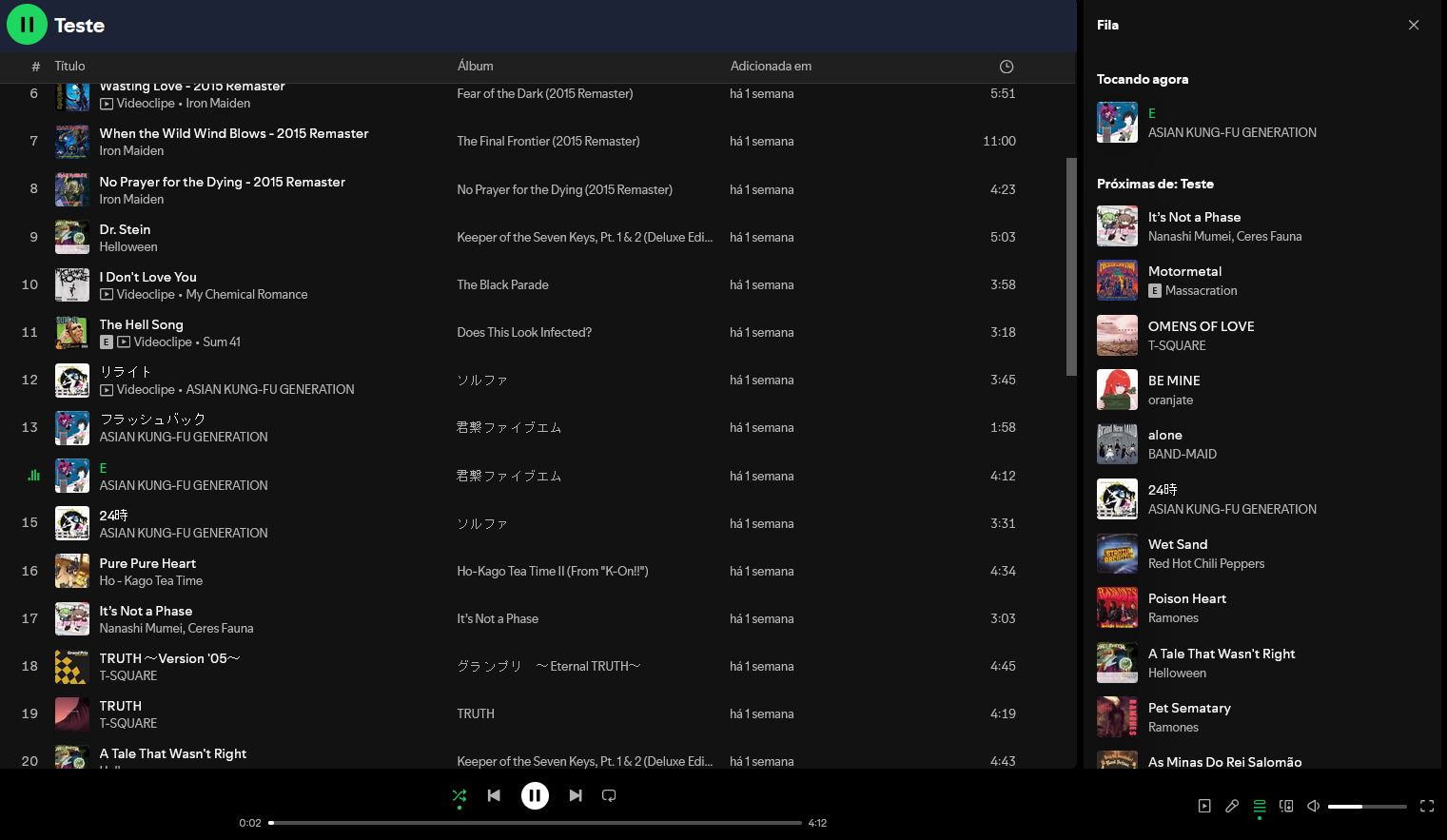
I tried a clean install, flush dns, cleaning cache, different networks, different devices and it seems that the problem is linked to my account since when creating a new account the problem does not happen. The Spotify Web Version has the same problem.
Edit: I posted (link to the post) about bringing this feature back in the Ideas Board and I encourage people that are having this problem to vote there so it becomes more relevant.
Edit 2: The post got removed from Ideas Board and I don't know why.
Edit 3: The post is back and the link works fine again.
Accepted answers
All comments

Hey @Guilherme_AUG,
Thank you for reaching to the Community and welcome.
We appreciate all the troubleshooting you've done so far. That's an odd behavior since the track's order should change if you play a different song. So to start investigating this, would you mind confirming if you've the Hardware acceleration enabled? and if so, could you disable it (or vice versa) to see if it makes any difference?
Also, could you check if turning the Shuffle button on/off (slowly) keeps showing the same songs on the "Next from" section? If possible, could you record a short video where we can take a better look? You can attach it to your next response by using the Insert Video option in the post editor. You can also upload it to YouTube or Google Drive and share the link with us (make sure the video has the permissions for anyone to watch it).
We'll be on the lookout for your response.
I appreciate the answer, thank you!
Yes, if a manually turn on and off with the shuffle button it works normally, but the expected behavior is that if I select a new song in the playlist, while the shuffle button is on, the queue would refresh.
I tried slowly turning on/off the shuffle button but that didn't resolve the problem. I also have tried turning on/off the Autoplay, Canvas, Hardware acceleration, Automix, Crossfade or any other settings that can be modified.
I uploaded two videos showing the issue with two diferrent playlists.


Thanks for the response and for the provided videos, @Guilherme_AUG!
We checked them out and as you also mentioned - the expected behavior is that if you select a new song in the playlist, while the shuffle button is on, the queue should refresh.
We understand that it's not an ideal solution to go for a new account, but if this behavior persists with your current account across devices even after extensive troubleshooting, as well as in the Web Player, then this would be the best option.
When it comes to your music, you won't be able to transfer your listening history and habits, however, you can check out this FAQ article on how to transfer your playlists, liked songs and who you're following.
The Community's here should you need assistance with anything else.

Hey, @Guilherme_AUG!
I did some research and testing, from what I can see, when smart shuffle is on, that replicates the behaviour you're seeing here, try turn smart shuffle on then back off, then try and use normal shuffle and see if that changes things!
edit: I was going to record the issue on my end but now it doesn't seem to do it, I'll do some more research and see if I can figure anything out!
Let us know how you go!
Cheers,
Jordan
Hey, @Guilherme_AUG, could you capture what the queue does when you have shuffle off, does it have the same behaviour, or does it update as you go through songs with shuffle off?
Cheers,
Jordan

Wanted to add on here and call out that I am experiencing this same exact issue so it's not exclusive to just this user.
Also tried all of the suggestions on this thread with none of them working. Experiencing this on my desktop on Win11 and on my phone (Android).

Plan
Premium
Country
New Zealand
Device
iPhone 13 Pro Max
Operating System
IOS 18.5
My Question or Issue
What is wrong with my Spotify queue? I have it shuffle and I'll click a song. I'll check the queue, then I'll click another song, and instead of resetting the queue like ti normally does it all stays the same. I'll remove a song from the queue, click a new song and the song I removed would be restored with the exact same queue. And if I click the song thats new in the queue it'll just go through the queue like normla instead of resetting. The only way for me to shuffle is to toggle shuffle off and back on, or using smart shuffle (but that doesn't let me listen to my local files and gives me songs I don't like). And no, it's nto similar songs playing. I have tried to clean reinstall. Didn't work. I REALLY REALLY hope this isn't intentional.
I've attached three videos, one of them shows my problem, second one is resetting the queue and last one is showing playing the next song in queue.

Country
United States
Device
Samsung A16/Computer
Operating System
(Android/Windows
My Question or Issue
Anytime I click on a new song it won't change the order of songs. I have shuffle on, I do not have any songs queued, and I've tried clearing cach. I've tried uninstall and reinstall. I can't update the app and login and then in does not work. I've tried different Playlist and it does the same thing. When I click a song layer in the next to play, it just adds the songs back when I click a different song. I click later song, then click different song, next in line repeats. It adds removed songs back. Even when going to the very bottom of the Playlist when I click a different song it all goes back.
Sorry for the spelling mistakes I'm in a rush

I just wanted to say that I also am having this issue, even after following all these steps, so hopefully it gets fixed soon!
Same here, I’ve messed around with signing out and reinstalling the app and all that stuff and nothing works.

On previous versions, if I was listening to a playlist on shuffle and I manually selected a song from the playlist to play, it would re-shuffle the songs. This functionality seems to have changed. Now I need to turn shuffle off and back on to get it to re-shuffle.
If I don't like the queue lineup, I like to re-shuffle by picking a new song to start. Please bring that feature back!
I am on Samsung Galaxy S24, Android 15.
Im thinking maybe an update ruined it for now. Hopefully they fix it.
Having the same issue

Plan
premium family
Country
turkey
Device
redmi note 13 pro
Operating System
android 15
My Question or Issue
hello! i've been experiencing this issue with my playlists lately. Basically when i choose a song on my playlist while its on shuffle mode it locks onto the shuffle it makes so when i choose another song it uses the same shuffle as the one before unlike creating a new shuffle
the only way i can get around this is that i choose another song from another playlist then choose a song on my playlist again. i tried resetting my phone deleting cache etc.

- Plan
Premium
Country
America
Device
iPhone 15
My Question or Issue
Whenever I don’t like my queue songs lined up, I would choose a new song and that would shuffle the songs randomly. However, it recently changed and whenever I try clicking a new song, my queue doesn’t change. The only way I’ve found to change it is by changing the shuffle mode to off then shuffle again. I’ve refreshed, deleted Spotify, and restarted my phone. Nothing has worked.

Hey everyone,
Thanks for reaching out on the Community!
As we're seeing a few new posts about this, we've passed it onto our tech folks, so they can have a look at the app behavior you're experiencing with the queue and Shuffle.
We'll keep you posted in this thread if we have any news to share 🙂
Cheers!
Hey, @CryticalAce, thanks for your effort in trying to help me! I can't really record a video now (work has been pretty tough!), but I can assure you that the behavior is the same when going through songs with shuffle off between an account that works fine and my account.
Thanks,
Guilherme.

It seems to be something with linked to the new update as someone said before... don't think it's a specific configuration issue from our end.
Probably we'll just have to wait till they get it fixed (hope they do it soon, i can't explain but it feels bad to be stuck with the same queue for days lol).
It’s very painful to deal with the same queue but I found that if you play a different playlist and then go back to your main one it will have reset, so that’ll help until they fix the issue!


Same also experiencing this issue on all my devices (windows 11 and ios)

Hey there folks,
Thanks for all your replies here!
We can confirm this is one of the changes we recently made. Now, you can reorder the queue by turning Shuffle off and on again. At Spotify, we're always testing new improvements and features to give our users a better experience. We really appreciate the time you took to let us know about this, we know you want to make the best out of your listening experience.
Your feedback is very important to us, because it helps us make future decisions. There's now an existing Live Idea on the topic from the user @Guilherme_AUG which you can check out and add your vote in order to show support.
We'll be here if anything else comes up. Once again, thanks for the feedback.
Hey!
Thanks for clarifying the issue. It's pretty sad that the "feature" got removed. I sure will send the idea to bring back it.

Turning shuffle on and off shuffles, but I still notice it is pulling a lot of the same songs that were on the previous shuffle. The shuffle was doing so well a few weeks ago and seemed to be fixed, now, not so much.

NO. A bug isn’t a f word ing idea. and where the f word is the solution. NO, WE DONT HAVE IDEAS WE HAVE F WORD ING BUGS


Plan
Premium
Country
United States
Device
Windows PC, Samsung Galaxy s10e
Operating System
Windows 11, Android 12
My Question or Issue
Spotify used to reshuffle the up next songs when i manually played a different song from the currently playing playlist but now it keeps the same up next songs
In macOS version Spotify for macOS (Apple Silicon) 1.2.64.408.g0a9b557c and iOS version 9.0.44.500 the shuffle function does not work as it has before. Let's say I am playing song number 10 in my playlist, if I click or tap on 11, the upcoming shuffled songs would be reshuffled. Now, this order never changes. I can play any new song and the upcoming ones DO NOT SHUFFLE. This is new. What USED TO HAPPEN was that the shuffle order would be shuffled whenever I play a new song. This needs to be fixed.