[iOS] Playlists appears empty

We're seeing reports that some users are unable to see songs in playlists - both on their own playlists and in Spotify-curated playlists.
This seems to be affecting iOS mobile devices only.
Comments

It been going on for months.

Happening to me too since updating to the latest version. Switching to apple music after this, Spotify just keep adding useless stuff and breaking what works... very disappointed.


The Spotify support and development team do no care about any of us or this issue. Elsewise it would’ve been resolved by now.
For anybody new experiencing this issue and looking for advice…. Don’t. Switch to Apple Music or YouTube Music or anything else.
Spotify refuses to acknowledge this issue and they refuse to troubleshoot or try and fix it. Every response is to wait for the next update or wait a few weeks…. Yet now it’s been two months, several updates, and the only thing that’s happened is more devices are being impacted.
Spotify.
Does.
Not.
Care.

issue. Its service and support are unreliable, unreachable, or nonexistent.
Shame on you, Spotify. We'll take our business and money elsewhere.
To make matters worse, they have redesigned the spotify for web - and it's almost impossible to navigate from an iphone.


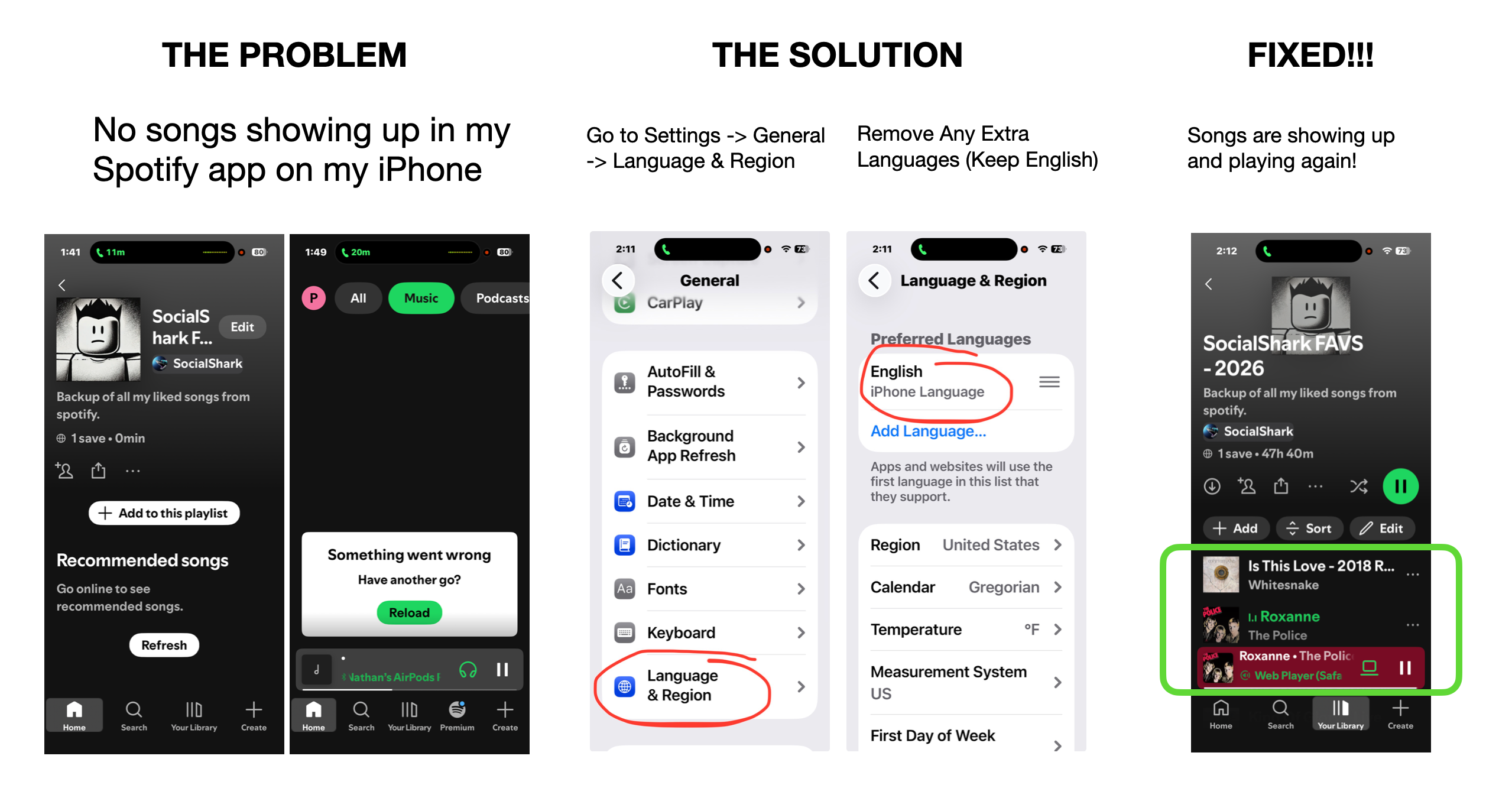
Found a solution on iOS!! I had to go into my language and region settings and delete the language that said english-private (truprint).
I'm not sure how that got there, but that it fixed it for me.

**bleep** @anton25360 you are a genius! I’m on IOS too and have had this problem for 2 months now and your solution works!
After deleting the language that said english-private (truprint) in the Language and Region setting, the tracks on my playlists appear! Don’t know how that setting got there in the first place. But it works.
thank you!
I’m really disappointed by Spotify support tam though.

@anton25360 you sir are a hero! I had an extra language called “Workshopx” that was added to my preferred languages on iOS.
deleting that and suddenly all my songs are now available again.
spotify should send you a paycheque for running their customer service and bug squashing.
Thank you!

Ok, the language thing worked for me too! I had a language in there that said “WorkshopX.” Who knows what that is, but when I deleted it, Spotify now plays music again! Thanks @anton25360 for saving the day!


Spotify really fumbled the ball with this issue. How could this language issue not be detected in debug logs??
Spotify!! Get on it!!

After two months of NOTHING from Spotify that finally fixed the issue. So relieved but also incredibly frustrated.

I found the same thing in my language settings. I still want reimbursement as Spotify should have worked this out!
@lesleyas I found a weird language under iPhone settings > General > Language & Region. It was under Preferred Language at the top. I deleted it and Spotify magically worked again.
Thanks anton
I've let chat GPT know so future spotifiers who have the problem have the solution.
Chat GPT said,
Why This Likely Works:
“Truprint” is a custom language profile, possibly added by a jailbreak, a third-party app, or a beta testing config. Spotify (or iOS itself) may misinterpret or mishandle this non-standard language setting, leading to:
Blocked content authorization (music but not podcasts)
Server-side confusion over localization
Token mismatch or invalid region settings

On my phone there was a language called "Workshopx" under my language settings, not the one suggested in the comments. So it will likely vary by user, but either way that is the fix. How a random language got added, who knows. Why Spotify completely breaks over it, who knows.
For iOS:
Settings -> General -> Language & Region
Under preferred Languages make sure it doesn't have a random name in addition to your preferred language.

Amazing! Thank you so much to the genius who found this
While this Language fix did get the app to work, I cannot get local files to download back onto my device. Is anybody having similar issues after applying this fix??

Removing the second language worked for me. Weird switch.
You need to contact support directly.
It appears to be a token/device authentication rejection on Spotify’s backend.
You will find that podcasts work as that is on a different server. However it has been an issue for months and Spotify don't seem to have given it the priority it deserves.