When changing between playback devices, the playlist is started from the beginning

Plan
Premium
Country
USA
Device
Samsung Galaxy S21 FE, Google home mini
Operating System
Android 14
My Question or Issue
As of recently, whenever I switch between my phone and google home mini or vice versa, whatever playlist I am listening to starts back from the beginning. This happens on regular playlists, a song radio, daily mix etc. It used to pick up where it left off, so it seems like something changed recently.
Accepted answers
All comments

Hey there folks,
Thanks for posting here and for the info shared.
@KellyC81, we really appreciate all the info you kindly sent us. Would you mind sending us more info about the Google speakers you've mentioned? Send us the make/model of those.
Additionally, could you send us a video recording of this behavior so we can have a closer look at it? You can attach the video in your next reply in mp4 format, or upload it to YouTube or Google Drive and make it public.
@Slosh1111, we understand where you're coming from. In order for us to continue investigating this behavior, we'll need:
- The make/model and OS of the affected devices (both your computer and mobile).
- The exact Spotify version you're running there.
- All the troubleshooting steps you've tried so far.
- Are you using any Google speakers like other users in this thread?
We'll be around!

Windows 10 64 bit app version 1.2.65.255.g85e641b4
No google speakers, my only outputs from phone are ear buds and car head unit. This issue can simply happen between sessions, listen in the car to destination, on the way back the playlist has restarted bar the song you were listening to.
I have cleared data, cleared cache, uninstall, reinstall, created new playlists, switch between shuffle methods (smart and standard), small playlists, large playlists, the problem even happens with DJX - it is like the playlist is predefined rather than true shuffle or creation

Honestly??? Doing a video is going to be quite lengthy and I'm going off of other's issues here - this is not isolated, nor does my Google speaker make/model have anything to do with it. However they are Google Nest speakers. Happened again today after listening in my office (on the Google Nest speakers) - got in the truck to drive across town and it started over at the same song it started with this morning when I first started listening. This is not the first song in my playlist, it is shuffling the songs... but it's essentially starting over where I started earlier today.

Hey folks,
Thanks for your replies and the info you've provided
We've forwarded this to our tech team and we'll keep you posted on any updates in this thread.
Cheers,
Hey folks,
Thanks for your replies and for all the info you kindly shared with us.
We went ahead and passed this onto the right team. We'll let you know here as soon as we get any news to share, so we'd recommend you subscribe to this thread.
We understand taking a video of this behavior might be difficult, but it'd be really helpful if you could try.
We'll be around!

Hey, just posting this to bring it to supports attention that after the most recent update last week, it appears that if you are using your playlist for a day or two, it remembers what the last song was of the session, but resets back to the starting song of the playlist (let’s say for example my last session ended on Beetlebum by Blur but returns to playing Überlin by REM which was the first song playing from 2 days ago), been doing this for about a week now. Bringing this up because it affects people who like having their playlists or liked songs on loop, especially the ones who have extremely large playlists or collections
Current Spotify version running on iPadOS: 9.0.50.511
Current iPadOS version: 17.7.8
Cannot confirm if it’s also happening on iOS or Windows
There literally memes being created about this issue, how can Spotify not be aware?

Plan
Student Premium
Country
Netherlands
Device
Oppo A16S
Operating System
ColorOS 13.0
My Question or Issue
Whenever I remove songs from the queue and continue playing the same queue after an app restart it adds the removed songs back in their original place or the start of the queue if the original place was passed
I have only confirmed this on mobile but it might apply to pc as well

Plan
Premium
Country
USA
Device
iPhone 15 Pro
Operating System
iOS 17.6.1
My Question or Issue
Every time the app reopens, the playlist I was listening to resets to the beginning. Have to click through every single time to find where I left off listening before. Never had this issue for several years, and all of a sudden now it’s the third or fourth time I’ve experienced this problem over the course of just a few months.

Hey @kylexmccarthy, welcome to the Spotify Community! 🎵
Is this happening only on a specific device? Try reproducing this issue on other platforms, like the desktop app or the web player, see if the issue exists there.
Also, is this happening for all playlists or only one of them?
Keep me posted. 🙂

Is there a fix for this? I've been having issues with this for the past couple weeks and have tried everything recommended to me including creating a new Spotify account. That fixed the problem for a couple days but now the issues continue as I use multiple devices. Queue constantly reverts back to songs I listened to previously.
This is happening on my phone in my liked songs playlist.

For the last month, I have experienced this problem where a certain “chunk” of the queue plays and a few days later, the same “chunk” is repeated again. I have not been switching between devices. I thought that getting a new queue would fix the issue, however, when I started a new queue, the same chunks kept on repeating.
Furthermore, if I try to skip the chunks I already listened to, I can listen like 3 songs and go back (I’m guessing) 3 songs later of the same chunk I skipped (I listen to songs as if I skipped but then goes back to the chunk as if I did not skip it but listen to songs of the chunk).
I have the premium plan, the full playlist is downloaded on my device (iPhone 11 with iOS 17.6.1).
Edit: I have my playlist in Shuffle and not in Bucle.

Hey XimenaPHG, I’ve noticed a similar issue on my end with playlists repeating certain segments. It seems like the Shuffle feature might not be fully random, especially with downloaded playlists. I tried clearing the app cache and reinstalling Spotify, and it slightly reduced the repetition. This could be happening due to how Spotify’s shuffle algorithm prioritizes certain songs based on recent plays or listening habits. Hopefully, they will release an update soon if it’s a bug affecting more users.

Whenever I switch my playback device (e.g. from my phone to a Bluetooth speaker, speaker to Google home, laptop to phone, etc.) the current playlist will partially reset or shuffle. This can be pretty annoying because often times it will immediately play the previous 3 songs / generally gets very repetitive. I tend to switch playlists entirely when I switch speakers / to my headphones but even that's gotten pretty annoying. Maintaining some kind of memory across devices would be great! Thanks
Thanks for the reply @kylexmccarthy. I recommend a clean-install of the Spotify app. You can try using this guide for the same. This tends to fix most such issues easily.
Please let me know how it goes.
I tried that and it didn’t work. Issue is still happening almost a week later, never had it go on for this long.

Plan
Premium
Country
Poland
Device
(iPhone 13 Pro, PC)
Operating System
(iOS, Windows 11.)
My Question or Issue
I have a problem with queue. This is like 3 time is it happening. I'm tired of waiting for solving this problem. Queue is resetting, just getting back to first song of the queue. It's resetting every time when I close app or when I switch devices from PC to mobile and from mobile to PC. It's not possible to listen big playlist normally on shuffle. Fix that please and don't let it happen again.
app version: 1.2.66.447.g4e37e896

Plan
Premium
Country
United States
Device
Samsung Galaxy S23+
Operating System
Android 15
My Question or Issue
- Ive had this issue for about a month now where if you close the app it adds previously listened to songs from the queue back into it in the order they were previously. It only seems to happen once you get about 50 or so songs deep into the queue. And it happens consistently whenever you close and reopen the app on android.

I appreciate some help, its annoying hearing the same set of songs you listen 10 min ago while you are washing the dishes and unable to change it because your hands are too wet 😕

When switching the device I am listening on, something funky happens.
IF: Listening on my phone (Android) and switch to PC, the PC will pick up where the phone was and continue onwards.
That is the expected result, however:
IF: I then listen to music on the PC for a while and run out somewhere, my phone automatically connects to my vehicle and continues playing music...From when the phone was last used.
Case example: I listen to 10 songs(referenced as song 1.2.3....10) in my truck and go to PC. I listen to 10 more songs, starting from song 10 (referenced as song 11,12,13...) I go back to the truck and spotify starts at song 10 and continues to 11,12,13 etc. instead of starting where I was on the desktop (song 20)
If im running to my truck I don't want to have to take the time to reset my playlist or anything, and I don't want to listen to the exact same songs I just listened to.
Hey latify.
I cleared the cache after experiencing the issue but it remained unchanged. Further, I have noticed that it mostly happens when I stop listening to music and leave Spotify open in the background. The last song that I was listening to (and if I go to the previous ones) “leave their place on the queue” and join the queue way earlier.
It also seems as if I keep listening to the same queue, I will have to be skipping more and more songs. Even though I’ve listened 30 songs after certain song, it keeps going back to that same song when I resume playing music (i.e. I’m playing the song #170 in queue and I stop listening to music. When I resume playing, it goes back to #30 in queue as the next song to #170, after #30 is #31, then #32… #169, so I have to skip from song #30 to a song I remember was close to #170 because apparently song #170 disappeares from the queue / turned into #29…)

Plan:
Premium
Country:
Australia
Device
iPhone SE 2022
Operating System
iOS 18.5
My Question or Issue:
Whenever I close down the Spotify app on my iPhone, the playlist reverts back to whatever I had started listening to. For example, I could be a few hundred songs deep in my 4000+ song playlist and it'll take me right back to the start if I shut down the app, with the exception of having the 'now playing' song as whatever I last listened to.
I've had this issue many times before and it's incredibly frustrating. I've reinstalled the app, re-downloaded my playlist (I prefer to listen in offline mode on my iPhone), cleared the cache, logged out and back in, turned shuffle (Ordinary shuffle, Smart Shuffle is disabled) off and back on, turned offline mode off and connected to Spotify on my PC, and pretty much everything else under the sun that has been suggested to me by Spotify support. Yet, it still seems to be a problem that occurs frequently. It seems to be purely isolated to iOS devices. The desktop version of Spotify doesn't have this issue. None of the 'solutions' have ever fixed it, or have provided a very brief period where it is sort of fixed.
Hey @BRB1993,
I’m having the same issue on my iPhone. Every time I close the app, my playlist scrolls back to the top, even if I was hundreds of songs in. The song I was last listening to still shows, but the playlist doesn’t stay in the right spot.
Just wanted to let you know you’re not the only one. Hopefully, Spotify fixes this soon.

Plan
Premium
Country
UK
Device
Samsung Galaxy S23
Operating System
Android 15
My Question or Issue
I play my Liked Songs playlist on shuffle. Whenever I skip songs, they reappear at the top of the queue when I re-open the app. For example, the same run of 10-15 songs keeps appearing as the next songs the last 3 times I've turned the app off, no matter how far past them I skip. This has been ongoing for a couple of weeks. If this is a new feature on a recent update, it's one of the worst ideas I've seen implemented.

This is still an issue. Does Spotify just not care to find a solution? I would really like it fixed because it's annoying to constantly restart the Liked Songs playlist or try to remember where I was. It's also annoying to continuously just add songs to the queue so I don't lose them when the playlist starts over.
Can’t believe I’m still having this same problem several weeks later and they’ve not addressed it at all. Spotify is borderline unusable these days.

Plan
Premium
Country
uk
Device
iPhone 16 pro max
Operating System
(iOS 10, Android Oreo, Windows 10,etc.)
My Question or Issue
hi! I was just wondering whether anyone is experiencing this issue. once I have exited the app, the songs which ive previosly skipped will reappear on the top of what will be played next. meaning that im stuck on the same few songs everytime I open the app.
ive tried logging out and logging back in again (on my MacBook as well), unintsalling and reinstalling the app, clearing the cache.
example:
ive started off with this song
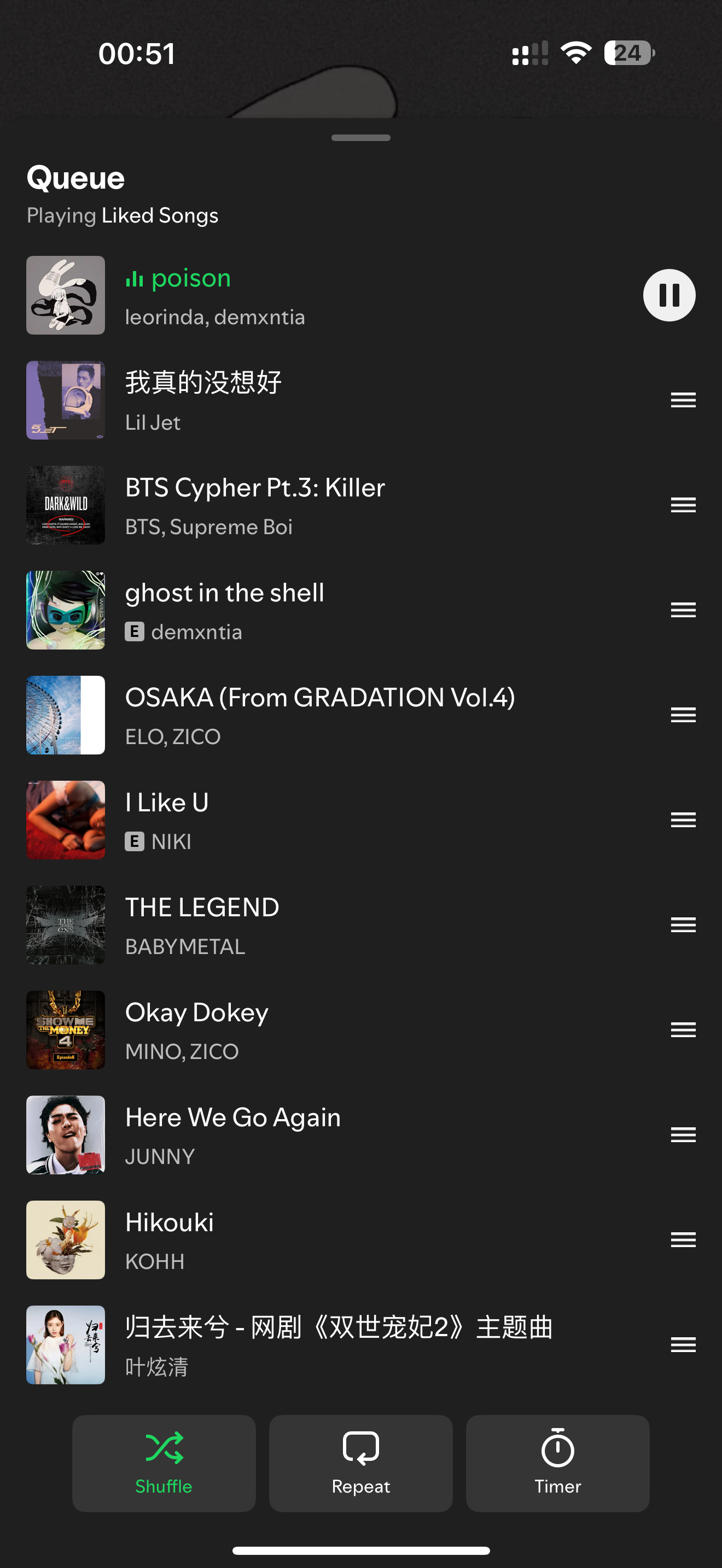
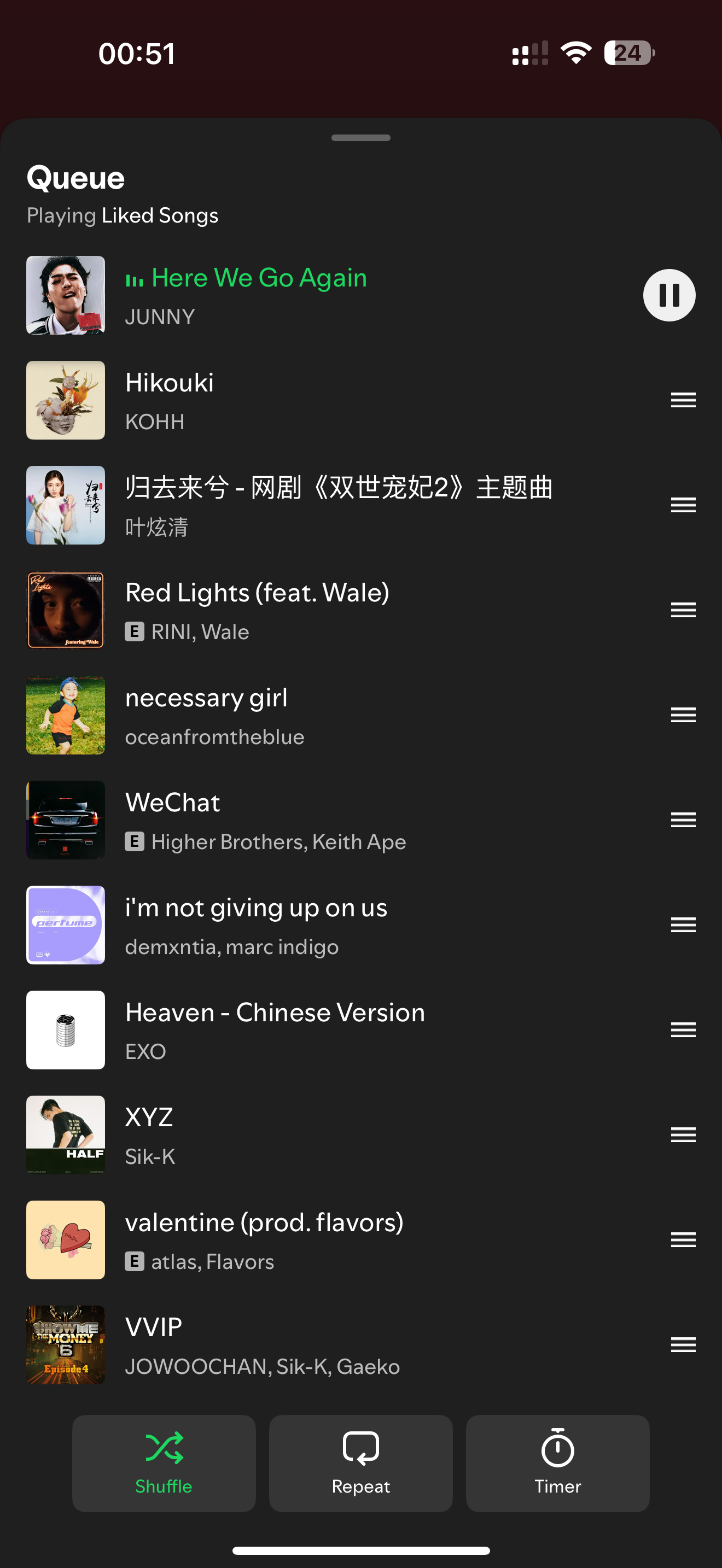
I have skipped from poison to here we go again, all the song between posion and here we go again disappear like normal
ive exited the app and reopened it, its still showing here we go again but the songs which Ive previously skipped has reappeared again
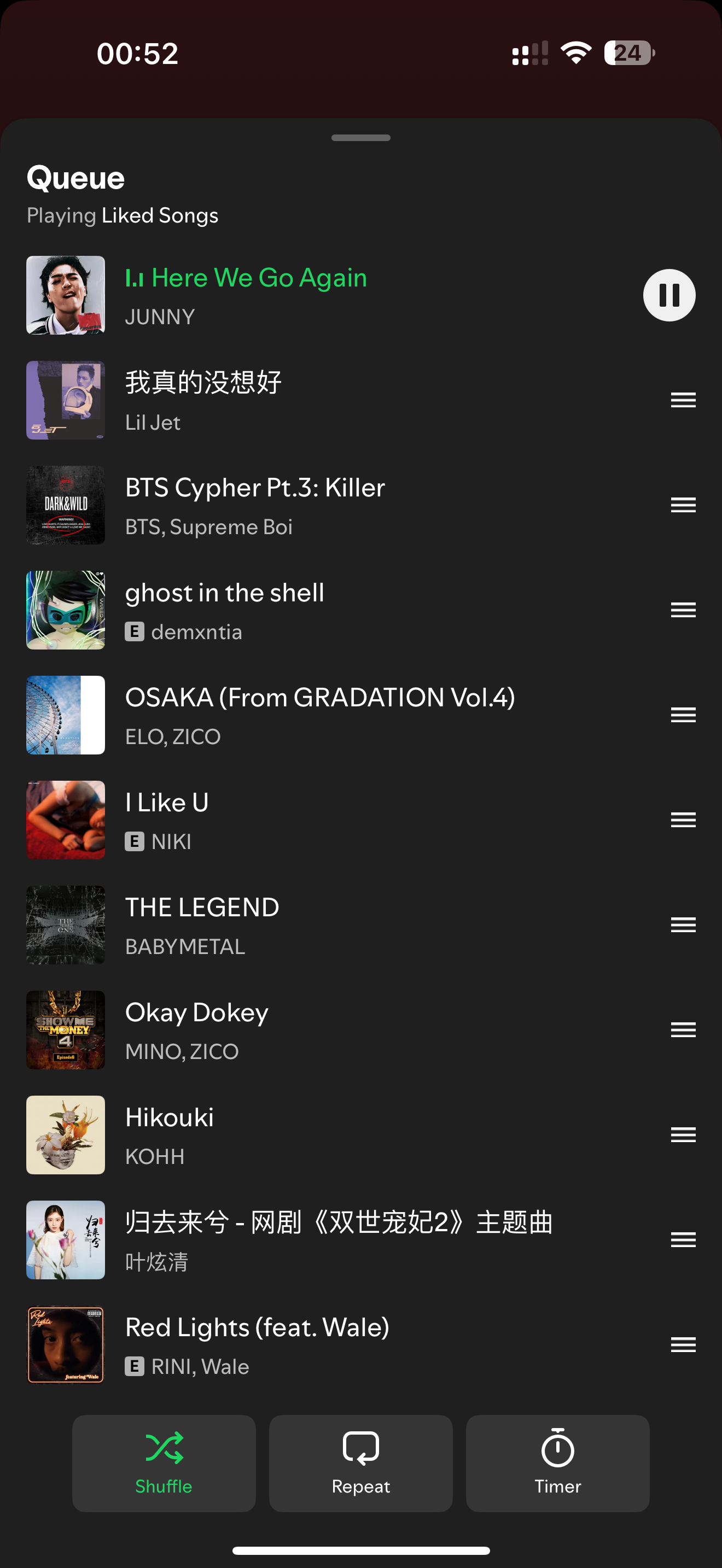
can someone help me with this because it feels like im stuck on the same few songs everytime I open the app


Android version 9.0.58
When closing the app, the progress on a playlist / liked songs is lost and it goes back to the beggining.
Happening both in mobile and Windows.
Did Android clean reinstall. No change. I listen to songs, and when not doing so for a while or closing the app, it goes back to the first song i clicked on the playlist.
I use shuffle and it's very annoying since i have to click forward and remember where i left off every time i want to keep listening to that playlist.
Thanks!
Same here Pixel Pro 6, has been happening since I went to premium so over a year. Clean installs have been done, last time I spoke to Spotify it was because I was using liked songs instead of a playlist, created a playlist, same thing happens. Also happens on windows version of the app swapping between mobile and PC when I'm listening. It doesn't matter what connection you are using, it's happened over multiple android versions, multiple Spotify versions including the most recent (I clean installed last night). It is a fault, with the app, not a phone. If you do not pay for Spotify shuffle works great because it doesn't let you reply songs - apply that to premium with the ability to skip simples