Can't edit playlist order on Android - Premium

Plan
Premium
Country
United Kingdom
Device
Pixel 6a
Operating System
Android 16
My Question or Issue
Hello all.
Per the title - I and another member of my family subscription can't edit the order of tracks in our Playlists. This worked fine until yesterday and still does for two other members of the same subscription. No other issues with our phone touch capability or with Spotify.
My Question or Issue
Accepted answers
All comments

Hey @nico_rjinders 👋
Thanks for reaching out, and a warm welcome to the Spotify Community! That definitely sounds frustrating — let’s see if we can sort it out together.
First up, a couple of things to try:
-
Make sure you're sorting by "Custom Order" in the playlist — tap the three dots in the upper-right corner > "Sort" > choose "Custom order." Only this setting lets you manually drag tracks.
-
Restart the app and clear the cache (Settings > Storage > Clear cache).
-
Make sure your Spotify app is fully updated from the Play Store.
-
If that doesn’t help, try a clean reinstall of the app by following these steps.
If you're still having trouble, could you let me know the exact version of your Spotify app and the exact version of the operating system you're running?
Let me know how it goes! ✨
Thanks so much for the reply. Unfortunately no, none of these steps, including the clean reinstall, were successful. It's a strange one!
Hey @nico_rjinders,
Thanks so much for getting back to me and for trying all those steps. I know it's a real pain when something that should be simple just isn't working, especially after a clean reinstall! It's definitely a strange one.
Since the basics didn't do the trick, let's try to narrow down what could be happening. I have a few more questions that might help us figure it out:
- Can you edit on another platform? Are you able to reorder the tracks in your playlists using the Spotify desktop app on a computer or by logging into the Web Player? This would tell us if the issue is with your account or just the mobile app.
- Does it affect all playlists? Does this happen with every single one of your playlists, or just specific ones? For example, can you edit playlists you created yourself vs. playlists you've liked from others?
- What about the other person? What kind of device and operating system is the other family member using who is also having this issue?
Sometimes, features can behave differently due to A/B testing that Spotify runs in the app. This means some users get a slightly different version of the app than others. Finding out if you can edit on the desktop app is usually the best clue.
Let me know what you find! We'll get to the bottom of this. 🎧

Plan
Premium Family
Country
USA
Device Pixel 8 pro
Operating System
Android
My Question or Issue
I am no longer able to move songs around in playlists, I'm able to go to the edit screen but when I try to drag the songs nothing happens, I have it set to custom order, I tried switching to a different order and switching back. The save button is greyed out too. My Spotify version is 9.0.66.655

Hey @jasoneff, thanks for reaching out to the Community!
Could you try restarting your device? If that doesn't help, try a clean reinstall of the app following these steps. These steps are more thorough than the simple reinstall and can solve common issues.
If you're still having trouble, can you send me a screen recording of what happens when you try to edit your playlist? Make sure to hide sensitive info when posting to the Community.
Let me know how everything goes!
Hi @noah Thanks again for the response. Sorry for the delayed follow up, I was on holiday : )
I can't edit any playlists and neither can the only affected person. I also tried on web version and the Desktop app, but no good. The other user has the same Android and Spotify version as me.
Let me know if you have any other suggestions. Seems very strange that this doesn't seem to be affecting other Spotify users!

I have the same problem. Did all the steps including clean install. I can sort on desktop but not on Android mobile.

I have the same problem!!!!
I'm on Samsung S25 - android 15. I cleaned out the cache, all files, uninstalled, restarted, clean install, STILL HAPPENS! I cannot reorder any playlist. Yes, I disabled smart shuffle. Yes, I can reorder on the desktop - completely different interface; the problem seems to be with the Spotify app on Android itself.

Hey folks,
Thanks for reaching out and flagging this!
Since this seems to have become a more widespread issue, we'd like to report it to our tech folks for further investigation. We just need some additional info to be able to do so:
- Make and model of the affected device and its OS version
- The Spotify version you're currently running
We can see the some of you have already shared their device info, so it'd be great if you can send us the version as well ✌️
We'll be on the lookout.

Samsung Galaxy S24
9.0.68.632 (just re-installed from Google Playstore)
One UI version : 7.0
Android version : 15
Hey folks,
@Willy1981, thanks for the info! On my end it works if I first press and hold the song I want to move instead of dragging it directly. Can you check if you can do that and let us know so we can have a closer look? I've also attached a screen recording for better visibility, hope it helps!
Keep us posted.
Thanks! I gave my device and operating system details above. Spotify version is 9.0.66.655
This approach now works for me, thank you. I am as certain as I can be that this wasn't the case when I open the thread.
Ok, it appears that the interface design was changed to require a "track" selection by pressing and holding, then moving the track to somewhere else in the list. Previously the only way to change track order was to pull up or down on the three bars to the right. So yeah, the method shown in the mp4 above works for me. Thank you!
Btw, I'm on a Samsung S25 (model SM-S931U, hardware v1.0), Android version 15, build AP3A.240905.015.A2.[...]
Spotify version 9.0.66.655

Hi Spotify team,
I'm currently using Spotify on an Android device, and I've been experiencing an issue: I’m unable to reorder songs within my playlists. I don’t want to rely on the "Queue" feature—I’d prefer to manually arrange songs within the playlist itself.
Often, I add songs from different genres, and being able to reorder them would help me organize the flow better. I read that tapping “Edit” and then using the three horizontal lines should allow reordering, but that option doesn’t appear for me.
I’d really appreciate it if this feature could be improved or clarified for Android users.
Thanks for your time!

My Spotify app for Android does not allow me to move songs in a playlist since the recent updates.

I'm having the same issue as of the last update. It won't let me reorder any of my playlists.
Spotify version: 9.0.68.632
Samsung Galaxy A52 5G
One UI version: 6.1
Android version: 14
Edit: clearing the cache seems to have worked for me

Hi,
For some reason, I can no longer edit playlists on my Samsung Galaxy S23 Ultra to rearrange playlists I have created, even those I have previously edited. I am in Ireland and have a premium account. I have cleared the cache, logged out and back in, and uninstalled and reinstalled, all to no effect. All I can do is scroll the list, but cannot move songs.
Any suggestions or advice would be very welcome, thanks.

Hi Spotify Support,
I'm a Premium member and am currently unable to edit the order of songs in my playlists. When I tap "Edit," the playlist opens, but I’m no longer able to move or reorder tracks as I used to.
I’ve already tried the following:
• Uninstalled and reinstalled the app (twice)
• Restarted my phone (three times)
Unfortunately, none of these steps have resolved the issue.
Could you please advise on how to fix this? I’d love to get back to curating my playlists the way I used to.
Thanks so much for your help!

Hi @Hotyogini,
Thanks for posting in the Spotify Community, and welcome!
If you can see the three lines icon next to each song in your playlist while you’re in the “Edit playlist” screen, I’d suggest making sure you’re holding down the icon before you try moving the song to a new position.
If the three lines icon doesn’t show up for you, I would recommend trying a clean reinstall by following these steps.
Let me know how this goes, as well as if you have any other questions, and have a good day!

None of the below information is required. However, the more you provide the easier it will be for us to try and
Plan
Premium
Country
Usa
Device
Samsung galaxy s8
Operating System
Android
My Question or Issue
I cant move songs within my playlists on the app. I can do this fine on desktop. I can edit the playlist but the lines next to the songs are greyed out. I can add/delete but cant move anything
I have already tried a clean reinstall. This was never an issue until last night. How do I solve this?

Plan
Premium
Country
Device
Samsung Galaxy S20
My Question or Issue
My app has stopped allowing me to re-order songs in a playlist. I can add or delete, but not reorder. I have uninstalled and reinstalled the app and it hasn't helped. I was able to reorder songs last week. Has something changed?
Hi @Hotyogini, @Dhdieieueue, and @DuncanReis,
Thank you all for reporting this issue about being unable to change the order of the songs in your playlists.
Since the same issue appears to be affecting multiple users, it sounds like something we might need to report to the relevant team.
For this reason, can you share your relevant device info (the device’s make, model, and operating system, as well as the version of Spotify that you’re using) here?
Keep me posted, and have a good day!

Hello,
Also unable to edit (change the custom order of songs) on playlists I made after updating to the latest version. I was organising playlists last night, updated the app this morning, and now I cannot edit playlists. Australia, if that helps.
I am able to change the order on the desktop version of the app. Restarted the app, cleared cache and restarted my phone as well - still unable to edit playlist order.
Hoping this gets fixed soon.
Hi @visanya,
Thanks for posting in the Spotify Community, and welcome!
Can you share your relevant device info (make, model, and operating system, as well as the version of Spotify that you’re using) here as well, so that I can pass it along to the relevant team?
Keep me posted, and have a good day!

You have to hold down the three lines next to the song for a longer time and then move the song. The moving is not as smooth, but it should work.
Hi @lubos,
Thanks for sharing this workaround!
@Hotyogini @Dhdieieueue @DuncanReis @visanya I’m tagging you to bring your attention to the workaround that @lubos has shared (holding down the three lines for a longer time than usual before moving the song in the playlist), so that you can try it out.
If the issue persists, can you share your relevant device info (make, model, and operating system, as well as the version of Spotify that you’re using)?
Have a good day!
Hello,
I'm a bit late to respond as I was travelling the past week.
I updated the app again between trips and only now got to check the edit feature on mobile. The issue has been resolved, I no longer have issues on Oppo Reno 10x Zoom. Holding the three dots/lines longer did not work for my device at the time.
Thanks and have a great weekend


It's soooo dumb. I pay for a family premium plan, new app on a newish iphone, reinstalled, but a simple function where I can just move a song around in a playlist does not work (much less there is no "edit" mode which is the dumbest thing I ever heard anyway, if it even worked). I mean, wth.... I have spent 30 minutes scrolling the internet and the most widely used app probably ever in history is just.... my head is going to explode.
Hi @AlsoHatingThis,
Thanks for posting in the Spotify Community, and welcome!
In case it’s helpful, editing a playlist on the mobile app should work this way:
- Open a playlist you’ve created
- Tap Edit from the options right above the songs
- Tap and hold the three lines on the right side of any song to move it around
Here are also a couple of screenshots from my end, to show where these options are:
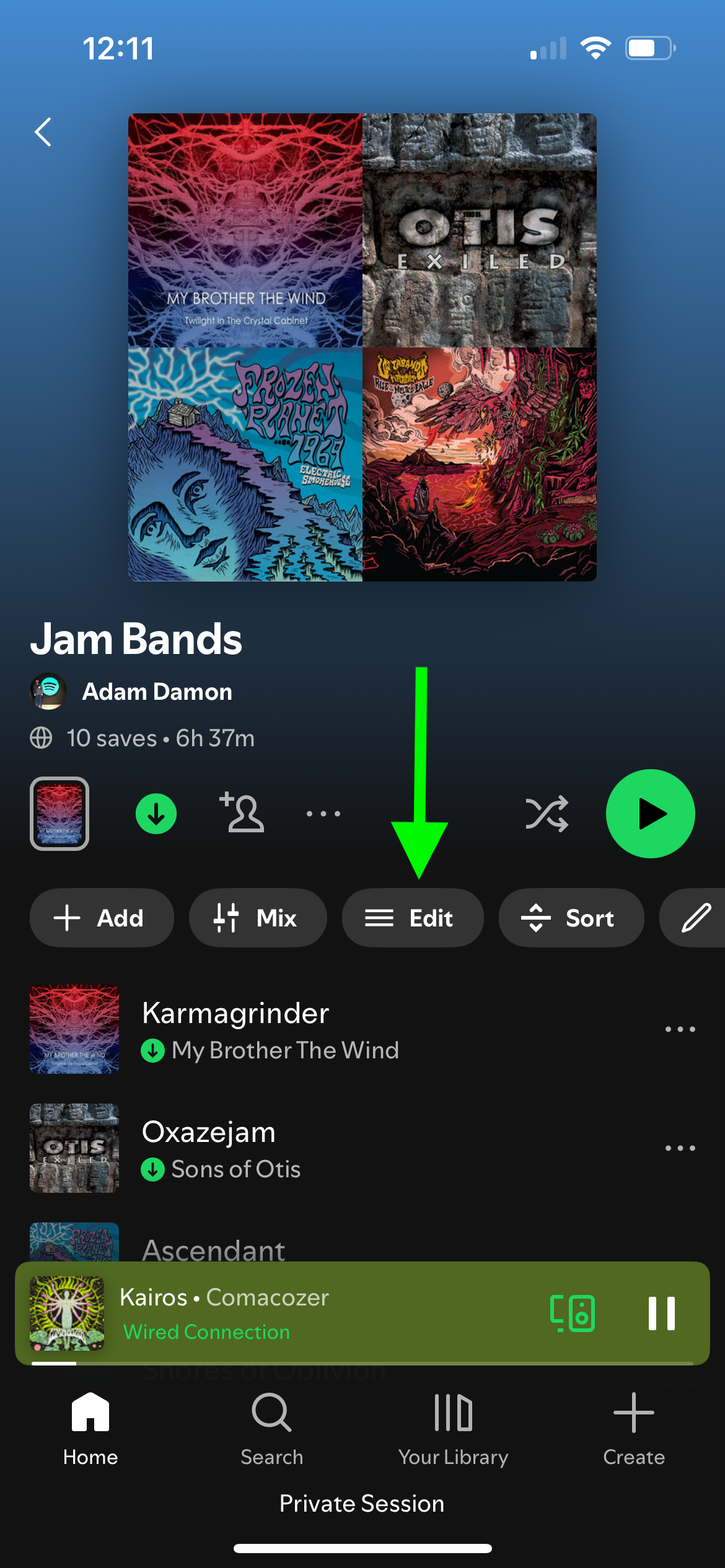
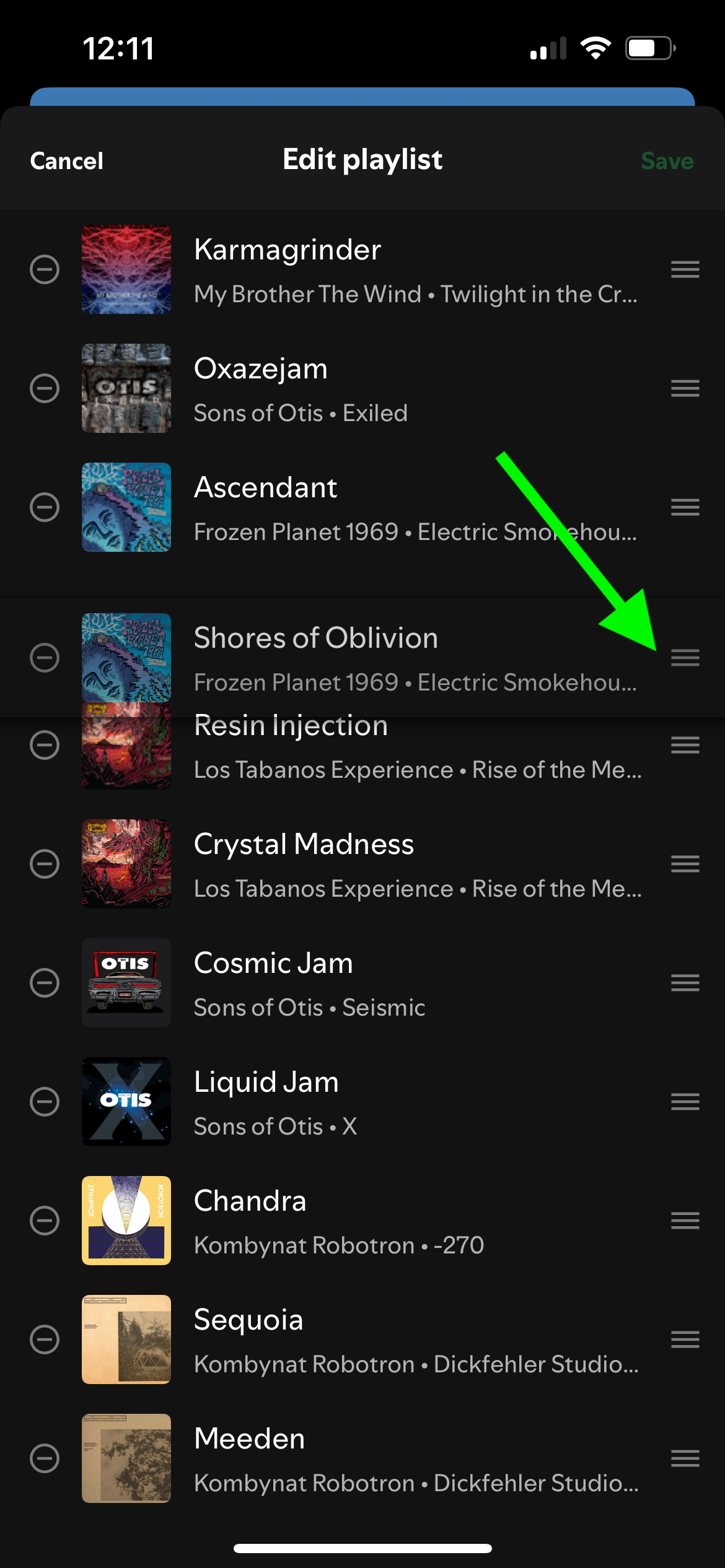
If these steps aren’t working for you, can you let me know which playlist you’re trying to edit, as well as your relevant device details (model, operating system version, and Spotify app version)?
Keep me posted on how this goes, and let me know if you have any other questions.
Have a good day!
Hey folks,
@Willy1981, thanks for the info! On my end it works if I first press and hold the song I want to move instead of dragging it directly. Can you check if you can do that and let us know so we can have a closer look? I've also attached a screen recording for better visibility, hope it helps!
Keep us posted.