The latest spotify for android update, as well as the newest iOS update, removed the "shuffle all" option for multiple playlists within a folder. I used this feature every day and it's my favorite spotify feature. Please bring it back!
**bleep**
Let's be real guys. Spotify will never implement the Folder Shuffle feature. It has also removed it from the Desktop App. Let's move on.
Fortunately for us we have Playmixify I've been using it for years and it's been great. I see that it recently updated its UI for better. Previous users might not find their old Playmixify lists, you'll have to re-create them, but the old created playlists are still in the Spotify app, working flawlessly. Newly created Playmixify lists will also be synced without issues. I believe this is a more efficient way of randomly listening to our music, because we can create a list of lists and select the playlists from whenever they are located, not just a particular grouping folder. Much more flexible in my opinion.
Why isn't it an option for mobile already? It doesn't make sense
Hi, should I cancel my subscription? Seems this basic feature is disabled on purpose, all I can think of is that Spotify wants to test how can it be a dictator and the users being slaves. So, Spotify-the-dictator can just laugh at users keeping subscriptions even though they've been denied the most sought features. Wait...Apple Music provides this feature....oh...I can escape from Spotify's tyranny.
As a Spotify user who accesses my account through my phone and iPad, I really wish I could edit my Spotify folders on the mobile app. I used to do this on my laptop using the desktop app, but this is no longer an option with my iPad setup. I would love to be able to organize folders within the mobile app. While currently it seems I can create a new playlist within an existing folder, I would like to be able to create new folders and move existing playlists to folders within the mobile app.
In the Spotify desktop app, I can play all my playlists by clicking on the playlist files. However, on iOS I can only play one playlist at a time. It would be great if you could bring the same feature from the desktop app to the iOS version.
Hi Spotify,
This functionality WILL make shuffling between playlists an easily accessible feature to any user. Currently 'playing from outside the folder' can only be initiated from the Web App. Once started I can switch to a mobile device BUT i'm locked in to the folder. If I play anything else I have to restart from a Desktop app if I want to shuffle between playlists again.
So by bringing up the play button when long pressing on a folder in the Mobile App. Shuffling between playlists becomes and easily accessible feature. Rather than a hack.
Image 1 - Playing from outside the folder in the Web App, then shuffling = Shuffling between the playlists inside.
Image 2 - Shows what currently happens when long pressing on a folder in the Mobile App. Add a play button here and we're all good to go
I totally agree!
We need this function on mobile too. Not only for the desktop PC app.
Allow shuffling or playing an entire folder of playlists on mobile, not just individual playlists
Use Playmixify (which is unfortunately not working for me at the moment). Spotify is never gonna add it.
This is 2026, and it's still the same 😥I'll join Spotify just to fix this ✊🏽
Anyone else also experiencing problems with Playmixify? It lets me add new playlists in Playmixify, but they are not synched in Spotify.
@kk86 Same here its not been working for a while now. Tried emailing the registrar of the domain name but no reply
"Hi I just want to let the creator of playmixify know that the playlists can not be created anymore."
Maybe someone has a better idea to get in contact.
In also sent a DM on this forum, no respons unfortunately!
No updates unfortunately...
@kk86 i just tried Playmixify it and seems to work again.
Its back on Android!!! And you can now add playlists to folders on android as well. Go to a folder, hit the play button top right, THANK YOU SPOTIFY!
Yes, indeed. 😂🤸
Thanks for letting us know!
Wow, its really true. There is a god.
Attention everyone apparently it’s back on android so I checked on iOS after switching from android to iOS awhile back I have two greatest playlist in a folder that I used to constantly switch between playlists in the folder and now I noticed in the top right you can click play which plays both and shuffles them thank god… seems like it’s back hey moderator when can you update this form thread from way back in 2017 let’s close this chapter! You have given what the people needed
Yes!!!! Thanks Spotify. And thanks to all contributors to this issue.
Yes very good
@Korjuin @volcanicglass @Lockness01 @kk86 @csky @kk86 @cvemann @Bartekjw @daywitt @syd-knee @Cose @zionicko @McClausky @alien236
Hello 👋👋👋
As many have seen. A folder is now playable on a mobile device.
This means you can now load playlists and/or albums inside a folder, press play, then shuffle the entire folder.
Previously this could only be done on a desktop by playing from outside the folder
One thing to be aware of
Spotify remembers the shuffle queue.
To reshuffle the queue at any time:Press pause > take of shuffle > advance 1 song > restart > turn shuffle back on
Any one else having problems when playing a folder with Spotify connect (I'm streaming to my Yamaha r-600n amplifier via Spotify connect), it doesn't work? I can't click the play button, nothing happens. When I play 'on this phone' it works, but while playing the folder and switching to Spotify connect, it plays the song and after that it stops and I can't use the back of forward buttons...
It doesn't work with my Sonos Move 2 (via connect) either, same problems.
New app update, still doesn't work with Spotify Connect.
Am I the only one with this problem?
Same behavior for me - works great on my phone but does not work when using Spotify Connect to play on my Sonos System.
Spotify: this is a bug, please fix it!
Good news!
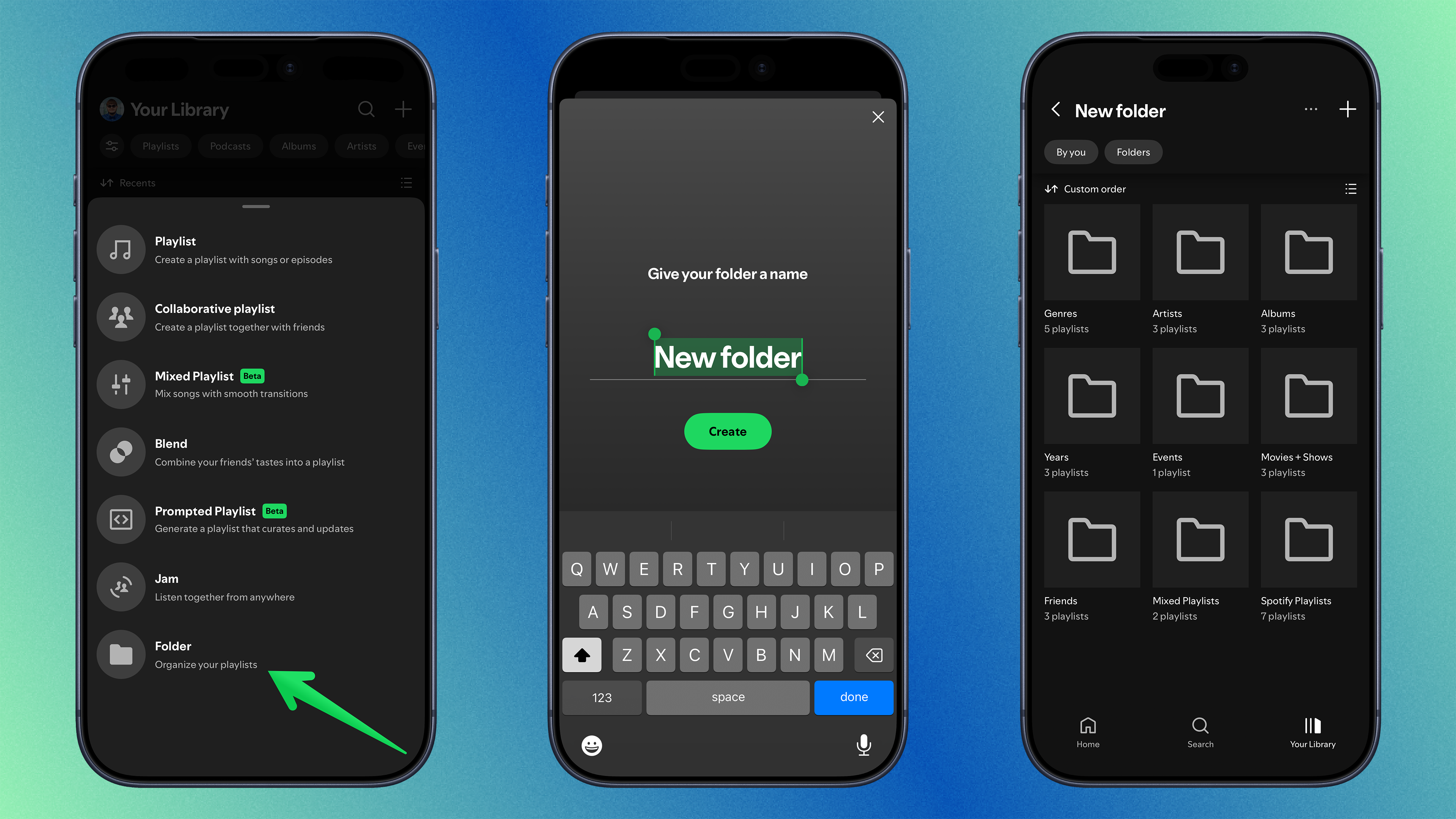
Playlist Folders can now be created and managed in the Spotify mobile app in addition to the desktop app and Web Player.
Playlist Folders in the mobile app can also now be played in order or shuffled. When you play a Playlist Folder, you will be playing through all of the playlists in the folder, starting with the first playlist and then onto the next playlist. When you Shuffle play a Playlist Folder, you will be randomly playing through all of the songs from all playlists that are in the folder.
Check out this post to see what's new and get tips for organizing your playlists:
➜ Playlist Folders are Now Available on Mobile – Here’s How to Organize Your Playlists
The ability to create and manage Playlist Folders in the mobile app has been one of the most requested features, and now it's rolling out globally to all Free and Premium users. 📱 📁
Playlist Folders are a great way to organize the playlists in Your Library. If you have a lot of playlists that you've created or saved, then it can sometimes be a challenge to quickly find the one you're looking for. Playlist Folders help you clean up Your Library so that you can spend less time finding your playlists and more time listening.
Playlist Folders sync across the mobile and desktop apps. Folders that you create and any changes you make will show up across both platforms.
@smallett20
Playing an entire Playlist Folder is not currently supported over Spotify Connect. When you try to do so, you may see that nothing happens or that you get an error message. To play an entire Playlist Folder you will need to play them from the Spotify desktop or mobile apps. You can still play playlists inside of a folder over Spotify Connect, but you need to specifically choose the playlist inside of the folder and not the entire folder.