No more Library?

with the recent upgrade i dont see the home library anymore.
i could always find a particular track in that library button if wasn't able to locate a track in a particular playlist.
now what?
now it seems i have to re-save all tracks so they show in the songs or ablum tab.....
or
is there another way to see your entire library in one place ?
if i drag and drop all my playlist into a new folder then there will be multiple duplicates in that new combo folder.
any other ideas?
Comments
i see,
i finally found many responses to this issue that i should have read first but i apprciated your quick response.
thanks
i do like the new version other than this will take some time to get re-organized .
thanks
mark

I've been using it for a few months as one of the beta testers and, for me, the biggest problem was getting my head around how to make it work for me 🙂

Removing the libray option is the most idiotic and retarded idea possible.
I have many playlists and now you really think all users should MANUALLY add all their tracks to this list?!!! (500 TRACKS MAX in order to not crash?)
****?! whos coming up with this cr*p and whos responsible!?
I dont pay 10€ per month to get **** after years of good spotify experience!!
I SERIOUSLY CONSIDER CANCELLING MY PAID MEMBERSHIP
BOOOOO for spotify!!


Totally agree with Bartssom, and I added a new post as well with this issue. It is a terrible idea if it is true that I would have to manually add the music from my playlists. But more so, I dont have every song from my library added into my plyalists, so it would still be missing music if I were to manually add them.
I would think that the "Your Music" tabs would automatically populate, like how itunes simply does, and how spotify did before with the "Library" list. All of the music I have on spotify is straight from spotify so I don't know why mine is not populating if there's another way other than doing it manually.
Not to metion not having a proper help desk is a joke.


Hi Guys and Girls
This one has me in a bit of a fix all of my music is in the libary .so am i being thick i hope not ,i have had spotify for many years where has the libary gone ?.I hope that stored tracks can be recoverd.
here is part of a recent support reply
|
10:10 AM (5 minutes ago)
 |
|
||
|
||||
Hey there,
Thanks for getting back to us.
We are always trying to improve Spotify with bigger and better features and so we are constantly updating the app, sadly this sometimes means that certain features are removed.
In this case the Library was replaced with the Your Music feature.
Think of it more like an improved version of Library.
Unfortunately however unless the tracks were saved or in a playlist then they will be gone as they were not tied to the account.
Hope this explains things a little more.
All the best
Duncan
Spotify Customer Service

 |
|
let me ask few of us ..... why we don't demand a refund for the months the library was removed from the product we have been paying for . essentially, i have been renting and paying for all the songs that were in my library and then without notice they're all gone . i , like many of us, saved particular songs to playlists but not all of a particular album. so now i've been going thru all my playlist to see what's missing and it's thousands of songs that i have already, so to speak, paid for the use of .... this has been a total waste of time and could have been easily avoided if notified and i/we could have saved our entire library to a specific play list that would have solved the issue
i want a refund, do you ?
hey peter ,
actually no.
the library did indeed show the content from my playlist but not all my content was in playlists ....thousand were only in the library ,
not part of any playlist.
the playlist were the only thing transferred.
so yes,
i lost tons and tons of content.
content i'm saying in some way i paid for at the time ,now gone .......
I've just double checked with one of the Spotify team and it definitely was never possible to save content to your library directly, so any content that was displayed there will still be on your account somewhere:
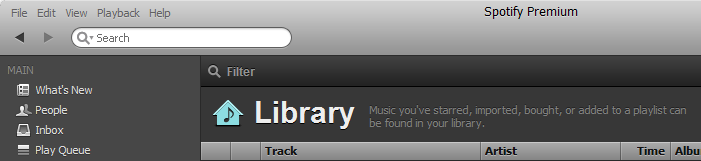
It is possible you may have removed some of the playlists content was on, if so you should be able to restore them here:
https://www.spotify.com/account/recover-playlists/
I've also removed a few duplicate posts/topics, let's keep the discussion in one place.
i would check that again, because that is exactly how and why my content was effectively removed. that is how i saved most of my music and then at some point moved it to specific playlist. can someone else back me up on this.
i did not remove any playlists.
so you work with or for spotify to resolve these types of issues.
thanks for consolidating the topic
peter,
it seems your partial right , i see now that the content i'm looking for , for weeks ! is actually in my" local files" now. this was prior music only from the itunes transfer and actual added cd disks, now it seems it is also music from my library that was not in any playlist. so now i need to highlight that and drag that to the "songs" tab .... and i'm back to a new library of sorts , correct ?
well, i just dragged over some files to my "songs" and they play ......
what does that mean they are not supported ?
From my understanding, you could not put songs directly to the old library, just into playlists. However, when you put a song into a playlist, it would then appear into the library, and if I ever deleted a playlist, all my songs would still be in the library so that I could then make new playlists. The other issue I am having is that not only can I not access all of my old songs from the old library, but that those songs are still taking up memory on my phone. @brotman I think it is competele reasonable to have our accounts credited some for these issues and hassles.
I was going back and for a bit with spotify support, but I have included below the two responses I have received. Have not had a chance to try either method yet, but I will reply back when I do.
>Looking over your last email I can happily say that if you ever delete a play list and thing "nooooo, what have I done" you can log into your account on our website and go to the "recover playlists" section. Here you will find all of your old old playlists waiting eagerly to be reunited with you.
>If the app is still using memory then you'll need to clear your cache. You can visit this link on your mobile to reinstall;
http://m.spotify.com
This link will automatically detect the most recent compatible version of our app for your phone.
No it wasn't, but I had them all downloaded for "offline play."
http://community.spotify.com/t5/Help-iOS-iPhone-iPad-iPod-Touch/Clear-Cache-Button-Needed/m-p/671808/highlight/true#M26904
peter , now i'm back to this subject and it seems you are the spotify rep.
so how is it now explained that the local files are not compatible to the "your music" tab. ....prior to the change all was in my library.....now i need to toggle between the local file and "songs" to get access to all my paid for rental tracks from spotify .... or re-save them which mean i need to go thru all and see what is in the local files but now not in my "library" or as spotiy calls it "my music" except it's not !
what is the link to begin the process to ask for a refund and then a canceling of my premium account
this is terrible
You can get in touch with the customer services guys from here:
https://www.spotify.com/about-us/contact/contact-spotify-support/
You're right in everything you say and yes, the folder solution is as close as you'll get to recreating the old library. Your music is actually a much better way to organise your collection, once you get used to it. I moved everything into YM over a couple of week and now only use playlists for "mixes" and local files.
You can move tracks in bulk by dragging them onto Songs in the desktop client. Just be sure not to drag more than 500 at a time as it can trigger a bug.