Release Notes - Spotify for iOS 1.4.0

- New: You can now view and control your Play Queue. (iPhone)
- New: To avoid duplicates, we'll ask you to confirm if you add a song to a playlist twice. (iPhone)
- New: Say hello to sorting and filtering in Your Music. (iPhone)
- Fictitious: This app is obsessed with penguins.
#iOS #1.4.0 #ReleaseNotes
- We are looking into fixing iPad rotation with version 1.5, but keep in mind it may slip to a later update.
- Filtering and sorting in Your Music is not rolled out to everyone yet. We'll be rolling it to more users every day. Apologies for any confusion.
Update for version 1.4.1: Only some minor backend fixes.
Accepted answers
All comments

If it's like the android app, dragging down reveals the filter and sort.

Well...@jwylot...that's the first thing I did 🙂 but dragging down won't show anything.
Rearranging your playlist in Your Music:
Open playlist, tap three dots (top right), tap edit, drag tracks.

???? You've just described what a customer has to do to EDIT a playlist...
Since the changelog says: "Say hello to sorting and filtering in Your Music" I'm wondering what the playlist editing has to do with sorting or filtering????
Thought you were referring to arranging your playlist.
For sorting albums, songs and artists just drag down and tap the stripes to the right of Filter

Hello Per,
So basicly you are saying that we still can't sort our own playlists (Like the desktop app, by artist, added and so on)?
That this function is limited to Your music > Songs, Albums, artists etc.?
Why not impliment the same functionality for our own playlist, That is probably what most people long for...
And using the Edit function in a playlist is far from the same thing.

no this update is not supposed to do only playlist sorting...it's supposed to any sorting, filtering in your YM but for me it doesn't work.

The filter/sorting option won’t show until you force quit the application 😕
now I see...thank you. (but I had already tried to quit the app...with no results)

So 'control of your play queue ' seems to be to just view your play queue and pick a different song, not edit the play que. Correct?

I got a little bit excited thinking this update would bring playlist sorting to iPhone, but as previously said it's only for Your Music. Was highly disappointed. Are we ever going to get this feature?
Glad about the play queue and duplication features though - they've been long overdue. Hopefully they'll get added to the iPad app soon.

anthonylennon: Do you want to sort tracks within a playlist? Is that it?

still no eq

I thought this update meant I would be able to sort playlists I have created into alphabetical order automatically instead of doing it manually? Or have I missed the point?!
Oobermann: You can now automatically sort the playlists within "Your music" alfabetically, but not the tracks within a playlist. Sorting tracks within a playlist is still a manual job it seems.
I am currently in the "Playlists" tab in My Music and I can't see any option to sort playlists alphabetically? I just have edit in the top right hand corner which brings up the option to delete playlists I have created
Oobermann: Dry dragging the screen down a bit and a filterbox should be visible. To the right of this is a button that lets you choose sorting method. If you don't see the filterbox try to force quit the app and restart. I had to do this.
Forced closed the app, restarted my phone. Reinstalled app. Restarted my phone! Still no option. Can you post a print screen of what I should be seeing? Thanks 🙂
Oobermann:
Like this:
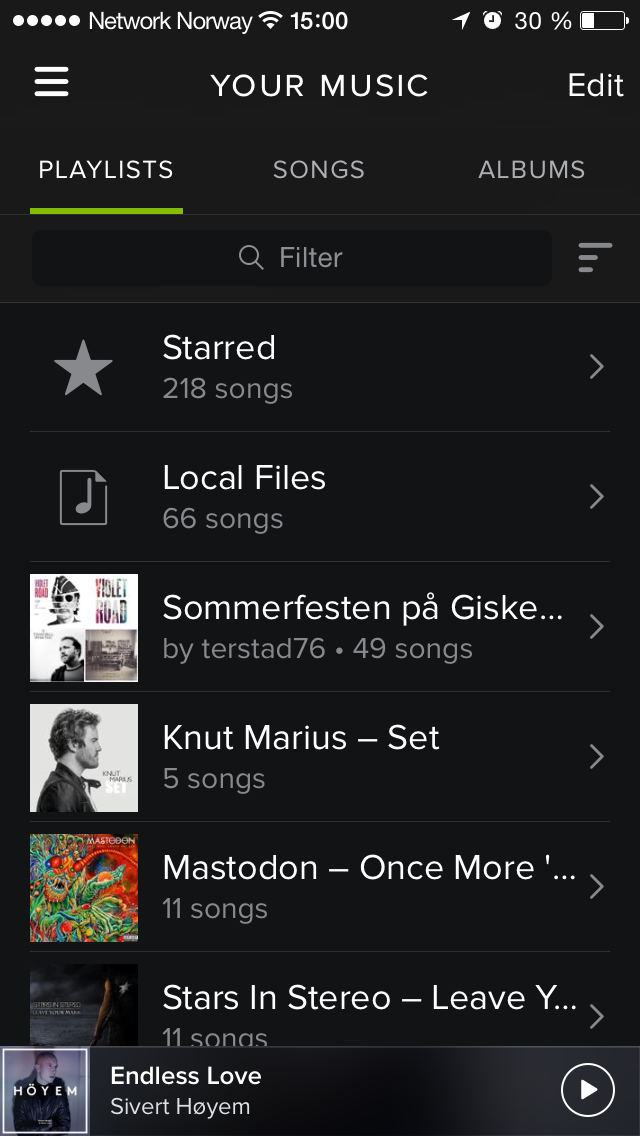
Thanks 🙂 I am not getting that filter box! Do not know what else to try! 😞
@Oobermann wrote:Thanks 🙂 I am not getting that filter box! Do not know what else to try! 😞
And you're sure youäre on 1.4?
Could you screenshot your settings screen where it shows your version, and your playlist screen after dragging down? I can show this to our QA folks.
Here


And this is after I have scrolled down


And if you drag playlists all the way down, i.e. scroll all the way to the top?
This


Updated the app but can't see any sorting under albums...deleted and reistalled the app after rebooting my iphone...