Release Notes - Spotify for iOS 1.4.0

- New: You can now view and control your Play Queue. (iPhone)
- New: To avoid duplicates, we'll ask you to confirm if you add a song to a playlist twice. (iPhone)
- New: Say hello to sorting and filtering in Your Music. (iPhone)
- Fictitious: This app is obsessed with penguins.
#iOS #1.4.0 #ReleaseNotes
- We are looking into fixing iPad rotation with version 1.5, but keep in mind it may slip to a later update.
- Filtering and sorting in Your Music is not rolled out to everyone yet. We'll be rolling it to more users every day. Apologies for any confusion.
Update for version 1.4.1: Only some minor backend fixes.
Accepted answers
All comments
 finnaqua

Hello,
Definitely happy to see Spotify giving their iOS (iPhone) customers a little love with the rollout of Your Music Sorting to this platform. Maybe next time, iOS can rate higher up on your Android-Priority delivery roadmap. We can always dream...
Overall the sorting works well, but the app. has crashed on me at least 4 times in the last day. This has occurred primarily when adding a number of albums (7-10 at a time) to Your Music, and after an average time period of 10-15 minutes. I have also noticed while accessing the app. running in background, it will open and then go back to background mode (still running). I have also seen a few Off Line screens which require a app. reload to correct.
The other thing I noticed is Spotify needs to add some better way of scrolling through a large number of albums in Your Music (when sorted by Last Added). If there was a date index on the right side of screen, or maybe provide a fast scroll option (just a thought).
And we finally have access to the Play Queue, but not really sure how much help it is in the current implementation. The Spotify Play Queue has always been a mystery to many, and I can see the same questions popping up all over again (why does it work that way....lol, don't need to respond). It would be help to move ALL tracks in the queue, and not just the ones you add after the fact. So for example, when play an album and then view the play queue, I can see all the album tracks (but cannot move them around). If you then queue a track or two, you can move those up and down but only within the recently queue tracks. And the BIG question is, Why can't I queue an album????? The Play Queue function is NOT album friendly....
Spotify, any plans to add Album reviews to any of your platforms? You must be the only music service not providing this feature. And while you're at it, can you please increase the Artist Bio font size on iOS so it's readable by human eyes?
Thanks, Phil
Spotify client 1.4.0.1334
iOS 7.1.1 on iPhone 5

i use deezer and their app is useful, at least i can use that on my ipad and iphone. i will continue to move my playlists via spotizr.
you don't say anythin your customers but you have to explain what is going on. maybe you won't update spotify for ipad....

Minor little issue I noticed, when playing a track from the Albums tab in Your Music, the artist and album seem to be swapped around so the "playing from" description sounds a bit strange:
http://i.imgur.com/2iITdGx.jpg
Should be "Immersion by Pendulum", not "Pendulum by Immersion" 😉
Pendulum is the artist and Immersion is the album. Only occurs when you navigate to the track from Albums, as the description just mentions the artist when you navigate from Artists, and it says "Playing from Your Music: Songs" when navigating from Songs.
Seems to occur with any other tracks I've tried as well when playing from Albums.
Hopefully it's a quick enough fix that it can be fixed in the next update!


The developers should be aware of the title swapping bug. Hopefully it'll be fixed in the next update.

I still haven't had the filtering update 😞 What is the time scale for it being rolled out?

Where is the filtering function in the latest version? I can`t find it??
Hello,
You may not have it yet as they are doing a phased rollout. When you have the sorting option, you should be able to pull down on the screen in Album and Artist view, and see an indicator on top right to display the sorting options.
Regards, Phil
Ok ,thanks for the fast reply Phil.
So, does this mean that the playlists won`t get the filtering function but only album & artist view?

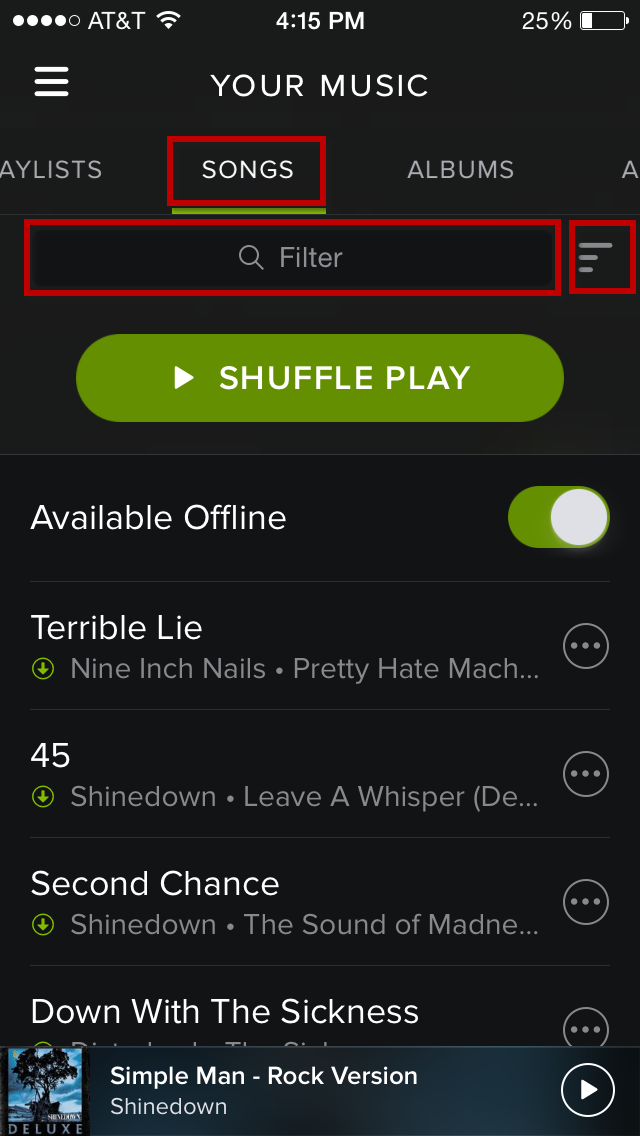
Hi,
Sorry but I didn't even notice that Playlists also have sorting feature. The options are by Name, or Custom which is how you arranged them. You can also view Playlists that are available offline.
Regards, Phil



Update for version 1.4.1: Only some minor backend fixes.

> Update for version 1.4.1: Only some minor backend fixes.
Does this include a fix where Spotify's song list freezes every hour or so, and thus user is required to restart Spotify? I'm using iPad Air with iOS 7.1.2. This freezing problem started with Spotify 1.4.0.
What's the intended behaviour of the play queue in this context? You use the filter box to find a song to listen to. Say you end up filtering the song list down to about ten tracks with the same word in it. You play a song from that view. When you open the play queue, it shows those ten tracks in the queue (shuffled or not).
You leave the song playing, and go back to the filtered song list. You clear the filter box, and go back to the now playing screen and open the play queue. The play queue still shows the filtered song list in the queue. You can't clear it until you change to another track that's not in the queue already.
In the desktop app, the play queue dynamically updates if you play a song from a filtered view. So if you clear the filter, the play queue updates itself to reflect the change in the filter. Wouldn't it make sense for the iOS app to do the same thing?

Has anyone noticed this bug:
If I search for a specific song, it will come back with "See All Songs". The I get a screen with a "Most Relevant" section and an "All Songs" section. When I tap on a song in the latter section, it does not play the song i selected, but plays a completely different song from the former section.
Any ideas? Thanks!

"New: You can now view and control your Play Queue (iPhone)"
How do you control the play queue? I can view it, but can't see how to "control" it (where, by "control" I mean dragging songs within the queue to reorder them).
Hello,
Unfortunately you can't really do too much with the iPhone Play Queue.
If you select an album to play, you can see the tracks in the queue but cannot change their order. After you select that album, if you queue additional tracks, you can move the order of only the additional ones you added.
Would LOVE for Spotify to comment on the usefulness of their new iPhone play queue function. It's nice to see, but not very functional at this point. Maybe that will change in the future...
Thanks, Phil

I have to say, well done spotify. Some actually very useful features there.
- duplicate track warning is perfect
- filter by avail. offline is nice touch
- i can now see the queue!! wooooooW long wait
- sorts are good addtion but need bolstering to make useful
- it does seem quicker in fairness.
So, kudos to you guys for rolling out positive changes. Thank you.
But, and this is a big but...
- features should be generically rolled across platforms. The duplicate warning should be in the desktop app and android at the same time. its doesnt make sense, too many people having different experiences. i have an iphone, andorid tab and desktop and each one is different... i also have the virgin tivo app but that is just useless.
- i still would like to add items quickly to my 'starred' playlist, it isnt the same as 'saving'... it just isnt.
- the old double tap feature needs to return, really handy to quickly access menu.
- queue editing is lacking basics like, reorder and remove, only thing we can do is skip.
- all the buttons are too small these days, the + icon and filter buttons, sort buttons, etc. they are just so fiddly if your trying to use it on the move i.e. at traffic lights, laybys, waiting for a bus.
anyway, thanks for making some immediate improvements, I was close to leaving recently and it is good to see some positive moves to get spotify back to its former user friendly self.

I couldn't find a way to control the play queue either. This is the one feature I really am missing in the Spotify app.
For now I am testing out the SpotQueue app which allows you to log in to your Spotify account and view AND edit your play queue. Check it out.
I would think if someone else can do it so can Spotify, but still waiting.

I've not been that impressed with Spotify after a couple of weeks. I've had requests to do two app upgrades and, given that they are rolling out so quickly you think you're in a position to put in "funny" fictitious features? I don't think so.
Reading through this discussion makes me think that many of the folk who use the app enthusiastically aren't that impressed with it either.
It probably won't be long before this one gets uninstalled I suspect.

Nope but since you mention search, I have the following bug: try to play specific song from search results directly (not via showing its album etc) --> app "crashes" (well actually it minimizes and the process probably gets suspended but not killed). Happens every time in any search result. (iphone4-32 / ios 6.1 / spotify 1.4.1.4)
Same issue after update 1.4.1.4
Ios 6.1
Spotify 1.4.1.4
Iphone 4 -32G
Jbroken = Yes

I am still waiting for being able to sort my playlists A-Z I know I got told this was being rolled out BUT IT HAS BEEN NEARLY 2 weeks.
I pay £9.99 a month and other people who pay the same are getting better features? Can someone from Spotify comment on how this is fair? Or when I am likely to be able to get this feature? App is updated to the latest version

still no eq