10,000 song limit

This is more just a plea to the people at spotify:
Why have you put a limit on how many songs we can have in our own music? It just makes no sense!! I've filled up my 10,000 song limit allowance already and now want to save more music but can't.
The quicker this can be changed the better as I am seriously considering cancelling my subscription
Accepted answers
All comments

When Spotify made it clear they didn't care what their users want, I downgraded to v .9.7.16. However sooner or later Spotify will make it really clear they don't care what their users want and force an upgrade. I was skimming through the forum and noticed this topic. I have about 3,000 CD's ripped to my hard drive and many more digitally purchased tracks. Is Spotify seriously saying they'll only import up to 10,000 tracks? I can understand having a 10,000 track limit per playlist but limiting an entire collection to 10,000 tracks is just plain stupid. It's not like Spotify's catalog is close to being complete or anything.

I think the 10,000 track limit is just an issue with the Your Music not with the Local Files folder of the app. I believe you are still able to add as many local file songs as you wish. Although I only have a little over a couple thousand right now as most of the music I had in local files I found in the spotify service and use those versions instead. Everytime I have done a full fresh install of the spotify desktop app the first thing it does automatically is search for local music files still, and always adds what is currently almost 7800 tracks currently. You can add it all just be prepared for the spotify app to automatically link any local files you have with whatever is in the spotify service. I always drag and drop manually any local music files a few at a time such as single albums and adjust accordingly to what spotify wants to do from there. As sometimes the spotify linking can get screwy and messed up.

Thanks guys. Good to know Spotify isn't that crazy yet.

By the way, the actual limit for songs per playlist is 1,000, as far as I know. And drawing a conclusion from the fact that hardly anyone has playlists longer than 10,000 songs to limiting the complete user library (which is Your Music -> Songs now) to 10,000 songs is hard to understand. I like the new easy method of saving an album which automatically adds all its songs to Your Music -> Songs, but I have to keep in mind this limit all the time and only pick the most interesting albums from my favorite artists, otherwise I already would have hit it in the meantime. Users who are not aware of it (probably most Spotify users) will simply run into this wall wondering what happened.
@hans-jürgen Is that limit exactly at 1000? I just tried a test playlist to see if I could reach this limit? I am already over the 1000 limit with all spotify content no local files at all. In fact I am at exactly 1147 songs on a test playlist. I like to see things sometimes myself, I have always seen the 10,000 track limit, so I wondered and tested, I think I broke it. 🙂
I thought I had read about a 1,000 songs limit recently, but maybe got something wrong, perhaps in the context of radio stations internally only using the first whatever number it is when you base them on a playlist. I have some old playlists myself converted from Last.fm which have more than 1,000 songs as well, e.g. my loved tracks.
Ahh ok, no harm no foul, just checking and making sure I am not reading things wrong. "Now wipes forehead of sweat thinking of needing more playlists when I actually don't". 🙂

It's not about single playlists. A couple of month ago i erased all my carefully built up playlists (sorted by genres and artist) and switched to the, as easy to handle declared album section. Now i reached the limit of songs and can't save any more music... this is so depressing!!!
THIS NEEDS TO BE CHANGED!
And if the argument against this, is that "only a smal group of people would benefit from", i just can say that in this case
Spotify isn't thankful enough to those who are useing and supporting the plattform the most!
Peace out
-Mike (germany)

this is not about playlists but your music library
partymayc schrieb:It's not about single playlists. A couple of month ago i erased all my carefully built up playlists (sorted by genres and artist) and switched to the, as easy to handle declared album section. Now i reached the limit of songs and can't save any more music... this is so depressing!!!
It might still be possible to restore your deleted playlists in your account settings, so you could e.g. move your old playlists into one new playlist folder and play that whole folder in shuffle mode. It's the only way of having more than 10k tracks in one place at the moment besides the Starred playlist which also allows that, but the handling of such large playlists is very slow in the current desktop version:
https://www.spotify.com/account/recover-playlists/
By the way, this is an old thread, the current related idea to vote for a higher limit is here:

I'm a massive music fan but feel the walls of Spotify are closing in on me as I am forced to streamline the music I have saved.
Increasing this limit has to be a no brainer for Spotify if they want to appeal to proper music lovers.

Honestly I've got a little over 15,000 purchased tracks in my personal collection from pre spotify days and spotify limits my local files collection to 10,654, I'm considering switching to Apple music or Google play music because it's a pain to sort through tracks, because I don't need all the songs in spotify per say but because of the limit it leaves out tracks that aren't available on spotify.

I just started a Google Play trial due to this limitation. I have a very wide taste in music, so any "station" will never cover all what I like. It may help with a current mood I am in, but not help me when I just want to shuffle through all the songs I like.
I just rebuilt my library in Google Play (10,500+ songs so far) and it keeps going.
I like the social features on Spotify, but I am not sure if they are enough to keep me when I cannot keep my library as full as I would like it to be.
In 28 days I have a big descsion to make...

I will be leaving spotify because of this limitation.
I found out about this limitation from a friend also leaving because of this.
I'm here to verify it is true, and it seems it is.
Very dumb move, Spotify.

Happened to me. I couldn't figure out what I was doing wrong.
I thought it had to be a hardware issue. I have gone in and tried to put stuff on "Play Offline" mode over and over again only to loose them. Frustrating for a guy who travels a lot without the option of online play when in the air or on the road in the middle of nowhere.
Can someone plainly state to me what the maximum number of "Play Offline" songs is?
And/or is there a way to download the files (in playable format) to my micro sd card?
There is a limit of 3,333 songs for offline, which is different to the limit of songs that you can have in your library:
https://support.spotify.com/us/learn-more/faq/#!/article/How-many-tracks-can-I-sync-to-my-device


I would quit Spotify too-- immediately-- if there were a 10,000 track limit. My main "playlist" is 63,618 tracks; my SoftTimes "playlist" is 12,711 tracks.
So the 10,000 track limit is just another Bug that you can DeBug by debugging your "operations procedures"-- just like NASA to deal with the reality that your "software" is out towards Mars and you cannot debug the code right now. (smile and laughing)
I certainly agree with you, @1248753321, that the 1.0.16 player and progeny are all non-functional in having that 10,000 TrackLimit bug-- and many other bugs-- for which no DeBug has yet been found. I would leave Spotify too-- immediately-- if I could not use a fully functional and working Spotify player such as >> 0.9.15. <<

This is what lead to me cancelling my sub this morning. Just hit it, it's bull**bleep**, and I wont pay for it.
Why? What happened?
You can have a playlist of at least 63,000 tracks right now if you want. You want more?
Managing that playlist of 63,000 tracks takes some strategy in what you do and don't do-- but that is how Technology is. Maybe Windows 8 was unusable for business-- but Windows 7 did quite well, did it not?-- as long as Microsoft did not find some nefarious way to take away your Windows 7 tools, right? You can give me a similar situation on Mac, if you know one.
You have the same situation here on Spotify-- as long as Spotify does not take away the tools that work on Spotify, there is no logical reason to "cancel your sub".
What are you trying to do, @rustyteakettle, that you think you cannot do with the "sub" that you had on Spotify?
Personally I just want to be able to browse through one list of music that I have spent a considerable amount of time selecting.
Browsing through a playlist of over 60,000 tracks is completely reasonable. I commend you on your understanding that in any civilized computerized situation, you must be able to search, filter, and edit in one list.
As I write this to you, I am looking on another computer at my largest playlist of 63,975 tracks-- and growing-- that I call WorldLibrary.
In that one list of 63,975 tracks, I can do the following-- just as I would with any small playlist.
* Order all 63,975 tracks by the column I wish
* Filter across all columns to select all matching tracks among the 63,954 tracks using any word combination
* Copy any selection-- including Ctrl-A to select all 63,954 tracks for Randomization in an Internet tool outside Spotify-- or in an Excel spreadsheet for various DeDuplication operations-- such as select only one performance of "Eleanor Rigby". If I want a particular performance of "Eleanor Rigby", I put that track in a Special Playlist that does not go through DeDuplication.
Of course, none of the above operations can be done in any of the 1.0.x Spotify players. I use the 0.9.15 player-- which is one of the fully-functional players that all of the Spotify power users have permanently installed so that updates are blocked and refused always.
Among my friends, which are typical of all Spotify Premium users, less than 20% demand a OneList display of more than 10,000 tracks-- so Spotify does not feel any necessity to maintain a OneList display for more than 10,000 tracks.
If Spotify for some illogical reason removes our ability to use a fully-functional player, such as 0.9.15, which fully-functional player provides a OneList display of more than 10,000 tracks, then all of us will terminate our Spotify contracts and move on.
So I can commiserate, @rod_law-- you definitely need to browse through OneList of all the music that you have selected. Would you like to install 0.9.15?
I can give you some suggestions for operations and organization of your Folders under your MasterFolder so that you have a virtual playlist of over 60,000 tracks that you can Browse, Sort, and Select in OneList.
I'm sure other users will be of the same opinion.
Am I correct in my interpretation of what you're saying, that an early version of Spotify allows us to bypass this issue?
Maybe >> try this link << for the 0.9.15 player.
I organize the songs in the playlists so that I can tell from the "Added" column-- in which playlist the track will appear-- in case I want to delete the track from the TotalListingOfAllTracks in the ...WorldLibrary folder displayed in the LeftPanel in the illustration.
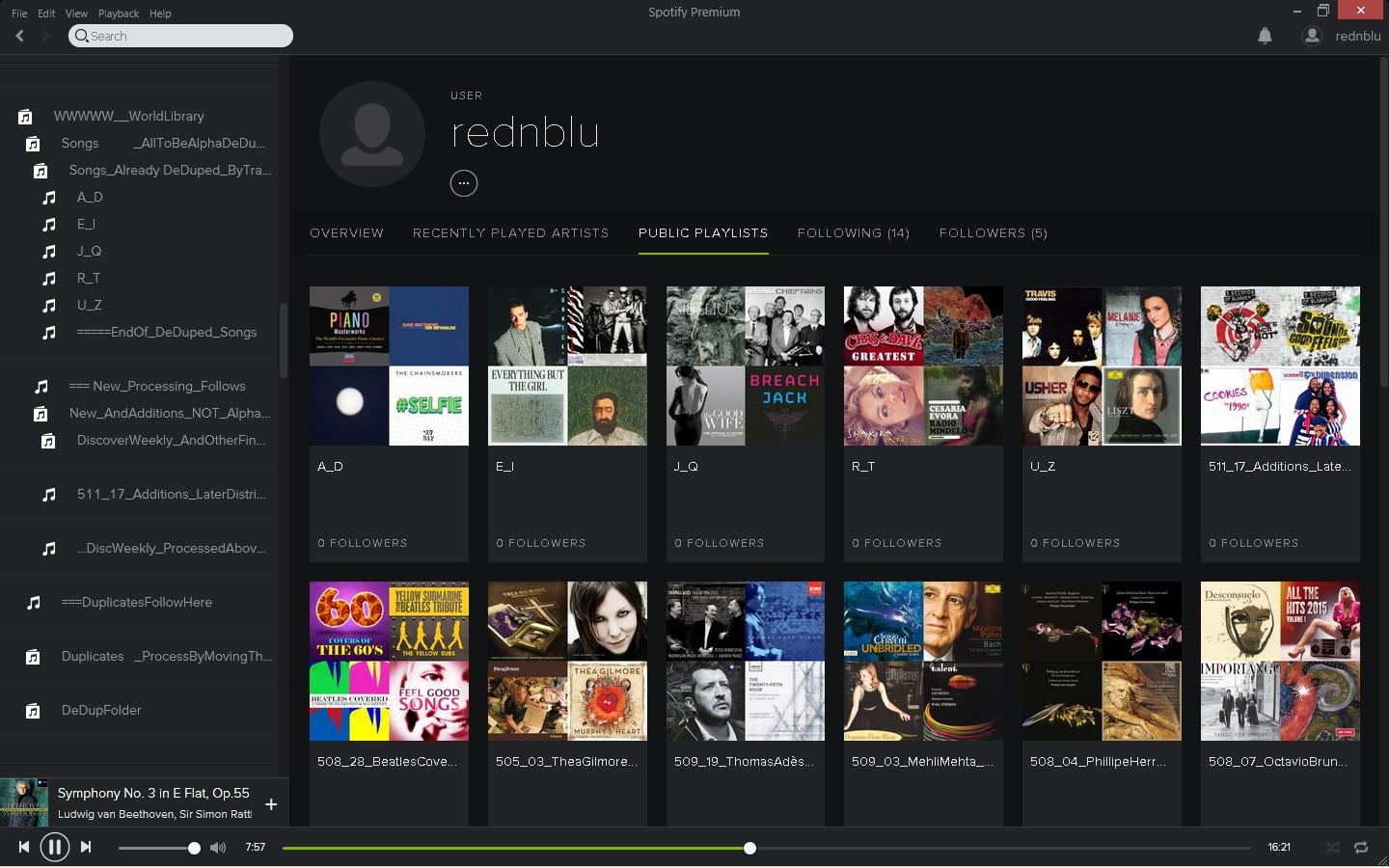
* I put all of the Unique songs in a Folder named Songs_AlreadyDeDuped_ByTrackName and name the PlaylistContainer by the Alphabetical contents such as A_D, E_I . . . . You can list the contents of the A_D, ... playlists from my profile in the illustration and copy the tracks by [Ctrl-A, Ctrl-C, Ctrl-V] to your own playlists in your own Folder. I suggest you copy rather than follow-- because you will want to make your own additions and deletions, right? Save all of these on the same date so that you can tell from the "Added" column in the ...WorldLibrary listing if any track is in the Songs_AlreadyDeDuped... folder-- so that you can delete it from the appropriate alphabetical playlist if you want.
* For the classical music, I name the playlist starting with SystemDateOnWhichI_SaveAllTracks to the playlist by [Ctrl-A, Ctrl-X, Ctrl-V] in the date format where 2015_11_01 becomes the PlaylistPrefix for 511_01_PlaylistName . . . . and thus from the date in the "Added" column of the ...WorldLibrary I know immediately which Playlist the track resides so that I can delete it there if I choose.
Hee!
So does this look like it would be exhausting, @rod_law?
Here is a great >> Randomizing site. << Just drag the selection from your playlist or Folder into the top TextBox. You will see the "Randomize the order" RadioButton just above the brown SortList button.
Ctrl-A in the LowerPanel of the RandomizingScreen and drag the Randomized tracks wherever you want-- such as onto the "Play Queue" icon at the top of the LeftWindow, and when the Queue opens, drag the tracks to where you want your Randomized tracks in your PlayQueue. There you have the whole World Of Music from SpotifyTheEverythingMusicLibrary.

I just want to say that all this fuss about 10,000 songs is silly. How in the world are you supposed to listen to THAT much music? I don't even have that much and I am fine. If you have 10000 songs and you aren't happy, then remove some of the stuff you don't listen to.
@Reflux_ wrote:I just want to say that all this fuss about 10,000 songs is silly. How in the world are you supposed to listen to THAT much music? I don't even have that much and I am fine. If you have 10000 songs and you aren't happy, then remove some of the stuff you don't listen to.
I welcome your artistic suggestions.
You can list the contents of my playlist on Last.fm under my profile >> Rednblu777 << . . . . Which "some of the stuff" should I delete from my playlist to be happy would you say?
This is a (non-official) response I found on another site, I too have the same issue
1. Very few playlists approach 10000 songs. If we increased the limit, it would only benefit and extremely small fraction on users, so we'd be spending precious resources on something that only a fraction of users would benefit from.
2. For users that approach the limit, it's very easy to work around by creating another playlist.
3. It's not clear if a single long playlist of 10000+ is a very useful way of navigating songs.
From here