Spotify Android app using a LOT of data on 3G!

Hi there,
I didn't use Spotify yesterday until the preview app was announced and I installed it. Since installing it yesterday shortly after it was announced I've been using it a fair amount.
I have only listened to music in playlists already downloaded for offline use, but Spotify itself has been online.
In Settings 'Download over 2G/3G' is set to OFF - although as stated I have not been listening to anything requiring a download and have also not sync'd any new playlists, except while on wifi last night when I sync'd one new album.
In the two days, 19th and 20th, Android shows Spotify as having used nearly 100MB of network traffic.
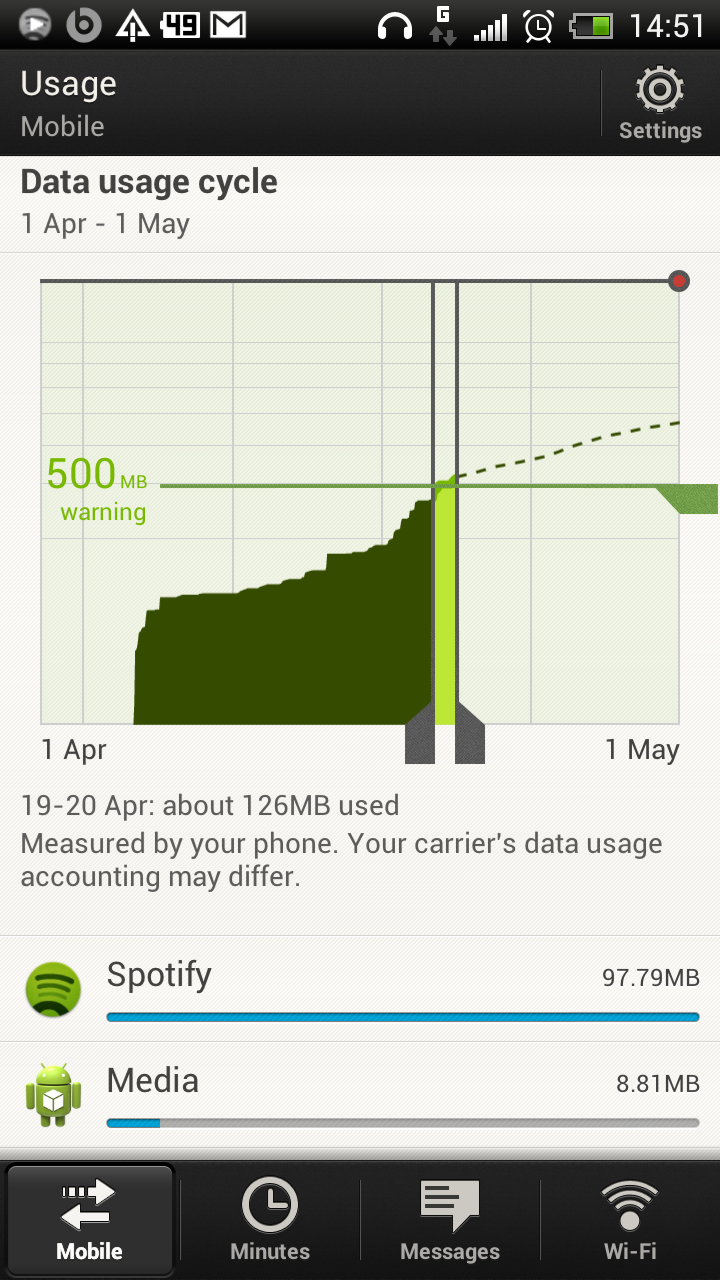
This is worrying. Why is it using so much data? I am on a data plan that restricts how much 'streaming and downloading' data I am entitled to use, so am worried that I am going to get throttled due to this.
Can others with the new app please check their own usage amounts?
Dave
Accepted answers
@lassi wrote:Question: How many playlists do you have? I have MANY...
Who's that question directed to?
I have many playlists too, but the ONLY ones I actually listen to while out and about are those sync'd offline
All comments
As when I first reported this, I only ever listen to offline playlists, I only sync new stuff while of wifi and I try to remember to put Spotify into offline mode when I am done syncing - although a obviously forgot a few times.

Setting Spotify to go offline everytime is not really what I would to do. I don't care if uses data when I'm on Wifi, but on mobile data it should just stick to downloading metadata etc.
Does anyone know if this excess data use also happens on iOS?

How has no spotify employee even commented on this thread yet? Starting to wonder if they care 😛
Well, it seems the iOS version of the app always has their main attention. That app already has Spotify Radio integrated while we (on Android) are still struggeling with an app that has just come out of the beta phase.
Using offline mode seems to "solve" the excess data use for now, though I really, really hope that the developers are going to sort this out soon.

I had a temporary solution for this while in the beta. Should probably still work now, although I haven't tested yet if last.fm will still scrobble.
If you are on android ICS do the following:
System settings --> Data usage --> Set mobile data limit (tick this) --> find spotify in the list in the lower end of the data usage screen --> press it --> on the spotify stats scroll down and restrict background data
If you look at the stats you see you will cut about 90% of the data... I had about 60mb currently, foreground was only 2,6...
I hope this helps those also under tyranny of their service providers. Mark as solution if this helped you.
Hi,
It seems to do the trick by enabling the restrict background data option. Spotify now stays offline as long as the app is running in the background. It only sends data when the app is open on screen or when my phone is on Wifi. As soon as Spotify is online again (either on Wifi or when the app is opened on screen) it will also scroblle all played songs to Last.fm.
Thanks for the tip!

I checked my data usage today and only have 50MB left of data out of a 500MB allowance - with another two weeks before my allowance resets. ICS says Spotify is what's using up all the data, even though it's set to only download songs over Wifi and I've only listened to about two songs that hadn't been downloaded over wifi (and after they'd been played once they were marked as downloaded so they shouldn't have streamed again - they were both in offline playlists). I also just switch from iPhone to a Galaxy Nexus in May, and never had these problems with the iPhone app.
I'm now having to pay another £5/month to Vodafone to increase my data tariff just for Spotify eating up all my data allowance, on top of the £10/month I already pay for Spotify premium. I'm very unhappy about this and as soon as the time I've already paid for premium is up I'm going to switch to Rdio.

Looks like there are many who have this problem. Does anyone know what Spotify says about it?
I agree that this is just a temporary fix and we will have to wait untill spotify adress this issue. For now this will help people to be able to use spotify and not exceed their bandwidth cap.
Btw, theres is no need to turn anything on/off when you use spotify. You only need to do this procedure once and you will make it impossible for spotify to send data in the background (where 90% of this weird data usage happens).
For me this, and the inability to save songs to external SD need to be priorities for the next update.

Report the app as a data hog in the Play Store. They might listen if Google complains!

Hi everyone!
Just wanted to make a quick post saying we're looking into this. We don't want to post just for the sake of posting, but know we're keeping an eye on this thread.
Of course the more info you can provide the better. As David said earlier, posting a screenshot of what Spotify is doing the Background is a great help.
As soon as we have an update I'll be posting it here.

Right a bit more feedback for you:
- Switching off post to Last.fm and Facebook makes no difference so I don't think the problem's there.
- Switching off post to Facebook does however stop the bug I have where the music cuts out when I go from signal to no-signal (I guess it's trying to constantly let FB know what I'm listening to).
- After listening to a downloaded album (completely underground and without signal) after three hours including two and a half of idle time, I had used 4.4 MB of data.
- If I kill the app using task manager, restart it but don't play any music, the usage isn't going up.
Therefore my little bit of research suggests if you listen to Spotify the bug will occur. If you kill it and leave it killed or reopen it without listening to any music, the bug will not occur.
Interested to hear if my findings match other people's experiences.
Okay slight change, killed the app after my last post and restarted it without playing any music. It's used half a meg. So it's still comsuming data, but at a slower rate.
Well, today was my first real test with the "restrict background data" option checked. I have been listening downloaded playlists for about 2 hours today, and Spotify now "only" used about 7,33 MB which now is all foreground data, no background data is used. That's some good news a last.
I still think that is a lot for an app only playing offline files and scrobbling to last.fm. I'm not really sure how I can monitor more closely what the app is doing, so if there's any app you can recommend for monitoring or logging, please do tell.

I have the same problem. Almost 50 mb per day in background data is used while im listening to offline lists. Very weird and very unwanted.

I know you guys have posted all this stuff on the issue, I just wanted to report my data useage. I have the Droid RAZR on Verizon and I have had Spotify for just over a week. Acording to the built in data monitering on Android 4.0 my data usage from 6/28 to 7/5 for spotify was 1.83Gb and all of it was used in the background. I noticed that the My Verizon app reported I had used 2 of my 5Gb plan in just over a week.

Its still got to stream each song is about 10MB at that quality.
Ive done over 10GB on stpify on my mobile network. 3 rules 🙂

The Same problem here, up to 20 MB per Day, far too much!!!

Hey all,
New users to Spotify as of a week ago and not very happy. I am still trying to track down the exact details but quick picture of my wife's data usage over the last 4 days. From 07/03-07/07 (4 days), 3.1GB has been consumed of our 3GB allowance. We have ATT and she has an iPhone 4S. I have an iPhone 4. As a comparison, I have used 47MB in the last 4 days. She has been listening to a considerable amount of Spotify in that time but not THAT much and we do have the options set to 'Sync Over 2G/3G' turned OFF.
I am a little confused over the 'Offline Mode' option? Do I want this turned 'On' or 'Off''? The note on the screen says "When offline, only the playlists you have made available for offline listening will be playable." Does that mean when this mode is turned on, you can't accidentally stream play over 2G/3G? Haven't I already done this by turning off 'Sync Over 2G/3G'?
Anyways, I am personally not a user and I don't plan for her to be much longer. I just want to make sure I let others know. Since this is the only thing that is new on her phone, I am pretty sure it is the issue. I am leaving Spotify on for a few more days because I want to prove that it is the culprit. I have downloaded a few monitoring apps to identify the data usage. Apple does not have the great diagnostics that Android has by default. Any reccomendations here from other iPhone users?
Thanks and I'll keep you posted on my findings.
-Jason
The data usage you are seeing is therefore completely your own faults - of course Spotify needs to download the bits if you ask it to play a song and it doesn't already have that in the cache. This is what the Spotify app does and part of what you are paying for, not a bug in the app.
If you want to cut out data usage then sync some playlists over wifi and then listen to those while on the move.
Again, this topic is about the Android app using a lot of data when only listening to offline playlists. This is a bug (IMO)

My data usage has become excessive over the last two weeks. I just found out that the spotify app is causing this because it is syncing over 2G/3G, even though this is disabled in the settings menu. I do not have an unlimited data account and this has costed me already 10 euros for the last 3 days (I know this since I had to pay extra, which has never happened before)!
Needless to say that this needs to be fixed asap!
I've recently found that even though I have the app limited to only using Wi-Fi data in the background (done through ICS data usage settings), the app is still giving me problems by using crazy amounts of Wi-Fi data while I'm not using it. Although I'm not limited in how much Wi-Fi data I can use, it's ruining my battery life. For example, this weekend when I went to sleep the phone was at 47% battery, when I woke up it was at 5%. Android said Spotify had used 49% of my battery since the last charge and that it had used about 600mb Wi-Fi in the last day. All my offline playlists had already been downloaded, so I cant imagine what it was doing other than downloading them all over again 😕

Until the issue is resolved im uninstalling it, and therefore have no need for premium subs

Currently I experience the exact same problems with the iOS version of the app, so I am not sure, whether this problem limited to the android app.
Even if I am listening to synchronized songs, about 20 MB per hour are used in the background. I have no idea what they are used for though. Synching over 3G is turned off. The only thing that does the trick is going completely offline.
I had a temporary solution for this while in the beta. Should probably still work now, although I haven't tested yet if last.fm will still scrobble.
If you are on android ICS do the following:
System settings --> Data usage --> Set mobile data limit (tick this) --> find spotify in the list in the lower end of the data usage screen --> press it --> on the spotify stats scroll down and restrict background data
If you look at the stats you see you will cut about 90% of the data... I had about 60mb currently, foreground was only 2,6...
I hope this helps those also under tyranny of their service providers. Mark as solution if this helped you.