Most common issues can be fixed with a quick reinstall of the app. In some situations however, a clean (more thorough) reinstall of the app might be needed. This way, you can start afresh with Spotify on your device.
Heads up: You'll need to re-download any downloaded music and podcasts after reinstalling the app. Your settings will also be reset to the defaults, so it's a good idea to make screenshots of them so you can quickly set them up the way you like them again.
Below you can find all the steps for a clean install of Spotify on your device - just scroll down until you see your device/OS:
Android
- Go to your phone’s Settings.
- Select Apps.
- Select Spotify from the list of apps.
- Tap Storage / Storage & cache memory.
- Find and tap Clear storage / Clear data and Clear cache.
- Return to the previous screen and tap Uninstall.
- In the phone's Files (or File Manager, My Files, etc.) app, Go to Internal Storage > Android > data. If you see a com.spotify.music folder, delete it. If you’re using an SD card, go to SD Card > Android > data. If you see a com.spotify.music folder, delete it.
- Restart your device.
- Go to Google Play and install the Spotify app.
iPhone/iPad
- Open Spotify. In the app's settings (you can access them by going to your profile picture in the top left corner and then tapping Settings and privacy gear icon), select Data-saving and offline, then Storage and click on Clear cache.
- Head to your device's Settings, then tap General.
- Tap iPhone Storage.
- Select Spotify from the list of apps.
- Tap Offload the app and confirm. This will delete the app but its documents data will be kept.
- Then tap Delete App and confirm. This action should delete any leftover documents and data.
- Once the app is deleted, press and hold the Side/Top button and either volume button until the power off slider appears.
- Drag the slider to turn your device completely off.
- After your device turns off, wait a couple of minutes.
- Press and hold the Top (or Side) button again until the display turns on.
- Switch your device back on and install Spotify from the App Store.
iPad
The steps for a clean reinstall in an iPad device are similar to those of iPhone devices above. Keep in mind that in step 4 you'll need to look instead for iPad Storage.
Desktop (Mac)
- Quit Spotify.
- Open Finder then click Go (on the menu bar on the top of the screen).
- Select Library from the drop-down menu that appears (you may need to hold the Option (Alt) key if Library isn’t visible).
- Open Caches and delete the com.spotify.Client and com.spotify.client.helper folders.
- Click the back arrow.
- Open Application Support and delete the Spotify folder.
- Hit Command+Shift+G from your OS X desktop to bring out the Go to Folder window.
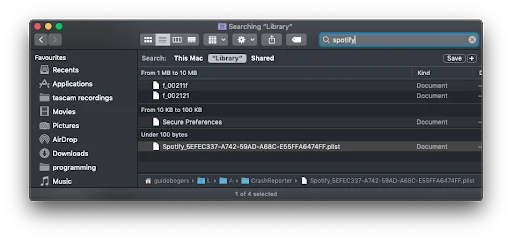
- Enter /Library/ to open Library folder.
- Enter “Spotify” in the search field, hit “Search: Library” and delete all files that appear:
-

11. Shut down your computer.
12. Wait a couple minutes and then hit the Power button again to boot your device.
13. Download and install Spotify.
Desktop (Windows)
- Open Spotify and click File in the menu bar. Select Exit.
- Click the Start button.
- Select Settings.
- Open System.
- Click Apps & features, then select Spotify.
- Click Uninstall. Click Uninstall again in the pop-up to confirm.
- On the Start search bar, type %AppData% and hit enter. This should open up AppData\Roaming.
- In the new window that opens up make sure there's no Spotify folder showing up. If there is, you can delete it.
- Make sure that there is no Spotify folder left in AppData\Local (or C:\Users\*USERNAME*\AppData\Local\Spotify\Storage) as well.
- In addition, you can run a search on your device to look for any leftover Spotify folders left. If you find any, make sure to delete them.
- Shut down your device, wait a couple of minutes and switch it on again.
Download and install Spotify (try different download sources, if the issue doesn't get resolved after the first try):
- from the Windows Apps store.
- from the Spotify site.
Tip: If you'd like to be more thorough, you can also use in addition a trusted third-party device cleaner app to make sure you've removed any leftover files before installing the app again.
Didn't help? Search for more Spotify Answers, or create a new thread and ask the Community.