- Home
- Welcome
- Community Blog
- Introducing the Spotify Miniplayer to Spotify Desk...
Help Wizard
Step 1
Type in your question below and we'll check to see what answers we can find...
Loading article...
Submitting...
If you couldn't find any answers in the previous step then we need to post your question in the community and wait for someone to respond. You'll be notified when that happens.
Simply add some detail to your question and refine the title if needed, choose the relevant category, then post.
Just quickly...
Before we can post your question we need you to quickly make an account (or sign in if you already have one).
Don't worry - it's quick and painless! Just click below, and once you're logged in we'll bring you right back here and post your question. We'll remember what you've already typed in so you won't have to do it again.
FAQs
Please see below the most popular frequently asked questions.
Loading article...
Loading faqs...
Ongoing Issues
Please see below the current ongoing issues which are under investigation.
Loading issue...
Loading ongoing issues...
Help categories
Account & Payment
Using Spotify
Listen Everywhere
Introducing the Spotify Miniplayer to Spotify Desktop
- Subscribe to RSS Feed
- Mark as New
- Mark as Read
- Bookmark
- Subscribe
- Printer Friendly Page
- Report Inappropriate Content

Introducing the Spotify Miniplayer to Spotify Desktop


- Mark as New
- Bookmark
- Subscribe
- Mute
- Subscribe to RSS Feed
- Permalink
- Report Inappropriate Content
Hey folks!
I’m excited to introduce a new addition to the Spotify desktop experience: the Spotify Miniplayer!
Whenever I’m working, Spotify is always running in the background. I keep jumping from track to track and this means I keep switching between windows. If I have to adjust volume or change the Repeat mode, for example, I need to switch to the Spotify window. I bet that you also felt from time to time that there should be a better way to handle these controls?
Well, we got lucky! That’s what the Miniplayer is for! Looks like this nifty feature is designed to give us maximum control over our music and podcasts with minimal intrusion, ensuring the workflow goes undisturbed.
Here’s a couple of things we can expect from the new Miniplayer:
Supported Content
Whether you're into the music, podcasts, or both, the Miniplayer is your go-to. It delivers a balanced experience, catering equally to both video and music content. I really like how it takes the video podcasts out in a picture-in-picture mode with controls. I can make the video size larger or smaller based on my preference.
Discreet
I find it neat how the Miniplayer floats over other applications. I can get all the playback controls I need without getting distracted. This helps me stay focused and does not disturb my workflow.
Fluid Transition
The Miniplayer doesn't replace the main Spotify window. It's easy to switch back and forth. I can open the Miniplayer or close it without interrupting the listening experience.
I love exploring playlists and podcasts but this can easily become a distraction. One example is the time I was listening to rock music whilst replying to some emails, and I wanted to shuffle my playlist. I switched to Spotify and a few minutes later I was browsing a classical playlist. You see? It is so easy to get lost since there are a lot of amazing curated playlists.
Thanks to the Miniplayer, I can now shuffle my queue or put a song on repeat without opening the main app. I can also quickly add or remove a song or episode from my library with just one click.
Adaptable Design
It’s awesome that I can shape my space according to my own rules. I really enjoy that the Miniplayer can transform its shape into a square, rectangle, or a sleek bar. You can adjust it to any size based on the current task.

I often use the Miniplayer in a small pill size. This gives me the basic controls while maintaining the minimum visual presence. I can then close the main Spotify window but still control my music and podcasts easily.
Earlier today I was reviewing my projects. The Miniplayer was quietly sitting at the bottom left corner of my screen. It takes the minimum screen real estate while giving me a visual glimpse of what is playing and ability to quickly pause or go to the next track.
Quick Tip: You can also click the Artist name, Song name, or the Album Art to open it in the main Spotify app.
Availability
The Miniplayer is only available for Premium users just now. To use the Miniplayer, look for this icon on your desktop app:

You can find it at the bottom right corner between the volume and the full screen buttons.
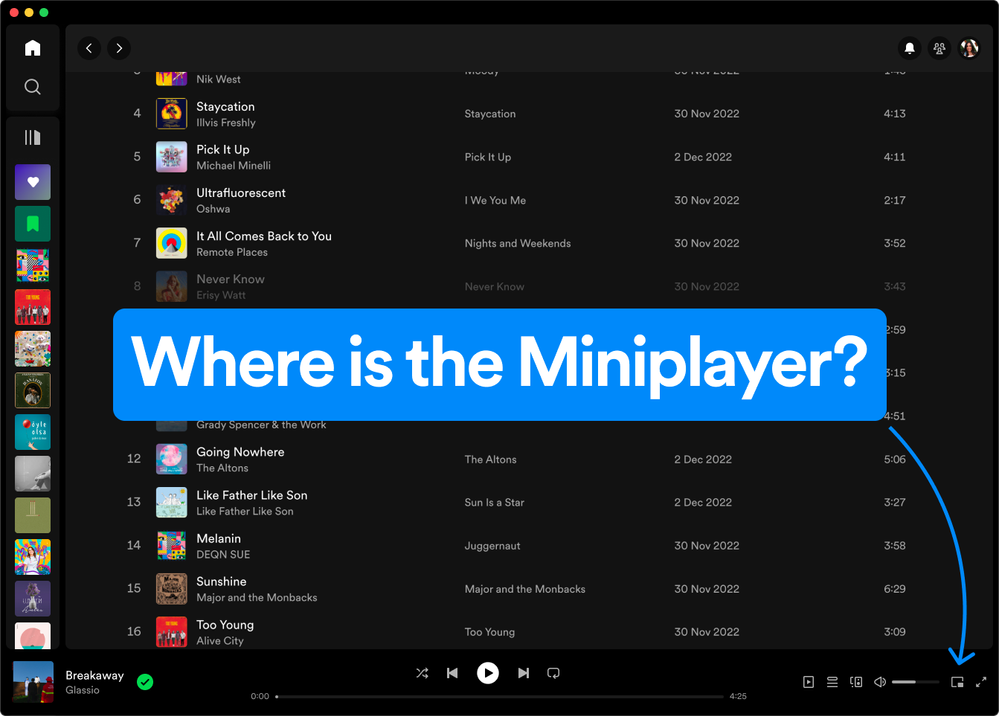
I hope you have the same handy experience with the Miniplayer as I did. Maybe you will discover even more useful things. Don’t forget to share them with the rest of the Community - feel free to drop your thoughts and feedback below.
- Previous
-
- 1
- 2
- 3
- …
- 7
- Next »

- Mark as Read
- Mark as New
- Bookmark
- Permalink
- Report Inappropriate Content
YES YES YES! FINALLY!! GREAT WORK SPOTIFY!!!

- Mark as Read
- Mark as New
- Bookmark
- Permalink
- Report Inappropriate Content
I like the miniplayer, but I noticed the desktop layout in general has changed for me, see the search bar on the top. I don't know how to feel about it but besides getting used to the new layout, it seems functionally the same? Just wondering if anyone else has this layout or thoughts on it.


- Mark as Read
- Mark as New
- Bookmark
- Permalink
- Report Inappropriate Content
Finally! This is an excellent addition. Can't wait for more functionalities of the mini player in future

- Mark as Read
- Mark as New
- Bookmark
- Permalink
- Report Inappropriate Content
Will the miniplayer eventually come to free accounts?

- Mark as Read
- Mark as New
- Bookmark
- Permalink
- Report Inappropriate Content
THANK YOU i have been searching for a spotify mini player for YEARS and the way you've implemented it is PERFECT I LOVE IT

- Mark as Read
- Mark as New
- Bookmark
- Permalink
- Report Inappropriate Content
I've been using opensource software, lofi (lofi.rocks), as a Spotify miniplayer on my 2nd display, my TV. This is very close to replacing it, except this version doesn't seem to have a progress meter, or customizable font to match my other software. And it's also got a little 'chunk' to it.

Otherwise, I appreciate**bleep** out of y'all adding this (back).

- Mark as Read
- Mark as New
- Bookmark
- Permalink
- Report Inappropriate Content
Finally! Looks neat. The only thing that's missing is a progress bar that would let you jump to a specific part of a song or podcast.
- Mark as Read
- Mark as New
- Bookmark
- Permalink
- Report Inappropriate Content
A good way, now all that's missing is when you hover over it 100% visible, when you go down again it will be graded transparent with transparent.

- Mark as Read
- Mark as New
- Bookmark
- Permalink
- Report Inappropriate Content
I have premium and the latest version (Spotify for macOS (Intel) 1.2.33.1042.g26c92729) and it does not show me up for me.

- Mark as Read
- Mark as New
- Bookmark
- Permalink
- Report Inappropriate Content
You don't seem to have the lastest version. I'm on Intel too but I have version 1.2.34.779.g922cb565
The miniplayer button didn't show up after the relaunch (after I upgraded to this version) but after relaunching the app again it was there.

- Mark as Read
- Mark as New
- Bookmark
- Permalink
- Report Inappropriate Content
M2 Mac mini.
Latest version.
It's not there...

- Mark as Read
- Mark as New
- Bookmark
- Permalink
- Report Inappropriate Content
I would like to rescind any previous criticism I have made towards Spotify. The recent unfortunate queue change is merely a drop in the bucket compared to the endless majesty of the Miniplayer. I once again love Spotify - thank you for this change. For once, the UI has IMPROVED!!!

- Mark as Read
- Mark as New
- Bookmark
- Permalink
- Report Inappropriate Content
I already have a bug for y'all. If you resize it to the minimum size needed so the controls still show, but no album image, hovering over the volume icon to adjust the volume makes scrollbars appear and it goes all haywire.

It keeps flashing the scrollbars and nudging the layout back and forth.

- Mark as Read
- Mark as New
- Bookmark
- Permalink
- Report Inappropriate Content
This was exciting news until I went to my Mac (Mini M1), immediately checked for an update just in case (there wasn't one), only to notice the absence of the new Miniplayer icon/option. Given I've been a Premium subscriber for years, about six at this point, I was pretty disappointed to still be stuck with a full-sized window. Come on, Spotify, given us what we've been asking for. All of us. At the same time.

- Mark as Read
- Mark as New
- Bookmark
- Permalink
- Report Inappropriate Content
Found an Bug where you can open a new window of Chromium with the new miniplayer feature.

- Mark as Read
- Mark as New
- Bookmark
- Permalink
- Report Inappropriate Content
I had the same problem as Filipn in that I upgraded using the in-app option and it took me to Spotify for macOS (Intel) 1.2.33.1042.g26c92729 without the mini player, even after an app restart. When I did a manual download of the Mac OS app from the Spotify website, this upgraded me again to 1.2.34.779.g922cb565.
@Spotify people, two things:
- Fix the in-app update option so it downloads the current version
- Address the issue with the missing progress bar (and missing previous track button when minimised to pill shape). Without this it's a bit pointless
- Mark as Read
- Mark as New
- Bookmark
- Permalink
- Report Inappropriate Content
I don't need a miniplayer, I need HIFI lossless quality sound. Just make it happen.


- Mark as Read
- Mark as New
- Bookmark
- Permalink
- Report Inappropriate Content
For many of us in this comment section on M1, M2 Macs this is broken. We cannot find the mini player. Same goes for my friends.
Your tech team should definitely get on this ASAP produce a ticket to get this tested and fixed for Mac users.
You've just done a bells and whistles launch including on Product Hunt but it doesn't work. So someone has not done their job properly. Myself and probably multiple other users take ~30m out of our days to spotting what went wrong. That's a huge own goal on payed user expectations.
I'm a Premium subscriber and have been for years. I'm on a Macbook Pro basic M1 with Spotify for macOS (Apple Silicon) 1.2.33.1042.g26c92729 -
I also have tech company, am an engineer by background and regularly debug. Here's what I tried (in order) -
- Clicking on Spotify - About and updating the desktop app that way (didn't work).
- Uninstalling Spotify and reinstalling by downloading from the website (didn't work).
- Clearing all Spotify cached files, uninstalling Spotify and reinstalling by downloading from the website again (still didn't work).
- Restarting the app (didn't work).
- Restarting my computer (still didn't work).
-> I still see this with no mini player option.
Your team have my email. My community email is the same as with Spotify premium. Reach out to me if you'd like to get this reproduced over multiple Looms or screen videos.


- Mark as Read
- Mark as New
- Bookmark
- Permalink
- Report Inappropriate Content

I cannot use this feature on my Macbook M1 computer.
You must be a registered user to add a comment. If you've already registered, sign in. Otherwise, register and sign in.