- Home
- Welcome
- Community Blog
- The ♡ Heart button is being replaced with a (+) Pl...
Help Wizard
Step 1
Type in your question below and we'll check to see what answers we can find...
Loading article...
Submitting...
If you couldn't find any answers in the previous step then we need to post your question in the community and wait for someone to respond. You'll be notified when that happens.
Simply add some detail to your question and refine the title if needed, choose the relevant category, then post.
Just quickly...
Before we can post your question we need you to quickly make an account (or sign in if you already have one).
Don't worry - it's quick and painless! Just click below, and once you're logged in we'll bring you right back here and post your question. We'll remember what you've already typed in so you won't have to do it again.
FAQs
Please see below the most popular frequently asked questions.
Loading article...
Loading faqs...
Ongoing Issues
Please see below the current ongoing issues which are under investigation.
Loading issue...
Loading ongoing issues...
Help categories
Account & Payment
Using Spotify
Listen Everywhere
The ♡ Heart button is being replaced with a (+) Plus button
- Subscribe to RSS Feed
- Mark as New
- Mark as Read
- Bookmark
- Subscribe
- Printer Friendly Page
- Report Inappropriate Content

The ♡ Heart button is being replaced with a (+) Plus button


- Mark as New
- Bookmark
- Subscribe
- Mute
- Subscribe to RSS Feed
- Permalink
- Report Inappropriate Content
In March 2023, the ♡ Heart button will start being replaced with a (+) Plus button for saving things to Your Library. Things that have been saved to Your Library will now show a green ✔ Check icon instead of a green Heart icon.
This new experience is now rolling out to the mobile and desktop apps first and will then come to the other apps (watch, TV, etc.) at a later time.
You can check out this Spotify news article for more information:
Save Your Favorite Songs, Podcasts, and More With Spotify’s Plus Button
In this post, we will show you how to use the new experience and answer your questions. You might have already seen this change being discussed in the Community recently.
New Experience:
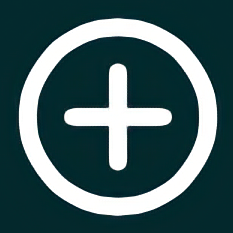

Old Experience:


How does the (+) Plus button work?
- The experience will remain similar for you. When you tap the (+) Plus button from the Now Playing View, songs will be saved to your Liked Songs. The only difference is that now you can quickly tap the (+) Plus button again to add the song to your other playlists too! When you tap the button again, you'll also see the other playlists that the song has already been added to with a green ✔ Check icon.
- The experience is the same for Podcast Episodes. You can tap the (+) Plus button to save podcast episodes to Your Episodes, and then tap the button again to add the podcast episode to your other playlists too.
- Once you tap on the (+) Plus button, the icon will change to a green ✔ Check to let you know that the track has been saved.
- The green ✔ Check icon also shows up next to the songs that are saved to Your Library on Album and Playlist pages. (but not when viewing your own playlists, only other playlists)
When you see a green ✔ Check icon on a song, it means that it has been saved to Your Library. A song added to either (or both) Liked Songs or one of your own playlists counts as being saved to Your Library. Before with the heart button, the green heart icon meant that the song was saved only to your Liked Songs.
If a song has a green ✔ Check icon because is has already been added to one of your playlists, you can still add it to your Liked Songs playlist. Tap on the green ✔ Check icon and select your Liked Songs playlist from the menu and it will be added.
- The (+) Plus button will also still let you save Playlists, Albums, and Audiobooks to Your Library.
- This change will not affect the things you have already saved to Your Library. The songs you've previously saved will remain in Liked Songs. The Playlists, Albums, Podcasts, and Audiobooks you've previously saved will remain in Your Library.
- The "Add to playlist" icon in the options menu will also become a (+) Plus, but the functionality remains the same.

FAQ:
This section will answer your frequently asked questions and will be updated with the latest answers.
Why are the 💚 green heart icons next to songs I've already liked missing? I used to be able to see the songs I've previously liked when viewing songs on Album and Playlist pages.
- The green 💚 Heart icon has been replaced with a green ✔ Check icon
- The green ✔ Check icon shows up next to the songs that are saved to Your Library on Album and Playlist pages. (but not when viewing your own playlists, only other playlists)
- When you see a green ✔ Check icon on a song, it means that it has been saved to Your Library. A song added to either (or both) Liked Songs or one of your own playlists counts as being saved to Your Library. Before with the heart button, the green heart icon meant that the song was saved only to your Liked Songs.
- If you don't yet see the green ✔ Check icon next to songs in track listings (Album and Playlist pages), you should see this once it rolls out to more users.
I want to add a song to a playlist from the Now Playing View, but I don't want to save it to my Liked Songs. Why do I have to save the song to Liked Songs first?
- The (+) Plus button will let you edit the destination of the song you liked. After you have tapped the button from the Now Playing View, you can tap it again to change or add it to more playlists.
- Alternatively, you can still add a song to playlists without saving it to Liked Songs. Go to the options menu by first tapping the "..." icon and then tap on "Add to Playlist" to select the playlist(s) you want to add the song to.
How do I remove a song from Liked Songs or my other playlists now?
How do I remove a podcast episode from Your Episodes or my other playlists now?
- Songs: This same function can now be done by tapping the green ✔ Check button on the Now Playing View or by going to the options menu and tapping on "Add to playlist". After tapping the button or the option in the options menu, uncheck the "Liked Songs" playlist and then tap on the green "Done" button at the bottom. You can also use this menu to remove the song from your other playlists.
- Podcast Episodes: This same function can now be done by tapping the green ✔ Check button on the Now Playing View, on Podcast pages, or by going to the options menu and tapping on "Add to playlist". After tapping the button or the option in the options menu, uncheck the "Your Episodes" playlist and then tap on the green "Done" button at the bottom. You can also use this menu to remove the podcast episode from your other playlists.
What happened to the "Like all songs" menu option on Album pages in the mobile app?
- This same function can now be done by tapping the "Add to playlist" menu option on an album page and then selecting the "Liked Songs" playlist.
What happened to the "Swipe left to Like" gesture to quickly like and unlike songs in the mobile app?
- When you use the "Swipe left to Like" gesture on songs in playlists or in album pages, the song will still be saved to Liked Songs. However, now when you swipe again, the "Add to playlist" menu will open up so you can now quickly add to or remove from Liked Songs and your other playlists all in one step.
Why can I no longer add a song to a playlist more than once using the "Add to playlist" menu in the mobile app? There used to be a popup telling me if a song was already added to a playlist and there was an option to ignore that and add it again.
- Right now the ability to add a song to a playlist more than once using the "Add to playlist" menu in the mobile app is currently not possible. As a workaround you can still add songs to a playlist more than once using the desktop app. In the desktop app, you can drag the song into the playlist, or use the "Add to playlist" option in the right click menu.
Feedback:
Where can I give my feedback about the new (+) Plus button?
- We welcome your feedback about this change. The best way to share your feedback is to comment here in this thread.

- Previous
-
- 1
- …
- 16
- 17
- 18
- …
- 58
- Next »

- Mark as Read
- Mark as New
- Bookmark
- Permalink
- Report Inappropriate Content
This “update” is nonsensical. I want my like button, I don’t care about playlists and other nonsense. Bring back the Like button, otherwise I’ll change to a service that has this basic feature. Fire whoever came up with this idea.

- Mark as Read
- Mark as New
- Bookmark
- Permalink
- Report Inappropriate Content

- Mark as Read
- Mark as New
- Bookmark
- Permalink
- Report Inappropriate Content
The title of this whole endeavour is : the heart is replaced by a plus. Really ? This is the case at song view level, but in the list view, the heart is simply eliminated. And this is where most of the issues are about. Just put the plus/check button next to each song in the list view. This way, at least the functionality is aligned with the new process. Please don't come up with some other symbol for liked songs in the list view that would just tell you if the song is liked. At least stay coherent with the update.
- Mark as Read
- Mark as New
- Bookmark
- Permalink
- Report Inappropriate Content
PLEASE give us any sort of indication of songs that we have previously liked. It can be literally anything! That removal totally changed the whole spotify experience for me. And in this post yall mentioned that you are working on it but its been quite a while. If you bring back the feature it doesn't have to be perfect. You see hundreds of your users begging for it… and then take all the time you need finding your “perfect symbol.” Other streaming platforms are sounding real nice right now.

- Mark as Read
- Mark as New
- Bookmark
- Permalink
- Report Inappropriate Content
Unnecessary and bad change to the overall experience. Unbelievable that you would roll this out to the masses without even deciding what will be displayed to users in playlists or albums.

- Mark as Read
- Mark as New
- Bookmark
- Permalink
- Report Inappropriate Content
New thing I dislike about this change: the add to playlist and add to library buttons on the "..." menu next to songs both have the same plus within a circle symbol so it is easy to get the two mixed up since the both start with "+ add to..." Just another thing that makes this change in the interface terrible.

- Mark as Read
- Mark as New
- Bookmark
- Permalink
- Report Inappropriate Content
I'm late and newly shocked to this party after experiencing the new functionality for the past few weeks. I find it so irritating I was driven to this forum to give feedback.
Why oh why did you remove the heart, or any visual indicator of a 'loved' song, from the tracklist view? I'm struggling to understand how, from a user-experience perspective, you could have arrived at the conclusion that this was a good idea.
I (previously) used the heart to:
- easily see and skip to only the tracks I have 'loved' when listening to an album
- same as above for a playlist (shockingly, I don't 'love' every track I add to a playlist)
- easily see tracks I have previously 'loved' but forgotten in search results view
- 'love' a track on an album without adding it to a playlist
All that beautiful functionality is now gone, and for what? So I can add a track to an enormous playlist that I will never listen to in one step? No thanks.
If ease of adding to the 'liked songs' playlist and/or other playlists was the goal, why not just make it so the heart did that while keeping all the other functionality intact? If changing the heart symbol was the goal, why not just change the symbol without messing with the functionality? Or a combination of the above.
It's difficult to understand how a company such as Spotify has made such a horrendous user-experience blunder in 2023.
- Mark as Read
- Mark as New
- Bookmark
- Permalink
- Report Inappropriate Content
Everyone complains about the missing heart symbol, and I wish I had the "+" sign.
Anyone here want to trade places with me? 😁

- Mark as Read
- Mark as New
- Bookmark
- Permalink
- Report Inappropriate Content
When will we be able to view songs again, especially when looking at an album, and know what songs we have liked?
This could be fixed immediately. At this point we are being gaslighted.

- Mark as Read
- Mark as New
- Bookmark
- Permalink
- Report Inappropriate Content
I understand that You're frustrated with the way music streaming service are run by big companies, and you're considering resorting to piracy. however, it's important to remember that piracy is illegal and can have serious consequences. It also deprives artists and creators of their rightful income, which can have a detrimental effect on the music industry as a whole. Instead of pirating music, you might want to explore alternative options like supporting independent artists, buying physical copies of albums, or using free streaming services that compensate artists fairly. Let's find a way to enjoy music while also respecting the hard work of the artists and the importance of legal and ethical practices. .

- Mark as Read
- Mark as New
- Bookmark
- Permalink
- Report Inappropriate Content
Useless. Return the old ui. This is garbage and your customer service blows. You’ve upset the people that have paid for your service for years and are doing nothing to right the situation. Completely shameful.

- Mark as Read
- Mark as New
- Bookmark
- Permalink
- Report Inappropriate Content
Stop changing the UI. You've been messing with it for YEARS and you just keep making it worse and worse. Literally no one asked for, wants, or accepts the new UI. Stop changing the UI. Stop. Changing. The. UI. STOP **bleep**ING CHANGING THE GOD DAMN UI INTO TIK TOK GARBAGE
- Mark as Read
- Mark as New
- Bookmark
- Permalink
- Report Inappropriate Content
Just my daily shout into the void about how terrible this update is. 😃 #spotifydoesntcare
- Mark as Read
- Mark as New
- Bookmark
- Permalink
- Report Inappropriate Content
Another day with a shitty app and no fix. Gaslighting Day 40 something.

- Mark as Read
- Mark as New
- Bookmark
- Permalink
- Report Inappropriate Content
@MattSuda wrote:
- The ability to see which songs you've previously liked will return to track listings soon. (Playlist and Album pages) We don't know yet if this icon will still be a green heart. The team is currently working on making this experience better.
When is “soon” ? This is the MAIN thing people are upset about, and it is such basic functionality I’m baffled that the removal didn’t trigger an emergency rollback of what is a poorly-designed UI change that apparently nobody wanted except internal dev team management.

- Mark as Read
- Mark as New
- Bookmark
- Permalink
- Report Inappropriate Content
still no fix!
come one Spotify - WAKE UP

- Mark as Read
- Mark as New
- Bookmark
- Permalink
- Report Inappropriate Content
The + symbol is all useful,i get it. But i would always prefer the heart symbol, as it was not so appish to use and it always felt good and personal whenever liking a particular song.. so please bring back the heart button. I love spotify and dont want to use any other music app. Bring back the heart please.
- Mark as Read
- Mark as New
- Bookmark
- Permalink
- Report Inappropriate Content
Just a reminder to ask support for free premium subscriptions until this is addressed. Starting my second free month of premium after updating and seeing that nothing had changed on the newest ios app update. Not paying to wait for a fix at some undefined time in the future.

- Mark as Read
- Mark as New
- Bookmark
- Permalink
- Report Inappropriate Content
Removing the heart button to like songs on iOS has significantly reduce my experience of exploring and liking music that I want to revisit later. On the player screen, when a song is playing, there’s now an add button on the right hand side. This add button has really been confusing me since it was released because it will show a green check state if a song is added to a playlist, but this does not mean it’s added to my liked list (so I’ve been making an assumption this whole time that’s added to my liked playlist, when it’s not). I heavily use and love the heart/like feature because I can filter by genres of music from my like playlist.
If you’re going to elevate the add button, don’t disrupt the like button functionality because I heavily use it.
You must be a registered user to add a comment. If you've already registered, sign in. Otherwise, register and sign in.