- Home
- The Vault
- App & Features
- Problem with the order of Playlists and folders wi...
Help Wizard
Step 1
Type in your question below and we'll check to see what answers we can find...
Loading article...
Submitting...
If you couldn't find any answers in the previous step then we need to post your question in the community and wait for someone to respond. You'll be notified when that happens.
Simply add some detail to your question and refine the title if needed, choose the relevant category, then post.
Just quickly...
Before we can post your question we need you to quickly make an account (or sign in if you already have one).
Don't worry - it's quick and painless! Just click below, and once you're logged in we'll bring you right back here and post your question. We'll remember what you've already typed in so you won't have to do it again.
FAQs
Please see below the most popular frequently asked questions.
Loading article...
Loading faqs...
Ongoing Issues
Please see below the current ongoing issues which are under investigation.
Loading issue...
Loading ongoing issues...
Help categories
Account & Payment
Using Spotify
Listen Everywhere
Problem with the order of Playlists and folders with the latest Spotify update
Solved!- Subscribe to RSS Feed
- Mark Topic as New
- Mark Topic as Read
- Float this Topic for Current User
- Bookmark
- Subscribe
- Printer Friendly Page

- Mark as New
- Bookmark
- Subscribe
- Mute
- Subscribe to RSS Feed
- Permalink
- Report Inappropriate Content
Good morning,
Until now, Spotify users could freely order playlists and folders.
But with the last Spotify update, instead it, Spotify only allows you to sort them in the categories "Alphabetically", "recently added" or "by creator". Which is a problem, because, in the "by creator" category, which seems to give you the most freedom, it doesn't actually allow you to set an order for either lists or folders: If you create a new playlist and add it to the folder, Spotify will put the playlist in the first position of the folder, it does not give you the option to move it higher or lower.
And the same happens with folders. You can move a folder inside another folder and it will put it on top of the list, but It does not allow you to put it higher or lower to continue ordering it the same way you had ever ordered the lists or/and the folders until now.
I don't know if it is a problem that many Spotify users will suffer. I understand that the new user, who uses Spotify little or who doesn't make many lists or folders will not be affected, but in my case it is really a problem because I have used Spotify a lot for 14 years, and in this time I have been creating a series of order lists and folders that suddenly with this update no longer allows me to continue.
This would be solved if the new order option by "Creator" in the last update allowed to freely order the lists and folders, which has always been possible.
Please let me know if something is not understood so I can explain it better, and of course feel free to check my account to understand what I mean by the order, for example in the folder I've named "General".
Thanks for your attention, I look forward to it being resolved in the next update.
I have reviewed the translation and I think it is well understood, but in case something is lost in the translation, I am attaching the original text in Spanish.
Thank you so much.
The Translation:
Buenos días,
Hasta ahora los usuarios de Spotify podíamos ordenar las listas de reproducción y las carpetas con total libertad.
Pero a partir de la última actualización de Spotify en cambio sólo permite ordenarlas en las categorías "Alfabéticamente", "agregadas recientemente" o "por creador". Lo cual es un gran problema porque, en la categoría "por creador", que parecería que fuera la que te da más libertad, en realidad no te permite establecer un orden ni de listas ni de carpetas: Si creas una lista nueva y la agregas a una carpeta te la pondrá la primera, no te da opción a moverla más arriba o más abajo.
Y lo mismo con las carpetas. Puedes mover una carpeta dentro de otra carpeta y te la pondrá arriba de todo en la lista. No te permite ponerla más arriba o más abajo para seguir ordenándola como la habías ordenado hasta ahora.
No sé si es un problema que sufrirán muchos usuarios de Spotify. Entiendo que al usuario novel, al que use poco Spotify o al que no se haga muchas listas o carpetas no le afectará, pero que en mi caso es realmente un problema porque he usado Spotify bastante desde hace 14 años, y en este tiempo he ido creando una serie de orden de listas y carpetas que de golpe con esta actualización ya no me permite seguir.
Esto se solucionaría si la nueva opción de orden por "Creador" de la última actualización permitiera ordenar las listas y carpetas libremente, que se ha podido hacer siempre.
Por favor, háganme saber si algo no se entiende para explicarlo mejor, y por supuesto sean libres de revisar mi cuenta para entender a lo que me refiero con el orden, por ejemplo en la carpeta que he llamado "General".
Gracias por la atención, espero ansioso se resuelva en la próxima actualización.
Muchas gracias.
Solved! Go to Solution.
Accepted Solutions

- Mark as New
- Bookmark
- Subscribe
- Mute
- Subscribe to RSS Feed
- Permalink
- Report Inappropriate Content
There is actually a way to sort your playlists in a custom order, just like in the old UI! Please follow these instructions.
- Set the Filter to Playlists.
- Set the sort order to Custom order.
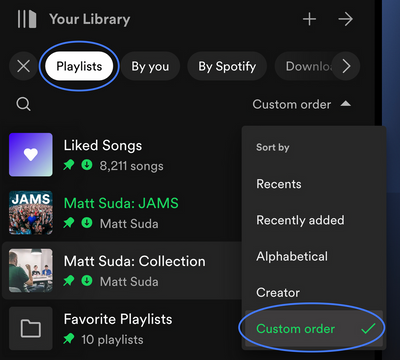
You should now be able to drag & drop playlists outside of your folders as well as change their order.
Please click here for more information.
You can also enable compact mode to make the sidebar most like the old one.
Here's how to get it as close as possible to the old sidebar:
In the left "Your Library" sidebar, click on the "Playlists" filter.
Then, in the sort drop down select "Custom order". You will then see your previous playlist order and be able to reorganize your playlists (move playlists and folders like before)
Your current preference will be remembered each time you start up the Spotify desktop app.
If you would like to only see text in the Your Library sidebar, go to the Spotify app Settings ---> Library ---> and select "use compact library".
You can also drag the left sidebar to different sizes, as well as fully expand the sidebar by clicking the arrow button, and fully collapse the sidebar by clicking on the "Your Library" heading.
I hope this helps!
If my answer was useful, don't forget to give it a 'Like!' If my answer was the solution, don't forget to mark it as the solution! Thanks! 😇 | If you need anything else, please reply and ask, Feel free to follow my Spotify or Community profiles! Disclaimer: I am not affiliated with Spotify. |
- Mark as New
- Bookmark
- Subscribe
- Mute
- Subscribe to RSS Feed
- Permalink
- Report Inappropriate Content
There is actually a way to sort your playlists in a custom order, just like in the old UI! Please follow these instructions.
- Set the Filter to Playlists.
- Set the sort order to Custom order.
You should now be able to drag & drop playlists outside of your folders as well as change their order.
Please click here for more information.
You can also enable compact mode to make the sidebar most like the old one.
Here's how to get it as close as possible to the old sidebar:
In the left "Your Library" sidebar, click on the "Playlists" filter.
Then, in the sort drop down select "Custom order". You will then see your previous playlist order and be able to reorganize your playlists (move playlists and folders like before)
Your current preference will be remembered each time you start up the Spotify desktop app.
If you would like to only see text in the Your Library sidebar, go to the Spotify app Settings ---> Library ---> and select "use compact library".
You can also drag the left sidebar to different sizes, as well as fully expand the sidebar by clicking the arrow button, and fully collapse the sidebar by clicking on the "Your Library" heading.
I hope this helps!
If my answer was useful, don't forget to give it a 'Like!' If my answer was the solution, don't forget to mark it as the solution! Thanks! 😇 | If you need anything else, please reply and ask, Feel free to follow my Spotify or Community profiles! Disclaimer: I am not affiliated with Spotify. |
- Mark as New
- Bookmark
- Subscribe
- Mute
- Subscribe to RSS Feed
- Permalink
- Report Inappropriate Content
Wow, that's not intuitive at all hahaha.
I truly recommend Spotify to return to the previous efficient workflow. The new aspect is also worst, the fact that the album cover shows smaller without fitting with the column have no sense aesthetically.
In my opinion Spotify should evolve to give the user the oportunity to see the album cover bigger and better if the user want it, under no circumstances obligatory smalller, that is senseless.
Thanks for your response kaworu_bloodpaw!

Suggested posts

Hey there you, Yeah, you! 😁 Welcome - we're glad you joined the Spotify Community! While you here, let's have a fun game and get…
