- Home
- Welcome
- Community Blog
- Introducing the Spotify Miniplayer to Spotify Desk...
Help Wizard
Step 1
Type in your question below and we'll check to see what answers we can find...
Loading article...
Submitting...
If you couldn't find any answers in the previous step then we need to post your question in the community and wait for someone to respond. You'll be notified when that happens.
Simply add some detail to your question and refine the title if needed, choose the relevant category, then post.
Just quickly...
Before we can post your question we need you to quickly make an account (or sign in if you already have one).
Don't worry - it's quick and painless! Just click below, and once you're logged in we'll bring you right back here and post your question. We'll remember what you've already typed in so you won't have to do it again.
FAQs
Please see below the most popular frequently asked questions.
Loading article...
Loading faqs...
Ongoing Issues
Please see below the current ongoing issues which are under investigation.
Loading issue...
Loading ongoing issues...
Help categories
Account & Payment
Using Spotify
Listen Everywhere
Introducing the Spotify Miniplayer to Spotify Desktop
- Subscribe to RSS Feed
- Mark as New
- Mark as Read
- Bookmark
- Subscribe
- Printer Friendly Page
- Report Inappropriate Content

Introducing the Spotify Miniplayer to Spotify Desktop


- Mark as New
- Bookmark
- Subscribe
- Mute
- Subscribe to RSS Feed
- Permalink
- Report Inappropriate Content
Hey folks!
I’m excited to introduce a new addition to the Spotify desktop experience: the Spotify Miniplayer!
Whenever I’m working, Spotify is always running in the background. I keep jumping from track to track and this means I keep switching between windows. If I have to adjust volume or change the Repeat mode, for example, I need to switch to the Spotify window. I bet that you also felt from time to time that there should be a better way to handle these controls?
Well, we got lucky! That’s what the Miniplayer is for! Looks like this nifty feature is designed to give us maximum control over our music and podcasts with minimal intrusion, ensuring the workflow goes undisturbed.
Here’s a couple of things we can expect from the new Miniplayer:
Supported Content
Whether you're into the music, podcasts, or both, the Miniplayer is your go-to. It delivers a balanced experience, catering equally to both video and music content. I really like how it takes the video podcasts out in a picture-in-picture mode with controls. I can make the video size larger or smaller based on my preference.
Discreet
I find it neat how the Miniplayer floats over other applications. I can get all the playback controls I need without getting distracted. This helps me stay focused and does not disturb my workflow.
Fluid Transition
The Miniplayer doesn't replace the main Spotify window. It's easy to switch back and forth. I can open the Miniplayer or close it without interrupting the listening experience.
I love exploring playlists and podcasts but this can easily become a distraction. One example is the time I was listening to rock music whilst replying to some emails, and I wanted to shuffle my playlist. I switched to Spotify and a few minutes later I was browsing a classical playlist. You see? It is so easy to get lost since there are a lot of amazing curated playlists.
Thanks to the Miniplayer, I can now shuffle my queue or put a song on repeat without opening the main app. I can also quickly add or remove a song or episode from my library with just one click.
Adaptable Design
It’s awesome that I can shape my space according to my own rules. I really enjoy that the Miniplayer can transform its shape into a square, rectangle, or a sleek bar. You can adjust it to any size based on the current task.

I often use the Miniplayer in a small pill size. This gives me the basic controls while maintaining the minimum visual presence. I can then close the main Spotify window but still control my music and podcasts easily.
Earlier today I was reviewing my projects. The Miniplayer was quietly sitting at the bottom left corner of my screen. It takes the minimum screen real estate while giving me a visual glimpse of what is playing and ability to quickly pause or go to the next track.
Quick Tip: You can also click the Artist name, Song name, or the Album Art to open it in the main Spotify app.
Availability
The Miniplayer is only available for Premium users just now. To use the Miniplayer, look for this icon on your desktop app:

You can find it at the bottom right corner between the volume and the full screen buttons.
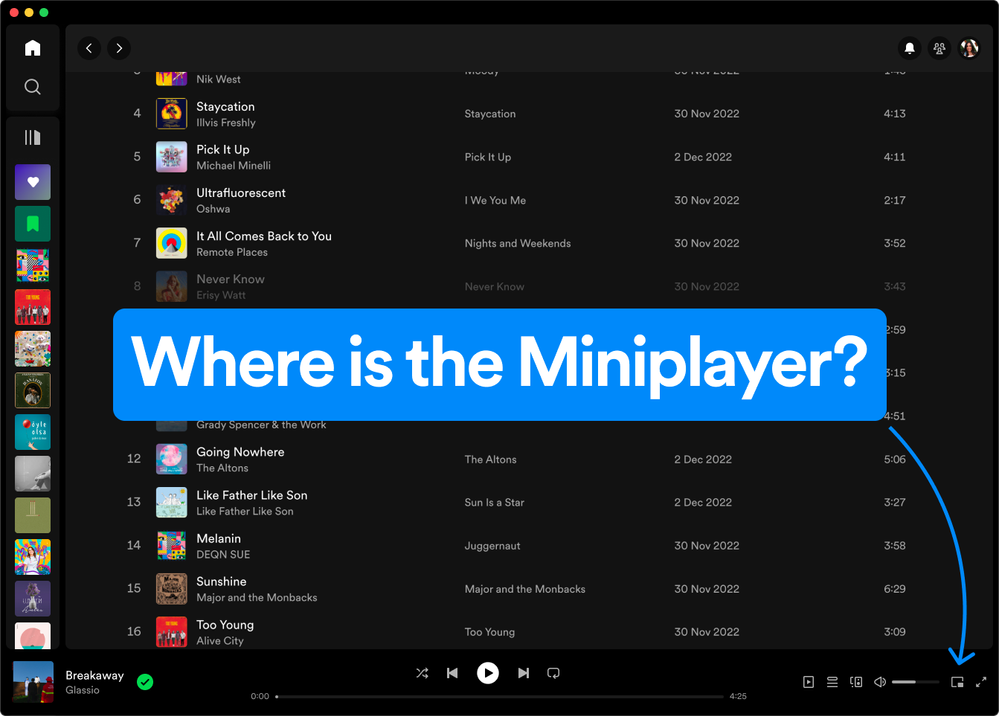
I hope you have the same handy experience with the Miniplayer as I did. Maybe you will discover even more useful things. Don’t forget to share them with the rest of the Community - feel free to drop your thoughts and feedback below.
- Previous
-
- 1
- 2
- 3
- 4
- 5
- 6
- 7
- Next »

- Mark as Read
- Mark as New
- Bookmark
- Permalink
- Report Inappropriate Content

- Mark as Read
- Mark as New
- Bookmark
- Permalink
- Report Inappropriate Content
Not available on the Linux desktop app

- Mark as Read
- Mark as New
- Bookmark
- Permalink
- Report Inappropriate Content
I have tried all the suggestions on here for the Window platform and still do not get the icon. Is this feature not available for Family Platinum accounts?
- Mark as Read
- Mark as New
- Bookmark
- Permalink
- Report Inappropriate Content
This is something I've been wanting, and glad y'all did it. However like many have said here, I also cannot get it. Tried downloading latest from Spotify, no dice. Tried downloading from MS Store, no dice.

- Mark as Read
- Mark as New
- Bookmark
- Permalink
- Report Inappropriate Content
This is an excellent addition. Can't wait for more functionalities of the mini player in future

- Mark as Read
- Mark as New
- Bookmark
- Permalink
- Report Inappropriate Content
A wonderful addition. I finally don't have to mess with workarounds for this.

- Mark as Read
- Mark as New
- Bookmark
- Permalink
- Report Inappropriate Content
A nice feature, would be even nicer if it could display the same, higher resolution artwork that shows when clicking it at the top of an album page. It lets me resize it to roughly two-thirds of the monitor size so full res art being missing seems like an oversight. It is equally crusty-looking next to the now playing view artwork.


- Mark as Read
- Mark as New
- Bookmark
- Permalink
- Report Inappropriate Content
I previously posted about "jittery" behavior when hovering over or clicking on the mute icon. I also noticed it did not remember previous location and dimensions when closed and then re-opened.
Then, a couple days later these two issues were fixed.
As of yesterday, the same problems are BACK!
Is it really that difficult to roll out software updates? Come on Spotify. Get your act together.

- Mark as Read
- Mark as New
- Bookmark
- Permalink
- Report Inappropriate Content
Been waiting for a desktop update to get this. Today an update finally happened. No miniplayer. Figure it out.

- Mark as Read
- Mark as New
- Bookmark
- Permalink
- Report Inappropriate Content
That's great and all but, when will you guys finally allow people to remove podcasts from "your shows"? If you listen to one episode and never want to listen to it again, though luck, it's such there forever.
People have been asking for this for literal years now.
Also, this "draft saving" in this comment session is messing with people on mobile, wifi in the middle of writing and your keyboard goes away, never go return until you refresh the page.
P.S.: I'm using the duckduckgo browser and SwiftKey keyboard.
- Mark as Read
- Mark as New
- Bookmark
- Permalink
- Report Inappropriate Content
You're in the wrong thread

- Mark as Read
- Mark as New
- Bookmark
- Permalink
- Report Inappropriate Content
Since release, I've reinstalled the app 10 times, both from microsoft store and spotify website directly. I see no mini-player. My partner (who has the premium family plan) has access to it and they sit literally next to me... How is it possible that the feature is being "slowly rolled out"? Is that to specific users? If it's a known issue please let us know, or provide some troubleshooting steps to do...

- Mark as Read
- Mark as New
- Bookmark
- Permalink
- Report Inappropriate Content
Doesn't work on Apple Silicon Desktop.
- Mark as Read
- Mark as New
- Bookmark
- Permalink
- Report Inappropriate Content
2 updates later and still now miniplayer. Tried everything from reinstalling the desktop version to reinstalling the Windows Store version to using a program uninstaller that deletes every spotify related entry in the Registry. Still no miniplayer. This must be some form of bug right?
- Mark as Read
- Mark as New
- Bookmark
- Permalink
- Report Inappropriate Content
Well they are claiming that "it's being rolled out" but they don't specify if it is being rolled out to users or countries/region. I think it's a bug personally but what can you do...

- Mark as Read
- Mark as New
- Bookmark
- Permalink
- Report Inappropriate Content
I have the mini player two days ago I just perform a format of my pc and re install spotify and now I dont have it anymore ....
an i found no answer at all
- Mark as Read
- Mark as New
- Bookmark
- Permalink
- Report Inappropriate Content

- Mark as Read
- Mark as New
- Bookmark
- Permalink
- Report Inappropriate Content
1 month and still not rolled out to everyone, what a joke. https://open.spotify.com has had it since release, but requires your browser to be open and on the page.
- Mark as Read
- Mark as New
- Bookmark
- Permalink
- Report Inappropriate Content
Premium DUO user on Win11 and I've deleted and re-installed the app several times and still don't have the option for the miniplayer!

- Mark as Read
- Mark as New
- Bookmark
- Permalink
- Report Inappropriate Content
Like others, I was having an issue with the MiniPlayer not being seen after uninstall/reinstall of the latest version directly from Spotify as well as the MS Store version as a Premium user. I resolved it by closing Spotify, going to the Task Manager - close the Spotify Background process, and restarted Spotify. All good now and the MiniPlayer is there!
I am a Windows user and assume it might be a similar process for Mac folks with the same issue.
You must be a registered user to add a comment. If you've already registered, sign in. Otherwise, register and sign in.