The community is in read-only mode
The Spotify Community is in read-only mode while we move to a new platform. We expect to be back up and running October 6th. During this time you can read existing content but take no other actions. If you still need help, visit our Support Site or contact us.
- Home
- Help
- Your Library
- Introducing Smart Shuffle!
Help Wizard
Step 1
Type in your question below and we'll check to see what answers we can find...
Loading article...
Submitting...
If you couldn't find any answers in the previous step then we need to post your question in the community and wait for someone to respond. You'll be notified when that happens.
Simply add some detail to your question and refine the title if needed, choose the relevant category, then post.
Just quickly...
Before we can post your question we need you to quickly make an account (or sign in if you already have one).
Don't worry - it's quick and painless! Just click below, and once you're logged in we'll bring you right back here and post your question. We'll remember what you've already typed in so you won't have to do it again.
FAQs
Please see below the most popular frequently asked questions.
Loading article...
Loading faqs...
Ongoing Issues
Please see below the current ongoing issues which are under investigation.
Loading issue...
Loading ongoing issues...
Help categories
Account & Payment
Using Spotify
Listen Everywhere
Introducing Smart Shuffle!
Solved!

- Mark as New
- Bookmark
- Subscribe
- Mute
- Subscribe to RSS Feed
- Permalink
- Report Inappropriate Content
Introducing Smart Shuffle!
We know that our users love creating their own playlists to capture key moments in time – in fact, playlists created by users often become their most-streamed playlist for the first several months but listening to these playlists slowly fades overtime, and users are eager to discover new music.
With this in mind, we’re excited to launch a new play mode called Smart Shuffle that keeps listening sessions fresh and provides personalized recommendations that perfectly match any listeners’ playlist vibe.
This update will roll out to Premium users on mobile devices starting today.
How does Smart Shuffle work?
- You can use it in any playlist created by you, and your Liked Songs.
- To activate it, just use the Shuffle button to switch between regular play, Shuffle mode and Smart Shuffle.
- When Smart Shuffle is on, recommendations are added to your session automatically. You can find all the recommendations sitting in your queue.
- You will be able to recognize the music we are recommending with the sparkle (✨) symbol next to the track. For a playlist with more than 15 songs, we’ll recommend one song for every three tracks.
- And the best part, your original playlist remains untouched, so you can add any new track that catches your ear.
- If you like a specific recommendation, just save it using the plus button in the Now Playing View. If that song doesn’t hit right, just tap the minus to remove it from the recommendations. This is then used to better adjust the suggestions we put forward.
- Every time you turn Smart Shuffle off, a new mix will be available every time you activate it again.


Adding and removing recommendations.
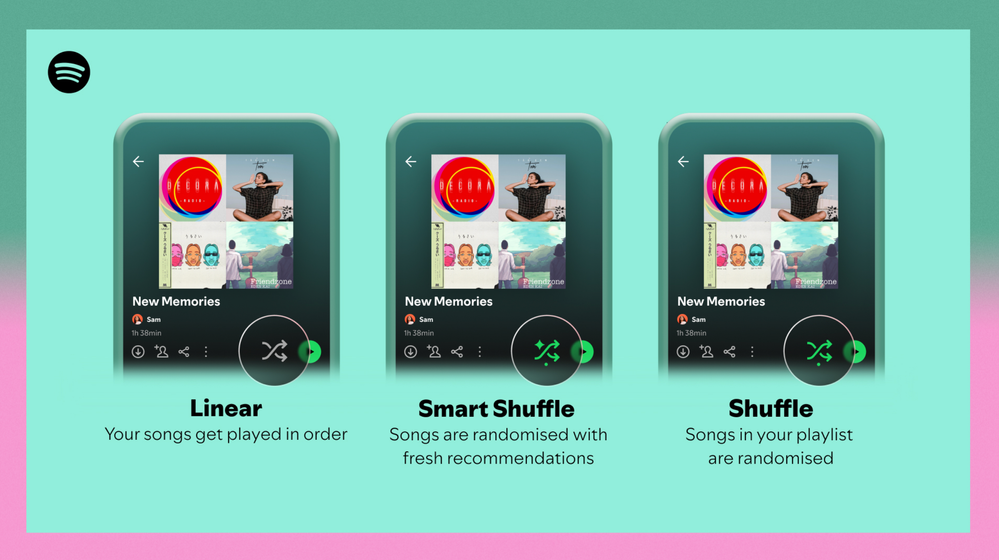
Different playback options.
FAQ
What about the Enhance feature?
For now, Smart Shuffle will replace the Enhance feature.
What will happen to Discover Weekly and other regularly updated playlists?
For the time being, no changes to those will be made. Smart Shuffle aims to improve the listening experience for user curated playlists.
Does this mean that using Smart Shuffle will cause my carefully curated playlists to get cluttered with new recommendations?
No! Your original playlist remains untouched, so you can add any new track that catches your ear. Smart Shuffle won’t change your playlist without your explicit permission. What changes instead is what you'll hear during each specific listening session
🌟 I would like to disable Smart Shuffle permanently. Can I do that?
Yes, you can! Just go to Settings and privacy and then to Playback and toggle the option Enable all play modes to off. This will mean you will only have the regular shuffle.
Note: This option is for Premium users only.
We hope you're as excited as we are about this new play mode. The official Newsroom announcement is out, you can check that out too. For any and all feedback on the matter you may have, you're more than welcome to comment in the thread below.
Solved! Go to Solution.
- Subscribe to RSS Feed
- Mark Topic as New
- Mark Topic as Read
- Float this Topic for Current User
- Bookmark
- Subscribe
- Printer Friendly Page

Hi there folks,
We're here to say that we've taken your feedback into account and you will now be able to disable Smart Shuffle from the app settings, as described in this now implemented idea!
The steps are as follows:
- Tap your profile picture at the top.
- Tap Settings and privacy.
- Select Playback.
- Switch Enable all play modes off.
This is for Premium users only and is only available on mobile at the moment, but rest assured it will be coming to desktop in due time as well.
Cheers!

- Mark as New
- Bookmark
- Subscribe
- Mute
- Subscribe to RSS Feed
- Permalink
- Report Inappropriate Content
Hello,
I like using the smart shuffle on my "Liked Playlist" because I enjoy hearing things I did not realize I did not have saved.
The downside I have noticed while using this, despite having almost 3,000 songs liked, over MANY genres, whenever I turn the smart shuffle on it will always only play the few rap songs I have liked while only recommending more rap songs. Is there a way to improve on this where it will shuffle ALL my liked songs and recommend a variety of different ones, not just rap....?


- Mark as New
- Bookmark
- Subscribe
- Mute
- Subscribe to RSS Feed
- Permalink
- Report Inappropriate Content
Good news!
There is a new setting in the Spotify desktop app for Premium users to disable Smart Shuffle. This setting was previously available only in the mobile app.
Turning this setting off will remove the Smart Shuffle option from play modes. Cycling through the Shuffle modes will no longer include Smart Shuffle, only regular Shuffle and Shuffle off.
If you don't see the new setting yet, make sure the desktop app is up to date.
To disable Smart Shuffle in the desktop app:
1: Click on your profile picture at the top right corner
2: Click on Settings
3: Scroll down to Playback
4: Turn off Include Smart Shuffle in play modes
More info about the Shuffle modes can be found in the support article:

- Mark as New
- Bookmark
- Subscribe
- Mute
- Subscribe to RSS Feed
- Permalink
- Report Inappropriate Content
It doesn't take a genius to work out that this was a terrible terrible terrible idea to forcefully lock in as a feature as it did when it first came out. I realise its been now fixed and people have the option to disable it however the problem goes far deeper....it indicates that there is someone in the spotify development team that is severely detached from the basic awareness of how people prefer to listen to music. And the presence of that person is obviously having further detrimental effects to issues we are all experiencing with spotify. They are obviously making nonsensical design and development choices that go against all rational thinking such as a back/ previous/ swipe left option that doesn't function as intended in queue mode thus forcing users to create a new playlist every time they want to check out a new song to see if they like it or not, the whole thing is a **bleep** mess. I've never encountered a more un-intuitive , un-userfriendly, absurd, nonsensical way of using a music app. It makes no **bleep** sense. I was scrolling forward through my queue (because that's the only apparent direction ) and accidentally tapped on one of the songs and that was the end of it , i lost the chance to listen to a dozen of the songs I had qued up because there was no back button, there was no undo option. And I'm willing to bet that the same looney tune that enforced tbe smart shuffle is behind this bevause it's at tbe same level of crazy as that

- Mark as New
- Bookmark
- Subscribe
- Mute
- Subscribe to RSS Feed
- Permalink
- Report Inappropriate Content
Too bad that's only for premium users, but good news indeed!

Suggested posts

Hey there you, Yeah, you! 😁 Welcome - we're glad you joined the Spotify Community! While you here, let's have a fun game and get…