Announcements

Help Wizard

Step 1

NEXT STEP

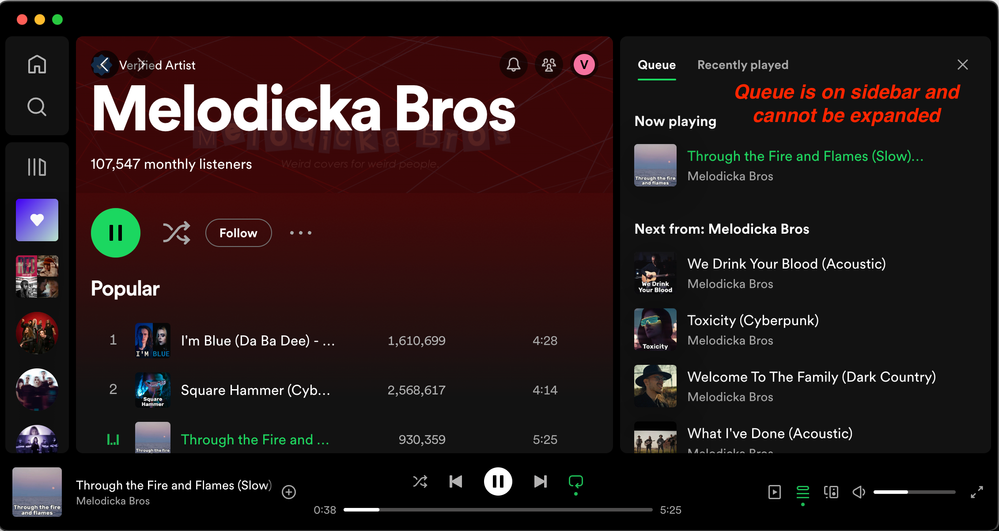
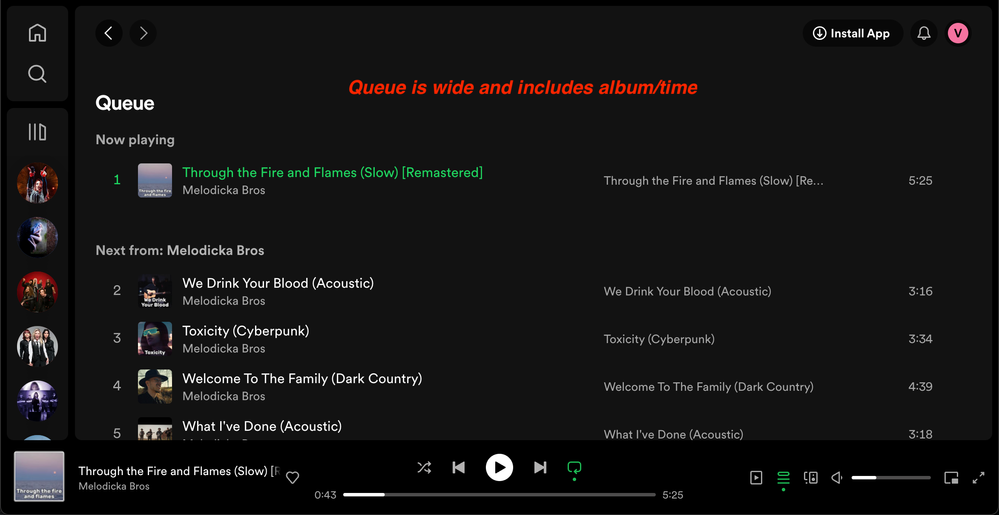
Return expanded queue view (not only sidebar) for desktop as it was before and now on web

As mentioned in https://community.spotify.com/t5/Desktop-Mac/Cannot-expand-queue-section-on-Mac-desktop-application/... it would be great to return old and pretty standard view for queue (aka playing now). As having it very limited on sidebar is against existing UX


Screenshots for reference:

MasOS:

Eternal__0-1709552573340.png

Web version (preferred version):

Eternal__1-1709552590975.png


Comments
pastjohn

Yep, I agree. I've seen a couple other posts for this. This is a HORRIBLE change Spotify! It's a loss of functionality and makes managing currently playing songs much more difficult. CHANGE IT BACK NOW!!!

Linda34

I agree also! Change it back!!!! Otherwise I will unsubscribe, and a lot of other users will too!!!

hazyy

Recently, my desktop version of Spotify has updated with the new feature of the queue being added to the right sidebar. I believe that the queue feature deserves better, and I have come up with an idea that I believe solves the majority of issues people are complaining about.


Extended queue added to the "Now playing view"

A problem that I have seen many people point out with the new queue is their dislike of it occupying the entire right sidebar, which results in people going through the bothersome motion of clicking back and forth between the queue and Now playing view features. For this reason, I think it would be better if we were able to expand and collapse the "Next in queue" section that's already within the Now playing view. The updated Now playing view would reposition the Next in queue section to the top for when the queue is collapsed. When the queue is expanded, however, all the information usually listed in the sidebar beneath the current song playing will be replaced and filled with the songs queued (refer to the first two images to see my example).


Now playing view queue collapsed

NPV queue collapsed.png


Now playing view queue expanded

NPV queue expanded.png


Return of middle screen queue


Although moving the right sidebar queue to the Now playing view is a step in the right direction, it is not enough to please us, since the much narrower version of the queue seen above is not always sufficient. On desktop, there is no good reason to not have both a more compact and accessible queue in the right sidebar, and a large queue in the middle with the added info of listed track lengths, album names, and # positions in the queue. As seen in my illustration, recently played tracks and desktop jam would only be available in the middle screen queue, but I believe this idea offers a much better user experience than the one Spotify has devised for us. (see image below for the example)


Middle screen queue

queue button.png


tltimelord

It's an absolutely terrible change and needs to be an option for people to opt out of. Getting really tired of companies making worthless UI changes like this in order to appease the investors. 

tltimelord

Would love to see this change either reverted or made optional. Getting tired of companies forcing me to change my muscle memory to appease their investors. 

alexjamesbutler

Agree completely with what has been said before (well, apart from “overpaid designers”.. dude they’re doing their job and probably are not overpaid!).


SPOTIFY you’ve seen enough feedback for why we want these recent changes reverted. We appreciate that advertising is a part of your service; I personally would be alright (as a premium subscriber) with the spruiking of merch, tix, etc etc; Actually I think that’s awesome! Just move it to the bottom 1/4 of the screen on desktop—that would be fine!


Currently I really am not happy with the majority of my screen being taken up by… well nothing productive.
Give us back what we want please. It’s what we subscribe for.

eisenhomer

Please revert the Queue back to the center pane in the desktop app.

mikeg40

the centre section is now just a waste of space. I used to have queue on the right and now playing in the middle. now I can only have one or the other, not both.

Magpie666

I cannot possibly see any advantage to this change other than for people who want to put on a karaoke playlist and have the lyrics in the center with the queue on the side. Absolutely no other scenario makes sense. 


All of the information is squished, you can't read the entire track name or see any additional info. If you show your playlist in the center, it doesn't move and doesn't show you the order of the tracks if you are playing on shuffle. Showing the home view also does not do anything. There's no purpose to having a static screen be the majority of your software's real estate. 


This is compounded by the fact that the left hand sidebar can be extended almost all the way across, to the point where it collapses the right hand toolbar. Why on Earth would you allow that, but not the other way around? I don't need to extend my library all the way over to the right. What I do need is to see the songs that I'm currently playing, in the order I'm currently playing them, with a heart button to add them to my liked songs, a + to add to the playlist if I have Smart Shuffle on, and an ellipsis to add to an additional playlist. And duration, album, and you know... The ENTIRE song title. Go fit a Bal-Sagoth playlist in that space. Try it. 🤦🏼‍♀️😄


Screenshot_20240326_180724_Spotify.jpg


I also agree with the other commenter regarding Playlist Radio being much better than Smart Shuffle, and the heart to add to Liked Songs.  


I worked in UI, and this never would have made it out of beta testing. I have no idea how anyone thought this was a good idea, let alone forcing users into it rather than making it an option. 


I've already been debating bailing on Spotify because of how little they pay the artists compared to other music streaming platforms. I don't use Apple products, but if this kind of nonsense without regard for user choice (especially on a paid platform) continues, I'm going to be finding a way to try to port my stuff over to Tidal. The only thing keeping me from doing so has been not wanting to lose my playlists and 10K plus liked songs.


Even Windows lets me customize the toolbar to add back Quick Launch, never combine icons, hide the ribbon in Excel, hide the new terrible left hand pane in Outlook, etc, because despite being known for rolling out changes everyone hates, at least they try to give users a means to change it back to how they prefer it. 


Thrusting major UI changes on your users without notice or options is asking for some pretty terrible customer experience ratings to go hand in hand with people bailing on your platform. 


This change 100% should have been optional and needs to be optional. 

Magpie666

Deleting this comment's contents, since they have merged threads and it is now a duplicate.