The community is in read-only mode
The Spotify Community is in read-only mode while we move to a new platform. We expect to be back up and running October 6th. During this time you can read existing content but take no other actions. If you still need help, visit our Support Site or contact us.
- Home
- Help
- Your Library
- Re: Introducing Smart Shuffle!
Help Wizard
Step 1
Type in your question below and we'll check to see what answers we can find...
Loading article...
Submitting...
If you couldn't find any answers in the previous step then we need to post your question in the community and wait for someone to respond. You'll be notified when that happens.
Simply add some detail to your question and refine the title if needed, choose the relevant category, then post.
Just quickly...
Before we can post your question we need you to quickly make an account (or sign in if you already have one).
Don't worry - it's quick and painless! Just click below, and once you're logged in we'll bring you right back here and post your question. We'll remember what you've already typed in so you won't have to do it again.
FAQs
Please see below the most popular frequently asked questions.
Loading article...
Loading faqs...
Ongoing Issues
Please see below the current ongoing issues which are under investigation.
Loading issue...
Loading ongoing issues...
Help categories
Account & Payment
Using Spotify
Listen Everywhere
Introducing Smart Shuffle!
Solved!

- Mark as New
- Bookmark
- Subscribe
- Mute
- Subscribe to RSS Feed
- Permalink
- Report Inappropriate Content
Introducing Smart Shuffle!
We know that our users love creating their own playlists to capture key moments in time – in fact, playlists created by users often become their most-streamed playlist for the first several months but listening to these playlists slowly fades overtime, and users are eager to discover new music.
With this in mind, we’re excited to launch a new play mode called Smart Shuffle that keeps listening sessions fresh and provides personalized recommendations that perfectly match any listeners’ playlist vibe.
This update will roll out to Premium users on mobile devices starting today.
How does Smart Shuffle work?
- You can use it in any playlist created by you, and your Liked Songs.
- To activate it, just use the Shuffle button to switch between regular play, Shuffle mode and Smart Shuffle.
- When Smart Shuffle is on, recommendations are added to your session automatically. You can find all the recommendations sitting in your queue.
- You will be able to recognize the music we are recommending with the sparkle (✨) symbol next to the track. For a playlist with more than 15 songs, we’ll recommend one song for every three tracks.
- And the best part, your original playlist remains untouched, so you can add any new track that catches your ear.
- If you like a specific recommendation, just save it using the plus button in the Now Playing View. If that song doesn’t hit right, just tap the minus to remove it from the recommendations. This is then used to better adjust the suggestions we put forward.
- Every time you turn Smart Shuffle off, a new mix will be available every time you activate it again.


Adding and removing recommendations.
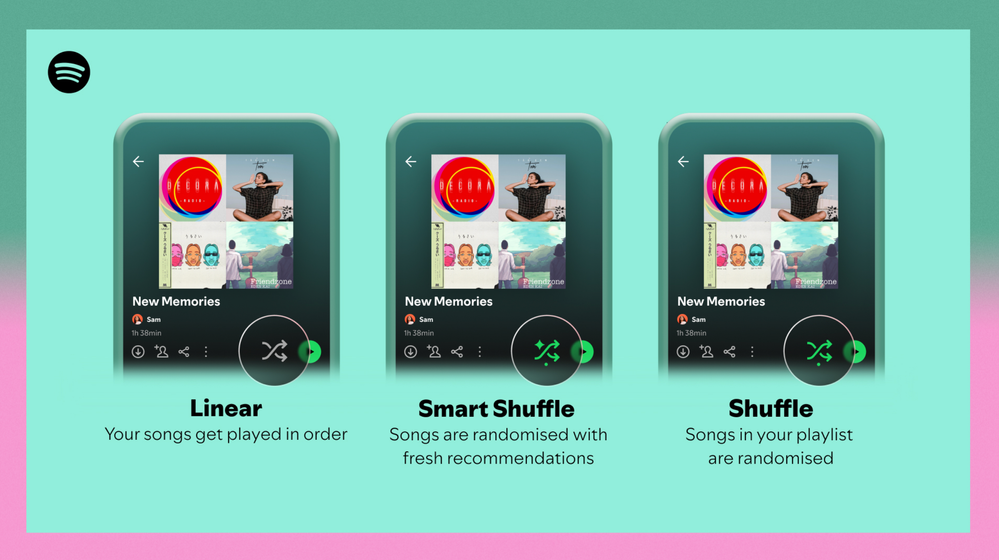
Different playback options.
FAQ
What about the Enhance feature?
For now, Smart Shuffle will replace the Enhance feature.
What will happen to Discover Weekly and other regularly updated playlists?
For the time being, no changes to those will be made. Smart Shuffle aims to improve the listening experience for user curated playlists.
Does this mean that using Smart Shuffle will cause my carefully curated playlists to get cluttered with new recommendations?
No! Your original playlist remains untouched, so you can add any new track that catches your ear. Smart Shuffle won’t change your playlist without your explicit permission. What changes instead is what you'll hear during each specific listening session
🌟 I would like to disable Smart Shuffle permanently. Can I do that?
Yes, you can! Just go to Settings and privacy and then to Playback and toggle the option Enable all play modes to off. This will mean you will only have the regular shuffle.
Note: This option is for Premium users only.
We hope you're as excited as we are about this new play mode. The official Newsroom announcement is out, you can check that out too. For any and all feedback on the matter you may have, you're more than welcome to comment in the thread below.
Solved! Go to Solution.
- Subscribe to RSS Feed
- Mark Topic as New
- Mark Topic as Read
- Float this Topic for Current User
- Bookmark
- Subscribe
- Printer Friendly Page

- Mark as New
- Bookmark
- Subscribe
- Mute
- Subscribe to RSS Feed
- Permalink
- Report Inappropriate Content
≫ ... disabling the option ... need an option to disable ... if the signal is ropey, the dopey shuffle hangs on ... the repeats and inserted advertisement of tracks drive me mad ... and I will cancel all my paying accounts ... if you don’t fix this!
There are several quick solutions-- but this is Spotify-- and the users have to discover and do it themselves-- without any help from Spotify help.
And there is no reliable place for the hard users to post the simple, straight-forward solutions in a way that the real users could edit the text of the solutions themselves to counteract the constant changes that destroy the instructions for the quick fixes-- So lots of anger and frustration-- and the Spotify dungeon boss just laughs and laughs and does it again and again.
That said-- as of now-- the summary of the current fix for desktop, mobile, web browser player, and TV player is-- Start the perfect Shuffle on the desktop and then Connect to play wherever you would like.
On the desktop Spotify: 1) Insert a FiveTrackPlaylist just above the up-to 9999 track playlist you want to shuffle-- then 2) set the DefaultByPlaylist default to “NONsmartShuffle_only”-- 
And as a pleasant result, the shuffle will play perfectly-- My last shuffle has played right now-- for 1,994 tracks on my Win_10 Spotify player-- sometimes connecting to play on my mobile whenever I want-- This perfect Spotify shuffle has been running for six days without stopping and without failure-- Zero repeats as recorded and scrutinized faithfully by my last.fm reporter-- And zero moments of anger at noticing any infuriating smart-alecky insertion by the Spotify Smart shuffle or other minions of evil.
But the Spotify Dungeon Boss can strike at any minute-- I know-- by day or night to make changes-- even to code or default settings without my approval-- However, my last.fm reporter will certainly notice any repeating string of infuriating repeats, and last.fm will certainly warn me without fail before I even notice the repeat-- even any infuriating repeat from the repeats without ceasing from that pretendingToBeSMART Dungeon Boss of a shuffle breaker.

- Mark as New
- Bookmark
- Subscribe
- Mute
- Subscribe to RSS Feed
- Permalink
- Report Inappropriate Content
Thanks for that completely unhelpful wall of text

- Mark as New
- Bookmark
- Subscribe
- Mute
- Subscribe to RSS Feed
- Permalink
- Report Inappropriate Content
Could you please remove Smart Shuffle from the Brazilian free tier? Or at least make both Shuffles available?
- Mark as New
- Bookmark
- Subscribe
- Mute
- Subscribe to RSS Feed
- Permalink
- Report Inappropriate Content
Plan
Free
Country
Brazil
Device
Motorola Edge 40
Operating System
Android 14
My Question or Issue
Could you please remove Smart Shuffle from the Brazilian free tier? Or at least make both Shuffles available? In my experience all recommendations were garbage. Not even from the genres I listen to, let alone the genre of the songs in the playlist. It's honestly so bad I uninstalled the app and started using the web version as a PWA because the web version still offers me the normal Shuffle. As a side effect, the browser I use blocks ads too, but if you remove Smart Shuffle from the app, I'd go back to using the app and listen to the ads. The ads are honestly less annoying than the recommendations
In the announcement post you say I would notice if it's a recommendation if it has a little star on the icon. In actuality, I can immediately notice it's a recommendation because the song is one that I would never actively add to the playlist. It's literally the worst combination of songs possible for my playlist. You are adding Brazilian country/folk music and Brazilian pop music to a mostly heavy metal playlist ¯\_(ツ)_/¯
The folk music being added isn't even from the region I live at, which is honestly kinda disrespectful if you think all of Brazil listens to that specific folk genre.
- Mark as New
- Bookmark
- Subscribe
- Mute
- Subscribe to RSS Feed
- Permalink
- Report Inappropriate Content
To whoever migrated my post here, I disagree. This shouldn't be merged. It's a separate request that only affects Brazilian free users.

- Mark as New
- Bookmark
- Subscribe
- Mute
- Subscribe to RSS Feed
- Permalink
- Report Inappropriate Content
Not having this feature be something that can be disabled in the setting is actually infuriating. I spent me hours curating my playlists and liked songs. I use the shuffle feature religiously and find that I look away for a few moments and smart shuffle is suddenly on. I now no longer use the shuffle feature at all just to make sure I’m listening to the music I actually want to listen to. You made it so we could turn off auto play so why on earth would you do this to us?
- Mark as New
- Bookmark
- Subscribe
- Mute
- Subscribe to RSS Feed
- Permalink
- Report Inappropriate Content
Well said!
All!

- Mark as New
- Bookmark
- Subscribe
- Mute
- Subscribe to RSS Feed
- Permalink
- Report Inappropriate Content
This needs an account level feature to permanently disable. The recommendations are atrocious. It recommends music I’ve heard one billion times. The only possible reason I can think of for continuing to push this feature on users is because the labels must be asking for it. Jimi Hendrix and Led Zeppelin on a playlist with Devo, the Cure and the Smiths?

- Mark as New
- Bookmark
- Subscribe
- Mute
- Subscribe to RSS Feed
- Permalink
- Report Inappropriate Content
I just want a random shuffle. This should be a simple, big standard feature of this app, and it doesn't exist. Instead we have the special "Spotify shuffle" that just plays you the same ten songs over and over and over. And now, after making the shuffle boring by overplaying the same songs, instead of making shuffle random, they "fix" it by... Adding in songs I DONT WANT TO HEAR. FFS Spotify this is terrible.

- Mark as New
- Bookmark
- Subscribe
- Mute
- Subscribe to RSS Feed
- Permalink
- Report Inappropriate Content
I finally warmed up to this function during the sessions with my huge playlist of over 1,000 songs. The trouble with the old shuffle function, which still occurs with the smart feature, is that only a select group of those 1,000 songs are played more often than others. The mix of songs not on the list is helpful, but more attention needs to be paid to the shuffle function itself. If the smart function can find those tracks that don't get played as often. THAT would be a smart shuffle function!

- Mark as New
- Bookmark
- Subscribe
- Mute
- Subscribe to RSS Feed
- Permalink
- Report Inappropriate Content
please give us an option to turn this off across the whole account
I just want to play the music I'm selecting not have an AI insert additional tracks into playlists etc

- Mark as New
- Bookmark
- Subscribe
- Mute
- Subscribe to RSS Feed
- Permalink
- Report Inappropriate Content
I've never hated anything more in my life than I do Smart Shuffle. It's so cringe that it cannot be turned off.
- Mark as New
- Bookmark
- Subscribe
- Mute
- Subscribe to RSS Feed
- Permalink
- Report Inappropriate Content
Just send us a note and we can help Spotify Help write out the simple 1- 2- 3 to solve this.

- Mark as New
- Bookmark
- Subscribe
- Mute
- Subscribe to RSS Feed
- Permalink
- Report Inappropriate Content
I can´t seem to deactivate smart shuffle
I click it once - it says Smart Shuffle deactivated BUT the damn suggestions are still in the wait list
I click it twice - shuffle is deactivated and the playlist is in line...
PC Windows App, Premium Account
This is SUPER annoying

- Mark as New
- Bookmark
- Subscribe
- Mute
- Subscribe to RSS Feed
- Permalink
- Report Inappropriate Content
Let me turn this off or i'll switch to Apple

- Mark as New
- Bookmark
- Subscribe
- Mute
- Subscribe to RSS Feed
- Permalink
- Report Inappropriate Content
I can't believe you are forcing this **bleep** on us. Who is the **bleep**ing **bleep** that thought this was a good idea to keep paid customers happy? We pay YOUR BILLS and all you can think to do is **bleep** us off. GUESS WHAT I have a **bleep** ton of songs download and purchased SO I DON'T NEED YOU FOR ANYTHING!!!!!!!!!!!!!!!!! TURN THIS **bleep** OFF OR I WILL CANCEL MY SUBSCRIPTION!!!!!!!!!!!!!!!!!!!

- Mark as New
- Bookmark
- Subscribe
- Mute
- Subscribe to RSS Feed
- Permalink
- Report Inappropriate Content
- Mark as New
- Bookmark
- Subscribe
- Mute
- Subscribe to RSS Feed
- Permalink
- Report Inappropriate Content
We have been requesting this get removed or relocated for over a year now and nothing has been done. Combine that with the current absolute failure of the the app right now and it’s almost like you’re purposefully killing it. Do something.

- Mark as New
- Bookmark
- Subscribe
- Mute
- Subscribe to RSS Feed
- Permalink
- Report Inappropriate Content
Spotify, you have 44 Likes and 63 PAGES OF HATE COMMENTS for this feature, take a f***g hint and let us disable this in Settings once and for all!
- Mark as New
- Bookmark
- Subscribe
- Mute
- Subscribe to RSS Feed
- Permalink
- Report Inappropriate Content
disc_count, that's a very good point. Spotify forgets they are just slightly more convenient than pirating

Suggested posts

Hey there you, Yeah, you! 😁 Welcome - we're glad you joined the Spotify Community! While you here, let's have a fun game and get…
