- Home
- Help
- Your Library
- Introducing Smart Shuffle!
Help Wizard
Step 1
Type in your question below and we'll check to see what answers we can find...
Loading article...
Submitting...
If you couldn't find any answers in the previous step then we need to post your question in the community and wait for someone to respond. You'll be notified when that happens.
Simply add some detail to your question and refine the title if needed, choose the relevant category, then post.
Just quickly...
Before we can post your question we need you to quickly make an account (or sign in if you already have one).
Don't worry - it's quick and painless! Just click below, and once you're logged in we'll bring you right back here and post your question. We'll remember what you've already typed in so you won't have to do it again.
FAQs
Please see below the most popular frequently asked questions.
Loading article...
Loading faqs...
Ongoing Issues
Please see below the current ongoing issues which are under investigation.
Loading issue...
Loading ongoing issues...
Help categories
Account & Payment
Using Spotify
Listen Everywhere
Introducing Smart Shuffle!
Solved!

- Mark as New
- Bookmark
- Subscribe
- Mute
- Subscribe to RSS Feed
- Permalink
- Report Inappropriate Content
Introducing Smart Shuffle!
We know that our users love creating their own playlists to capture key moments in time – in fact, playlists created by users often become their most-streamed playlist for the first several months but listening to these playlists slowly fades overtime, and users are eager to discover new music.
With this in mind, we’re excited to launch a new play mode called Smart Shuffle that keeps listening sessions fresh and provides personalized recommendations that perfectly match any listeners’ playlist vibe.
This update will roll out to Premium users on mobile devices starting today.
How does Smart Shuffle work?
- You can use it in any playlist created by you, and your Liked Songs.
- To activate it, just use the Shuffle button to switch between regular play, Shuffle mode and Smart Shuffle.
- When Smart Shuffle is on, recommendations are added to your session automatically. You can find all the recommendations sitting in your queue.
- You will be able to recognize the music we are recommending with the sparkle (✨) symbol next to the track. For a playlist with more than 15 songs, we’ll recommend one song for every three tracks.
- And the best part, your original playlist remains untouched, so you can add any new track that catches your ear.
- If you like a specific recommendation, just save it using the plus button in the Now Playing View. If that song doesn’t hit right, just tap the minus to remove it from the recommendations. This is then used to better adjust the suggestions we put forward.
- Every time you turn Smart Shuffle off, a new mix will be available every time you activate it again.


Adding and removing recommendations.
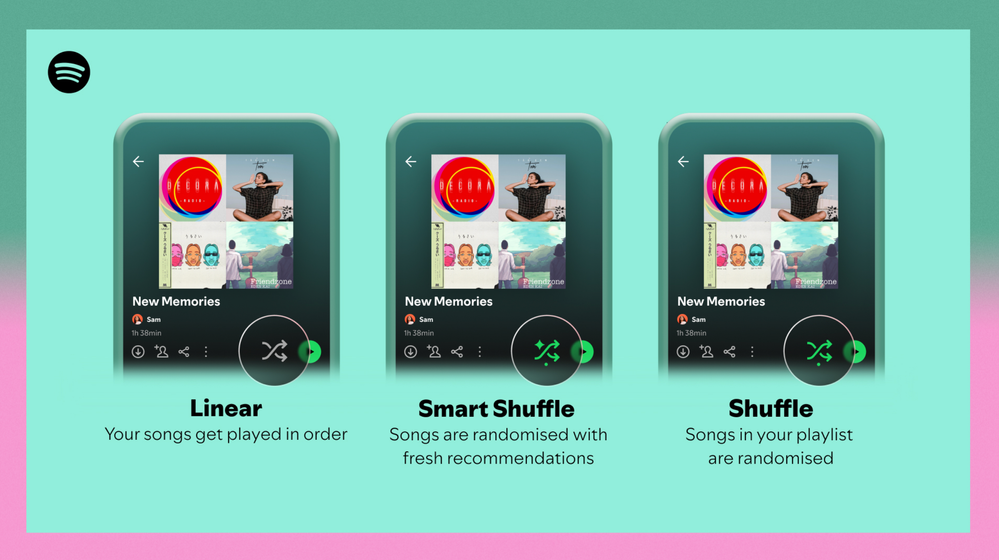
Different playback options.
FAQ
What about the Enhance feature?
For now, Smart Shuffle will replace the Enhance feature.
What will happen to Discover Weekly and other regularly updated playlists?
For the time being, no changes to those will be made. Smart Shuffle aims to improve the listening experience for user curated playlists.
Does this mean that using Smart Shuffle will cause my carefully curated playlists to get cluttered with new recommendations?
No! Your original playlist remains untouched, so you can add any new track that catches your ear. Smart Shuffle won’t change your playlist without your explicit permission. What changes instead is what you'll hear during each specific listening session
🌟 I would like to disable Smart Shuffle permanently. Can I do that?
Yes, you can! Just go to Settings and privacy and then to Playback and toggle the option Enable all play modes to off. This will mean you will only have the regular shuffle.
Note: This option is for Premium users only.
We hope you're as excited as we are about this new play mode. The official Newsroom announcement is out, you can check that out too. For any and all feedback on the matter you may have, you're more than welcome to comment in the thread below.
Solved! Go to Solution.
- Subscribe to RSS Feed
- Mark Topic as New
- Mark Topic as Read
- Float this Topic for Current User
- Bookmark
- Subscribe
- Printer Friendly Page

Hi there folks,
We're here to say that we've taken your feedback into account and you will now be able to disable Smart Shuffle from the app settings, as described in this now implemented idea!
The steps are as follows:
- Tap your profile picture at the top.
- Tap Settings and privacy.
- Select Playback.
- Switch Enable all play modes off.
This is for Premium users only and is only available on mobile at the moment, but rest assured it will be coming to desktop in due time as well.
Cheers!

- Mark as New
- Bookmark
- Subscribe
- Mute
- Subscribe to RSS Feed
- Permalink
- Report Inappropriate Content
When will you guys remove the smart shuffle feature? It's been 3 months and I'm still not used to it, and I'm sure many people feels the same, I saw some reviews of the app on twitter and app store and there are so many criticism to this new interface update in playlists and choice of songs! The App is great, has a vast library and good quality. However, smart shuffle doesn't please a lot of users and also doesn't add up to anything because the weekly recommendations playlist already exists, this update doesn't allow me to choose a particular song both in playlists and in search, and doesn't allow me to change the order of a playlist. This inhibition of freedom is ridiculous. If this feature is so important for Spotify then make it optional for each user to have it if they want it, cause I don't want to use it and don't want to go through it when I have to change to regular play in my playlist, besides takes too long to have to load and change through the options it also messes up the whole order of my songs, whenever I want my playlist of songs downloaded in the regular order it always starts in a certain order caused by the smart shuffle and I don't have the option to choose songs inside my own playlist and I can't change the order even is this thing is turned off, is really annoying. Please, think about remove it in the next update!!!

- Mark as New
- Bookmark
- Subscribe
- Mute
- Subscribe to RSS Feed
- Permalink
- Report Inappropriate Content
I strongly dislike this feature. I like the Enhance function still available on PC, because I get to choose WHEN I want to sprinkle some new tracks into a playlist I have.
Smart Shuffle is clunky and bothersome! WHY do I have to cycle through it when trying to shuffle a playlist???? That's a terrible design choice that worsens the user experience. Nobody should have to wait 15 seconds to shuffle a playlist a couple of times.
WHO thought it was a good idea to add something so useless to an essential feature like Shuffle??? Please return to Enhance and provide a way to disable Smart Shuffle permanently.

- Mark as New
- Bookmark
- Subscribe
- Mute
- Subscribe to RSS Feed
- Permalink
- Report Inappropriate Content
Can you like, UNINTRODUCE it?
Most annoying Spotify feature you guys have ever put out.

- Mark as New
- Bookmark
- Subscribe
- Mute
- Subscribe to RSS Feed
- Permalink
- Report Inappropriate Content
ive been on spotify since 2008, and yeah i agree with everyone here this is the worst feature yall have introduced in a long time. please add the ability to turn this off permanently in the settings. keep it for the people that want algorithmically generated recommendations, especially since your algorithm cannot seem to identify basic differences in genres.

- Mark as New
- Bookmark
- Subscribe
- Mute
- Subscribe to RSS Feed
- Permalink
- Report Inappropriate Content
Somehow my subscription to this thread was deactivated although I did not
login revently. Noticed that email notifications stopped. What about the others here?

- Mark as New
- Bookmark
- Subscribe
- Mute
- Subscribe to RSS Feed
- Permalink
- Report Inappropriate Content
I think it's time to switch to Tidal. Spotify doesn't care.

- Mark as New
- Bookmark
- Subscribe
- Mute
- Subscribe to RSS Feed
- Permalink
- Report Inappropriate Content
Hi, I like the smart shuffle 🙂
I would like to enable it on the web application but it doesn't seem to be an option, is this feature only available on the app version?
Thanks
Mariannna

- Mark as New
- Bookmark
- Subscribe
- Mute
- Subscribe to RSS Feed
- Permalink
- Report Inappropriate Content
Delete me
- Mark as New
- Bookmark
- Subscribe
- Mute
- Subscribe to RSS Feed
- Permalink
- Report Inappropriate Content
shouldn't you, spotify developers, just repair usual shuffle functionality? instead of adding another worthless extensions?

- Mark as New
- Bookmark
- Subscribe
- Mute
- Subscribe to RSS Feed
- Permalink
- Report Inappropriate Content
Please bring back the enhance function on android. I used it as my primary way of discovering new music. Not only that the enhanced songs remained in my list while now they are randomly added to the queue and will disappear afte that. It really feels like the Spotify app is evolving, only backwards.

- Mark as New
- Bookmark
- Subscribe
- Mute
- Subscribe to RSS Feed
- Permalink
- Report Inappropriate Content
When is this garbage feature going to be removed. Suck less at your job Spotify executive who got stuck with having to find a way to promote certain songs or whatever stupid decisions led to wanting to insert your music into my playlist when I’m just trying to toggle between shuffle and non shuffle.

- Mark as New
- Bookmark
- Subscribe
- Mute
- Subscribe to RSS Feed
- Permalink
- Report Inappropriate Content
bring back the enhance feature- i dont want to turn on and off smart shuffle every single time i shuffle its so unnecessary

- Mark as New
- Bookmark
- Subscribe
- Mute
- Subscribe to RSS Feed
- Permalink
- Report Inappropriate Content
I've been on Spotify for years, currently looking into switching because of this terrible, annoying feature.

- Mark as New
- Bookmark
- Subscribe
- Mute
- Subscribe to RSS Feed
- Permalink
- Report Inappropriate Content
Please add an option to completely disable this feature. At the moment you've committed a well-known UX sin: changing the functionality of a core button. Everyone knows when you press shuffle it either enables/disables shuffle. Adding smart shuffle to this button throws years of user experience out of the window and now they have to learn new functionality of a feature that most people don't want in the first place.
(Side note: currently you can "disable smart shuffle" by enabling offline mode, since it needs internet to work. I find myself doing this now, despite its inconvenience, as smart shuffle is too annoying to deal with. I'd prefer to just check a box to disable smart shuffle, but here we are.)

- Mark as New
- Bookmark
- Subscribe
- Mute
- Subscribe to RSS Feed
- Permalink
- Report Inappropriate Content
Really glad to see I'm not the only one who hates Smart Shuffle. It appears that the feature came to my app later than most. I was fine with the Enhance feature because you could more easily deselect it within the playlist and then not really have to worry about accidentally turning it on, or dealing with the load-up lag that I've experienced with Smart Shuffle (even with 5G service and/or strong WiFi).
This should be an optional feature that can be permanently toggled off and on within the Settings tab. It shouldn't be a feature that hampers UX. I like to regularly click Shuffle while listening to playlists just to keep things a bit fresher. Now, I'm frustrated by a new shuffle selection that, more often than not, is a distraction from my listening experience as well as any other activities I'm doing in the moment.
As someone who has been a Premium subscriber for years, I want it to be as easy and hassle-free as possible anytime I play one of my carefully/purposefully constructed playlists. If I wanted a shuffle feature with a bunch of random songs that *might* fit my interests, then I would just stop paying for Premium.
Spotify needs to fix this ASAP. I don't pay monthly for an interface that actively makes it more difficult to enjoy my playlists.
- Mark as New
- Bookmark
- Subscribe
- Mute
- Subscribe to RSS Feed
- Permalink
- Report Inappropriate Content
If the enhanced feature doesn't come back I'm switching to youtube music. Plain and simple, the enhanced feature was good, smart shuffle is not.
- Mark as New
- Bookmark
- Subscribe
- Mute
- Subscribe to RSS Feed
- Permalink
- Report Inappropriate Content
It's devolving. 😢
- Mark as New
- Bookmark
- Subscribe
- Mute
- Subscribe to RSS Feed
- Permalink
- Report Inappropriate Content
UX Design needs far more control and clarity on when a given "shuffle" is enabled. Even better if it involves curating what kind of "recommendations" it makes. The backend needs tinkering too. So far Spotify's algorithm has been 0 for 8 in me trying to use that feature to find new music I want to listen to. It's awful.
- Mark as New
- Bookmark
- Subscribe
- Mute
- Subscribe to RSS Feed
- Permalink
- Report Inappropriate Content
For the love of all that's holy, take this feature OFF the shuffle button when you're in the mode looking at what you're playing. If you have to leave it around for people who actually want to use it, put it somewhere else - anywhere else - or give an option to turn it off like others have suggestion. I brought up Spotify this morning to play music from my phone for something and ended up turning this feature on because it's ON THE SHUFFLE BUTTON. I don't want to turn on some feature I don't want in my playlist. I just want to shuffle the music in my playlist. Keep it simple and do what literally every other shuffle button in existence does. Either shuffle or not shuffle!
If I want recommendations to my playlists, I'll scroll to the bottom to the list, same as I always have so I can listen to them before they get added to my playlist.

- Mark as New
- Bookmark
- Subscribe
- Mute
- Subscribe to RSS Feed
- Permalink
- Report Inappropriate Content

Suggested posts

Hey there you, Yeah, you! 😁 Welcome - we're glad you joined the Spotify Community! While you here, let's have a fun game and get…