- Home
- Help
- Your Library
- Introducing Smart Shuffle!
Help Wizard
Step 1
Type in your question below and we'll check to see what answers we can find...
Loading article...
Submitting...
If you couldn't find any answers in the previous step then we need to post your question in the community and wait for someone to respond. You'll be notified when that happens.
Simply add some detail to your question and refine the title if needed, choose the relevant category, then post.
Just quickly...
Before we can post your question we need you to quickly make an account (or sign in if you already have one).
Don't worry - it's quick and painless! Just click below, and once you're logged in we'll bring you right back here and post your question. We'll remember what you've already typed in so you won't have to do it again.
FAQs
Please see below the most popular frequently asked questions.
Loading article...
Loading faqs...
Ongoing Issues
Please see below the current ongoing issues which are under investigation.
Loading issue...
Loading ongoing issues...
Help categories
Account & Payment
Using Spotify
Listen Everywhere
Introducing Smart Shuffle!
Solved!

- Mark as New
- Bookmark
- Subscribe
- Mute
- Subscribe to RSS Feed
- Permalink
- Report Inappropriate Content
Introducing Smart Shuffle!
We know that our users love creating their own playlists to capture key moments in time – in fact, playlists created by users often become their most-streamed playlist for the first several months but listening to these playlists slowly fades overtime, and users are eager to discover new music.
With this in mind, we’re excited to launch a new play mode called Smart Shuffle that keeps listening sessions fresh and provides personalized recommendations that perfectly match any listeners’ playlist vibe.
This update will roll out to Premium users on mobile devices starting today.
How does Smart Shuffle work?
- You can use it in any playlist created by you, and your Liked Songs.
- To activate it, just use the Shuffle button to switch between regular play, Shuffle mode and Smart Shuffle.
- When Smart Shuffle is on, recommendations are added to your session automatically. You can find all the recommendations sitting in your queue.
- You will be able to recognize the music we are recommending with the sparkle (✨) symbol next to the track. For a playlist with more than 15 songs, we’ll recommend one song for every three tracks.
- And the best part, your original playlist remains untouched, so you can add any new track that catches your ear.
- If you like a specific recommendation, just save it using the plus button in the Now Playing View. If that song doesn’t hit right, just tap the minus to remove it from the recommendations. This is then used to better adjust the suggestions we put forward.
- Every time you turn Smart Shuffle off, a new mix will be available every time you activate it again.


Adding and removing recommendations.
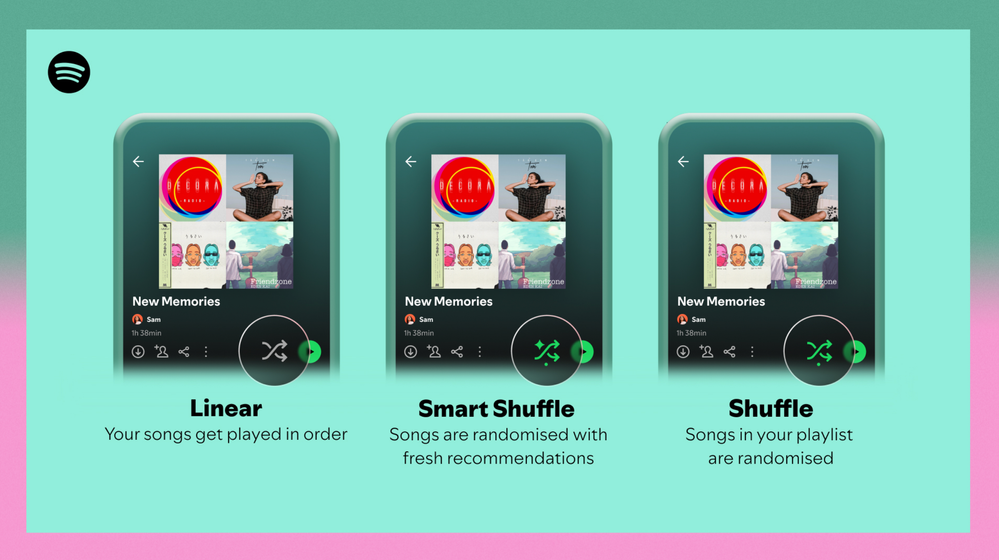
Different playback options.
FAQ
What about the Enhance feature?
For now, Smart Shuffle will replace the Enhance feature.
What will happen to Discover Weekly and other regularly updated playlists?
For the time being, no changes to those will be made. Smart Shuffle aims to improve the listening experience for user curated playlists.
Does this mean that using Smart Shuffle will cause my carefully curated playlists to get cluttered with new recommendations?
No! Your original playlist remains untouched, so you can add any new track that catches your ear. Smart Shuffle won’t change your playlist without your explicit permission. What changes instead is what you'll hear during each specific listening session
🌟 I would like to disable Smart Shuffle permanently. Can I do that?
Yes, you can! Just go to Settings and privacy and then to Playback and toggle the option Enable all play modes to off. This will mean you will only have the regular shuffle.
Note: This option is for Premium users only.
We hope you're as excited as we are about this new play mode. The official Newsroom announcement is out, you can check that out too. For any and all feedback on the matter you may have, you're more than welcome to comment in the thread below.
Solved! Go to Solution.
- Subscribe to RSS Feed
- Mark Topic as New
- Mark Topic as Read
- Float this Topic for Current User
- Bookmark
- Subscribe
- Printer Friendly Page

Hi there folks,
We're here to say that we've taken your feedback into account and you will now be able to disable Smart Shuffle from the app settings, as described in this now implemented idea!
The steps are as follows:
- Tap your profile picture at the top.
- Tap Settings and privacy.
- Select Playback.
- Switch Enable all play modes off.
This is for Premium users only and is only available on mobile at the moment, but rest assured it will be coming to desktop in due time as well.
Cheers!

- Mark as New
- Bookmark
- Subscribe
- Mute
- Subscribe to RSS Feed
- Permalink
- Report Inappropriate Content
It's been almost 4 months now since Smart Shuffle launched and paid users keep complaining about it while you guys don't do anything to solve this issue, besides always suggest us to opine in the official Spotify community to help the app improve but seems that the own moderators/developers don't even visit this site in the first place, otherwise they would know that no one likes this new feature, 29 pages of negative comments but this smart shuffle thing still there! Like...seriously? Does Spotify even care about the opinions of its paying customers? If you're not going to remove this soon, I think will be time for me to switch to another streaming platform which really listens to the complaints of its paying customers and doesn't make their lives stressful with annoying and unnecessary updates like this new play mode. Please, understand that Smart Shuffle is useless and is not an essential feature, return to Enhance button on mobile or simply provide a way to disable Smart Shuffle permanently for those who don't want it (most Spotify users probably).
- Mark as New
- Bookmark
- Subscribe
- Mute
- Subscribe to RSS Feed
- Permalink
- Report Inappropriate Content
This is such an awful design choice. As a paying subscriber, I don't recall being sent an email being asked an opinion on this new "feature."
- There was nothing wrong with the "Enhance" feature.
- Switching to Smart Shuffle to turn off shuffle mode takes way too long.
- Enabling Smart Shuffle skips the current song I'm listening to.
Just remove the "feature" and bring back Enhance.

- Mark as New
- Bookmark
- Subscribe
- Mute
- Subscribe to RSS Feed
- Permalink
- Report Inappropriate Content
The smart shuffle **bleep**! The enhance playlist feature is easily my favorite thing you've ever added to the platform and I feel lost without it now. Horrible loss. Please bring it back

- Mark as New
- Bookmark
- Subscribe
- Mute
- Subscribe to RSS Feed
- Permalink
- Report Inappropriate Content
I have paid for Spotify so that I CAN LISTEN TO THE SONGS I WANT TO.
When i say "Shuffle" it should be shuffling the songs that i have added to my playlist. I don't want your recommendations!
While i respect people who might like this feature, i want this to be gone. So please create an option to DISABLE this useless feature. I use spotify when i am driving. I DO NOT WANT to touch my screen every single time your app messes up my list.

- Mark as New
- Bookmark
- Subscribe
- Mute
- Subscribe to RSS Feed
- Permalink
- Report Inappropriate Content
Horrible update. 3 Reasons:
1. Enhance was perfect EXACTLY how it was.
2. Shuffle options should be JUST shuffle or off. Making 3 options for a toggle button is dumb and now I have to deal with the loading time just to turn off my shuffle.
3. No one wants these features combined. I want enhanced WITHOUT shuffling my playlist. Forcing one to be tethered to the other is a horrible idea.
In conclusion:
For the love of god, put it back the way it was.

- Mark as New
- Bookmark
- Subscribe
- Mute
- Subscribe to RSS Feed
- Permalink
- Report Inappropriate Content
Commenting here doesn’t matter !! If you want a change you need to vote on changes propositions about smart shuffle, like this one (there are others) :
Spotify ONLY act when the like counter pass a certain threshold.

- Mark as New
- Bookmark
- Subscribe
- Mute
- Subscribe to RSS Feed
- Permalink
- Report Inappropriate Content
This smart shuffle is stupid, atrocious, and an inefficient way to find new music. Bring back enhanced or catch me switching to Apple Music out of spite. Sincerely, someone who likes finding new music.

- Mark as New
- Bookmark
- Subscribe
- Mute
- Subscribe to RSS Feed
- Permalink
- Report Inappropriate Content
I absolutely HATE this feature. Not ONE song that’s played from this has been one that I like. I listen to metal and every band that had been selected by this “smart” feature has been some crappy unknown band. I pay for this **bleep** for a reason! TO PLAY THE SONGS I LIKE AND HAVE SELECTED. IF I wanted to listen to random **bleep** I would go to Pandora! I’m pretty close to cancelling my subscription. I’ve been a subscriber for years, and this is ticking me off to the point of moving over to so where else. I know plenty of other people who have said the same thing. AT LEAST MAKE IT OPTIONAL FEATURE. I toggled it “off” and this did absolutely NOTHING. IT STILL DOES IT! Ugh!!

- Mark as New
- Bookmark
- Subscribe
- Mute
- Subscribe to RSS Feed
- Permalink
- Report Inappropriate Content
Plan
Premium
Country
Canada
Devices
(iPhone 11, iPhone 12)
Operating System
(iOS 16)
My Question or Issue
I am encountering a few issues/regressions in app behaviour after the "Smart Shuffle" feature was added. I am able to reproduce these issues on an iPhone 11 and an iPhone 12. The main issues follow:
1. Issues activating or deactivating Smart Shuffle in areas with poor(er) internet connectivity.
In situations where I am on cellular connectivity or in areas with slower internet, I am finding that attempting to activate or deactivate Smart Shuffle results in either (a) the app getting stuck with the loading spinner active for long, indeterminate periods of time or (b) the app freezes and requires a restart before I can use any of the shuffling functionality.
2. Issues activating or deactivating Smart Shuffle when offline.
If I activate airplane mode and attempt to shuffle/unshuffle a playlist, various regressions in app behaviour are present. The main two regressions are:
(a) Turning off shuffling on a playlist using the shuffle button (outside of the Now Playing view) does not work. I get a notice saying "To turn on Smart Shuffle, you'll need to go online".
(b) Turning on/off shuffling in the Now Playing view works, however, this always results in the notification "To turn on Smart Shuffle, you'll need to go online" showing up. If the user has purposefully gone offline, I don't believe they should need to see this toast notification every time they attempt to shuffle or unshuffle something.
If there is no internet connection, I also do not believe Smart Shuffle should make any attempts to enable itself at all.
Overall, I'm disappointed to see this feature pushed out with the above issues present. In my opinion, these issues are not edge-cases and are degrading general usage of the app.

- Mark as New
- Bookmark
- Subscribe
- Mute
- Subscribe to RSS Feed
- Permalink
- Report Inappropriate Content
Every single comment is about how negative this change has been. When my spotify is offline and I want to listen to my DOWNLOADED LIKED SONGS I can because it goves me the message to “turn off smart shuffle” with a big green button that says “Turn off” yet UH OH IT DOES NOTHING!! I can press that button a hundred times and nothing happens. I just payed sixteen dollars for airplane wifi to listen to music that I have downloaded because you people wont let me permanently disable this feature. Everyone hates it. Let me listen to my music I don’t CARE WHAT A STRANGER’S CODE THINKS I WILL LIKE.

- Mark as New
- Bookmark
- Subscribe
- Mute
- Subscribe to RSS Feed
- Permalink
- Report Inappropriate Content
This "feature" is profoundly dumb, let us disable it completely.

- Mark as New
- Bookmark
- Subscribe
- Mute
- Subscribe to RSS Feed
- Permalink
- Report Inappropriate Content
did the ceo create this feature himself or something? why is it being pushed so much after hundreds of complaints? anyways, I'm switching to youtube music. this is the 3rd reply I've made in this thread after never complaining for the first 7 years I had spotify premium. unbelievable that you don't care about your paying customers so blatantly.
- Mark as New
- Bookmark
- Subscribe
- Mute
- Subscribe to RSS Feed
- Permalink
- Report Inappropriate Content
All I wanted was a DUMBER shuffle, not a smarter one. We already know the shuffle Spotify does is already influenced and not a random track number generator, which is straight up all I want. At least let us turn this off.
You could've added multiple play sessions so we don't have to lose our progress on things we're listening to, but no, y'all keep pushing useless**bleep**.

- Mark as New
- Bookmark
- Subscribe
- Mute
- Subscribe to RSS Feed
- Permalink
- Report Inappropriate Content
dear spotify, i despise smart shuffle - didn’t ask for it to be pushed in my face as a playback option that i have to cycle thru and it always delays when toggling. it’s a pebble in the shoe, and with no option to date to permanently turn it off it’s just user-unfriendly design. didn’t ask for it, don’t want it, paying user, it’s functionally a bug, please add the option in Settings to DISABLE it. thanks in advance. user since 2012.
- Mark as New
- Bookmark
- Subscribe
- Mute
- Subscribe to RSS Feed
- Permalink
- Report Inappropriate Content
smart shuffle has implemented itself worse on my end. when i press shuffle to turn it off, it toggles smart shuffle instead. there's no option to turn off shuffle, but instead leaves me with shuffle OR smart shuffle as the only options to toggle.

- Mark as New
- Bookmark
- Subscribe
- Mute
- Subscribe to RSS Feed
- Permalink
- Report Inappropriate Content
smart shuffle? more like fart shuffle haha
anyways, delete this dogass feature
- Mark as New
- Bookmark
- Subscribe
- Mute
- Subscribe to RSS Feed
- Permalink
- Report Inappropriate Content
Please give us the option in settings to toggle "Smart Shuffle" on or off. And please don't tell me "well you CAN turn it off if you cycle through the Shuffle icon" NOOOOOOO! I don't want to cycle though it every time! Or just get rid of it all together. I hate it, it sucks, it buffers every damn time I cycle through Shuffle / "Smart Shuffle" I don't want it and it sounds like everyone hates it as well. This ain't it cheif. It's f***ing annoying. Please and thank you dev team❤️

- Mark as New
- Bookmark
- Subscribe
- Mute
- Subscribe to RSS Feed
- Permalink
- Report Inappropriate Content
Awful awful awful. Spotify has been pushing tracks on us for years (e.g. recommended songs at end of playlist, automatically playing new songs at the end of playlist, “enhance” feature) but this is too much. I now have to listen to the music they want me to no matter what. A single toggle button has been turned into a 3 option selection. I have now have to wait for shuffle to load. WHAT?! Do you understand how stupid that is? Shuffle button should be simple. Not require a mf internet connection. IM leaving spotify.

- Mark as New
- Bookmark
- Subscribe
- Mute
- Subscribe to RSS Feed
- Permalink
- Report Inappropriate Content
I REALLY hate this. I never have complained about anything Spotify has done up until this point. But I really preferred the enhance feature. It was easy to switch on and off and I could easily distinguish what is my own from what was "shuffled" into the playlist. I hate going back and forth from my queue line and my playlist to see what is next or what is new. I'd even prefer a playlist radio over this by far. I really don't like shuffling. This is not for the carefully curated playlist I've made.
- Mark as New
- Bookmark
- Subscribe
- Mute
- Subscribe to RSS Feed
- Permalink
- Report Inappropriate Content
Seems like, between removing playlist radio and forcing smart shuffle on us that improving is the last thing on your minds, It genuinely feels like you want as many people to cancel as possible

Suggested posts

Hey there you, Yeah, you! 😁 Welcome - we're glad you joined the Spotify Community! While you here, let's have a fun game and get…