- Home
- Help
- Your Library
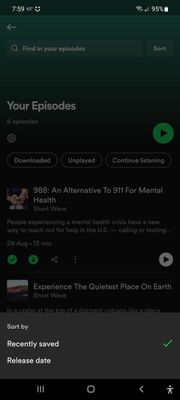
- Your Episodes (Podcasts) Sort Options
Help Wizard
Step 1
Type in your question below and we'll check to see what answers we can find...
Loading article...
Submitting...
If you couldn't find any answers in the previous step then we need to post your question in the community and wait for someone to respond. You'll be notified when that happens.
Simply add some detail to your question and refine the title if needed, choose the relevant category, then post.
Just quickly...
Before we can post your question we need you to quickly make an account (or sign in if you already have one).
Don't worry - it's quick and painless! Just click below, and once you're logged in we'll bring you right back here and post your question. We'll remember what you've already typed in so you won't have to do it again.
FAQs
Please see below the most popular frequently asked questions.
Loading article...
Loading faqs...
Ongoing Issues
Please see below the current ongoing issues which are under investigation.
Loading issue...
Loading ongoing issues...
Help categories
Account & Payment
Using Spotify
Listen Everywhere
Your Episodes (Podcasts) Sort Options
Your Episodes (Podcasts) Sort Options

- Mark as New
- Bookmark
- Subscribe
- Mute
- Subscribe to RSS Feed
- Permalink
- Report Inappropriate Content
Plan
Free
Country
US
Device
Samsung Galaxy A71
Operating System
Android
My Question or Issue
There is no option to sort podcasts in "Your Episodes" in descending date order (i.e. oldest episodes to newest).
- Subscribe to RSS Feed
- Mark Topic as New
- Mark Topic as Read
- Float this Topic for Current User
- Bookmark
- Subscribe
- Printer Friendly Page

- Mark as New
- Bookmark
- Subscribe
- Mute
- Subscribe to RSS Feed
- Permalink
- Report Inappropriate Content
I finally bit the bullet and migrated my podcast collection. Tried a few different options and settled on Pocket Casts, which has excellent sorting options. No playlists, but uses "filters" to sort your library, but I think it's aruguably a better way of doing it. You blew it, Spotify!

- Mark as New
- Bookmark
- Subscribe
- Mute
- Subscribe to RSS Feed
- Permalink
- Report Inappropriate Content
It's not a top level menu item but there is an "up next" feature in the filter menu where you can add things from a filter to what is effectively a queue. You can also customize that menu in the "..." cuz by default the option adds items to the top, where there's another one that lets you add it to the bottom
The up next feature itself is a bit finicky (long press plays an item, when in filters it does multi select; it's easy to fat finger reordering), but it's there
And, yes, we're using the Spotify forum to now share best practices for a replacement app
- Mark as New
- Bookmark
- Subscribe
- Mute
- Subscribe to RSS Feed
- Permalink
- Report Inappropriate Content
Yeah, I can't get to the vote option (why do we need to vote for something that's obviously not right?) It keeps saying "Access Denied"
EDIT: I FOUND THE RIGHT LINK TO VOTE ON THIS ISSUE:
Your episodes playlist order - The Spotify Community
- Mark as New
- Bookmark
- Subscribe
- Mute
- Subscribe to RSS Feed
- Permalink
- Report Inappropriate Content
Your link is broken.
- Mark as New
- Bookmark
- Subscribe
- Mute
- Subscribe to RSS Feed
- Permalink
- Report Inappropriate Content
highly recommend.

- Mark as New
- Bookmark
- Subscribe
- Mute
- Subscribe to RSS Feed
- Permalink
- Report Inappropriate Content
I have to agree with the others on here. HOW can this not be a basic feature on one of the biggest platforms???? This has to be implemented for any normal podcast listening. It makes me wonder if anyone at Spotify even listens to podcasts or uses their own app, since any normal listener would want this almost immediately.

- Mark as New
- Bookmark
- Subscribe
- Mute
- Subscribe to RSS Feed
- Permalink
- Report Inappropriate Content
This is the bane of my existence. Why have this list you can auto download to if you can only listen newest to oldest. So annoying.

- Mark as New
- Bookmark
- Subscribe
- Mute
- Subscribe to RSS Feed
- Permalink
- Report Inappropriate Content
True, but...
Pocket Casts has terrible implementation on Alexa platform. It's primitive on Alexa without many commands. Perhaps, they don't have the resources to focus on Alexa platform?
Pocket Casts for many years was my podcast player, but with the addition of smart speakers, I have found that Spotify has excellent integration among platforms including Android (eg. phones), Alexa and Fire TV!
- Mark as New
- Bookmark
- Subscribe
- Mute
- Subscribe to RSS Feed
- Permalink
- Report Inappropriate Content
I've been on them for ages about this. It's pathetic.

- Mark as New
- Bookmark
- Subscribe
- Mute
- Subscribe to RSS Feed
- Permalink
- Report Inappropriate Content
They added it and remove it this week, i saw the option, don't know why they remove it
- Mark as New
- Bookmark
- Subscribe
- Mute
- Subscribe to RSS Feed
- Permalink
- Report Inappropriate Content
I wanted to listen to a podcast on desktop.
There's no option to sort from the oldest.
It's 144 episodes.
App displays 10 by default.
To even get to the oldest one it will take 14 "load more" episodes.
Why won't spotify hire UX designer?
Why none of the spotify emplyes use their own app?
What the actual fu*k?

- Mark as New
- Bookmark
- Subscribe
- Mute
- Subscribe to RSS Feed
- Permalink
- Report Inappropriate Content
how is this such an old issue and still not solved? like even when i sort the episodes from oldest to newest then it just switches directions on which way it plays vertically. so frustrating

Suggested posts

Hey there you, Yeah, you! 😁 Welcome - we're glad you joined the Spotify Community! While you here, let's have a fun game and get…
