Announcements

Help Wizard

Step 1

NEXT STEP

Spotify display name

Spotify display name

Hi guys,


According to this Spotify support article linked below it says you can create a display name which will show instead of the account username, but the article doesn't say how to do it nor can I see anywhere to do it in my account. I have searched for an answer but still haven't been able to find out how. Can anyone shed any light on this please?


https://support.spotify.com/is/account_payment_help/account_help/change-my-username/


Many thanks..

Reply
2 Replies

Hi @user-removed, 


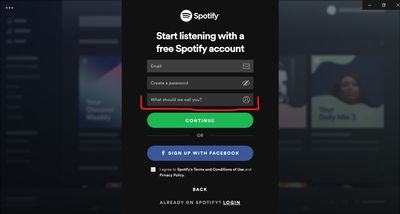
You can choose a display name when you create a new Spotify account.

You need to enter it in the 'What should we call you?' field. 

That's how it looks on desktop app: 

display name.jpg


Keep in mind that it's possible only during sign up. If you already have an account, you can't change the display name. However, you can create a new account and pick a new display name. 


If you'd like it to be possible to change a display name in the future, check this idea and make sure to add your +VOTE there. 

Hey there @user-removed,


Thanks for reaching out! 


Just like @Emilia_8 said - the username of an existing Spotify account cannot be changed. If you decide to create a new account, a username combining numbers and letters will be created automatically. This is happening due to security reasons.


You will however, have a display name as well. This is the one all users will see when they come across your account.
 

And no worries - you won't lose your music. If you wish to have a different username, you must create a new account and you can transfer all of your music to it. You can read more about it here.


Last but not least - it's very important that you cancel your subscription on your previous account and subscribe to Premium on the new account. If you have subscribed to Spotify through a partner of ours, you must reach out to them so they can fix this for you. 

We hope this helps 🙂

PetyaModerator
 
Help others find this answer and click "Accept as Solution".
If you appreciate my answer, maybe give me a Like.
 

Suggested posts

Let's introduce ourselves!

Hey there you,   Yeah, you! 😁   Welcome - we're glad you joined the Spotify Community!   While you here, let's have a fun game and get…

ModeratorStaff / Moderator/ 4 years ago  in Social & Random