The community is in read-only mode
The Spotify Community is in read-only mode while we move to a new platform. We expect to be back up and running October 6th. During this time you can read existing content but take no other actions. If you still need help, visit our Support Site or contact us.
- Home
- Help
- Desktop Windows
- Re: Remove from startup
Help Wizard
Step 1
Type in your question below and we'll check to see what answers we can find...
Loading article...
Submitting...
If you couldn't find any answers in the previous step then we need to post your question in the community and wait for someone to respond. You'll be notified when that happens.
Simply add some detail to your question and refine the title if needed, choose the relevant category, then post.
Just quickly...
Before we can post your question we need you to quickly make an account (or sign in if you already have one).
Don't worry - it's quick and painless! Just click below, and once you're logged in we'll bring you right back here and post your question. We'll remember what you've already typed in so you won't have to do it again.
FAQs
Please see below the most popular frequently asked questions.
Loading article...
Loading faqs...
Ongoing Issues
Please see below the current ongoing issues which are under investigation.
Loading issue...
Loading ongoing issues...
Help categories
Account & Payment
Using Spotify
Listen Everywhere
Remove from startup
Solved!
- Mark as New
- Bookmark
- Subscribe
- Mute
- Subscribe to RSS Feed
- Permalink
- Report Inappropriate Content
Spotify automatically starts up when I turn my computer on. How do I stop that? I am using windows 7 os.
Solved! Go to Solution.
- Subscribe to RSS Feed
- Mark Topic as New
- Mark Topic as Read
- Float this Topic for Current User
- Bookmark
- Subscribe
- Printer Friendly Page

- Mark as New
- Bookmark
- Subscribe
- Mute
- Subscribe to RSS Feed
- Permalink
- Report Inappropriate Content
Just installed latest Spotify for Windows on a brand new laptop, and I have the preferences set to NO to not start up with windows, and every single time windows starts, Spotify starts up full screen.
Please fix this!

- Mark as New
- Bookmark
- Subscribe
- Mute
- Subscribe to RSS Feed
- Permalink
- Report Inappropriate Content
Like everyone else on here I am having the same problem. Following a recent update Spotify started opening on Windows startup. The first time this happened there was also a blue strip at the top of the window saying that this behaviour could be turned off in settings. I duly went to settings and in the Advanced menu I set the auto start option to No. Today I started up my computer and there was Spotify again. I checked the setting and it was still set to No. I have now disabled the startup of Spotify in MSConfig so fingers crossed that will do it. But come on Spotify this is a bad bug. Firstly like many have said it is wrong to have the default behaviour set to open on startup because Spotify is a programme that most people use as and when they require it and not something they need open all the time. On top of that to have the auto start unable to be turned off without jumping through several hoops is just plain wrong. Please fix this and please fix this now!
- Mark as New
- Bookmark
- Subscribe
- Mute
- Subscribe to RSS Feed
- Permalink
- Report Inappropriate Content
i agree.
I tried to uninstall the new Spotify update, and couldn't. Ended up with many blue screens. The current version has a major bug.
- Mark as New
- Bookmark
- Subscribe
- Mute
- Subscribe to RSS Feed
- Permalink
- Report Inappropriate Content
The problem is that this does not work for long!

- Mark as New
- Bookmark
- Subscribe
- Mute
- Subscribe to RSS Feed
- Permalink
- Report Inappropriate Content
This does not work! The setting "Open spotify automatically" is set to "No" and it still starts whenever I log on! Spotify is also not in the autostart folder and not listed under Autostart in the task manager. I'm about to uninstall it's so annoying. Please fix this!
Using Windows 10 and Spotify 1.0.58.573.g57c9cd87.


- Mark as New
- Bookmark
- Subscribe
- Mute
- Subscribe to RSS Feed
- Permalink
- Report Inappropriate Content
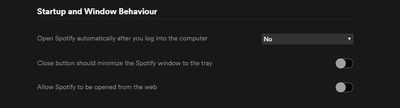
Turn off too option "Allow spotify to be opened from the web"

- Mark as New
- Bookmark
- Subscribe
- Mute
- Subscribe to RSS Feed
- Permalink
- Report Inappropriate Content
I had this problem and changing the settings and restarting didn't work. Go to task manager<startup<spotify and select disable then restart. That worked for me.

- Mark as New
- Bookmark
- Subscribe
- Mute
- Subscribe to RSS Feed
- Permalink
- Report Inappropriate Content
Have the same problem. Spotify starts up when Windows starts. I have tried same things like other users. Disabling the start up from the advanced settings and tried uninstalling Spotify also.
Nothing helps. Please fix the problem.

- Mark as New
- Bookmark
- Subscribe
- Mute
- Subscribe to RSS Feed
- Permalink
- Report Inappropriate Content
There IS a current problem with Spotify not recognizing the 'NO' auto startup parameter. I have found it is limited to my CREATORS UPDATE Windows machines. The only temporary solution is to 'DISABLE' Spotify from the Windows Task Manager 'Startup' Tab - However, this will also disable the Spotify Web Helper from opening the Spotify desktop app from web links.
PLEASE FIX THIS SPOTIFY!!!

- Mark as New
- Bookmark
- Subscribe
- Mute
- Subscribe to RSS Feed
- Permalink
- Report Inappropriate Content
hey guys, i had the same problem with spotify startup. If you choose NO then also uncheck "allow spotify to be opened from the web" , the next time you start your pc, spotify will not startup anymore. I actually got this solution from someone who accidentally discovered it.
- Mark as New
- Bookmark
- Subscribe
- Mute
- Subscribe to RSS Feed
- Permalink
- Report Inappropriate Content
I can confirm that this problem exists in Windows 7 also so is not limited to the latest Windows 10 updates.While good workarounds have been given here, it is down to Spotify to fix this as soon as possible.

- Mark as New
- Bookmark
- Subscribe
- Mute
- Subscribe to RSS Feed
- Permalink
- Report Inappropriate Content
I had the same bug.
I just switched to the old Spotify Client. This solved the autostart problem and also the resolution bug that appeared when the window was bigger than full HD.
http://download.spotify.com/Spotify%20Installer.exe

- Mark as New
- Bookmark
- Subscribe
- Mute
- Subscribe to RSS Feed
- Permalink
- Report Inappropriate Content
Having this new autostart issue as anyone else here! Spotify please fix this asap, its a pain to try to wing a solution with "ducktape" solutions from forums, this need to be top priority! Also, I am gonna contact customer support directly to get this issue on the map. Bad developers... 😞 Win 10 latest updates
- Mark as New
- Bookmark
- Subscribe
- Mute
- Subscribe to RSS Feed
- Permalink
- Report Inappropriate Content
There is open issue on issue tracker, so they are aware and looking for bug reports, please submit your info to get this resoveld asap! https://community.spotify.com/t5/Ongoing-Issues/Desktop-app-automatically-launching-on-startup/idc-p...

- Mark as New
- Bookmark
- Subscribe
- Mute
- Subscribe to RSS Feed
- Permalink
- Report Inappropriate Content
It worked! Thank you so much!

- Mark as New
- Bookmark
- Subscribe
- Mute
- Subscribe to RSS Feed
- Permalink
- Report Inappropriate Content
Thanks. The workaround to disable "Allow Spotify to be opened from the web" solved the autostart issue for me.

- Mark as New
- Bookmark
- Subscribe
- Mute
- Subscribe to RSS Feed
- Permalink
- Report Inappropriate Content
This also worked for me, but opening from web browser is something i do a lot and would like a real fix too 🙂
Thanks @Slakedk for the heads up on the workaround!

- Mark as New
- Bookmark
- Subscribe
- Mute
- Subscribe to RSS Feed
- Permalink
- Report Inappropriate Content

- Mark as New
- Bookmark
- Subscribe
- Mute
- Subscribe to RSS Feed
- Permalink
- Report Inappropriate Content
I tried this method for win 7 pro but Spotify continues to start with system start up, even after unchecking Spotify from Task Manager start up list also failed to prevent unwanted Spotify start up. It reappears checked, and unchecking it and setting a system restore point has not helped. Please advise

- Mark as New
- Bookmark
- Subscribe
- Mute
- Subscribe to RSS Feed
- Permalink
- Report Inappropriate Content
This thread is the top result for me on both Bing and Google, but it looks out of date.
I changed the setting, and Spotify still insists on starting up on startup/sign-in. It's obnoxious! Any new advice?
I'm using version 1.0.59.395.ge6ca9946 on Windows 10 Home.

Suggested posts

Hey there you, Yeah, you! 😁 Welcome - we're glad you joined the Spotify Community! While you here, let's have a fun game and get…
