- Home
- Help
- Your Library
- Default Playlist Cover Unsynced
Help Wizard
Step 1
Type in your question below and we'll check to see what answers we can find...
Loading article...
Submitting...
If you couldn't find any answers in the previous step then we need to post your question in the community and wait for someone to respond. You'll be notified when that happens.
Simply add some detail to your question and refine the title if needed, choose the relevant category, then post.
Just quickly...
Before we can post your question we need you to quickly make an account (or sign in if you already have one).
Don't worry - it's quick and painless! Just click below, and once you're logged in we'll bring you right back here and post your question. We'll remember what you've already typed in so you won't have to do it again.
FAQs
Please see below the most popular frequently asked questions.
Loading article...
Loading faqs...
Ongoing Issues
Please see below the current ongoing issues which are under investigation.
Loading issue...
Loading ongoing issues...
Help categories
Account & Payment
Using Spotify
Listen Everywhere
Default Playlist Cover Unsynced
Solved!
- Mark as New
- Bookmark
- Subscribe
- Mute
- Subscribe to RSS Feed
- Permalink
- Report Inappropriate Content
Plan
Premium Duo
Country
Canada
Device
iPhone XS Max
Macbook Pro 2017
Operating System
iOS 15.6
macOS Monterey 12.5
My Question or Issue
while reordering the tracks in my playlists, i noticed that the default playlist cover (4 tiles) is not always in sync with the four top tracks, specifically when viewing from my public profile versus from the playlist itself.
for instance, my playlist "fall 2019" has four albums displaying in 2x2 format as the default playlist art. my playlist has a "Custom order" and I've arranged the songs to appear:
1. Choke - iDKHOW
2. Gossip - SWS
3. Allergic - Post Malone
4. Welcome to the End of Your Life - THE DRIVER ERA
you can see that order reflected in the default tiled playlist cover here:
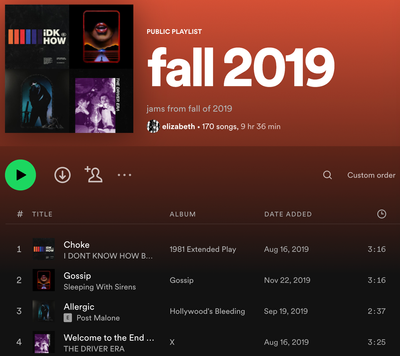
however, the playlist cover does not correspond with my preferred order when viewed from my public profile, as seen here:

just kinda bugging me as i like to re-order my tracks and customize those little default playlist covers! thnx in advance for any insight :")
Solved! Go to Solution.
- Labels:
-
Playlist Cover
- Subscribe to RSS Feed
- Mark Topic as New
- Mark Topic as Read
- Float this Topic for Current User
- Bookmark
- Subscribe
- Printer Friendly Page
Accepted Solutions

- Mark as New
- Bookmark
- Subscribe
- Mute
- Subscribe to RSS Feed
- Permalink
- Report Inappropriate Content
Hi there @hoppeellie,
Thanks for reaching out about this in the Community!
The cover image is based on the order of the tracks the playlist was created with initially. Any change to those tracks (to the top-4), like removing one of them, should cause the cover to update automatically.
Changing the sorting order via the menu will not cause a change as this is just a personal sorting filter.
Hope this info clears things up. Cheers.
- Mark as New
- Bookmark
- Subscribe
- Mute
- Subscribe to RSS Feed
- Permalink
- Report Inappropriate Content
small edit: i just checked and out of around 19 applicable playlists (without custom playlist covers), only TWO have accurate default cover art when viewing from my profile. 😭
- Mark as New
- Bookmark
- Subscribe
- Mute
- Subscribe to RSS Feed
- Permalink
- Report Inappropriate Content
Hi there @hoppeellie,
Thanks for reaching out about this in the Community!
The cover image is based on the order of the tracks the playlist was created with initially. Any change to those tracks (to the top-4), like removing one of them, should cause the cover to update automatically.
Changing the sorting order via the menu will not cause a change as this is just a personal sorting filter.
Hope this info clears things up. Cheers.
- Mark as New
- Bookmark
- Subscribe
- Mute
- Subscribe to RSS Feed
- Permalink
- Report Inappropriate Content
Thank you for the response! This definitely answers my question but I hate this haha! I guess I’ll have to figure something else out for my playlist covers from now on. Not a fan!
But anyways I appreciate the response, at least now I have a reason for the issue 🙂

- Mark as New
- Bookmark
- Subscribe
- Mute
- Subscribe to RSS Feed
- Permalink
- Report Inappropriate Content
Just like OP, I like to make the covers of my playlist to have songs in a particular order. And just like OP, the order of the songs on the cover in my public profile doesn't always match with the song order of the playlist. @Alex wrote that the cover image is based on the order of the tracks the playlist was created with initially, but I don't think that is right. If I apply this logic to OP's playlist, the order would be:
1. Choke - iDKHOW
2. Welcome to the End of Your Life - THE DRIVER ERA
3. Allergic - Post Malone
4. Gossip - SWS
Instead, the order in which the songs appear on the pubilc cover image is:
1. Gossip - SWS
2. Welcome to the End of Your Life - THE DRIVER ERA
3. Allergic - Post Malone
4. Choke - iDKHOW
It doesn't make sense to me, what is happening here?
Even when I make a new playlist and add the songs in the order I would like, the songs on the cover are mixed up. It's frustrating!
- Mark as New
- Bookmark
- Subscribe
- Mute
- Subscribe to RSS Feed
- Permalink
- Report Inappropriate Content
hey 🙂 I don’t have any helpful insight to provide as I never found an in-app solution, but I wanted to chime in with how I ended up mitigating this problem. What I ended up doing was using a third-party app to create my own custom Spotify playlist covers, in the order I wanted them to appear.
I think it’s ridiculous that Spotify hasn’t fixed this problem but lowkey I also started boycotting Spotify around the time they decided to be insane about AI, so I guess it’s a “if the shoe fits” situation. Best of luck with your playlists!


- Mark as New
- Bookmark
- Subscribe
- Mute
- Subscribe to RSS Feed
- Permalink
- Report Inappropriate Content
Hi folks,
Thanks for the replies.
I looked into this further and the playlists mentioned in this thread all appear correctly. This is both the case for various other playlists I found and those I made myself. So let's narrow down what's happening on your ends and see what we can do. Can you let us know the following:
- Do the playlists appear the same across all devices? What about the web player?
- Does rearranging the songs update the cover?
- Did this work before or has this never worked for you?
Let us know so we can look into this further.
- Mark as New
- Bookmark
- Subscribe
- Mute
- Subscribe to RSS Feed
- Permalink
- Report Inappropriate Content
Hi Joan,
As I mentioned in my recent comment (7 January 2026), I uploaded custom playlist covers to all of the playlists on my account. If you’re looking at my public Spotify profile, that’s what you’re seeing. The problem I had in 2022 is still persisting, I simply DIY’d a solution using a collage app and album art I found on Google Images.
As for your questions, I already answered them in the original post. 🙂

Suggested posts

Hey there you, Yeah, you! 😁 Welcome - we're glad you joined the Spotify Community! While you here, let's have a fun game and get…
