- Home
- Help
- Your Library
- Re: Introducing Smart Shuffle!
Help Wizard
Step 1
Type in your question below and we'll check to see what answers we can find...
Loading article...
Submitting...
If you couldn't find any answers in the previous step then we need to post your question in the community and wait for someone to respond. You'll be notified when that happens.
Simply add some detail to your question and refine the title if needed, choose the relevant category, then post.
Just quickly...
Before we can post your question we need you to quickly make an account (or sign in if you already have one).
Don't worry - it's quick and painless! Just click below, and once you're logged in we'll bring you right back here and post your question. We'll remember what you've already typed in so you won't have to do it again.
FAQs
Please see below the most popular frequently asked questions.
Loading article...
Loading faqs...
Ongoing Issues
Please see below the current ongoing issues which are under investigation.
Loading issue...
Loading ongoing issues...
Help categories
Account & Payment
Using Spotify
Listen Everywhere
Introducing Smart Shuffle!
Solved!

- Mark as New
- Bookmark
- Subscribe
- Mute
- Subscribe to RSS Feed
- Permalink
- Report Inappropriate Content
Introducing Smart Shuffle!
We know that our users love creating their own playlists to capture key moments in time – in fact, playlists created by users often become their most-streamed playlist for the first several months but listening to these playlists slowly fades overtime, and users are eager to discover new music.
With this in mind, we’re excited to launch a new play mode called Smart Shuffle that keeps listening sessions fresh and provides personalized recommendations that perfectly match any listeners’ playlist vibe.
This update will roll out to Premium users on mobile devices starting today.
How does Smart Shuffle work?
- You can use it in any playlist created by you, and your Liked Songs.
- To activate it, just use the Shuffle button to switch between regular play, Shuffle mode and Smart Shuffle.
- When Smart Shuffle is on, recommendations are added to your session automatically. You can find all the recommendations sitting in your queue.
- You will be able to recognize the music we are recommending with the sparkle (✨) symbol next to the track. For a playlist with more than 15 songs, we’ll recommend one song for every three tracks.
- And the best part, your original playlist remains untouched, so you can add any new track that catches your ear.
- If you like a specific recommendation, just save it using the plus button in the Now Playing View. If that song doesn’t hit right, just tap the minus to remove it from the recommendations. This is then used to better adjust the suggestions we put forward.
- Every time you turn Smart Shuffle off, a new mix will be available every time you activate it again.


Adding and removing recommendations.
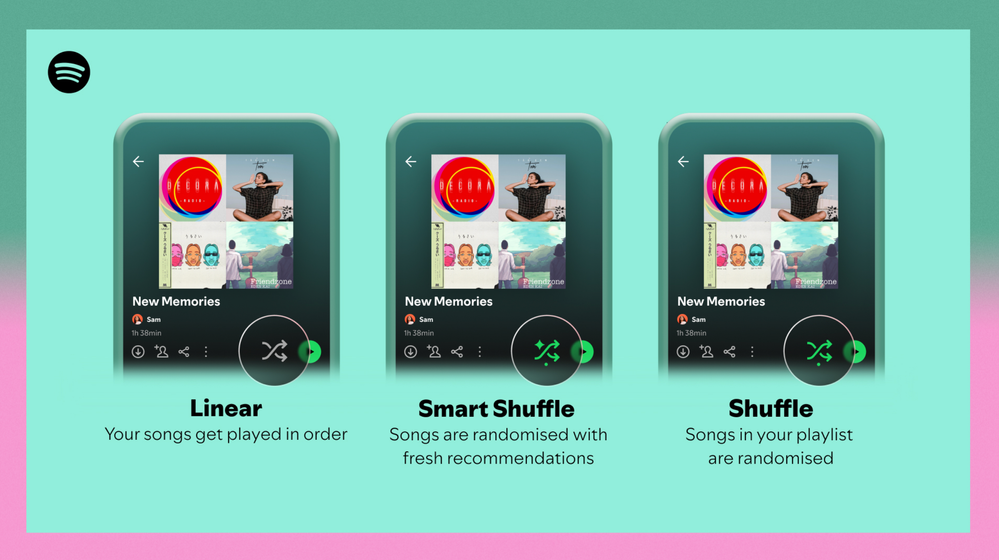
Different playback options.
FAQ
What about the Enhance feature?
For now, Smart Shuffle will replace the Enhance feature.
What will happen to Discover Weekly and other regularly updated playlists?
For the time being, no changes to those will be made. Smart Shuffle aims to improve the listening experience for user curated playlists.
Does this mean that using Smart Shuffle will cause my carefully curated playlists to get cluttered with new recommendations?
No! Your original playlist remains untouched, so you can add any new track that catches your ear. Smart Shuffle won’t change your playlist without your explicit permission. What changes instead is what you'll hear during each specific listening session
🌟 I would like to disable Smart Shuffle permanently. Can I do that?
Yes, you can! Just go to Settings and privacy and then to Playback and toggle the option Enable all play modes to off. This will mean you will only have the regular shuffle.
Note: This option is for Premium users only.
We hope you're as excited as we are about this new play mode. The official Newsroom announcement is out, you can check that out too. For any and all feedback on the matter you may have, you're more than welcome to comment in the thread below.
Solved! Go to Solution.
- Subscribe to RSS Feed
- Mark Topic as New
- Mark Topic as Read
- Float this Topic for Current User
- Bookmark
- Subscribe
- Printer Friendly Page

- Mark as New
- Bookmark
- Subscribe
- Mute
- Subscribe to RSS Feed
- Permalink
- Report Inappropriate Content
Smart shuffle is the worst.

- Mark as New
- Bookmark
- Subscribe
- Mute
- Subscribe to RSS Feed
- Permalink
- Report Inappropriate Content
Yeah, if I wanted to let an algorithm shape my choices I would go to Youtube, I wouldn't be paying for an app that works as a functional music player, not a forced exposure style experience. When I started on Spotify it was the only platform that just worked as a free and functional library. There are a lot more options these days that I ought to consider.

- Mark as New
- Bookmark
- Subscribe
- Mute
- Subscribe to RSS Feed
- Permalink
- Report Inappropriate Content
I don't want to have to wait 10 seconds to toggle away from music I don't want to see every time I enable/disable shuffle. Terrible feature, please get rid of it or add an option to disable it completely.

- Mark as New
- Bookmark
- Subscribe
- Mute
- Subscribe to RSS Feed
- Permalink
- Report Inappropriate Content
I don't see an option for turning on smart shuffle. I tried clicking the shuffle button, but it just toggles between shuffle and regular. In my iphone app, in the settings, the playback option is greyed out. On the webplayer, there's no settings to be found to turn it on. How do I get smart shuffle? Help! 😅

- Mark as New
- Bookmark
- Subscribe
- Mute
- Subscribe to RSS Feed
- Permalink
- Report Inappropriate Content
Unfortunately there is no way to get a smart shuffle. There is only an annoying dumb shuffle available which is falsely labeled as smart shuffle! Be happy that you don’t have to deal with it

- Mark as New
- Bookmark
- Subscribe
- Mute
- Subscribe to RSS Feed
- Permalink
- Report Inappropriate Content
Why is smart shuffle on every time I open the app? I turn it off and exit and then boom it’s back on next time. I was on vacation with no service and I tried to listen to my downloaded songs. It wouldn’t let me because smart shuffle was on even though I’ve turned it off 100 times. Told me to turn it off which you can’t with no service and no wifi. Put the app into offline mode and it still didn’t work! Unbelievably annoying

- Mark as New
- Bookmark
- Subscribe
- Mute
- Subscribe to RSS Feed
- Permalink
- Report Inappropriate Content
This is terrible. I agree with everyone who complained earlier about this stupid function.
I have another issue:
When I'm working on my PC I normally leave my phone somewhere else, so I can work more concentrated. However on my Windows PC I can't select the different shuffle mode. So if I wan't to remove these stupid AI / commercial suggestions, I have to grab my phone. Very annoying.
I use the following version on my PC: 1.2.13.661.ga588f749
Please fix this Spotify. And even better: get rid of this so called smart shuffle.

- Mark as New
- Bookmark
- Subscribe
- Mute
- Subscribe to RSS Feed
- Permalink
- Report Inappropriate Content
Let us permanently turn this off please. This is dumb.

- Mark as New
- Bookmark
- Subscribe
- Mute
- Subscribe to RSS Feed
- Permalink
- Report Inappropriate Content
This feature sucks. Bring back playlist radio.

- Mark as New
- Bookmark
- Subscribe
- Mute
- Subscribe to RSS Feed
- Permalink
- Report Inappropriate Content
Please please PLEASE bring back playlist radio! What happened to that feature getting removed? Literally no one seemed to ask for a bad feature such as Smart Shuffle....also where is HiFi or real lossless Spotify? This platform is going to die one day if they really stopped caring about their customers...also BRING FULL SCREEN ALBUM COVER BACK!!! It's been like 3 years now already since you guys k*lled that feature...I want to see the album cover like on TIDAL, but on Spotify, just like it used to be still around 2019 or so...do something about everything Spotify please!

- Mark as New
- Bookmark
- Subscribe
- Mute
- Subscribe to RSS Feed
- Permalink
- Report Inappropriate Content
On mobile when shuffle mode is on and I want to turn it off, pressing the button instead seems to want to turn smart shuffle on and it will not work no matter how long I wait. Is there a way to disable smart shuffle entirely?
- Mark as New
- Bookmark
- Subscribe
- Mute
- Subscribe to RSS Feed
- Permalink
- Report Inappropriate Content
Smart shuffle makes it so when offline I can’t unshuffle my playlist and generally makes it harder to just unshuffle playlists because there is a loading time. I don’t mind there being a feature to add recommended songs but smart shuffle isn’t a good way to implement it
- Mark as New
- Bookmark
- Subscribe
- Mute
- Subscribe to RSS Feed
- Permalink
- Report Inappropriate Content
I hate smart shuffle. I'm not here to get recommendations from Spotify, and it overloads the initial function of the shuffle button. It's confusing to a longtime Spotify user! I just want to disable this permanently! I don't want this and I'll definitely switch to a platform that actually gives users control after my premium subscription ends if these useless "AI" features keep getting added.

- Mark as New
- Bookmark
- Subscribe
- Mute
- Subscribe to RSS Feed
- Permalink
- Report Inappropriate Content
Please let me turn off the smart shuffle. It sucks. I don't want. Let me listen to what I want and not have to clear the hurdle of tapping the shuffle button multiple times.

- Mark as New
- Bookmark
- Subscribe
- Mute
- Subscribe to RSS Feed
- Permalink
- Report Inappropriate Content
I do love how the Spotify algorithm finds songs that I enjoy, however I’m really tired of having to sit and wait for ten seconds every time I press the shuffle button. When I’m listening to MY playlist, I don’t want to hear other songs, I want to hear the songs in this playlist. There should at least be a way to disable smart shuffle or change its location from the same shuffle button we use for the playlist itself. It’s not a hard feature to implement for such a widely shared annoyance among users.
- Mark as New
- Bookmark
- Subscribe
- Mute
- Subscribe to RSS Feed
- Permalink
- Report Inappropriate Content
Get rid of smart shuffle at least in the player because I hate having to press it twice and have it skip through my queue.

- Mark as New
- Bookmark
- Subscribe
- Mute
- Subscribe to RSS Feed
- Permalink
- Report Inappropriate Content
Is there still no way to disable this 'feature'? I switch between in-order and shuffle, and having to wait a couple of seconds Everytime I want to switch gets very annoying fast. Why is this not an option you can turn off in setting is beyond me
- Mark as New
- Bookmark
- Subscribe
- Mute
- Subscribe to RSS Feed
- Permalink
- Report Inappropriate Content
I pay £9.99 a month precisely so I can listen to my playlists the way I created them without any input from Spotify. There should be a way to turn off this option in settings, a playlist I listen to on shuffle regularly just randomly switched from shuffle to stupid shuffle and it's dreadful.
- Mark as New
- Bookmark
- Subscribe
- Mute
- Subscribe to RSS Feed
- Permalink
- Report Inappropriate Content
I thought I was going crazy and it's this horrible function that adds HORRIBLE songs to my nice playlist. It's impossible to listen to music like this
I want a button where I can turn this off and NEVER EVER see this message again 😠
#removesmartshuffle

- Mark as New
- Bookmark
- Subscribe
- Mute
- Subscribe to RSS Feed
- Permalink
- Report Inappropriate Content
I swear to god this is one of the dumbest Spotify feature. Please let us disable this future in setting. From hvaing to only one tap to enable anf disable shuffle turns into double tap and 3-5 seconds delay each time.
People shuffle songs often and having to double tap with several seconds wait is annoying.

Suggested posts

Hey there you, Yeah, you! 😁 Welcome - we're glad you joined the Spotify Community! While you here, let's have a fun game and get…
