- Home
- Help
- Your Library
- Re: Introducing Smart Shuffle!
Help Wizard
Step 1
Type in your question below and we'll check to see what answers we can find...
Loading article...
Submitting...
If you couldn't find any answers in the previous step then we need to post your question in the community and wait for someone to respond. You'll be notified when that happens.
Simply add some detail to your question and refine the title if needed, choose the relevant category, then post.
Just quickly...
Before we can post your question we need you to quickly make an account (or sign in if you already have one).
Don't worry - it's quick and painless! Just click below, and once you're logged in we'll bring you right back here and post your question. We'll remember what you've already typed in so you won't have to do it again.
FAQs
Please see below the most popular frequently asked questions.
Loading article...
Loading faqs...
Ongoing Issues
Please see below the current ongoing issues which are under investigation.
Loading issue...
Loading ongoing issues...
Help categories
Account & Payment
Using Spotify
Listen Everywhere
Introducing Smart Shuffle!
Solved!

- Mark as New
- Bookmark
- Subscribe
- Mute
- Subscribe to RSS Feed
- Permalink
- Report Inappropriate Content
Introducing Smart Shuffle!
We know that our users love creating their own playlists to capture key moments in time – in fact, playlists created by users often become their most-streamed playlist for the first several months but listening to these playlists slowly fades overtime, and users are eager to discover new music.
With this in mind, we’re excited to launch a new play mode called Smart Shuffle that keeps listening sessions fresh and provides personalized recommendations that perfectly match any listeners’ playlist vibe.
This update will roll out to Premium users on mobile devices starting today.
How does Smart Shuffle work?
- You can use it in any playlist created by you, and your Liked Songs.
- To activate it, just use the Shuffle button to switch between regular play, Shuffle mode and Smart Shuffle.
- When Smart Shuffle is on, recommendations are added to your session automatically. You can find all the recommendations sitting in your queue.
- You will be able to recognize the music we are recommending with the sparkle (✨) symbol next to the track. For a playlist with more than 15 songs, we’ll recommend one song for every three tracks.
- And the best part, your original playlist remains untouched, so you can add any new track that catches your ear.
- If you like a specific recommendation, just save it using the plus button in the Now Playing View. If that song doesn’t hit right, just tap the minus to remove it from the recommendations. This is then used to better adjust the suggestions we put forward.
- Every time you turn Smart Shuffle off, a new mix will be available every time you activate it again.


Adding and removing recommendations.
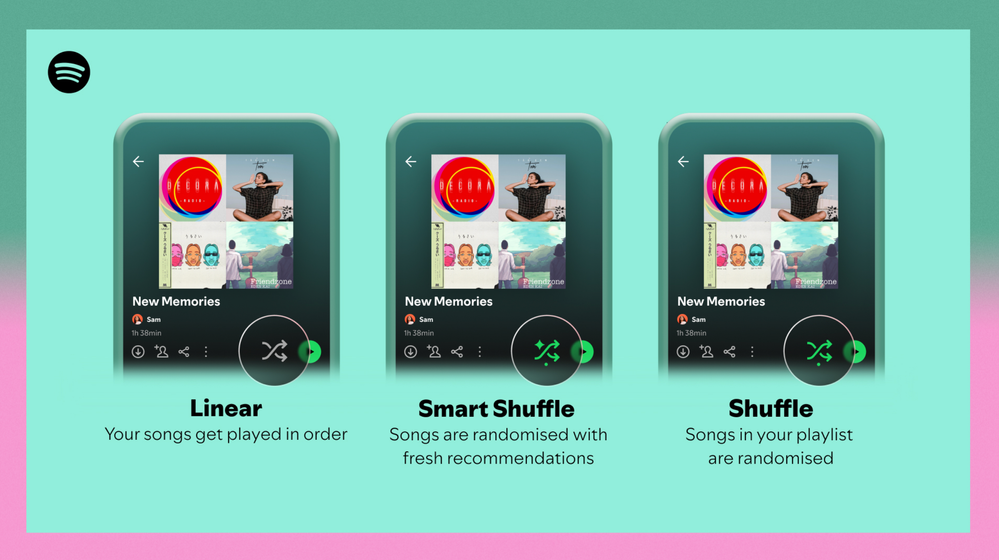
Different playback options.
FAQ
What about the Enhance feature?
For now, Smart Shuffle will replace the Enhance feature.
What will happen to Discover Weekly and other regularly updated playlists?
For the time being, no changes to those will be made. Smart Shuffle aims to improve the listening experience for user curated playlists.
Does this mean that using Smart Shuffle will cause my carefully curated playlists to get cluttered with new recommendations?
No! Your original playlist remains untouched, so you can add any new track that catches your ear. Smart Shuffle won’t change your playlist without your explicit permission. What changes instead is what you'll hear during each specific listening session
🌟 I would like to disable Smart Shuffle permanently. Can I do that?
Yes, you can! Just go to Settings and privacy and then to Playback and toggle the option Enable all play modes to off. This will mean you will only have the regular shuffle.
Note: This option is for Premium users only.
We hope you're as excited as we are about this new play mode. The official Newsroom announcement is out, you can check that out too. For any and all feedback on the matter you may have, you're more than welcome to comment in the thread below.
Solved! Go to Solution.
- Subscribe to RSS Feed
- Mark Topic as New
- Mark Topic as Read
- Float this Topic for Current User
- Bookmark
- Subscribe
- Printer Friendly Page

- Mark as New
- Bookmark
- Subscribe
- Mute
- Subscribe to RSS Feed
- Permalink
- Report Inappropriate Content
Why isn't smart shuffle an option? I want to shuffle but only the songs I've put on my Playlist. I strongly dislike that I if I want to shuffle then I can only smart shuffle.

- Mark as New
- Bookmark
- Subscribe
- Mute
- Subscribe to RSS Feed
- Permalink
- Report Inappropriate Content
There needs to be an option to permanently disable this feature. The delay to add songs to your queue when you switch to smart shuffle can take frustratingly long on anything but high speed data/internet. I have playlists I sometimes shuffle and sometimes play straight through. I sometimes unshuffle and reshuffle, and this intermediate step with delay is very annoying for something I know I will not use. It's not an inherently bad feature, but it absolutely needs to be taken out of the shuffle button or given an off switch.

- Mark as New
- Bookmark
- Subscribe
- Mute
- Subscribe to RSS Feed
- Permalink
- Report Inappropriate Content
just received the update with this feature on the pc app and i am now unable to shuffle playlists on either shuffle setting.
- Mark as New
- Bookmark
- Subscribe
- Mute
- Subscribe to RSS Feed
- Permalink
- Report Inappropriate Content
i just received this update for the pc app on windows and i am now unable to shuffle playlists on both the regular setting and the smart shuffle setting

- Mark as New
- Bookmark
- Subscribe
- Mute
- Subscribe to RSS Feed
- Permalink
- Report Inappropriate Content
I regularly switch between shuffle and no-shuffle in my 1000+ songs playlist. I more or less know the order of songs and if I know the next song in the order is cool I quickly disable shuffle for a song and turn it back on after. The problem is that now Smart Shuffle was added it takes a while to load and I cannot switch quickly anymore. What's worse is that I always skip the smart shuffle in the rotation but I am forced to wait because it's programmed on a single button. I get why this feature is added but either make it a seperate button or give users the freedom to turn it off completely. Now I am forced to deal with the loading times 20+ times a day.
- Mark as New
- Bookmark
- Subscribe
- Mute
- Subscribe to RSS Feed
- Permalink
- Report Inappropriate Content
I regularly switch between shuffle and no-shuffle in my 1000+ songs playlist. I more or less know the order of songs and if I know the next song in the order is cool I quickly disable shuffle for a song and turn it back on after. The problem is that now Smart Shuffle was added it takes a while to load and I cannot switch quickly anymore. What's worse is that I always skip the smart shuffle in the rotation but I am forced to wait because it's programmed on a single button. I get why this feature was added but either make it a seperate button or give users the freedom to turn it off completely. Now I am forced to deal with the loading times 20+ times a day.

- Mark as New
- Bookmark
- Subscribe
- Mute
- Subscribe to RSS Feed
- Permalink
- Report Inappropriate Content
Give us an option to permanently disable this garbage in the settings. Smart shuffle is trash

- Mark as New
- Bookmark
- Subscribe
- Mute
- Subscribe to RSS Feed
- Permalink
- Report Inappropriate Content
GET RID OF IT! We don't need it and it's annoying. In Android, it's hard to get back to regular play mode. It just switches from regular and this SH!T mode.

- Mark as New
- Bookmark
- Subscribe
- Mute
- Subscribe to RSS Feed
- Permalink
- Report Inappropriate Content
Having to wait for smart shuffle when you just want to switch from shuffle to no shuffle is terrible UX.

- Mark as New
- Bookmark
- Subscribe
- Mute
- Subscribe to RSS Feed
- Permalink
- Report Inappropriate Content
Quite literally one of the most baffling and thoroughly useless UX changes I have seen across all platforms and apps I use. The purpose of the shuffle button has been established since before many Spotify users were born, and yet your Weenie Hut Jr. designers have made it a 2 press, 10 second (on a good day) operation to toggle it. Your incompetence is baffling and your resistance to over 30 pages of negative user feedback is incredible. Let us toggle Smart Shuffle from settings, or better yet, eliminate it entirely. I’m giving it a few more weeks and then I’m off to Apple Music where basic functionality isn’t sabotaged on a regular basis.

- Mark as New
- Bookmark
- Subscribe
- Mute
- Subscribe to RSS Feed
- Permalink
- Report Inappropriate Content
Well said @cjermc
- Mark as New
- Bookmark
- Subscribe
- Mute
- Subscribe to RSS Feed
- Permalink
- Report Inappropriate Content
Just installed the latest update on Android, sad to report that smart shuffle behavior is unchanged. C'mon, Spotify... Please?

- Mark as New
- Bookmark
- Subscribe
- Mute
- Subscribe to RSS Feed
- Permalink
- Report Inappropriate Content
Quite possibly the most annoying update of any app ever. Why try to fix what's not broken? The fact that you can't permanently disable it makes it so much worse. If you guys really have to have it then let us permanently remove it and just have it back to when clicking the arrows once would enable our regular shuffle and clicking it again would disable the shuffle and thats it... why would you guys make us wait a couple of seconds extra to disable shuffle and have us go through an extra step?

- Mark as New
- Bookmark
- Subscribe
- Mute
- Subscribe to RSS Feed
- Permalink
- Report Inappropriate Content
Why is the smart shuffle turning on each time a open a playlist? What is the point of that? I don’t want my playlist to be turned into a radio. I’m considering switching over to a different provider because of this.

- Mark as New
- Bookmark
- Subscribe
- Mute
- Subscribe to RSS Feed
- Permalink
- Report Inappropriate Content
This feature is absolutely awful. I've been a Spotify Premium user since 2016 and have been seriously considering canceling. The damn thing doesn’t work and is awful. Why am I PAYING to have this? Shouldn't I pay to REMOVE IT? Please answer me, and if not, I'll promptly cancel my seven-year running subscription and move to a competitor.
- Mark as New
- Bookmark
- Subscribe
- Mute
- Subscribe to RSS Feed
- Permalink
- Report Inappropriate Content
You can downgrade to version 8.8.12.545 released Feb 22, the last version before they came out with**bleep**. If you break that version on purpose Spotify, I will jump ship immediately.

- Mark as New
- Bookmark
- Subscribe
- Mute
- Subscribe to RSS Feed
- Permalink
- Report Inappropriate Content
Oh man, i’ve been on vacation & haven’t had the chance to complain about this in a few days. Remove this feature! the delay is horrible & the songs you try to push onto us are even worse!! #ThisAppSucksA$$

- Mark as New
- Bookmark
- Subscribe
- Mute
- Subscribe to RSS Feed
- Permalink
- Report Inappropriate Content
Look it is fine to add new features to your app, but give people a choice. Its not that it ruins a playlist or song, it ruins the app experience when you are super inconviencenced by having to wait for the shuffle button to load back up after suggestions are added. Plus the fact I have to cycle through it everytime I want to shuffle or unahiffle. Its a bad idea and from a developers perspective to not have ability to disable or to give it a separate button from regular shuffle. Wreaks of a lack of user acceptance testing, this wouldn't fly in most development teams. Its an enormous oversight at a minimum to add such a new feature without the ability to disable it. Just one man's opinion, sure, but anyone who knows what they want to listen to and not be told is going to hate this. Idk about you but I got spotify to have control over the music I listen to. Otherwise its glorified AI radio... no thank you. Please revert back.

- Mark as New
- Bookmark
- Subscribe
- Mute
- Subscribe to RSS Feed
- Permalink
- Report Inappropriate Content
I like others don’t want smart shuffle. Why can’t I just disable it. Currently it seems I can’t take shuffle off to play through an album that I want once it comes up
I am on iPhone
Andrew

- Mark as New
- Bookmark
- Subscribe
- Mute
- Subscribe to RSS Feed
- Permalink
- Report Inappropriate Content
I want to PERMANENTLY DISABLE this dumb feature. I honestly hate it.

Suggested posts

Hey there you, Yeah, you! 😁 Welcome - we're glad you joined the Spotify Community! While you here, let's have a fun game and get…
