- Home
- Help
- Your Library
- Re: Introducing Smart Shuffle!
Help Wizard
Step 1
Type in your question below and we'll check to see what answers we can find...
Loading article...
Submitting...
If you couldn't find any answers in the previous step then we need to post your question in the community and wait for someone to respond. You'll be notified when that happens.
Simply add some detail to your question and refine the title if needed, choose the relevant category, then post.
Just quickly...
Before we can post your question we need you to quickly make an account (or sign in if you already have one).
Don't worry - it's quick and painless! Just click below, and once you're logged in we'll bring you right back here and post your question. We'll remember what you've already typed in so you won't have to do it again.
FAQs
Please see below the most popular frequently asked questions.
Loading article...
Loading faqs...
Ongoing Issues
Please see below the current ongoing issues which are under investigation.
Loading issue...
Loading ongoing issues...
Help categories
Account & Payment
Using Spotify
Listen Everywhere
Introducing Smart Shuffle!
Solved!

- Mark as New
- Bookmark
- Subscribe
- Mute
- Subscribe to RSS Feed
- Permalink
- Report Inappropriate Content
Introducing Smart Shuffle!
We know that our users love creating their own playlists to capture key moments in time – in fact, playlists created by users often become their most-streamed playlist for the first several months but listening to these playlists slowly fades overtime, and users are eager to discover new music.
With this in mind, we’re excited to launch a new play mode called Smart Shuffle that keeps listening sessions fresh and provides personalized recommendations that perfectly match any listeners’ playlist vibe.
This update will roll out to Premium users on mobile devices starting today.
How does Smart Shuffle work?
- You can use it in any playlist created by you, and your Liked Songs.
- To activate it, just use the Shuffle button to switch between regular play, Shuffle mode and Smart Shuffle.
- When Smart Shuffle is on, recommendations are added to your session automatically. You can find all the recommendations sitting in your queue.
- You will be able to recognize the music we are recommending with the sparkle (✨) symbol next to the track. For a playlist with more than 15 songs, we’ll recommend one song for every three tracks.
- And the best part, your original playlist remains untouched, so you can add any new track that catches your ear.
- If you like a specific recommendation, just save it using the plus button in the Now Playing View. If that song doesn’t hit right, just tap the minus to remove it from the recommendations. This is then used to better adjust the suggestions we put forward.
- Every time you turn Smart Shuffle off, a new mix will be available every time you activate it again.


Adding and removing recommendations.
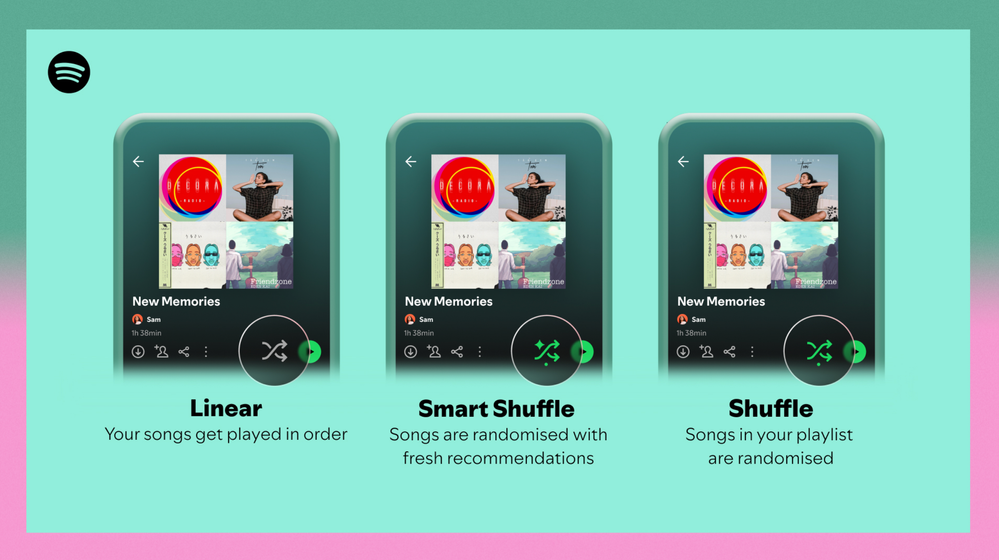
Different playback options.
FAQ
What about the Enhance feature?
For now, Smart Shuffle will replace the Enhance feature.
What will happen to Discover Weekly and other regularly updated playlists?
For the time being, no changes to those will be made. Smart Shuffle aims to improve the listening experience for user curated playlists.
Does this mean that using Smart Shuffle will cause my carefully curated playlists to get cluttered with new recommendations?
No! Your original playlist remains untouched, so you can add any new track that catches your ear. Smart Shuffle won’t change your playlist without your explicit permission. What changes instead is what you'll hear during each specific listening session
🌟 I would like to disable Smart Shuffle permanently. Can I do that?
Yes, you can! Just go to Settings and privacy and then to Playback and toggle the option Enable all play modes to off. This will mean you will only have the regular shuffle.
Note: This option is for Premium users only.
We hope you're as excited as we are about this new play mode. The official Newsroom announcement is out, you can check that out too. For any and all feedback on the matter you may have, you're more than welcome to comment in the thread below.
Solved! Go to Solution.
- Subscribe to RSS Feed
- Mark Topic as New
- Mark Topic as Read
- Float this Topic for Current User
- Bookmark
- Subscribe
- Printer Friendly Page

- Mark as New
- Bookmark
- Subscribe
- Mute
- Subscribe to RSS Feed
- Permalink
- Report Inappropriate Content
Smart shuffle keeps forcibly turning itself back on after I toggle it off. I am forced to download a playlist and play in offline mode if I want to avoid this unnecessary, invasive feature. There NEEDS to be a way to permanently turn off "Smart" Shuffle. It is RUINING my listening experience.

- Mark as New
- Bookmark
- Subscribe
- Mute
- Subscribe to RSS Feed
- Permalink
- Report Inappropriate Content
Please for the love of god add an option to completely disable this new "feature"! It's the worst update you guys have added in years and I can't even avoid it!

- Mark as New
- Bookmark
- Subscribe
- Mute
- Subscribe to RSS Feed
- Permalink
- Report Inappropriate Content
smart shuffle is the worst feature spotify has released and that is saying something. i dont pay 10 punds a month to take 3m to toggle between shuffle and non shuffle
furthermore it disables other shuffle functions by overriding them which is incredibly frustrating. How about you think of user experience before releasing a total disaster of a function?

- Mark as New
- Bookmark
- Subscribe
- Mute
- Subscribe to RSS Feed
- Permalink
- Report Inappropriate Content
I don't dislike Smart Shuffle in principle, as I do enjoy discovering new music, but I have a big issue with the way it's implemented on mobile (namely Android).
If I start my playlist and then realise it's in shuffle mode and want to disable the shuffle, I have to cycle through Smart Shuffle to get to no shuffle. This is bad for two reasons.
First of all, if I have no internet service, it thinks about it for 5 seconds, then goes "you must be online to enable Smart Shuffle" and goes back to normal shuffle mode.
Secondly, when you enable Smart Shuffle, it arranges the queue in "oldest first" order, but as my playlists are newest first, the top song - the song I tap to start the playlist - is the end of the playlist as far as Smart Shuffle is concerned, and so if I cycle from normal shuffle, to smart shuffle, then to no shuffle, the queue has flipped and I've only got one song playing followed by an empty queue. I have to cycle through to no shuffle, then restart the song I was listening to to get the playlist back in newest first order. Small as this may seem, this is a dealbreaker for me as I really dislike having to stop / restart a song.
The solution, in my eyes, is to disconnect the shuffle + "intersperse similar music in your queue" options. Have two separate buttons. Alternatively, add an option to disable Smart Shuffle altogether.

- Mark as New
- Bookmark
- Subscribe
- Mute
- Subscribe to RSS Feed
- Permalink
- Report Inappropriate Content
This feature is so bad. You have how many people complaining about this feature yet think it’s still a good idea?
Let the people listen to their music how they want, allow the ones who want it to have it on, and the ones who don’t, be able to toggle it off.
I don’t care for spotify’s recommendations at all, not once did i use it while it was enhance and not once will i use it while it’s smart shuffle.
actually listen to the people who use your app

- Mark as New
- Bookmark
- Subscribe
- Mute
- Subscribe to RSS Feed
- Permalink
- Report Inappropriate Content
Your algorithm is impressive; however, it falls short of precisely fulfilling my requirements.
While it successfully identifies genuinely "similar" tracks, as a user, I lack the ability to pinpoint the specific aspects I appreciate within those tracks.
Identified Issues:
- I am unable to select a specific segment of a track for targeted searching.
- The capability to select individual attributes of tracks, akin to those present in your API, is absent.
The Proposed Solution:
Introduce a feature allowing users to search using a specific segment of a track, rather than being limited to the entire track.
Enhance the user experience by enabling the selection of precise attributes from a track, thereby refining the search process.
Figma prototype:
https://www.figma.com/proto/G3askAANEoR5fLXfV9wPFU/Personal?type=design&node-id=163-26633&t=XxGMFLhW...
Fast analysis in Notion:
https://tranquil-boron-fb5.notion.site/Spotify-recommendation-enhancement-06ddff4ecc4448cf87e8e9fdd7...
- Mark as New
- Bookmark
- Subscribe
- Mute
- Subscribe to RSS Feed
- Permalink
- Report Inappropriate Content
Let me disabled smart shuffle! I want to listen to my playlist without shuffle but it just keeps going from smart shuffle to regular shuffle. I can't get it to play straight at all and it's driving me insane.

- Mark as New
- Bookmark
- Subscribe
- Mute
- Subscribe to RSS Feed
- Permalink
- Report Inappropriate Content
just switched to a different streamer! canceling premium now after 8-9 years of being subscribed to premium.
spotify announcing a price hike while actively making their platform worse is the funniest sht i've ever seen. i used to champion spotify to my friends, now all i can do is laugh and shake my head.
you killed the barcode-based group speaker sharing function (the most beloved feature ever added - one that set spotify apart from the competition), you inflicted "smart shuffle" on everyone, something that would get you expelled from even the most mid UX design introductory course, and you sit there with your thumbs up your collective nethers. oh, but you spent $200m so you could have exclusive rights to rogan's fully-liquefied brain.
it's time to go, spotify. myspace & digg are eagerly awaiting your arrival.

- Mark as New
- Bookmark
- Subscribe
- Mute
- Subscribe to RSS Feed
- Permalink
- Report Inappropriate Content
This option is TRASH! Perhaps do user testing with regular users and not with shareholders or bored developers. Get. Rid. Of. It. Literally nobody likes it! But, I'll just wait for the bot to tell me that they will let the right department know. **bleep**. Sure you will. Sure you will...
- Mark as New
- Bookmark
- Subscribe
- Mute
- Subscribe to RSS Feed
- Permalink
- Report Inappropriate Content
@Kyleno1 Oh they did do user testing with a subset of regular users (including me) before they launched the feature fully and lots of us complained like crazy about the smart shuffle feature, and they STILL released it to everyone! (I was confused at first why I had this random 'feature' that was more like a bug when my family and friends who also had spotify premium did not until I learned they were just testing it on a subset of users, then I thought when they got rid of it for me for a short amount of time they realized it was a terrible feature but nope.) Just adds to your point and goes to show how much they truly don't listen to their paying users.

- Mark as New
- Bookmark
- Subscribe
- Mute
- Subscribe to RSS Feed
- Permalink
- Report Inappropriate Content
This feature is exactly what I've wanted from a streaming service forever! When will it be made available on desktop?

- Mark as New
- Bookmark
- Subscribe
- Mute
- Subscribe to RSS Feed
- Permalink
- Report Inappropriate Content

- Mark as New
- Bookmark
- Subscribe
- Mute
- Subscribe to RSS Feed
- Permalink
- Report Inappropriate Content
^^^ another spotify intern LM@O
- Mark as New
- Bookmark
- Subscribe
- Mute
- Subscribe to RSS Feed
- Permalink
- Report Inappropriate Content
Literally was asking on twitter a few months ago if any streaming service offered something like this? I enjoy getting recommended new music I haven't heard before, but I want to listen to recs based on all my likes, not just specific genres. This gives me that. Just because you don't like the feature doesn't mean there aren't lots of us loving it.
- Mark as New
- Bookmark
- Subscribe
- Mute
- Subscribe to RSS Feed
- Permalink
- Report Inappropriate Content
What the feature itself is doing isn't really the problem, but rather the UX of how it's implemented is horrible for users that don't want to interact with Smart Shuffle.
- Mark as New
- Bookmark
- Subscribe
- Mute
- Subscribe to RSS Feed
- Permalink
- Report Inappropriate Content
from shuffle to non-shuffle. i don’t wanna use a broken feature because
imbeciles like you can’t find new music on their own.
- Mark as New
- Bookmark
- Subscribe
- Mute
- Subscribe to RSS Feed
- Permalink
- Report Inappropriate Content
edubkendo is absolutely off their rocker. people like that need to be checked into a mental institution
- Mark as New
- Bookmark
- Subscribe
- Mute
- Subscribe to RSS Feed
- Permalink
- Report Inappropriate Content
All people want is option to opt out of this feature. Its great yoy are enjoying it but clearly many are not.
- Mark as New
- Bookmark
- Subscribe
- Mute
- Subscribe to RSS Feed
- Permalink
- Report Inappropriate Content
People don't have to come at me like this though, just because I think the feature is awesome. I didn't come at them.
- Mark as New
- Bookmark
- Subscribe
- Mute
- Subscribe to RSS Feed
- Permalink
- Report Inappropriate Content

Suggested posts

Hey there you, Yeah, you! 😁 Welcome - we're glad you joined the Spotify Community! While you here, let's have a fun game and get…
