The community is in read-only mode
The Spotify Community is in read-only mode while we move to a new platform. We expect to be back up and running October 6th. During this time you can read existing content but take no other actions. If you still need help, visit our Support Site or contact us.
- Home
- Help
- Your Library
- Re: Introducing Smart Shuffle!
Help Wizard
Step 1
Type in your question below and we'll check to see what answers we can find...
Loading article...
Submitting...
If you couldn't find any answers in the previous step then we need to post your question in the community and wait for someone to respond. You'll be notified when that happens.
Simply add some detail to your question and refine the title if needed, choose the relevant category, then post.
Just quickly...
Before we can post your question we need you to quickly make an account (or sign in if you already have one).
Don't worry - it's quick and painless! Just click below, and once you're logged in we'll bring you right back here and post your question. We'll remember what you've already typed in so you won't have to do it again.
FAQs
Please see below the most popular frequently asked questions.
Loading article...
Loading faqs...
Ongoing Issues
Please see below the current ongoing issues which are under investigation.
Loading issue...
Loading ongoing issues...
Help categories
Account & Payment
Using Spotify
Listen Everywhere
Introducing Smart Shuffle!
Solved!

- Mark as New
- Bookmark
- Subscribe
- Mute
- Subscribe to RSS Feed
- Permalink
- Report Inappropriate Content
Introducing Smart Shuffle!
We know that our users love creating their own playlists to capture key moments in time – in fact, playlists created by users often become their most-streamed playlist for the first several months but listening to these playlists slowly fades overtime, and users are eager to discover new music.
With this in mind, we’re excited to launch a new play mode called Smart Shuffle that keeps listening sessions fresh and provides personalized recommendations that perfectly match any listeners’ playlist vibe.
This update will roll out to Premium users on mobile devices starting today.
How does Smart Shuffle work?
- You can use it in any playlist created by you, and your Liked Songs.
- To activate it, just use the Shuffle button to switch between regular play, Shuffle mode and Smart Shuffle.
- When Smart Shuffle is on, recommendations are added to your session automatically. You can find all the recommendations sitting in your queue.
- You will be able to recognize the music we are recommending with the sparkle (✨) symbol next to the track. For a playlist with more than 15 songs, we’ll recommend one song for every three tracks.
- And the best part, your original playlist remains untouched, so you can add any new track that catches your ear.
- If you like a specific recommendation, just save it using the plus button in the Now Playing View. If that song doesn’t hit right, just tap the minus to remove it from the recommendations. This is then used to better adjust the suggestions we put forward.
- Every time you turn Smart Shuffle off, a new mix will be available every time you activate it again.


Adding and removing recommendations.
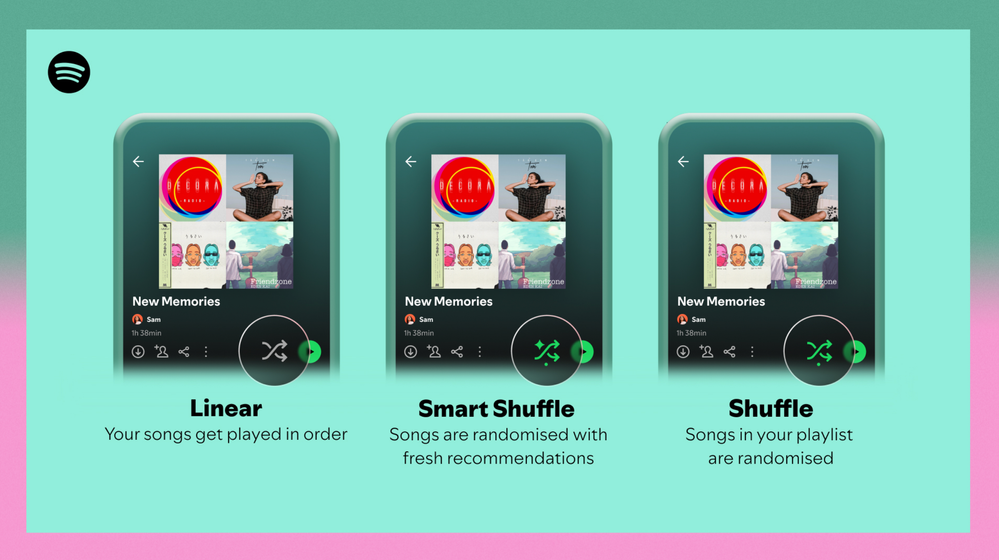
Different playback options.
FAQ
What about the Enhance feature?
For now, Smart Shuffle will replace the Enhance feature.
What will happen to Discover Weekly and other regularly updated playlists?
For the time being, no changes to those will be made. Smart Shuffle aims to improve the listening experience for user curated playlists.
Does this mean that using Smart Shuffle will cause my carefully curated playlists to get cluttered with new recommendations?
No! Your original playlist remains untouched, so you can add any new track that catches your ear. Smart Shuffle won’t change your playlist without your explicit permission. What changes instead is what you'll hear during each specific listening session
🌟 I would like to disable Smart Shuffle permanently. Can I do that?
Yes, you can! Just go to Settings and privacy and then to Playback and toggle the option Enable all play modes to off. This will mean you will only have the regular shuffle.
Note: This option is for Premium users only.
We hope you're as excited as we are about this new play mode. The official Newsroom announcement is out, you can check that out too. For any and all feedback on the matter you may have, you're more than welcome to comment in the thread below.
Solved! Go to Solution.
- Subscribe to RSS Feed
- Mark Topic as New
- Mark Topic as Read
- Float this Topic for Current User
- Bookmark
- Subscribe
- Printer Friendly Page

- Mark as New
- Bookmark
- Subscribe
- Mute
- Subscribe to RSS Feed
- Permalink
- Report Inappropriate Content
I strongly dislike Spotify Smart Shuffle as implemented here.
Please provide me the capability to turn Smart Shuffle on, or OFF, independently of the shuffle feature, and globally. The problem with “Smart Shuffle” is that you have overloaded the UX for Shuffle with an entirely different capability. This problem is compounded when the UX is small, slow to respond, or simply does not update. I often find Smart Shuffle on when random music I do not want to hear starts playing and the Spotify UX does not show me that it is on clearly (small DAP/phone UX) or due to limited internet bandwidth, is not updating. This overloaded feature becomes worse when I try to turn it off, the the button lags updating, leaving me tapping the shuffle button dozens of times attempting to confirm whether or not it registered my tap, or is just slow or unresponsive updating the silly icon.
I love the idea of having a Discovery/New Music type feature like this that I can turn on or apply selectively on a playlist. Great idea.
10/10 one of my all-time least liked Spotify features as you have it implemented now.

- Mark as New
- Bookmark
- Subscribe
- Mute
- Subscribe to RSS Feed
- Permalink
- Report Inappropriate Content
Please get rid of smart shuffle. It is the one downside of Spotify. If you want it so bad keep it but also add a shuffle that only mixes your Playlist. Smart shuffle SUCKS!!!

- Mark as New
- Bookmark
- Subscribe
- Mute
- Subscribe to RSS Feed
- Permalink
- Report Inappropriate Content
Smart shuffle is just annoying. I don't want it to suggest new songs. I just want to shuffle my own music. Spotify must have a setting to disable this feature totally

- Mark as New
- Bookmark
- Subscribe
- Mute
- Subscribe to RSS Feed
- Permalink
- Report Inappropriate Content
I spent about an hour trying to find the enhance button today, only to find out that it is now hidden under the shuffle button... which is just supposed to just shuffle songs, not suggest new ones. This is incredibly unintuitive, and a rather ridiculous implementation of something that wasn't needed, since we already had that as a separate, stand-alone feature. Not only do I feel bad that you obviously made some devs go out of their way to re-invent a feature that already existed (I guess you have to justify their jobs by forcing them to re-write perfectly good code once or twice a year), but now people are all confused as they try to simply shuffle their music, and get a bunch of new stuff they didn't ask for.
As for me personally, I enjoy having the enhance feature on my curated playlists, so I CAN find similar sounds and add them in, it was such a boon! But hiding that feature under the shuffle button was just... poor design, and is clearly poor implementation since I wasn't even notified and had to search for the answer to why Enhance was just... gone? And reading this forum, many others either had no idea, or hate the constant pop-ups. And now I can't see those songs IN my playlist - they only get added to the queue??? I preferred when I could see them in my playlist, and just go ahead and click on them to play them, or if I recognized it...I could go head and hit the plus sign and add it to the playlist. Now I have to go an extra step and find my queue to see it? Why? I'm not doing that, that takes too long - I listen to music while doing other things, and don't have time to constantly tab out and pull up a second, secret playlist! What an absurd (and frankly, stupid) decision.
And while we're talking about unnecessary changes? Why remove the heart button? I like songs. I don't want to add them to any playlists. I just want to hit like to help the algorithm, and now that's more confusing than ever, as well! Why is Spotify trying to re-invent the wheel every 6mos -1 year? Just leave it alone. Playlists have worked one way since the dawn of technology that utilizes them, and that is what people want and expect... stop trying to 'innovate' on something that doesn't need it. The wheel works fine, stop trying new shapes! (That said, of late I've had more luck with Youtube suggesting new music that's similar to my tastes than with Spotify - that would be something to iterate on, I have trouble getting outside of my musical bubble, and I enjoy a music listening program that can help me expand my listening repertoire - thus enjoying the Enhance button. It didn't need to change, so just put it back!)
I may well cancel my Spotify Premium over this, as the Enhance feature was the one big thing I REALLY liked about my playlists here, and as much as I hate Apple, they're not changing the functionality of a perfectly good music listening app every 6 months. Or maybe I'll just take my Spotify Premium money to Youtube music...literally anything that isn't Spotify, because I hate the constant, unnecessary, and unintuitive changes happening for no reason, and now listening to my music is more difficult, and listening to music...shouldn't be hard. I got premium to get the package with Hulu as well, but now that I have Disney +, I can just bundle Hulu with that, and drop Spotify for their bad business and unintuitive UI design that they don't ask the community about at all (was this beta tested with actual customers, even??) - we just have it forced on us because they think there's no competition and we have nowhere to go...but those days are long past.
Put it back, Spotify, put Enhance back. Smart Shuffle is terrible, and no one wants it.

- Mark as New
- Bookmark
- Subscribe
- Mute
- Subscribe to RSS Feed
- Permalink
- Report Inappropriate Content
Smart Shuffle works on all of my playlists except for my Liked Songs, which is where I want to use it the most. I'm part of a premium family plan. I have reinstalled the app on the computer, restarted the computer, tried it on my phone app. Not working on Liked Songs only. Help?

- Mark as New
- Bookmark
- Subscribe
- Mute
- Subscribe to RSS Feed
- Permalink
- Report Inappropriate Content
Please give users a way to turn off this function. I turn off smart shuffle and then minutes later I hear a song I'm not familiar with because it switched back to smart shuffle without me touching anything. It's very frustrating.

- Mark as New
- Bookmark
- Subscribe
- Mute
- Subscribe to RSS Feed
- Permalink
- Report Inappropriate Content
Worst implementation ever made. At least the way it's implemented is horrible. It would be much better if we hold the random button to activate the smart shuffle.

- Mark as New
- Bookmark
- Subscribe
- Mute
- Subscribe to RSS Feed
- Permalink
- Report Inappropriate Content
This feature is the first time in 10 years I have started looking at other platforms; it's infuriating. Any experience or comments with youtube music vs apple music as an alternative?

- Mark as New
- Bookmark
- Subscribe
- Mute
- Subscribe to RSS Feed
- Permalink
- Report Inappropriate Content
No one likes Smart shuffle. This is poor design. I want to permanently disable it. It sucks this is the default and while I'm driving I have to freaking try to flip it off when I just want to relax and listen to the playlist I made. Jesus. Why are you trying to drive away people from this app?
- Mark as New
- Bookmark
- Subscribe
- Mute
- Subscribe to RSS Feed
- Permalink
- Report Inappropriate Content
I am going to cancel my Premium if this feature does not go away soon!!

- Mark as New
- Bookmark
- Subscribe
- Mute
- Subscribe to RSS Feed
- Permalink
- Report Inappropriate Content
I have the "autoplay similar content" setting disabled because I just hate that Spotify THINKS that it knows what I want and still suggests me Brazilian country music god knows why. Why would I, despite not wanting to AUTOPLAY "similar content", want to SHUFFLE "similar content" when I click the shuffle button? How is shuffling any different from what I have DISABLED in settings?

- Mark as New
- Bookmark
- Subscribe
- Mute
- Subscribe to RSS Feed
- Permalink
- Report Inappropriate Content
Discovered that even for people who DO like smart shuffle it doesn't work right.
My partner uses smart shuffle, but whenever she adds one of the suggested songs to her playlist, that song will then be overrepresented in shuffle.
Like it'll play 2 or 3 times within a few minutes, which in a playlist of 1000+ songs should be statistically impossible

- Mark as New
- Bookmark
- Subscribe
- Mute
- Subscribe to RSS Feed
- Permalink
- Report Inappropriate Content
Hello,
Could we please go back to the parallel arrows for sequential play (or some other sensible symbol)? The current spotify on my phone uses the shuffle arrows for sequential play, shuffle, and smart shuffle. The only difference is that smart shuffle has a star and a dot and the normal shuffle only has a dot. The shuffle symbols are fine for those modes, but it is really annoying looking for if the dot is there when I want to play songs in order, especially when it glitches out as I change modes. Besides, it doesn't make sense to use crossing arrows to represent playing songs in order.
Plan
Premium
Country
US
Device
Samsung Galaxy S22 ultra
Operating System
Android One UI 5.1

- Mark as New
- Bookmark
- Subscribe
- Mute
- Subscribe to RSS Feed
- Permalink
- Report Inappropriate Content
Not only does this feature suck all by itself, but it also screwes up the Spotify as Alarm sound function on my Pixel 7. (When Smart Shuffle is on, even though the app is closed, the Alarm clock uses Media Volume instead of Alarm Volume. Smart Shuffle off; alarm works as normal. So if Media Volume is muted; no alarm. Missed work a couple of days, thanks. This goes for both mine and my gfs phone)

- Mark as New
- Bookmark
- Subscribe
- Mute
- Subscribe to RSS Feed
- Permalink
- Report Inappropriate Content
This feature is an absolute disaster. Since it has been added there is constant lag on the app, constant glitches and crashes in an effort to enforce this idea that is obviously terrible and has instantly been replaced by the superior AI dj. This simply has to go. It is a failure. Let it go.
- Mark as New
- Bookmark
- Subscribe
- Mute
- Subscribe to RSS Feed
- Permalink
- Report Inappropriate Content
A nice surprise when driving is that if I am connected via bluetooth to the car, the system bypasses smart shuffle if I tap the button on the car's monitor. By no means a solution to all other scenarios of use but was happy to see it excluded from that use at least.
- Mark as New
- Bookmark
- Subscribe
- Mute
- Subscribe to RSS Feed
- Permalink
- Report Inappropriate Content
My app hasn't been letting me keep normal shuffle on, it changes to smart shuffle after a song plays or even just turns shuffle off entirely. Normally I listen offline, but for my large playlist I find that offline listening severely limits how many songs it'll play. Despite the fact that I have the whole playlist downloaded. I like finding new music and originally just wanted a separate button for smart shuffle, but this has been implemented so poorly that I just want to be able to disable it for my account.

- Mark as New
- Bookmark
- Subscribe
- Mute
- Subscribe to RSS Feed
- Permalink
- Report Inappropriate Content
I initially thought I'd like Smart Shuffle since it functions essentially the same way as "playlist radio", but I really don't like the integration into the shuffle button. Plus whenever a playlist loops, the shuffle comes on automatically and I HATE that. I have character playlists and they start getting mixed up because of the smart feature. 95% of the time I want to listen to the same tracks I've always listened to. The other 5% of the time, I will CHOOSE when I want to find new music. Spotify Discover Weekly works great and I prefer it to smart shuffle, and when I want a specific genre, Playlist Radio worked better for that. Please create an option at least to disable Smart Shuffle.

- Mark as New
- Bookmark
- Subscribe
- Mute
- Subscribe to RSS Feed
- Permalink
- Report Inappropriate Content
Smart Shuffle is GARBAGE!
While listening to one of my playlists, I have disabled Smart Shuffle and enabled regular Shuffle.
Yet every handful of songs I find the Smart Shuffle features just comes back on automatically.
Every time it does this I have to stop my work, go back to the Spotify app skip the crappy song Spotify has so "smartly" chosen for me and disable Smart Shuffle AGAIN!
Please give us a way in the SETTINGS to completely disable this feature. PLEASE!
I am really considering looking for another music solution because of the inability to disable this feature.
- Mark as New
- Bookmark
- Subscribe
- Mute
- Subscribe to RSS Feed
- Permalink
- Report Inappropriate Content
I hardly ever comment on stuff like this.
But I have to say, it took me several minutes to get through and actually post my comment stating how much I want the ability to disable Smart Shuffle globally.
Now I feel compelled to comment again to further solidify my extreme and complete dissatisfaction with SMART SHUFFLE AND EVERYTHING ASSOCIATED WITH IT.
WHAT A PAIN!
AH!

Suggested posts

Hey there you, Yeah, you! 😁 Welcome - we're glad you joined the Spotify Community! While you here, let's have a fun game and get…
