- Home
- Help
- Your Library
- Introducing Smart Shuffle!
Help Wizard
Step 1
Type in your question below and we'll check to see what answers we can find...
Loading article...
Submitting...
If you couldn't find any answers in the previous step then we need to post your question in the community and wait for someone to respond. You'll be notified when that happens.
Simply add some detail to your question and refine the title if needed, choose the relevant category, then post.
Just quickly...
Before we can post your question we need you to quickly make an account (or sign in if you already have one).
Don't worry - it's quick and painless! Just click below, and once you're logged in we'll bring you right back here and post your question. We'll remember what you've already typed in so you won't have to do it again.
FAQs
Please see below the most popular frequently asked questions.
Loading article...
Loading faqs...
Ongoing Issues
Please see below the current ongoing issues which are under investigation.
Loading issue...
Loading ongoing issues...
Help categories
Account & Payment
Using Spotify
Listen Everywhere
Introducing Smart Shuffle!
Solved!

- Mark as New
- Bookmark
- Subscribe
- Mute
- Subscribe to RSS Feed
- Permalink
- Report Inappropriate Content
Introducing Smart Shuffle!
We know that our users love creating their own playlists to capture key moments in time – in fact, playlists created by users often become their most-streamed playlist for the first several months but listening to these playlists slowly fades overtime, and users are eager to discover new music.
With this in mind, we’re excited to launch a new play mode called Smart Shuffle that keeps listening sessions fresh and provides personalized recommendations that perfectly match any listeners’ playlist vibe.
This update will roll out to Premium users on mobile devices starting today.
How does Smart Shuffle work?
- You can use it in any playlist created by you, and your Liked Songs.
- To activate it, just use the Shuffle button to switch between regular play, Shuffle mode and Smart Shuffle.
- When Smart Shuffle is on, recommendations are added to your session automatically. You can find all the recommendations sitting in your queue.
- You will be able to recognize the music we are recommending with the sparkle (✨) symbol next to the track. For a playlist with more than 15 songs, we’ll recommend one song for every three tracks.
- And the best part, your original playlist remains untouched, so you can add any new track that catches your ear.
- If you like a specific recommendation, just save it using the plus button in the Now Playing View. If that song doesn’t hit right, just tap the minus to remove it from the recommendations. This is then used to better adjust the suggestions we put forward.
- Every time you turn Smart Shuffle off, a new mix will be available every time you activate it again.


Adding and removing recommendations.
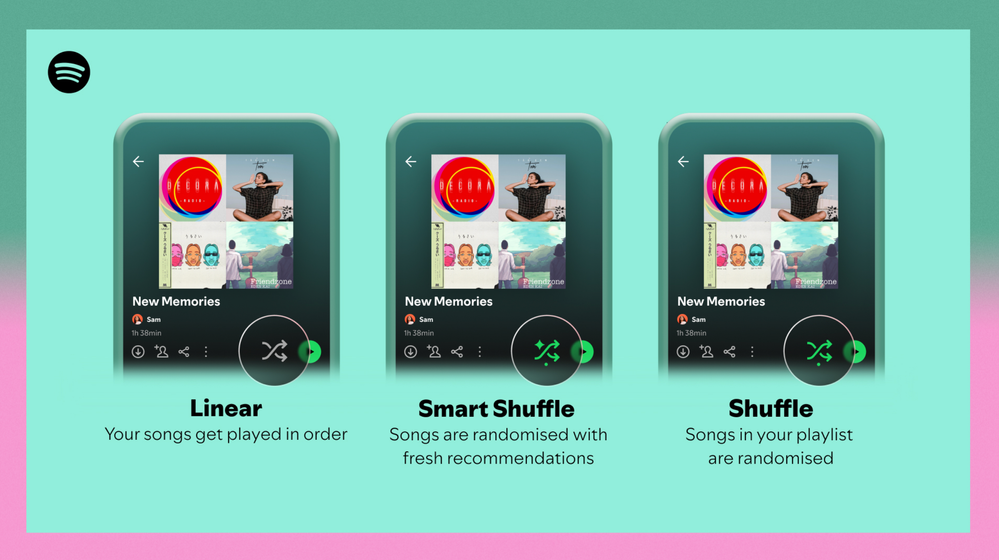
Different playback options.
FAQ
What about the Enhance feature?
For now, Smart Shuffle will replace the Enhance feature.
What will happen to Discover Weekly and other regularly updated playlists?
For the time being, no changes to those will be made. Smart Shuffle aims to improve the listening experience for user curated playlists.
Does this mean that using Smart Shuffle will cause my carefully curated playlists to get cluttered with new recommendations?
No! Your original playlist remains untouched, so you can add any new track that catches your ear. Smart Shuffle won’t change your playlist without your explicit permission. What changes instead is what you'll hear during each specific listening session
🌟 I would like to disable Smart Shuffle permanently. Can I do that?
Yes, you can! Just go to Settings and privacy and then to Playback and toggle the option Enable all play modes to off. This will mean you will only have the regular shuffle.
Note: This option is for Premium users only.
We hope you're as excited as we are about this new play mode. The official Newsroom announcement is out, you can check that out too. For any and all feedback on the matter you may have, you're more than welcome to comment in the thread below.
Solved! Go to Solution.
- Subscribe to RSS Feed
- Mark Topic as New
- Mark Topic as Read
- Float this Topic for Current User
- Bookmark
- Subscribe
- Printer Friendly Page

Hi there folks,
We're here to say that we've taken your feedback into account and you will now be able to disable Smart Shuffle from the app settings, as described in this now implemented idea!
The steps are as follows:
- Tap your profile picture at the top.
- Tap Settings and privacy.
- Select Playback.
- Switch Enable all play modes off.
This is for Premium users only and is only available on mobile at the moment, but rest assured it will be coming to desktop in due time as well.
Cheers!

- Mark as New
- Bookmark
- Subscribe
- Mute
- Subscribe to RSS Feed
- Permalink
- Report Inappropriate Content
Here's another comment since I had to verify my email address upon posting my 2nd comment.
SMART SHUFFLE SUCKS!
...and so does this community page. This is the only thing on my computer running super laggy... It's like they want us to get frustrated and not comment on how much we hate this feature.

- Mark as New
- Bookmark
- Subscribe
- Mute
- Subscribe to RSS Feed
- Permalink
- Report Inappropriate Content
Why was I forced into this? I detest this "feature" and would at minimum like the option to enable or disable this feature. Strongly considering switching to Apple Music or Tidal due to this inconvenience.

- Mark as New
- Bookmark
- Subscribe
- Mute
- Subscribe to RSS Feed
- Permalink
- Report Inappropriate Content
I want to be able to permanently disable Smart Shuffle - I want to listen to my playlist in the order I created it.
Smart Shuffle is buggy, and when I turn it off, it just turns itself back on.

- Mark as New
- Bookmark
- Subscribe
- Mute
- Subscribe to RSS Feed
- Permalink
- Report Inappropriate Content
Well, I made some 2 posts or so here before. I still like the idea of Smart Shuffle as long as I can control when and where. However, as it still, one year (almost) after release is still broken and dont actually work I am considering closing my subscription and finding a new streaming service. This is so **bleep** awful its beyond words... ffs.. solve it!

- Mark as New
- Bookmark
- Subscribe
- Mute
- Subscribe to RSS Feed
- Permalink
- Report Inappropriate Content
Smart shuffle is an unwanted feature which is better known as a bug. I don't want smart shuffle as an option when enabling and disabling shuffle. I want to be able to quickly enable and disable shuffle without enabling smart shuffle. It's obvious to me why Spotify created the smart shuffle bug. They are trying to recommend music that the user will like in order to keep the user engaged and using their app for a longer period of time. Spotify already has features for discovering new music. I don't need their suggestions thrust into my personal playlists.
Every time I turn around, I find another service trying to artificially drive user engagement by designing their service to work best for the company and not the user. If you would like to increase user engagement, focus on improving your service for the user.

- Mark as New
- Bookmark
- Subscribe
- Mute
- Subscribe to RSS Feed
- Permalink
- Report Inappropriate Content
Smart shuffle should be able to be disabled permanently. I hate how it defaults to on every time I tap a specific song in my playlist. Then I have to remember to go back and turn it off after selecting the part of the playlist I want to listen to. It's deeply aggravating.

- Mark as New
- Bookmark
- Subscribe
- Mute
- Subscribe to RSS Feed
- Permalink
- Report Inappropriate Content
I want to turn Smart Shuffle off ENTIRELY. I hate that Smart Shuffle is my first shuffle option, and I find that Spotify is slow to make the switch between my shuffle and Smart Shuffle, so I end up having to loop through shuffle options 1-3 times to accommodate the lag. I also don't like that if I accidentally put on Smart Shuffle and my playlist is downloaded, it'll download automatically ALL the Smart Shuffle recommendations, which takes up space on my phone. It's infuriating. I just want the option to turn it off for all of my playlists.

- Mark as New
- Bookmark
- Subscribe
- Mute
- Subscribe to RSS Feed
- Permalink
- Report Inappropriate Content
i am now so sick of the smart shuffle feature i went to the website to complain about it. let us disable this stupid feature please i dont want to switch to apple music

- Mark as New
- Bookmark
- Subscribe
- Mute
- Subscribe to RSS Feed
- Permalink
- Report Inappropriate Content
Thanks for this feature, but it's annoying AF when I just want to turn off my shuffle and it keeps the "smart shuffle" songs on my playlist when I'm in a particular mood. Honestly, just give us the option to enable or disable it. If I want new or random music recommendations, I'll go to Pandora. I like Spotify because it enables me to make playlists and pick my music, but if every time I turn on or off shuffle I have to jump through extra hoops, I'm just gonna get **bleep** and stop using the app. Just bring back Enhance, or allow us to disable it.
I miss the old Spotify where things were simpler to find and choose and didn't push you to explore weird things.....

- Mark as New
- Bookmark
- Subscribe
- Mute
- Subscribe to RSS Feed
- Permalink
- Report Inappropriate Content
smart shuffle makes me want to punch a small child , since that’s not socially acceptable I’ll settle for being able to disable the feature. K thanks ✌️

- Mark as New
- Bookmark
- Subscribe
- Mute
- Subscribe to RSS Feed
- Permalink
- Report Inappropriate Content
I literally have never posted here before so please take what I am about to say with the gravity that entails. I detest smart shuffle. I create thematic playlists to enjoy while gaming or to soothe my anxiety while out and about. The thing is, I know ever song in the selected list. The single worst thing for my anxiety and myriad other mental issues is for unexpected songs to appear in my carefully curated lists. Please either remove this abysmal rot in what is otherwise a nice tool for me or give those of us who passionately despise it the option to permanently disable it in settings. Honestly it seems like whoever decided to add that did not take any sort of accessibility or marketing courses as I personally did not intend to enable the smart shuffle, I just set my playlist to shuffle per usual and oops it was actually smart shuffle.
With Displeasure,
Lillian

- Mark as New
- Bookmark
- Subscribe
- Mute
- Subscribe to RSS Feed
- Permalink
- Report Inappropriate Content
Absolutely detest this feature! Please allow us to disable. I cannot even switch off, even if I am on normal shuffle it will keep switching to smart shuffle without pressing anything, and even when it doesn't it still litters my playlist with the same unwanted songs over and over again!

- Mark as New
- Bookmark
- Subscribe
- Mute
- Subscribe to RSS Feed
- Permalink
- Report Inappropriate Content
For the first time in 6 years im researching other options than Spotify. I really don't like forcing me to using "smart" options, and I cant pernamently switch it off. I have MY playlist, I use premium account and I would like to listen to MY music. But each and every time Spotify changes my shuffle to "smart". Apart from that the "recommendations" became absurd in the last year. Even if I mark recommendations as unliked I still keep getting music genres that I don't ever listen to. I really tired with Spotify, its getting worse with every update. Why forcing me to listen to music I dont want and dont like seems like a "smart" choice for Spotify? I just dont get it.
- Mark as New
- Bookmark
- Subscribe
- Mute
- Subscribe to RSS Feed
- Permalink
- Report Inappropriate Content
Even if we're (apparently) not getting the option to disable it, could you please at least fix this horrible thing so it doesn't turn itself back on after I've changed my playlist to non-shuffle? This is one of the most annoying so called "smart" features ever.

- Mark as New
- Bookmark
- Subscribe
- Mute
- Subscribe to RSS Feed
- Permalink
- Report Inappropriate Content
Not only is this a very annoying "feature", but it's also buggy, at least on Android. If normal shuffle is on and I want to disable it, I have to first go through the Smart shuffle option, to finally reach the disabled option. But for whatever reason that gets completely ignored, and it starts Smart shuffling anyways. Only maybe after two or three tries it finally stays disabled.

- Mark as New
- Bookmark
- Subscribe
- Mute
- Subscribe to RSS Feed
- Permalink
- Report Inappropriate Content
How can I turn off this recent plague of 1-2 minute tracks that have polluted literally everything - radios, autogenerated playlists, Autoplay? This horrible joke of an improvement has utterly ruined the listening experience with Spotify and lets me seriously consider giving my money to Qobuz or Tidal.

- Mark as New
- Bookmark
- Subscribe
- Mute
- Subscribe to RSS Feed
- Permalink
- Report Inappropriate Content
@spotify read the darn comments
- Mark as New
- Bookmark
- Subscribe
- Mute
- Subscribe to RSS Feed
- Permalink
- Report Inappropriate Content
Spotify has always been positioned as having a better suggestion algorithm than other streaming services. Ironically, now they seem stubbornly intent at ruining this competitive advantage.
- Mark as New
- Bookmark
- Subscribe
- Mute
- Subscribe to RSS Feed
- Permalink
- Report Inappropriate Content
Interesting how my comment was glued to the shuffle topic. Is the horrible 1-2 minute **bleep** really related to smart shuffle?
- Mark as New
- Bookmark
- Subscribe
- Mute
- Subscribe to RSS Feed
- Permalink
- Report Inappropriate Content
Recently, every time I put on smart shuffle (iPhone with the latest iOS and PC) for all my playlists, it plays the exact same songs. Whether I redo it in the same session or a few days later, the same lineup plays every time. Obviously, I use smart shuffle to expand the playlists that I'm listening too and discover new music, and it sucks that I can't do that.

Suggested posts

Hey there you, Yeah, you! 😁 Welcome - we're glad you joined the Spotify Community! While you here, let's have a fun game and get…