- Home
- Help
- Your Library
- Introducing Smart Shuffle!
Help Wizard
Step 1
Type in your question below and we'll check to see what answers we can find...
Loading article...
Submitting...
If you couldn't find any answers in the previous step then we need to post your question in the community and wait for someone to respond. You'll be notified when that happens.
Simply add some detail to your question and refine the title if needed, choose the relevant category, then post.
Just quickly...
Before we can post your question we need you to quickly make an account (or sign in if you already have one).
Don't worry - it's quick and painless! Just click below, and once you're logged in we'll bring you right back here and post your question. We'll remember what you've already typed in so you won't have to do it again.
FAQs
Please see below the most popular frequently asked questions.
Loading article...
Loading faqs...
Ongoing Issues
Please see below the current ongoing issues which are under investigation.
Loading issue...
Loading ongoing issues...
Help categories
Account & Payment
Using Spotify
Listen Everywhere
Introducing Smart Shuffle!
Solved!

- Mark as New
- Bookmark
- Subscribe
- Mute
- Subscribe to RSS Feed
- Permalink
- Report Inappropriate Content
Introducing Smart Shuffle!
We know that our users love creating their own playlists to capture key moments in time – in fact, playlists created by users often become their most-streamed playlist for the first several months but listening to these playlists slowly fades overtime, and users are eager to discover new music.
With this in mind, we’re excited to launch a new play mode called Smart Shuffle that keeps listening sessions fresh and provides personalized recommendations that perfectly match any listeners’ playlist vibe.
This update will roll out to Premium users on mobile devices starting today.
How does Smart Shuffle work?
- You can use it in any playlist created by you, and your Liked Songs.
- To activate it, just use the Shuffle button to switch between regular play, Shuffle mode and Smart Shuffle.
- When Smart Shuffle is on, recommendations are added to your session automatically. You can find all the recommendations sitting in your queue.
- You will be able to recognize the music we are recommending with the sparkle (✨) symbol next to the track. For a playlist with more than 15 songs, we’ll recommend one song for every three tracks.
- And the best part, your original playlist remains untouched, so you can add any new track that catches your ear.
- If you like a specific recommendation, just save it using the plus button in the Now Playing View. If that song doesn’t hit right, just tap the minus to remove it from the recommendations. This is then used to better adjust the suggestions we put forward.
- Every time you turn Smart Shuffle off, a new mix will be available every time you activate it again.


Adding and removing recommendations.
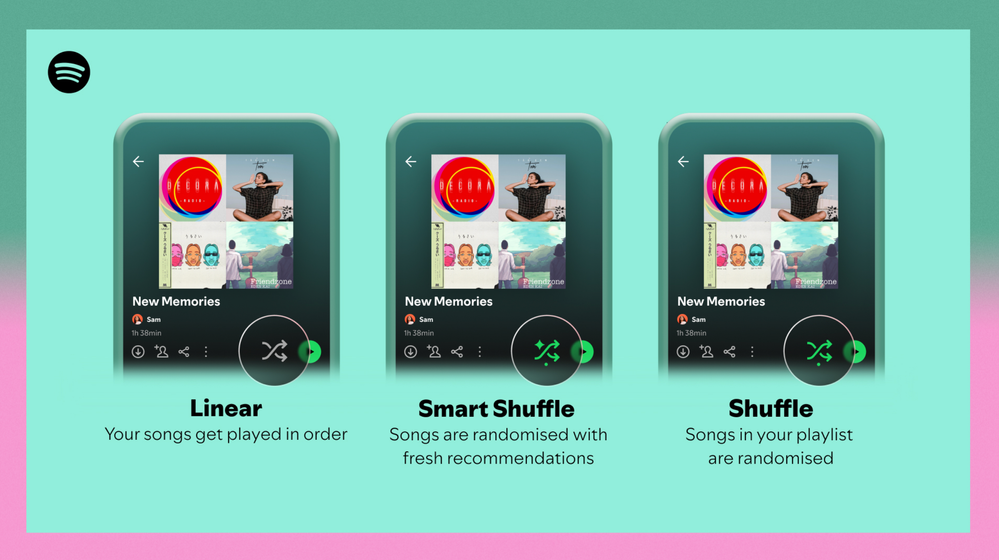
Different playback options.
FAQ
What about the Enhance feature?
For now, Smart Shuffle will replace the Enhance feature.
What will happen to Discover Weekly and other regularly updated playlists?
For the time being, no changes to those will be made. Smart Shuffle aims to improve the listening experience for user curated playlists.
Does this mean that using Smart Shuffle will cause my carefully curated playlists to get cluttered with new recommendations?
No! Your original playlist remains untouched, so you can add any new track that catches your ear. Smart Shuffle won’t change your playlist without your explicit permission. What changes instead is what you'll hear during each specific listening session
🌟 I would like to disable Smart Shuffle permanently. Can I do that?
Yes, you can! Just go to Settings and privacy and then to Playback and toggle the option Enable all play modes to off. This will mean you will only have the regular shuffle.
Note: This option is for Premium users only.
We hope you're as excited as we are about this new play mode. The official Newsroom announcement is out, you can check that out too. For any and all feedback on the matter you may have, you're more than welcome to comment in the thread below.
Solved! Go to Solution.
- Subscribe to RSS Feed
- Mark Topic as New
- Mark Topic as Read
- Float this Topic for Current User
- Bookmark
- Subscribe
- Printer Friendly Page

Hi there folks,
We're here to say that we've taken your feedback into account and you will now be able to disable Smart Shuffle from the app settings, as described in this now implemented idea!
The steps are as follows:
- Tap your profile picture at the top.
- Tap Settings and privacy.
- Select Playback.
- Switch Enable all play modes off.
This is for Premium users only and is only available on mobile at the moment, but rest assured it will be coming to desktop in due time as well.
Cheers!

- Mark as New
- Bookmark
- Subscribe
- Mute
- Subscribe to RSS Feed
- Permalink
- Report Inappropriate Content
It occurs to me that this was part of the reason why I even pay for this service - so I wasn't subjected to noise unexpectedly which some terrible AI thought I might like...
Now I am paying for the privilege of you ruining my focus regularly (yep, you just did it again which made me come back to this stupid open tab and write this comment)
Are we going back to the days of ripping/sharing CD's and carrying around Gb of music and building directories to listen to via a media player? As that feels like the only solution here. At least modern smartphones have a lot more storage... **bleep**.
YouTubeMusic might finally be worth setting up. (I'm sure they have their own progressive enshittification going on.... way of the world)

- Mark as New
- Bookmark
- Subscribe
- Mute
- Subscribe to RSS Feed
- Permalink
- Report Inappropriate Content
Smart shuffle seem to bug out more often than not. I enable it (I actually like this feature) and it shows me every third song is "suggested" and two seconds later it updates again and its gone. No smart shuffle... sometimes it works but most not at all. On Windows 11 23H2.

- Mark as New
- Bookmark
- Subscribe
- Mute
- Subscribe to RSS Feed
- Permalink
- Report Inappropriate Content
This is literally the worst feature to force upon users. PLEASE stop forcing it upon everyone. I'd like to shuffle my playlists without the influence of whatever dumb bs you want to push upon me.

- Mark as New
- Bookmark
- Subscribe
- Mute
- Subscribe to RSS Feed
- Permalink
- Report Inappropriate Content
Smart Shuffle NEEDS to go. Even when I select regular shuffle whilst playing through my car, it reverts to Smart Shuffle. I don't want this option and have never asked for it.
I agree with others, if it's not removed it's time to switch to another streaming service.

- Mark as New
- Bookmark
- Subscribe
- Mute
- Subscribe to RSS Feed
- Permalink
- Report Inappropriate Content
Listen to 90% of these comments AND MAKE IT AN OPTIONAL SETTING!!!! I’ve been scrolling through comments for five minutes, only 2 are in favor of it. GET THE **** RID OF IT!!! I’m tired of multi-million dollar corporations being too lazy to fix their features but have no problem throwing us into a beta-esc app with design flaws. Fix it. All I want is to not have to wait 5 seconds every time I click shuffle.

- Mark as New
- Bookmark
- Subscribe
- Mute
- Subscribe to RSS Feed
- Permalink
- Report Inappropriate Content
Hate smart shuffle. And now I have to manually enable/disable shuffle on every playlist I try - incredibly annoying and poor experience.
- Mark as New
- Bookmark
- Subscribe
- Mute
- Subscribe to RSS Feed
- Permalink
- Report Inappropriate Content
Here is how you fix this issue, just an FYI


- Mark as New
- Bookmark
- Subscribe
- Mute
- Subscribe to RSS Feed
- Permalink
- Report Inappropriate Content
I think everyone knows this. They just don't want the smart shuffle feature being activated by the shuffle button because it's an awful implementation of this feature and too buggy.

- Mark as New
- Bookmark
- Subscribe
- Mute
- Subscribe to RSS Feed
- Permalink
- Report Inappropriate Content
Hi. First time commenting here ever. That's how annoying Smart Shuffle is that you have me typing this.
This feature is awful. It should have an option to KEEP IT DISABLED. Not a toggle that reactivates itself when it feels like it.
I dont like this feature and I dont use it. I always make sure its off when I play my playlists. And two songs later, Smart Shuffle says "$#%$ you", tur s itself back on, and I'm now listening to a random track I did not want.
There seems to be a majority of people who simply want the option of permanently keeping this disabled, why is Spotify being this adamantly stubborn to fix this?
- Mark as New
- Bookmark
- Subscribe
- Mute
- Subscribe to RSS Feed
- Permalink
- Report Inappropriate Content
bring back enhance instead it was better :(. bring back radio for playlists that was the best feature

- Mark as New
- Bookmark
- Subscribe
- Mute
- Subscribe to RSS Feed
- Permalink
- Report Inappropriate Content
Smart shuffle is garbage, please add an option to permanently disable it.

- Mark as New
- Bookmark
- Subscribe
- Mute
- Subscribe to RSS Feed
- Permalink
- Report Inappropriate Content
How do we create a vote to have a disable option in the web/app settings?

- Mark as New
- Bookmark
- Subscribe
- Mute
- Subscribe to RSS Feed
- Permalink
- Report Inappropriate Content
Please, disable the shuffle button. It is too annoying and horrible decision of UX!!!

- Mark as New
- Bookmark
- Subscribe
- Mute
- Subscribe to RSS Feed
- Permalink
- Report Inappropriate Content
I do not enjoy the smart shuffle feature. Is it not essentially adding a way to revert back to the unpaid version of Spotify where it adds its own “recommendations” between the songs you are actually trying to listen to? Why would I, someone paying for spotify, want to go back to having to listen to spotify generated playlists. I pay for it so I can make my OWN. Adding the smart shuffle button on top of the regular shuffle is INSANELY inconvenient and makes using the app slow and clunky. Please add a way to disable this feature entirely. It’s annoying as **bleep**.

- Mark as New
- Bookmark
- Subscribe
- Mute
- Subscribe to RSS Feed
- Permalink
- Report Inappropriate Content
Please allow users to permanently disable smart shuffle, or remove it from the cycling of the shuffle button.
It is so poorly implemented- I am actually so frustrated using your app now. When network connection is poor, switching between shuffling and not is arduous when it is a core and simple feature of a playlist.
Additionally stop forcing smart shuffle by default. I have never once used it, and despite that I constantly find it enabled when opening up my playlists.

- Mark as New
- Bookmark
- Subscribe
- Mute
- Subscribe to RSS Feed
- Permalink
- Report Inappropriate Content
I was a huge fan of the enhance function that was just barely removed. I actually discovered almost all of my new music through the enhance feature. I have used the DJ, but I found myself getting annoyed because while I am looking for new music I don't want to hear the songs I already have added to my playlists. With enhance I was able to methodically go through each of the recommendations at my own pace by turning of the shuffle button and selecting the next recommended song after listening to the previous one. This method helped me to add dozens of hours of music from artists and genres that I feel I wouldn't have found otherwise. The new smart shuffle removes some of the freedom that was given with the enhance feature. Sure I can just open the queue and manually scroll through it, but I found my previous method with enhance was much more efficient

- Mark as New
- Bookmark
- Subscribe
- Mute
- Subscribe to RSS Feed
- Permalink
- Report Inappropriate Content
please just add an option to disable this feature without needing to tap the shuffle button 2 more times its so annoying

- Mark as New
- Bookmark
- Subscribe
- Mute
- Subscribe to RSS Feed
- Permalink
- Report Inappropriate Content
I want to permanently disable this feature. Give me the option.

- Mark as New
- Bookmark
- Subscribe
- Mute
- Subscribe to RSS Feed
- Permalink
- Report Inappropriate Content
Please change the behaviour of the shuffle button. I don't want to cycle between shuffle, smart shuffle and normal play. If there was a separate switch for enabling smart shuffle I would not mind the feature, but how it is implemented now is very annoying.
Sometimes I ride the train with bad network connectivity. I click on the shuffle button to disable shuffling. I see a spinner for a long time. I do not like this.

- Mark as New
- Bookmark
- Subscribe
- Mute
- Subscribe to RSS Feed
- Permalink
- Report Inappropriate Content
Plan
Free/Premium
Country
USA
Device
Samsung 23 Ultra, new windows 11 desk top computer, windows 10 laptop and a cheap old Android tablet just for testing on 4 different devices.
Operating System
( Samsung Android, Windows 10 and 11)
My Question or Issue
Spotify won't shuffle all the songs in my playlist. We should be able to just choose shuffle and it will shuffle and play all the songs in my playlist no matter how big it is. I tried all the suggested workarounds and they do not fix this issue, and they are too complicated and every time I log out and back in it auto repopulates the que therefor the clearing the que workaround has to be done every time I log in. Spotify needs to fix this ASAP, but since this has been a problem for a decade now I do not see them fixing it at all. I am on a 30 day trial and the ability to shuffle my entire playlist is at the top of my list of needs for a music streaming service. Looks like I may have to drop Spotify, too bad they can not fix this very simple but BIG issue.

Suggested posts

Hey there you, Yeah, you! 😁 Welcome - we're glad you joined the Spotify Community! While you here, let's have a fun game and get…