- Home
- Help
- Your Library
- Introducing Smart Shuffle!
Help Wizard
Step 1
Type in your question below and we'll check to see what answers we can find...
Loading article...
Submitting...
If you couldn't find any answers in the previous step then we need to post your question in the community and wait for someone to respond. You'll be notified when that happens.
Simply add some detail to your question and refine the title if needed, choose the relevant category, then post.
Just quickly...
Before we can post your question we need you to quickly make an account (or sign in if you already have one).
Don't worry - it's quick and painless! Just click below, and once you're logged in we'll bring you right back here and post your question. We'll remember what you've already typed in so you won't have to do it again.
FAQs
Please see below the most popular frequently asked questions.
Loading article...
Loading faqs...
Ongoing Issues
Please see below the current ongoing issues which are under investigation.
Loading issue...
Loading ongoing issues...
Help categories
Account & Payment
Using Spotify
Listen Everywhere
Introducing Smart Shuffle!
Solved!

- Mark as New
- Bookmark
- Subscribe
- Mute
- Subscribe to RSS Feed
- Permalink
- Report Inappropriate Content
Introducing Smart Shuffle!
We know that our users love creating their own playlists to capture key moments in time – in fact, playlists created by users often become their most-streamed playlist for the first several months but listening to these playlists slowly fades overtime, and users are eager to discover new music.
With this in mind, we’re excited to launch a new play mode called Smart Shuffle that keeps listening sessions fresh and provides personalized recommendations that perfectly match any listeners’ playlist vibe.
This update will roll out to Premium users on mobile devices starting today.
How does Smart Shuffle work?
- You can use it in any playlist created by you, and your Liked Songs.
- To activate it, just use the Shuffle button to switch between regular play, Shuffle mode and Smart Shuffle.
- When Smart Shuffle is on, recommendations are added to your session automatically. You can find all the recommendations sitting in your queue.
- You will be able to recognize the music we are recommending with the sparkle (✨) symbol next to the track. For a playlist with more than 15 songs, we’ll recommend one song for every three tracks.
- And the best part, your original playlist remains untouched, so you can add any new track that catches your ear.
- If you like a specific recommendation, just save it using the plus button in the Now Playing View. If that song doesn’t hit right, just tap the minus to remove it from the recommendations. This is then used to better adjust the suggestions we put forward.
- Every time you turn Smart Shuffle off, a new mix will be available every time you activate it again.


Adding and removing recommendations.
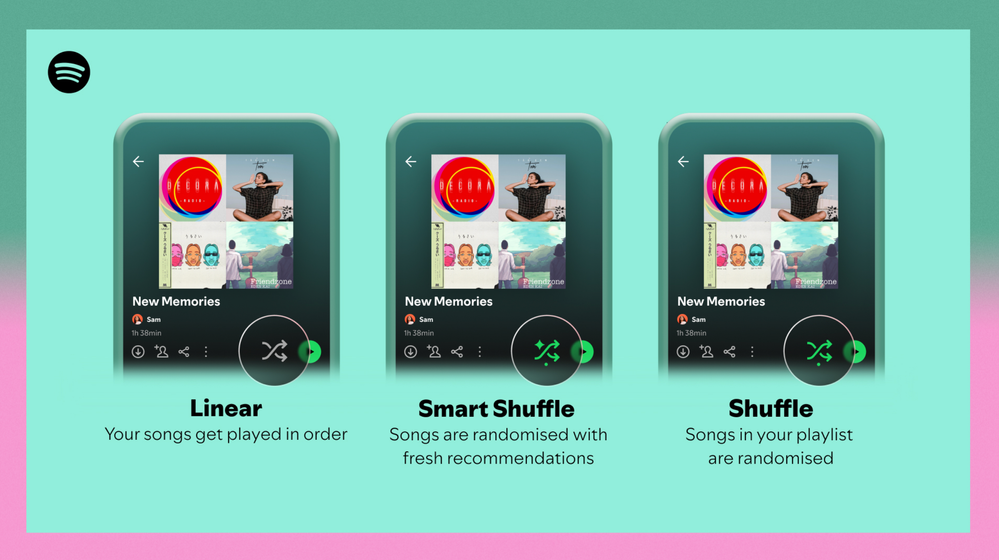
Different playback options.
FAQ
What about the Enhance feature?
For now, Smart Shuffle will replace the Enhance feature.
What will happen to Discover Weekly and other regularly updated playlists?
For the time being, no changes to those will be made. Smart Shuffle aims to improve the listening experience for user curated playlists.
Does this mean that using Smart Shuffle will cause my carefully curated playlists to get cluttered with new recommendations?
No! Your original playlist remains untouched, so you can add any new track that catches your ear. Smart Shuffle won’t change your playlist without your explicit permission. What changes instead is what you'll hear during each specific listening session
🌟 I would like to disable Smart Shuffle permanently. Can I do that?
Yes, you can! Just go to Settings and privacy and then to Playback and toggle the option Enable all play modes to off. This will mean you will only have the regular shuffle.
Note: This option is for Premium users only.
We hope you're as excited as we are about this new play mode. The official Newsroom announcement is out, you can check that out too. For any and all feedback on the matter you may have, you're more than welcome to comment in the thread below.
Solved! Go to Solution.
- Subscribe to RSS Feed
- Mark Topic as New
- Mark Topic as Read
- Float this Topic for Current User
- Bookmark
- Subscribe
- Printer Friendly Page

Hi there folks,
We're here to say that we've taken your feedback into account and you will now be able to disable Smart Shuffle from the app settings, as described in this now implemented idea!
The steps are as follows:
- Tap your profile picture at the top.
- Tap Settings and privacy.
- Select Playback.
- Switch Enable all play modes off.
This is for Premium users only and is only available on mobile at the moment, but rest assured it will be coming to desktop in due time as well.
Cheers!

- Mark as New
- Bookmark
- Subscribe
- Mute
- Subscribe to RSS Feed
- Permalink
- Report Inappropriate Content
Can't smart shuffle on pc/desktop 😕

- Mark as New
- Bookmark
- Subscribe
- Mute
- Subscribe to RSS Feed
- Permalink
- Report Inappropriate Content
Smart shuffle doesn't work on my iPhone app ever since the app update. I used to use an enhanced version of my playlist but now it doesn't show any suggested tracks anymore

- Mark as New
- Bookmark
- Subscribe
- Mute
- Subscribe to RSS Feed
- Permalink
- Report Inappropriate Content
Is there a way to remove the minus? I clicked it on a song but then wanted to listen to it and couldn't play it in my playlist due to the minus, I added it to the playlist and it still wouldn't play.

- Mark as New
- Bookmark
- Subscribe
- Mute
- Subscribe to RSS Feed
- Permalink
- Report Inappropriate Content
Hey everyone, LiamTems started a topic idea about making a toggle in settings to completely disable Smart Shuffle, go vote for it here:
I cannot recommend this feature enough, that way those who like Smart Shuffle can keep using it but for the many, of which it completely ruins how we normally use Spotify, we can turn it off in settings and just switch between the states of shuffle being only on or only off again.

- Mark as New
- Bookmark
- Subscribe
- Mute
- Subscribe to RSS Feed
- Permalink
- Report Inappropriate Content
Please bring back enhanced playlists. I have had to revert my Android Spotify app to an older version to get access to it again. Smart Shuffle is rubbish in comparison.

- Mark as New
- Bookmark
- Subscribe
- Mute
- Subscribe to RSS Feed
- Permalink
- Report Inappropriate Content
Please bring back enhance feature. It is so much easier to use than smart shuffle to find new songs.

- Mark as New
- Bookmark
- Subscribe
- Mute
- Subscribe to RSS Feed
- Permalink
- Report Inappropriate Content
I like this idea for 90% of my playlists however there’s one I have that is my actual master list of every song I like, and I hate that the shuffle experience for this playlist is now essentially ruined because there’s a delay every time I want to shuffle it a few times.
I would say conservatively 75% of my listening is on this main playlist and most times I just want to shuffle it til I find an order of songs that fit the mood I’m in. This smart shuffle has ruined that for me and it’s making me want to swap platforms after 8yrs, it’s wrecked a core function of the service for me.
Again I like the feature but you need to have an option to disable it or something please

- Mark as New
- Bookmark
- Subscribe
- Mute
- Subscribe to RSS Feed
- Permalink
- Report Inappropriate Content
one would think "smart shuffle" would find music that applies to the PLAYLIST instead of looking at your entire listening history? I used to use spotify to listen to ambient music to help me sleep at night, but it was destroying my listening history/yearly wrapup with nothing but yoga music and ambient music. I made a separate profile for that 5 months ago so my main profile hasn't listened to yoga music in half a year almost. But when I turn on Smart Shuffle on my "liked songs" which is 90% metal and 0% yoga music, the only thing it actually adds to my playlist is freaking yoga music?? I'm not talking every now and then, I'm talking every song it adds is yoga music. It's useless if it doesn't base itself on the playlist itself and pulls in music I haven't listened to in 5 months....

- Mark as New
- Bookmark
- Subscribe
- Mute
- Subscribe to RSS Feed
- Permalink
- Report Inappropriate Content
- This feature is broken on Android. It is almost always on, and one cannot disable it by any means in non specific Playlists (ones I make myself.) When I tap on the shuffle option, a message at the bottom of the screen pops up and reads "you discovered a premium feature." I am a premium member and it is absolutely infuriating to have songs I don't like/don't know injected without prejudice into my custom Playlist. I tested this on iOS and it works fine (I like the ios version better). Please investigate this error and fix asap. It is killing my enjoyment of the music I want to listen to.

- Mark as New
- Bookmark
- Subscribe
- Mute
- Subscribe to RSS Feed
- Permalink
- Report Inappropriate Content
Hate this feature. I often use spotify in places with slow service and unless I am in offline mode it takes up to a full minute or more for the smart shuffle to turn off. Incredibly annoying and pointless. PLEASE ADD AN OPTION TO DISABLE PERMANENTLY

- Mark as New
- Bookmark
- Subscribe
- Mute
- Subscribe to RSS Feed
- Permalink
- Report Inappropriate Content
“Thank you so much for bringing the enhance button back! I’m so excited that smart shuffle is out.” - An iOS 16.1.2 User
- Mark as New
- Bookmark
- Subscribe
- Mute
- Subscribe to RSS Feed
- Permalink
- Report Inappropriate Content
Can't believe it's still not removed or at the least a toggle button to disable it.
- Mark as New
- Bookmark
- Subscribe
- Mute
- Subscribe to RSS Feed
- Permalink
- Report Inappropriate Content
https://twitter.com/SpotifyCares/status/1636818433017823243?lang=en
Does this solve your issue? I haven’t intentionally used the “Smart Shiffle” and really missed the “Enhance” they just brought back.
If this doesn’t solve your issue, what platform are you listening on? Also, what is the device’s OS?

- Mark as New
- Bookmark
- Subscribe
- Mute
- Subscribe to RSS Feed
- Permalink
- Report Inappropriate Content
Yeahno. We all want the ability disable the feature, not hope it's not so buggy that you can turn it off.
- Mark as New
- Bookmark
- Subscribe
- Mute
- Subscribe to RSS Feed
- Permalink
- Report Inappropriate Content
it off when in slow service makes it buffer for way too long. And it
doesn't turn it off permanently, it comes back on every time I re-shuffle
(and I like to re-shuffle multple times but this is now really tedious.) I
am listening on the app, premium member, on android/samsung galaxy s23.
Thanks for the reply.
- Mark as New
- Bookmark
- Subscribe
- Mute
- Subscribe to RSS Feed
- Permalink
- Report Inappropriate Content
Is there a setting to turn this off completely? ... There should be.

- Mark as New
- Bookmark
- Subscribe
- Mute
- Subscribe to RSS Feed
- Permalink
- Report Inappropriate Content
There seems to be a bug with the toggle button in the main ‘liked songs’ playlist. In every playlist I can toggle shuffle on and off using the left most shuffle button in the player. However in liked songs, on iOS, tapping the button just keeps enabling it. To turn it off there I have to go to the playlist homescreen and use the button in the header. It would be best if you could toggle it on and off in the player for all playlists.

- Mark as New
- Bookmark
- Subscribe
- Mute
- Subscribe to RSS Feed
- Permalink
- Report Inappropriate Content
please please please get rid of this "feature"

- Mark as New
- Bookmark
- Subscribe
- Mute
- Subscribe to RSS Feed
- Permalink
- Report Inappropriate Content
Please enable a way in the settings to disable smart shuffle. Myself along with many other people based on the comments below do not like this function. It only creates a hassle to bypass. I really don’t like when it’s on smart shuffle to my surprise when I never hit the shuffle button to change it there. I don’t like having to click shuffle one extra time when I’m moving between shuffle and regular. I don’t like the delay that’s caused when it’s loading the recommendations, then the loading when it’s removing those songs when you turn it off. It’s really a hassle if you don’t want it. I make my playlists and only want to listen to my playlist. Please allow a disable option.
- Mark as New
- Bookmark
- Subscribe
- Mute
- Subscribe to RSS Feed
- Permalink
- Report Inappropriate Content
Is there any acknowledgement from Spotify that the regular shuffle feature is horrifically bad at randomizing? I have over 2,000 songs in my playlist, and every single day the shuffler/randomizer replays songs from yesterday. I'm a software engineer, so I understand that a truly random selection could play the same song twice in a row. But every single day, I hear several of the same songs I heard the day before? In a playlist of >2,000 songs? A playlist with 139 hours, and I do not listen more than 1 hour each day. There is something seriously wrong. Can someone at Spotify please at least acknowledge that there is a problem with the randomizer?

Suggested posts

Hey there you, Yeah, you! 😁 Welcome - we're glad you joined the Spotify Community! While you here, let's have a fun game and get…