- Home
- Help
- Your Library
- Introducing Smart Shuffle!
Help Wizard
Step 1
Type in your question below and we'll check to see what answers we can find...
Loading article...
Submitting...
If you couldn't find any answers in the previous step then we need to post your question in the community and wait for someone to respond. You'll be notified when that happens.
Simply add some detail to your question and refine the title if needed, choose the relevant category, then post.
Just quickly...
Before we can post your question we need you to quickly make an account (or sign in if you already have one).
Don't worry - it's quick and painless! Just click below, and once you're logged in we'll bring you right back here and post your question. We'll remember what you've already typed in so you won't have to do it again.
FAQs
Please see below the most popular frequently asked questions.
Loading article...
Loading faqs...
Ongoing Issues
Please see below the current ongoing issues which are under investigation.
Loading issue...
Loading ongoing issues...
Help categories
Account & Payment
Using Spotify
Listen Everywhere
Introducing Smart Shuffle!
Solved!

- Mark as New
- Bookmark
- Subscribe
- Mute
- Subscribe to RSS Feed
- Permalink
- Report Inappropriate Content
Introducing Smart Shuffle!
We know that our users love creating their own playlists to capture key moments in time – in fact, playlists created by users often become their most-streamed playlist for the first several months but listening to these playlists slowly fades overtime, and users are eager to discover new music.
With this in mind, we’re excited to launch a new play mode called Smart Shuffle that keeps listening sessions fresh and provides personalized recommendations that perfectly match any listeners’ playlist vibe.
This update will roll out to Premium users on mobile devices starting today.
How does Smart Shuffle work?
- You can use it in any playlist created by you, and your Liked Songs.
- To activate it, just use the Shuffle button to switch between regular play, Shuffle mode and Smart Shuffle.
- When Smart Shuffle is on, recommendations are added to your session automatically. You can find all the recommendations sitting in your queue.
- You will be able to recognize the music we are recommending with the sparkle (✨) symbol next to the track. For a playlist with more than 15 songs, we’ll recommend one song for every three tracks.
- And the best part, your original playlist remains untouched, so you can add any new track that catches your ear.
- If you like a specific recommendation, just save it using the plus button in the Now Playing View. If that song doesn’t hit right, just tap the minus to remove it from the recommendations. This is then used to better adjust the suggestions we put forward.
- Every time you turn Smart Shuffle off, a new mix will be available every time you activate it again.


Adding and removing recommendations.
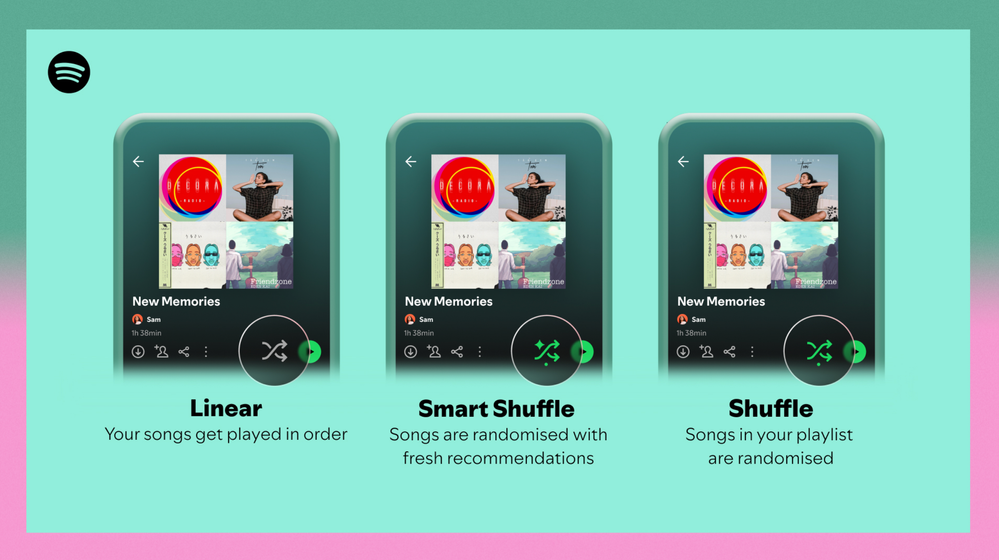
Different playback options.
FAQ
What about the Enhance feature?
For now, Smart Shuffle will replace the Enhance feature.
What will happen to Discover Weekly and other regularly updated playlists?
For the time being, no changes to those will be made. Smart Shuffle aims to improve the listening experience for user curated playlists.
Does this mean that using Smart Shuffle will cause my carefully curated playlists to get cluttered with new recommendations?
No! Your original playlist remains untouched, so you can add any new track that catches your ear. Smart Shuffle won’t change your playlist without your explicit permission. What changes instead is what you'll hear during each specific listening session
🌟 I would like to disable Smart Shuffle permanently. Can I do that?
Yes, you can! Just go to Settings and privacy and then to Playback and toggle the option Enable all play modes to off. This will mean you will only have the regular shuffle.
Note: This option is for Premium users only.
We hope you're as excited as we are about this new play mode. The official Newsroom announcement is out, you can check that out too. For any and all feedback on the matter you may have, you're more than welcome to comment in the thread below.
Solved! Go to Solution.
- Subscribe to RSS Feed
- Mark Topic as New
- Mark Topic as Read
- Float this Topic for Current User
- Bookmark
- Subscribe
- Printer Friendly Page

Hi there folks,
We're here to say that we've taken your feedback into account and you will now be able to disable Smart Shuffle from the app settings, as described in this now implemented idea!
The steps are as follows:
- Tap your profile picture at the top.
- Tap Settings and privacy.
- Select Playback.
- Switch Enable all play modes off.
This is for Premium users only and is only available on mobile at the moment, but rest assured it will be coming to desktop in due time as well.
Cheers!

- Mark as New
- Bookmark
- Subscribe
- Mute
- Subscribe to RSS Feed
- Permalink
- Report Inappropriate Content
This is the story of my Spotify life. And then when the song tracks appear (this is my downloaded 'Likes' song list) you can tap them all day and nothing will happen until you either restart the app or get a signal again.


- Mark as New
- Bookmark
- Subscribe
- Mute
- Subscribe to RSS Feed
- Permalink
- Report Inappropriate Content
How come the desktop version of Spotify only have regular shuffle? Why add smart shuffle to mobile version? Thank god I only use Spotify for research purpose to help build my library of music on my SD card via downloading music and using 3rd party music player app. I agree with the consensus by having a off and on option for smart shuffle. Forcing people to wait a few seconds to turn off/having to tap shuffle twice is ANNOYING!!

- Mark as New
- Bookmark
- Subscribe
- Mute
- Subscribe to RSS Feed
- Permalink
- Report Inappropriate Content
How smart shuffle works now is glitchy and worse at providing suggestions than it was upon its release. The songs that I remove from the recommended list reappear in the queue, and when I click on the previously removed song it skips to the next one, making it difficult to know what I have and haven’t already listened to. Smart shuffle used to be one of the easiest ways to find music, and now it’s basically rendered useless. These problems should either be fixed, or smart shuffle should be reverted back to the way it was.

- Mark as New
- Bookmark
- Subscribe
- Mute
- Subscribe to RSS Feed
- Permalink
- Report Inappropriate Content
How do i disable this new "feature" on a windows pc. I really don't like it, and would not want to see it ever again.

- Mark as New
- Bookmark
- Subscribe
- Mute
- Subscribe to RSS Feed
- Permalink
- Report Inappropriate Content
I don't get the smart shuffle option, just shuffle. The app is up to date on my phone, how do i do it?

- Mark as New
- Bookmark
- Subscribe
- Mute
- Subscribe to RSS Feed
- Permalink
- Report Inappropriate Content
It is really annoying that you can't disable the smart shuffle function. They shouldn't have put the smart shuffle button at the same spot as the shuffle button. From an UX perspective it just makes the user annoyed having to first skip past a step they don't want, aswell as having to wait until they can skip past the step ://. Please rethink the feature Spotify, it really makes trying to switch between shuffle/normal annoying every time!!!

- Mark as New
- Bookmark
- Subscribe
- Mute
- Subscribe to RSS Feed
- Permalink
- Report Inappropriate Content
Please integrate an option where you can turn off the smart shuffle entirely. At least it would be great if you could decide if you want it in every playlist or just in some (like you can set this in the playlist setting) sometimes it‘s great but most times it‘s annoying.

- Mark as New
- Bookmark
- Subscribe
- Mute
- Subscribe to RSS Feed
- Permalink
- Report Inappropriate Content
Please add a Setting to disable the Smart Shuffle Button.
If I want to switch between Random and Ordered, the Smart Shuffle is stealing 2 seconds for just being activated. I dont want to wait 2 seconds to switch. I don't want to wait at all to switch a settings button. So please make an option to deactivate the feature if not wanted. I want to circle around Shuffle and Ordered. Thats all, and nothing more.

- Mark as New
- Bookmark
- Subscribe
- Mute
- Subscribe to RSS Feed
- Permalink
- Report Inappropriate Content
Actually came on after googling the phrase ‘smart shuffle’. The feature here is not what I had in mind. I’d love a smart shuffle that knows where I am in my long playlist at any one time and will only shuffle unlistened to songs. Some playlists i play at a certain time of the day but feel like the shuffle just chooses the same songs all the time (I obviously know this is random), but the point is, I never feel like I get through all the music in the list and I don’t want to listen to it chronologically. If I did, the provide a bookmark feature much the same way as you would a book. If smart shuffle has gone maybe call this intelligent play. I definitely don’t want anything offering me even more music. I get enough of your suggestions already on the home page. Adding them into my playlists isn’t wanted. Sorry.
- Mark as New
- Bookmark
- Subscribe
- Mute
- Subscribe to RSS Feed
- Permalink
- Report Inappropriate Content
This is a horrible feature, just extra stuff we didn’t ask for, at least put an option in settings to turn it off? It’s difficult to use in the car or when busy just want to shuffle my music and get on with it. If I wanted those songs in the playlist then they’d already be in the playlist.

- Mark as New
- Bookmark
- Subscribe
- Mute
- Subscribe to RSS Feed
- Permalink
- Report Inappropriate Content
Bring back playlist radio.
Or bring back enhanced playlist.
Enhanced shuffle takes a while to load, which is very inconvenient when I'm just trying to switch shuffled to unshuffled.
Enhanced shuffle dosnt show me all the songs Spotify has added, making it very difficult to use to actually increase songs on a playlist. I have to skip past all the song I already know and individually add the new songs.
Enhanced shuffle dosnt have a continent button to add the song, instead requiring me to manually add each song.
Enhanced shuffle dosnt have a remove song button, instead I have to skip it everytime is plays.
Enhanced shuffle isn't a feature, it's a nuisance. For all the reasons I've listened enhanced shuffle is an insult of a feature to paying subscribers like myself. It's a poor replacement of features like playlist radio or enhance playlist.
I have found enhanced shuffle an inconvenient, annoying, boring and useless feature.
I hope to see either playlist radio or enhanced playlist return eventually.

- Mark as New
- Bookmark
- Subscribe
- Mute
- Subscribe to RSS Feed
- Permalink
- Report Inappropriate Content
who came up with this idea? i shouldn't have to press shuffle twice to go from shuffled to unshuffled. on top of that i have to wait for spotify to add, then remove the songs i didnt ask for. such a bullsh*t functionality. stop forcing this garbage and let us disable it completely in the settings.

- Mark as New
- Bookmark
- Subscribe
- Mute
- Subscribe to RSS Feed
- Permalink
- Report Inappropriate Content
Hey Moke123, check out this (89 page!!) thread about issues with shuffle. It is not just you noticing it and many people have complained about it. It is likely that way by design: https://community.spotify.com/t5/Live-Ideas/All-Platforms-Option-to-have-a-true-shuffle/idi-p/488059...

- Mark as New
- Bookmark
- Subscribe
- Mute
- Subscribe to RSS Feed
- Permalink
- Report Inappropriate Content
Dislike. Please include an option to permanently turn off or remove
- Mark as New
- Bookmark
- Subscribe
- Mute
- Subscribe to RSS Feed
- Permalink
- Report Inappropriate Content
why can't we permanently disable this? like it makes the UI for normal shuffling frustrating and awful instead of functional

- Mark as New
- Bookmark
- Subscribe
- Mute
- Subscribe to RSS Feed
- Permalink
- Report Inappropriate Content
Hello,
I’ve seen that this has been asked a lot but I try again maybe something happened in the meantime. I hate the smart shuffle mode !!! Is there any way I can turn it definitely off ? I am paying for Spotify premium to have the freedom to listen to my music in the order I want and wherever I am. The thing with the smart shuffle is that when offline and listening to my playlist with aleatory mode, if I wand to go back to the “order” mode it is impossible and it makes my spoty lag because the order Spotify have set with the shuffle is order-aleatory-smart 😞 It really sucks because with no internet it is impossible to switch from aleatory to order because of the smart shuffle in the middle ;( please help I am travelling soon and I really don’t wanna be blocked on aleatory for a 10 hours plane, why premium then ?

- Mark as New
- Bookmark
- Subscribe
- Mute
- Subscribe to RSS Feed
- Permalink
- Report Inappropriate Content
Some days ago when I turned on shuffle, I got a popup asking me if I want smart shuffle or normal shuffle. I thought at least they learned and I can turn it off! OF COURSE I chose „normal shuffle“ because smart shuffle sucks. Then I could cycle normally - shuffle
on - shuffle off. With the newest update this **** is back again and I AGAIN have the problem that it gets stuck. That is even more frustrating!! Spotify, what are you thinking??
just bring back playlist radio!
- Mark as New
- Bookmark
- Subscribe
- Mute
- Subscribe to RSS Feed
- Permalink
- Report Inappropriate Content
Smart shuffle is like someone on a lan event copying random stuff into your mp3 folders.
- Mark as New
- Bookmark
- Subscribe
- Mute
- Subscribe to RSS Feed
- Permalink
- Report Inappropriate Content
Smart shuffle is like the Apple decision to push a U2 album that noone wanted to their user‘s libraries.

- Mark as New
- Bookmark
- Subscribe
- Mute
- Subscribe to RSS Feed
- Permalink
- Report Inappropriate Content
Severely dissapointed by the Smart Shuffle option, as are many others in this comment thread. I feel we would greatly appreciate an option to disable Smart Shuffle completely, or for it to not be included in the Shuffle/Unshuffle button but for it to have a different button. The Smart Shuffle is actively lessening my enjoyment of Spotify Premium.

Suggested posts

Hey there you, Yeah, you! 😁 Welcome - we're glad you joined the Spotify Community! While you here, let's have a fun game and get…